• canvas文字绘制


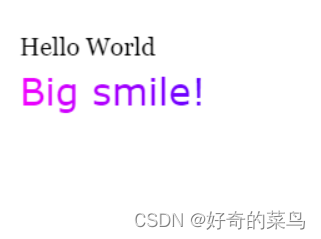
    一、fillText()函数绘制文字

    1. html>
    2. <html lang="en">
    3. <head>
    4. <meta charset="UTF-8">
    5. <title>canvastitle>
    6. head>
    7. <body onload="draw('myCanvas')">
    8. <canvas id="myCanvas" width="500" height="500">canvas>
    9. body>
    10. <script>
    11. function draw(id) {
    12. var c = document.getElementById(id);
    13. //获取canvs上下文
    14. var ctx = c.getContext("2d");
    15. //设置填充文字样式
    16. ctx.font = "20px Georgia";
    17. //设置文字及其位置
    18. ctx.fillText("Hello World", 10, 50);
    19. ctx.font = "30px Verdana"
    20. //设置线性渐变色
    21. var gradient = ctx.createLinearGradient(0, 0, c.width, 0);
    22. gradient.addColorStop("0", "magenta")
    23. gradient.addColorStop("0.5", "blue")
    24. gradient.addColorStop("1.0", "red")
    25. ctx.fillStyle = gradient;
    26. ctx.fillText("Big smile!", 10, 90)
    27. }
    28. script>
    29. html>

    二、strokeText()函数绘制文字

    1. html>
    2. <html lang="en">
    3. <head>
    4. <meta charset="UTF-8">
    5. <title>canvastitle>
    6. head>
    7. <body onload="draw('myCanvas')">
    8. <canvas id="myCanvas" width="500" height="500">canvas>
    9. body>
    10. <script>
    11. function draw(id) {
    12. var c = document.getElementById(id);
    13. //获取canvs上下文
    14. var ctx = c.getContext("2d");
    15. //设置填充文字样式
    16. ctx.font = "20px Georgia";
    17. //设置文字及其位置
    18. ctx.fillText("Hello World", 10, 50);
    19. ctx.font = "30px Verdana"
    20. //设置线性渐变色
    21. var gradient = ctx.createLinearGradient(0, 0, c.width, 0);
    22. gradient.addColorStop("0", "magenta")
    23. gradient.addColorStop("0.5", "blue")
    24. gradient.addColorStop("1.0", "red")
    25. ctx.strokeStyle = gradient;
    26. ctx.strokeText("Big smile!", 10, 90)
    27. }
    28. script>
    29. html>

     三、设置文字大小

    1. html>
    2. <html lang="en">
    3. <head>
    4. <meta charset="UTF-8">
    5. <title>canvastitle>
    6. head>
    7. <body onload="draw('myCanvas')">
    8. <canvas id="myCanvas" width="500" height="500">canvas>
    9. body>
    10. <script>
    11. function draw(id) {
    12. var c = document.getElementById(id);
    13. //获取canvs上下文
    14. var ctx = c.getContext("2d");
    15. //设置填充文字样式,大小20px
    16. ctx.font = "20px Georgia";
    17. //设置文字及其位置
    18. ctx.fillText("Hello World", 10, 50);
    19. //设置填充文字样式,大小30px
    20. ctx.font = "30px Verdana"
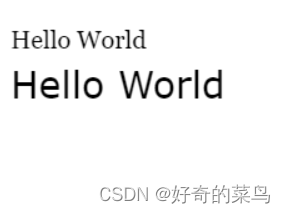
    21. ctx.fillText("Hello World", 10, 90);
    22. }
    23. script>
    24. html>

    四、设置文字字体

    1. html>
    2. <html lang="en">
    3. <head>
    4. <meta charset="UTF-8">
    5. <title>canvastitle>
    6. head>
    7. <body onload="draw('myCanvas')">
    8. <canvas id="myCanvas" width="500" height="500">canvas>
    9. body>
    10. <script>
    11. function draw(id) {
    12. var c = document.getElementById(id);
    13. //获取canvs上下文
    14. var ctx = c.getContext("2d");
    15. //设置填充文字样式,字体Georgia
    16. ctx.font = "20px Georgia";
    17. //设置文字及其位置
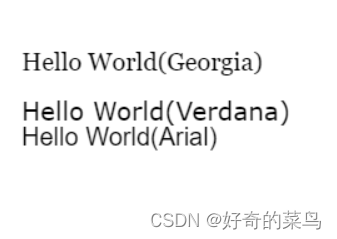
    18. ctx.fillText("Hello World(Georgia)", 10, 50);
    19. //设置填充文字样式,大小20px
    20. ctx.font = "20px Verdana"
    21. ctx.fillText("Hello World(Verdana)", 10, 90);
    22. //设置填充文字样式,大小20px
    23. ctx.font = "20px Arial"
    24. ctx.fillText("Hello World(Arial)", 10, 110);
    25. }
    26. script>
    27. html>

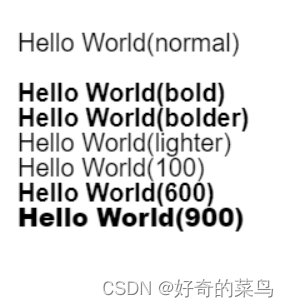
    五、设置文字粗体

    1. html>
    2. <html lang="en">
    3. <head>
    4. <meta charset="UTF-8">
    5. <title>canvastitle>
    6. head>
    7. <body onload="draw('myCanvas')">
    8. <canvas id="myCanvas" width="500" height="500">canvas>
    9. body>
    10. <script>
    11. function draw(id) {
    12. var c = document.getElementById(id);
    13. //获取canvs上下文
    14. var ctx = c.getContext("2d");
    15. //设置填充文字样式,粗体 normal
    16. ctx.font = "normal 20px Arial";
    17. //设置文字及其位置
    18. ctx.fillText("Hello World(normal)", 10, 50);
    19. //设置填充文字样式,粗体 bold
    20. ctx.font = "bold 20px Arial"
    21. ctx.fillText("Hello World(bold)", 10, 90);
    22. //设置填充文字样式,粗体 bolder
    23. ctx.font = "bolder 20px Arial"
    24. ctx.fillText("Hello World(bolder)", 10, 110);
    25. //设置填充文字样式,粗体 lighter
    26. ctx.font = "lighter 20px Arial"
    27. ctx.fillText("Hello World(lighter)", 10, 130);
    28. //设置填充文字样式,粗体 100
    29. ctx.font = "100 20px Arial"
    30. ctx.fillText("Hello World(100)", 10, 150);
    31. //设置填充文字样式,粗体 600
    32. ctx.font = "600 20px Arial"
    33. ctx.fillText("Hello World(600)", 10, 170);
    34. //设置填充文字样式,粗体 900
    35. ctx.font = "900 20px Arial"
    36. ctx.fillText("Hello World(900)", 10, 190);
    37. }
    38. script>
    39. html>

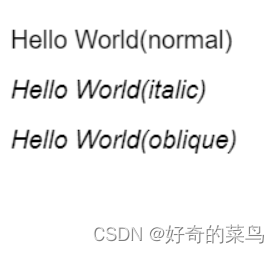
    六、斜体设置

    1. html>
    2. <html lang="en">
    3. <head>
    4. <meta charset="UTF-8">
    5. <title>canvastitle>
    6. head>
    7. <body onload="draw('myCanvas')">
    8. <canvas id="myCanvas" width="500" height="500">canvas>
    9. body>
    10. <script>
    11. function draw(id) {
    12. var c = document.getElementById(id);
    13. //获取canvs上下文
    14. var ctx = c.getContext("2d");
    15. //设置填充文字样式,font-weight normal
    16. ctx.font = "normal 20px Arial";
    17. //设置文字及其位置
    18. ctx.fillText("Hello World(normal)", 10, 50);
    19. //设置填充文字样式,font-style italic
    20. ctx.font = "italic 20px Arial"
    21. ctx.fillText("Hello World(italic)", 10, 90);
    22. //设置填充文字样式,font-style oblique
    23. ctx.font = "oblique 20px Arial"
    24. ctx.fillText("Hello World(oblique)", 10, 130);
    25. }
    26. script>
    27. html>

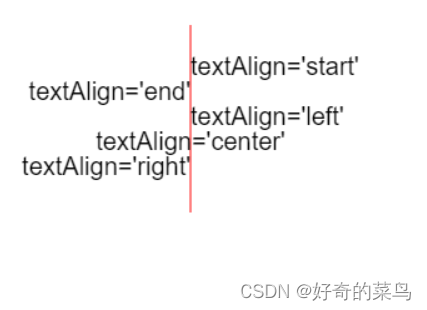
    七、文字对齐

    1. html>
    2. <html lang="en">
    3. <head>
    4. <meta charset="UTF-8">
    5. <title>canvastitle>
    6. head>
    7. <body onload="draw('myCanvas')">
    8. <canvas id="myCanvas" width="500" height="500">canvas>
    9. body>
    10. <script>
    11. function draw(id) {
    12. var c = document.getElementById(id);
    13. //获取canvs上下文
    14. var ctx = c.getContext("2d");
    15. //绘制一条基本线
    16. ctx.strokeStyle = 'red';
    17. ctx.moveTo(150, 20);
    18. ctx.lineTo(150, 170);
    19. ctx.stroke();
    20. //设置填充文字样式
    21. ctx.font = "20px Arial";
    22. //设置对方式
    23. ctx.textAlign = 'start'
    24. //设置文字及其位置
    25. ctx.fillText("textAlign='start'", 150, 60);
    26. //设置对方式
    27. ctx.textAlign = 'end'
    28. //设置文字及其位置
    29. ctx.fillText("textAlign='end'", 150, 80);
    30. //设置对方式
    31. ctx.textAlign = 'left'
    32. //设置文字及其位置
    33. ctx.fillText("textAlign='left'", 150, 100);
    34. //设置对方式
    35. ctx.textAlign = 'center'
    36. //设置文字及其位置
    37. ctx.fillText("textAlign='center'", 150, 120);
    38. //设置对方式
    39. ctx.textAlign = 'right'
    40. //设置文字及其位置
    41. ctx.fillText("textAlign='right'", 150, 140);
    42. }
    43. script>
    44. html>

    八、文字基线

    1. html>
    2. <html lang="en">
    3. <head>
    4. <meta charset="UTF-8">
    5. <title>canvastitle>
    6. head>
    7. <body onload="draw('myCanvas')">
    8. <canvas id="myCanvas" width="200" height="500">canvas>
    9. body>
    10. <script>
    11. function draw(id) {
    12. var c = document.getElementById(id);
    13. //获取canvs上下文
    14. var ctx = c.getContext("2d");
    15. var param = [{
    16. //普通字母线
    17. baseLne: "alphabetic",
    18. y: 50
    19. }, {
    20. //方框底线
    21. baseLne: "bottom",
    22. y: 100
    23. }, {
    24. //悬挂基线
    25. baseLne: "hanging",
    26. y: 150
    27. }, {
    28. //表意基线
    29. baseLne: "ideographic",
    30. y: 200
    31. }, {
    32. //方框中线
    33. baseLne: "middle",
    34. y: 250
    35. }, {
    36. //方框顶端
    37. baseLne: "top",
    38. y: 300
    39. }]
    40. for (var i = 0; i < param.length; i++) {
    41. //设置文字基线
    42. ctx.textBaseline = param[i].baseLne;
    43. ctx.font = '30px Arial';
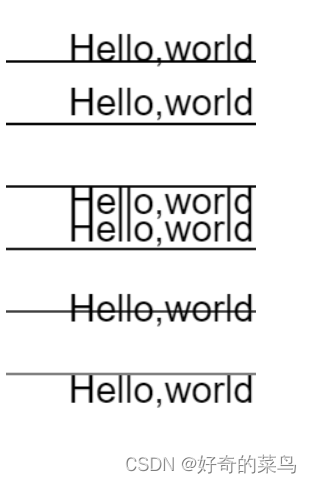
    44. ctx.fillText("Hello,world", 50, param[i].y);
    45. ctx.moveTo(0, param[i].y);
    46. ctx.lineTo(250, param[i].y);
    47. ctx.stroke();
    48. }
    49. }
    50. script>
    51. html>


  • 相关阅读:
    javascript 大文件下载,分片下载,断点续传
    系统分析师备考经验分享:分阶段、分重点
    Spire.PDF for .NET【文档操作】演示:将新的 PDF 页面插入到指定索引处的现有 PDF 中
    java导出excel(二):多个sheet
    LVS负载均衡群集及NAT模式群集
    css 超出滑动使用 CSS 实现超出滑动
    程序开发中表示密码时使用 password 还是 passcode?
    MySQL字符集大小写不敏感导致的主键冲突问题记录
    mybatisPlus
    Ubuntu18.04平台下Qt开发程序打包的一些问题总结
  • 原文地址:https://blog.csdn.net/qq_29752857/article/details/126257149