-
鸿蒙应用如何集成OKHttp网络三方库
准备资料
接口准备
准备get请求接

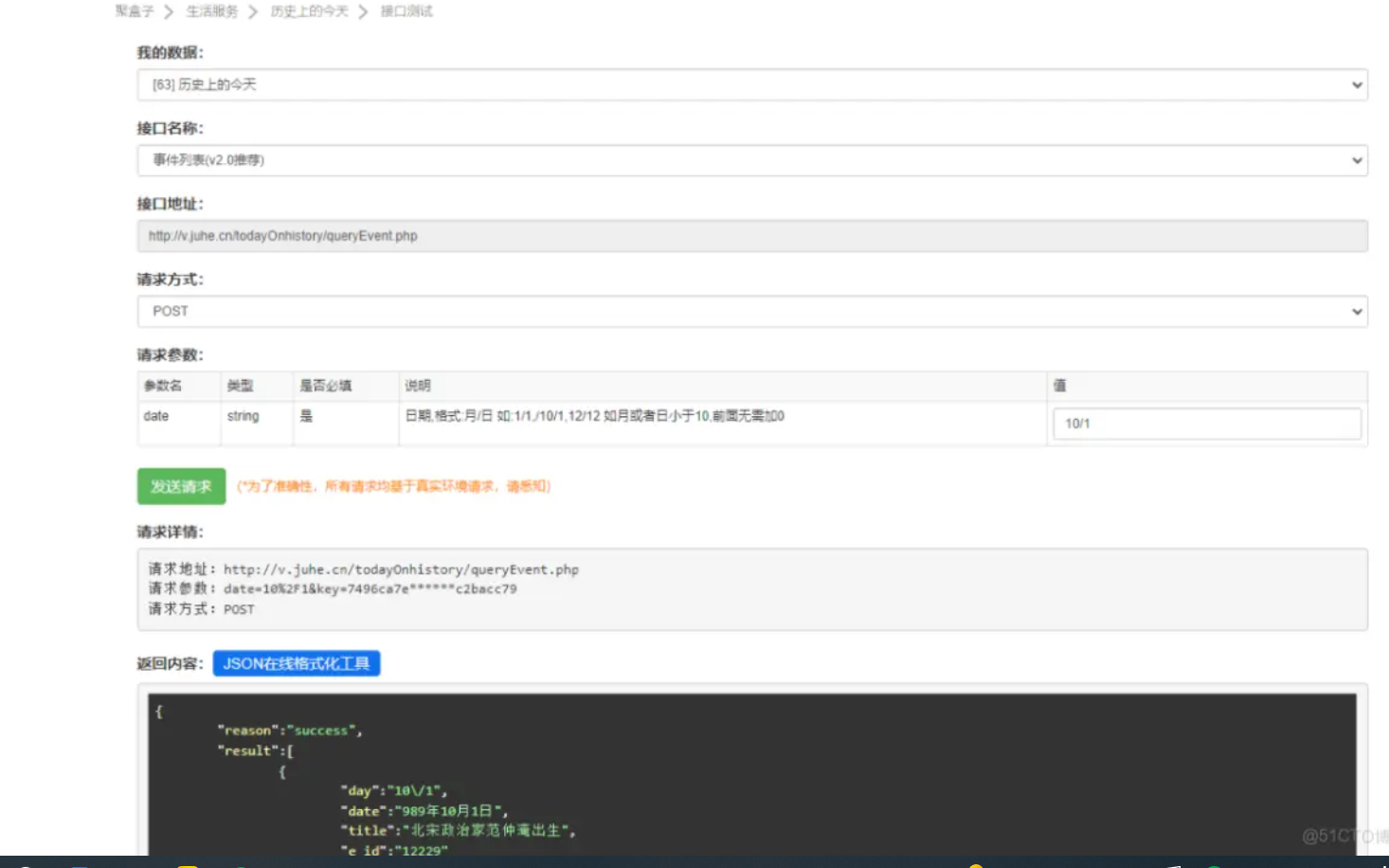
Post接口
如何集成
在项目级别的build.gradle添加如下代码
- <pre class="prettyprint hljs nginx" style="padding: 0.5em; font-family: Menlo, Monaco, Consolas, "Courier New", monospace; color: rgb(68, 68, 68); border-radius: 4px; display: block; margin: 0px 0px 1.5em; font-size: 14px; line-height: 1.5em; word-break: break-all; overflow-wrap: break-word; white-space: pre; background-color: rgb(246, 246, 246); border: none; overflow-x: auto; font-style: normal; font-variant-ligatures: normal; font-variant-caps: normal; font-weight: 400; letter-spacing: normal; orphans: 2; text-align: start; text-indent: 0px; text-transform: none; widows: 2; word-spacing: 0px; -webkit-text-stroke-width: 0px; text-decoration-style: initial; text-decoration-color: initial;">allprojects {
- repositories {
- maven {
- url 'https://repo.huaweicloud.com/repository/maven/'
- }
- maven {
- url 'https://developer.huawei.com/repo/'pre>
在entry的build.gradle添加如下代码
class="prettyprint hljs delphi" style="padding: 0.5em; font-family: Menlo, Monaco, Consolas, "Courier New", monospace; color: rgb(68, 68, 68); border-radius: 4px; display: block; margin: 0px 0px 1.5em; font-size: 14px; line-height: 1.5em; word-break: break-all; overflow-wrap: break-word; white-space: pre; background-color: rgb(246, 246, 246); border: none; overflow-x: auto; font-style: normal; font-variant-ligatures: normal; font-variant-caps: normal; font-weight: 400; letter-spacing: normal; orphans: 2; text-align: start; text-indent: 0px; text-transform: none; widows: 2; word-spacing: 0px; -webkit-text-stroke-width: 0px; text-decoration-style: initial; text-decoration-color: initial;">'io.openharmony.tpc.thirdlib:okgo:1.0.2'
- implementation 'io.openharmony.tpc.thirdlib:okrx:1.0.2'
- implementation 'io.openharmony.tpc.thirdlib:okrx2:1.0.2'
- implementation 'io.openharmony.tpc.thirdlib:okserver:1.0.2'
在entry的config.json添加 权限 代码如下
class="prettyprint hljs lua" style="padding: 0.5em; font-family: Menlo, Monaco, Consolas, "Courier New", monospace; color: rgb(68, 68, 68); border-radius: 4px; display: block; margin: 0px 0px 1.5em; font-size: 14px; line-height: 1.5em; word-break: break-all; overflow-wrap: break-word; white-space: pre; background-color: rgb(246, 246, 246); border: none; overflow-x: auto; font-style: normal; font-variant-ligatures: normal; font-variant-caps: normal; font-weight: 400; letter-spacing: normal; orphans: 2; text-align: start; text-indent: 0px; text-transform: none; widows: 2; word-spacing: 0px; -webkit-text-stroke-width: 0px; text-decoration-style: initial; text-decoration-color: initial;">"reqPermissions": [
- {
- "name": "ohos.permission.INTERNET"
注意事项
如果接口是https的话需要在config.json的deviceConfig里添加如下代码
class="prettyprint hljs lua" style="padding: 0.5em; font-family: Menlo, Monaco, Consolas, "Courier New", monospace; color: rgb(68, 68, 68); border-radius: 4px; display: block; margin: 0px 0px 1.5em; font-size: 14px; line-height: 1.5em; word-break: break-all; overflow-wrap: break-word; white-space: pre; background-color: rgb(246, 246, 246); border: none; overflow-x: auto; font-style: normal; font-variant-ligatures: normal; font-variant-caps: normal; font-weight: 400; letter-spacing: normal; orphans: 2; text-align: start; text-indent: 0px; text-transform: none; widows: 2; word-spacing: 0px; -webkit-text-stroke-width: 0px; text-decoration-style: initial; text-decoration-color: initial;">"deviceConfig": {
- "default": {
- "network": {
- "cleartextTraffic": true
界面实现
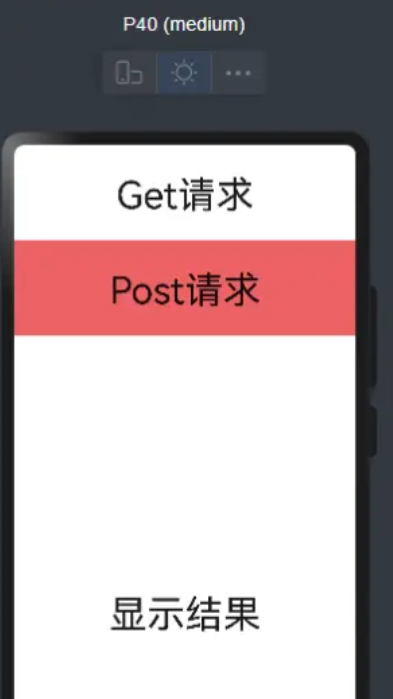
在layout的xml中写三个Text标签,第一个Text用于触发get请求的事件,第二个Text用于触发Post请求的事件,第三个Text用于显示结果,代码和效果图如下
- <pre class="prettyprint hljs vim" style="padding: 0.5em; font-family: Menlo, Monaco, Consolas, "Courier New", monospace; color: rgb(68, 68, 68); border-radius: 4px; display: block; margin: 0px 0px 1.5em; font-size: 14px; line-height: 1.5em; word-break: break-all; overflow-wrap: break-word; white-space: pre; background-color: rgb(246, 246, 246); border: none; overflow-x: auto; font-style: normal; font-variant-ligatures: normal; font-variant-caps: normal; font-weight: 400; letter-spacing: normal; orphans: 2; text-align: start; text-indent: 0px; text-transform: none; widows: 2; word-spacing: 0px; -webkit-text-stroke-width: 0px; text-decoration-style: initial; text-decoration-color: initial;">
- <DirectionalLayout
- xmlns:ohos="http://schemas.huawei.com/res/ohos"
- ohos:height="match_parent"
- ohos:width="match_parent"
- ohos:alignment="horizontal_center"
- ohos:orientation="vertical">
- <Text
- ohos:id="$+id:text_type_get"
- ohos:height="100vp"
- ohos:width="match_parent"
- ohos:text_alignment="center"
- ohos:layout_alignment="horizontal_center"
- ohos:text="Get请求"
- ohos:text_size="40vp"
- <Text
- ohos:id="$+id:text_type_Post"
- ohos:height="100vp"
- ohos:text_alignment="center"
- ohos:width="match_parent"
- ohos:background_element="#ed6262"
- ohos:layout_alignment="horizontal_center"
- ohos:text="Post请求"
- ohos:text_size="40vp"
- <Text
- ohos:id="$+id:text_result"
- ohos:height="match_parent"
- ohos:multiple_lines="true"
- ohos:text_alignment="center"
- ohos:width="match_parent"
- ohos:layout_alignment="horizontal_center"
- ohos:text="显示结果"
- ohos:text_size="40vp"
- DirectionalLayout>pre>
Get请求实现
在Get的Text点击事件,实现 [Get请求和请求成功之后和请求失败之后(参考 线程管理开发指导需要将子线程切到Ui线程进行显示数据,代码如下
class="prettyprint hljs java" style="padding: 0.5em; font-family: Menlo, Monaco, Consolas, "Courier New", monospace; color: rgb(68, 68, 68); border-radius: 4px; display: block; margin: 0px 0px 1.5em; font-size: 14px; line-height: 1.5em; word-break: break-all; overflow-wrap: break-word; white-space: pre; background-color: rgb(246, 246, 246); border: none; overflow-x: auto; font-style: normal; font-variant-ligatures: normal; font-variant-caps: normal; font-weight: 400; letter-spacing: normal; orphans: 2; text-align: start; text-indent: 0px; text-transform: none; widows: 2; word-spacing: 0px; -webkit-text-stroke-width: 0px; text-decoration-style: initial; text-decoration-color: initial;">new Component.ClickedListener() {
- @Override
- public void onClick(Component component) {
- OkHttpClient client = new OkHttpClient();
- Request.Builder requestBuilder = new Request.Builder();
- HttpUrl.Builder urlBuilder=HttpUrl.parse("http://web.juhe.cn/environment/air/cityair").newBuilder();//todo 接口链接
- urlBuilder.addQueryParameter("city","shanghai");//todo 参数
- urlBuilder.addQueryParameter("Key","******");// todo 密钥 key自己申请
- requestBuilder.url(urlBuilder.build());
- Call call = client.newCall(requestBuilder.build());
- call.enqueue(new Callback() {
- @Override
- public void onFailure(Call call, IOException e) {
- //todo 失败回调 需要回到主线程显示结果
- getUITaskDispatcher().asyncDispatch(new Runnable() {
- @Override
- public void run() {
- textResult.setText(e.getMessage());
- }
- });
- }
- @Override
- public void onResponse(Call call, Response response) throws IOException {
- if(response.isSuccessful()){
- String result = response.body().string();
- //todo 处理UI需要切换到UI线程处理
- getUITaskDispatcher().asyncDispatch(new Runnable() {
- @Override
- public void
Post请求实现
在Post的Text实现点击事件,具体参考 Android OkHttp常用详解,代码如下
class="prettyprint hljs java" style="padding: 0.5em; font-family: Menlo, Monaco, Consolas, "Courier New", monospace; color: rgb(68, 68, 68); border-radius: 4px; display: block; margin: 0px 0px 1.5em; font-size: 14px; line-height: 1.5em; word-break: break-all; overflow-wrap: break-word; white-space: pre; background-color: rgb(246, 246, 246); border: none; overflow-x: auto; font-style: normal; font-variant-ligatures: normal; font-variant-caps: normal; font-weight: 400; letter-spacing: normal; orphans: 2; text-align: start; text-indent: 0px; text-transform: none; widows: 2; word-spacing: 0px; -webkit-text-stroke-width: 0px; text-decoration-style: initial; text-decoration-color: initial;">TextPost.setClickedListener(new Component.ClickedListener() {
- @Override
- public void onClick(Component component) {
- OkHttpClient client = new OkHttpClient();
- FormBody body = new FormBody.Builder()
- .add("key","*****")// todo 密钥 key自己申请
- .add("date","10/1")//todo 日期参数
- .build();
- Request request = new Request.Builder()
- .url("http://v.juhe.cn/todayOnhistory/queryEvent.php")
- .post(body)
- .build();
- Call call = client.newCall(request);
- call.enqueue(new Callback() {
- @Override
- public void onFailure(Call call, IOException e) {
- //todo 失败回调 需要回到主线程显示结果
- getUITaskDispatcher().asyncDispatch(new Runnable() {
- @Override
- public void run() {
- textResult.setText(e.getMessage());
- }
- });
- }
- @Override
- public void onResponse(Call call, Response response) throws IOException {
- if(response.isSuccessful()){
- String result = response.body().string();
- //处理UI需要切换到UI线程处理
- //todo 失败回调 需要回到主线程显示结果
- getUITaskDispatcher().asyncDispatch(new Runnable() {
- @Override
- public void
运行效果
具体代码如下
java 代码
class="prettyprint hljs java" style="padding: 0.5em; font-family: Menlo, Monaco, Consolas, "Courier New", monospace; color: rgb(68, 68, 68); border-radius: 4px; display: block; margin: 0px 0px 1.5em; font-size: 14px; line-height: 1.5em; word-break: break-all; overflow-wrap: break-word; white-space: pre; background-color: rgb(246, 246, 246); border: none; overflow-x: auto; font-style: normal; font-variant-ligatures: normal; font-variant-caps: normal; font-weight: 400; letter-spacing: normal; orphans: 2; text-align: start; text-indent: 0px; text-transform: none; widows: 2; word-spacing: 0px; -webkit-text-stroke-width: 0px; text-decoration-style: initial; text-decoration-color: initial;">package com.harmony.alliance.myapplication.slice;
- import com.harmony.alliance.myapplication.ResourceTable;
- import ohos.aafwk.ability.AbilitySlice;
- import ohos.aafwk.content.Intent;
- import ohos.agp.components.Component;
- import ohos.agp.components.Text;
- import okhttp3.*;
- import java.io.IOException;
- public class MainAbilitySlice extends AbilitySlice
- Text TextGet,TextPost,textResult;
- @Override
- public void onStart(Intent intent) {
- super.onStart(intent);
- super.setUIContent(ResourceTable.Layout_ability_main);
- TextGet=findComponentById(ResourceTable.Id_text_type_get);
- TextPost=findComponentById(ResourceTable.Id_text_type_Post);
- textResult=findComponentById(ResourceTable.Id_text_result);
- TextGet.setClickedListener(new Component.ClickedListener() {
- @Override
- public void onClick(Component component) {
- OkHttpClient client = new OkHttpClient();
- Request.Builder requestBuilder = new Request.Builder();
- HttpUrl.Builder urlBuilder=HttpUrl.parse("http://web.juhe.cn/environment/air/cityair").newBuilder();//todo 接口链接
- urlBuilder.addQueryParameter("city","shanghai");//todo 参数
- urlBuilder.addQueryParameter("Key","6fba58dc50a8e3d92e8a2f63d25c7750");// todo key 密钥
- requestBuilder.url(urlBuilder.build());
- Call call = client.newCall(requestBuilder.build());
- call.enqueue(new Callback() {
- @Override
- public void onFailure(Call call, IOException e) {
- //todo 失败回调 需要回到主线程显示结果
- getUITaskDispatcher().asyncDispatch(new Runnable() {
- @Override
- public void run() {
- textResult.setText(e.getMessage());
- }
- });
- }
- @Override
- public void onResponse(Call call, Response response) throws IOException {
- if(response.isSuccessful()){
- String result = response.body().string();
- //todo 处理UI需要切换到UI线程处理
- getUITaskDispatcher().asyncDispatch(new Runnable() {
- @Override
- public void run() {
- textResult.setText(result);
- }
- });
- }
- }
- });
- }
- });
- TextPost.setClickedListener(new Component.ClickedListener() {
- @Override
- public void onClick(Component component) {
- OkHttpClient client = new OkHttpClient();
- FormBody body = new FormBody.Builder()
- .add("key","7496ca7e5e12c408ef14e465c2bacc79")// todo 密钥
- .add("date","10/1")//todo 日期参数
- .build();
- Request request = new Request.Builder()
- .url("http://v.juhe.cn/todayOnhistory/queryEvent.php")
- .post(body)
- .build();
- Call call = client.newCall(request);
- call.enqueue(new Callback() {
- @Override
- public void onFailure(Call call, IOException e) {
- //todo 失败回调 需要回到主线程显示结果
- getUITaskDispatcher().asyncDispatch(new Runnable() {
- @Override
- public void run() {
- textResult.setText(e.getMessage());
- }
- });
- }
- @Override
- public void onResponse(Call call, Response response) throws IOException {
- if(response.isSuccessful()){
- String result = response.body().string();
- //处理UI需要切换到UI线程处理
- //todo 失败回调 需要回到主线程显示结果
- getUITaskDispatcher().asyncDispatch(new Runnable() {
- @Override
- public void run() {
- textResult.setText(result);
- }
- });
- }
- }
- });
- }
- });
- }
- @Override
- public void onActive() {
- super.onActive();
- }
- @Override
- public void onForeground(Intent intent) {
- super.onForeground(intent);
- }
- }
xml 代码
- <pre class="prettyprint hljs vim" style="padding: 0.5em; font-family: Menlo, Monaco, Consolas, "Courier New", monospace; color: rgb(68, 68, 68); border-radius: 4px; display: block; margin: 0px 0px 1.5em; font-size: 14px; line-height: 1.5em; word-break: break-all; overflow-wrap: break-word; white-space: pre; background-color: rgb(246, 246, 246); border: none; overflow-x: auto; font-style: normal; font-variant-ligatures: normal; font-variant-caps: normal; font-weight: 400; letter-spacing: normal; orphans: 2; text-align: start; text-indent: 0px; text-transform: none; widows: 2; word-spacing: 0px; -webkit-text-stroke-width: 0px; text-decoration-style: initial; text-decoration-color: initial;">
- <DirectionalLayout
- xmlns:ohos="http://schemas.huawei.com/res/ohos"
- ohos:height="match_parent"
- ohos:width="match_parent"
- ohos:alignment="horizontal_center"
- ohos:orientation="vertical">
- <Text
- ohos:id="$+id:text_type_get"
- ohos:height="100vp"
- ohos:width="match_parent"
- ohos:text_alignment="center"
- ohos:layout_alignment="horizontal_center"
- ohos:text="Get请求"
- ohos:text_size="40vp"
- <Text
- ohos:id="$+id:text_type_Post"
- ohos:height="100vp"
- ohos:text_alignment="center"
- ohos:width="match_parent"
- ohos:background_element="#ed6262"
- ohos:layout_alignment="horizontal_center"
- ohos:text="Post请求"
- ohos:text_size="40vp"
- <Text
- ohos:id="$+id:text_result"
- ohos:height="match_parent"
- ohos:multiple_lines="true"
- ohos:text_alignment="center"
- ohos:width="match_parent"
- ohos:layout_alignment="horizontal_center"
- ohos:text="显示结果"
- ohos:text_size="40vp"
- DirectionalLayout>pre>
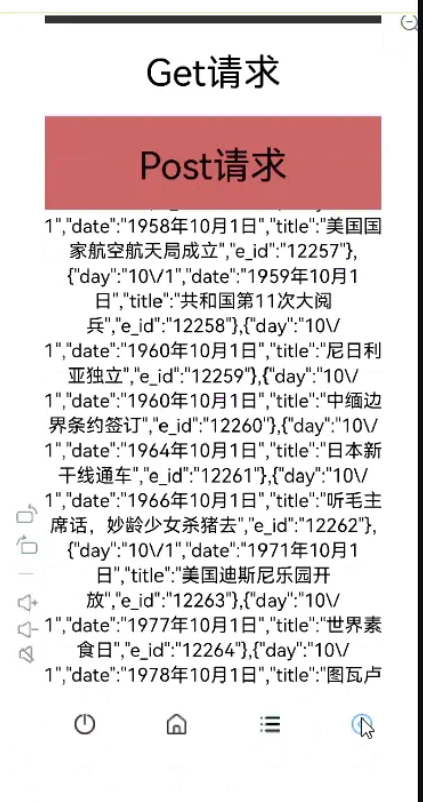
运行效果如下
-
相关阅读:
数据结构之位图【原理与实现】
jupyter notebook 隐藏&显示全部输出内容
FPGA project : TFT_LCD
交易履约之结算平台实践 | 京东云技术团队
make命令常用选项 + gcc 常用选项
亚马逊,shopee,lazada自养号测评补单操作流程和技巧
MySQL 高级函数整理
CTFHUB-信息泄露-目录遍历和PHPINFO
【网络安全】「漏洞原理」(二)SQL 注入漏洞之理论讲解
面试中关于 SpringCloud 都需要了解哪些基础?
- 原文地址:https://blog.csdn.net/weixin_62421895/article/details/126175148
