-
MyBatis-Plus 框架 2022-8-2
持久层
操作数据存储的层
与什么数据库无关
与什么技术无关
ORM
O(Object)R(Relationship)M(Mapping)对象关系映射
MyBatis 框架是一款持久层的ORM框架
MyBatis 与 JDBC 的关系
MyBatis 底层是JDBC,基于反射技术在运行时调用JDBC,实现数据库编程
苞米豆 baomidou (公司名)
MyBatis-Plus 与 SpringBoot 的关系
MyBatis-Plus 框架能够与 SpringBoot 框架无缝整合
学习一门框架
1.搭建环境
(1)安装哪些依赖(三方库)
(2)需要哪些配置
(3)框架提供了哪些API,怎么用
2.如何应用
3.研究它的底层
创建新的工程


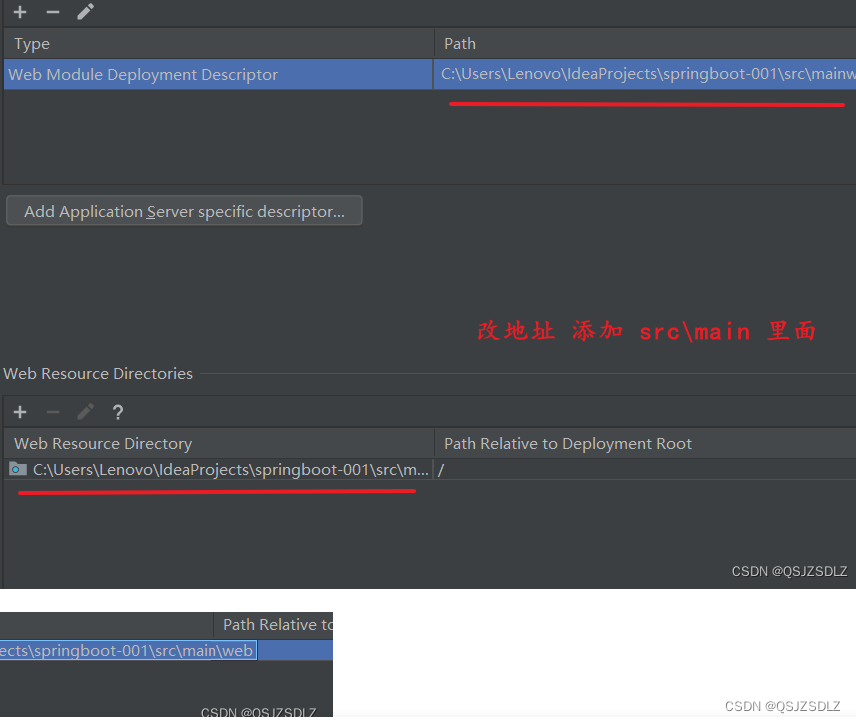
需要配置web目录(或者叫webapp),放在src/main/ 里面

把web删掉后需要 点击apply

安装JSP依赖
- <dependency>
- <groupId>org.apache.tomcat.embedgroupId>
- <artifactId>tomcat-embed-jasperartifactId>
- <scope>providedscope>
- dependency>
- <dependency>
- <groupId>jstlgroupId>
- <artifactId>jstlartifactId>
- <version>1.2version>
- <scope>providedscope>
- dependency>
- <dependency>
- <groupId>taglibsgroupId>
- <artifactId>standardartifactId>
- <version>1.1.2version>
- <scope>providedscope>
- dependency>
还要一个mysql 连接 java 的依赖
- <dependency>
- <groupId>mysqlgroupId>
- <artifactId>mysql-connector-javaartifactId>
- <version>5.1.47version>
- dependency>

配置maven 打包web 目录

- <resources>
- <resource>
- <directory>src/main/webdirectory>
- <targetPath>META-INF/resourcestargetPath>
- <includes>
- <include>**/*.*include>
- includes>
- resource>
- <resource>
- <directory>src/main/resourcesdirectory>
- <includes>
- <include>**/*.xmlinclude>
- <include>**/*.propertiesinclude>
- includes>
- resource>
- resources>
更改一下驱动会爆红 去掉 .cj
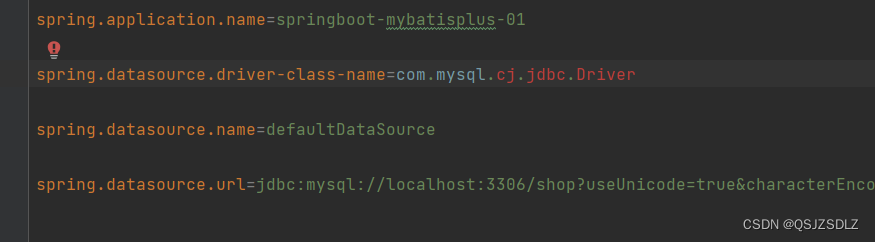

- spring.application.name=springboot-mybatisplus-01
- #com.mysql.cj.jdbc.Driver ??? 8.x??????????
- #com.mysql.jdbc.Driver ???5.x????????
- spring.datasource.driver-class-name=com.mysql.jdbc.Driver
- spring.datasource.name=defaultDataSource
- spring.datasource.url=jdbc:mysql://localhost:3306/shop?useUnicode=true&characterEncoding=utf-8&useSSL=false\
- &serverTimezone=UTC
- spring.datasource.username=root
- spring.datasource.password=root
- server.port=8080
- spring.mvc.view.prefix=/jsp/
- spring.mvc.view.suffix=.jsp
MyBatis-Plus 替代了原生的JDBC
代码写在工程的哪个包里面
dao 包 / mapper 包
如果写的是用原生JDBC写包名建议叫 dao 包
用框架写的包名建议叫 mapper 包
创建持久层的子包

先把user实体类和baseEntity实体类弄过来

在mapper子包中定义接口

在xml文件中编写SQL语句
xml文件写在 resources/mapper

xml 文件头
- mapper PUBLIC "-//mybatis.org//DTD Mapper 3.0//EN"
- "http://mybatis.org/dtd/mybatis-3-mapper.dtd">
- <mapper>
- mapper>


将接口的全局路径 粘贴 xml 文件中

安装插件,方便切换

File - Settings - Plugins - Marketplace 插件市场

点一下小鸟就切换了
需要绑定路径才出来小鸟


把XML 文件中的
删掉
Alt + Enter 会自动在XML生成 insert

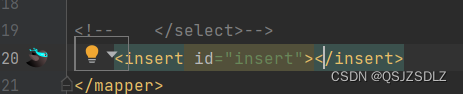
实现接口与xml 绑定后快速访问
检查接口中的抽象方法在绑定xml 文件 是否有对应的标签绑定


让框架发现使用在启动类上使用
@MapperScan("mapper包的全路径")注解,会扫描这个包
如何拿到 Mapper接口的实现类?
拿不到
为什么拿不到(因为没有物理文件,因为它存在于JVM内存中)
如何拿到框架穿件的Mapper接口的实现类的对象?
框架说:实现类你拿不到,对象我帮你创建好放在内存中,你直接拿对象
public class UserMapperImpl implements UserMapper {
@Override
public int insert (User user)throws Exception{
根据接口的绑定关系寻址 xml 文件
根据方法的绑定关系寻址绑定的SQL 语句
获取连接
预编译SQl
填充参数
执行SQL
}
}
UserMapper userMapper = new UserMapperImpl
图片代码有修改过


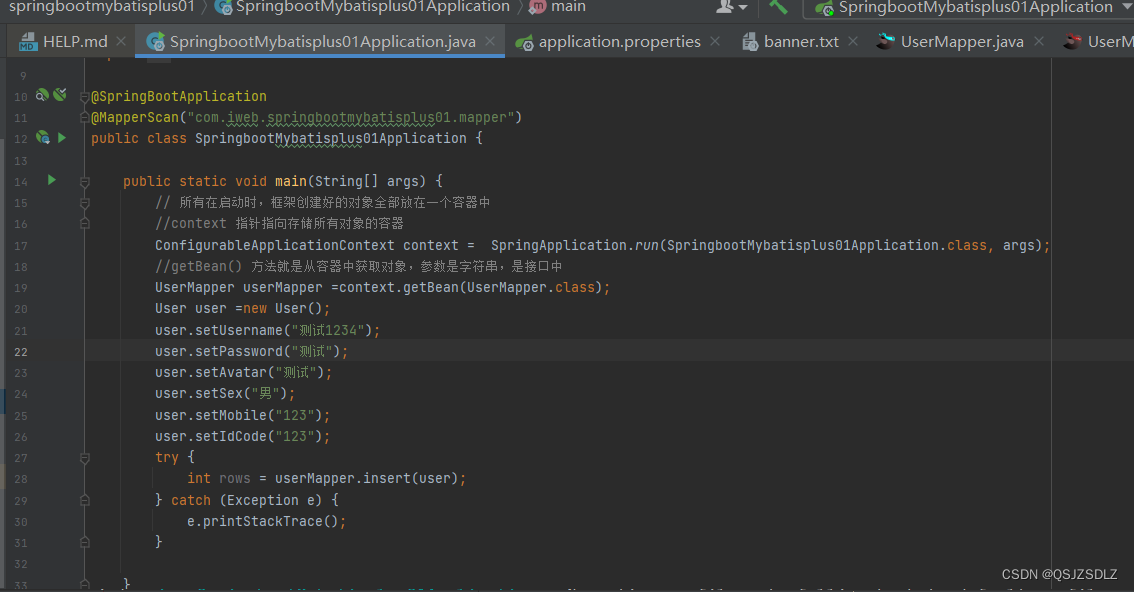

拿对象
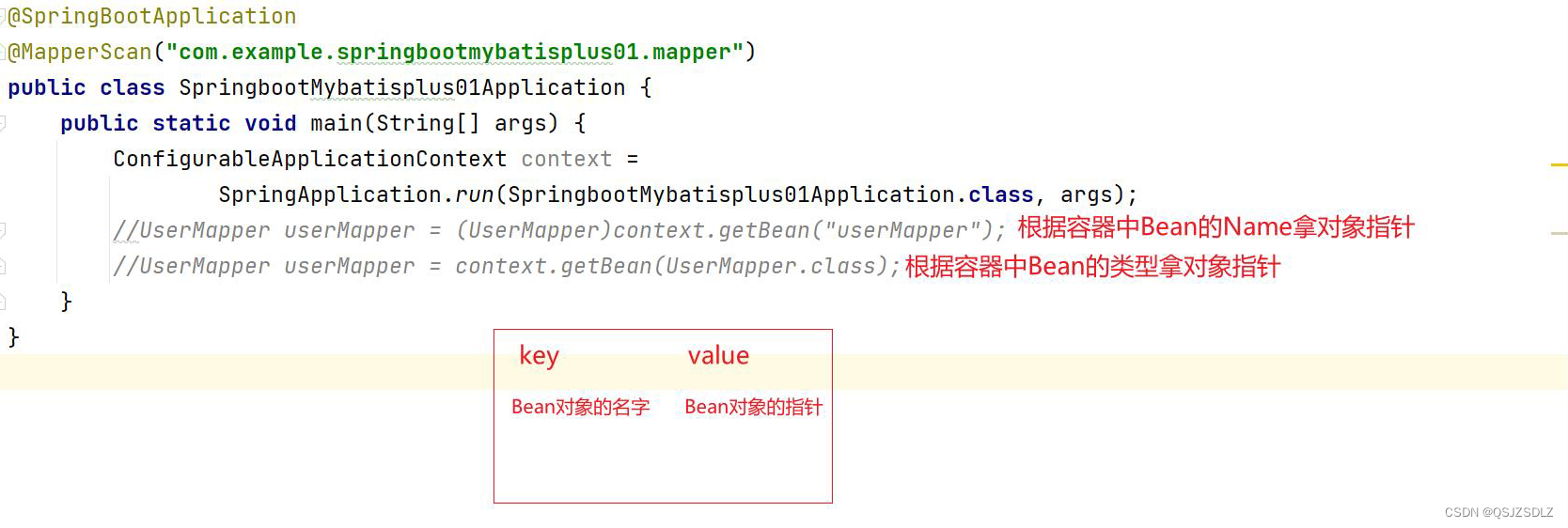
测试类

添加


添加日志文件
运行时 方便查看sql 语句 错误
mybatis-plus.configuration.log-impl=org.apache.ibatis.logging.stdout.StdOutImpl
删除


更新


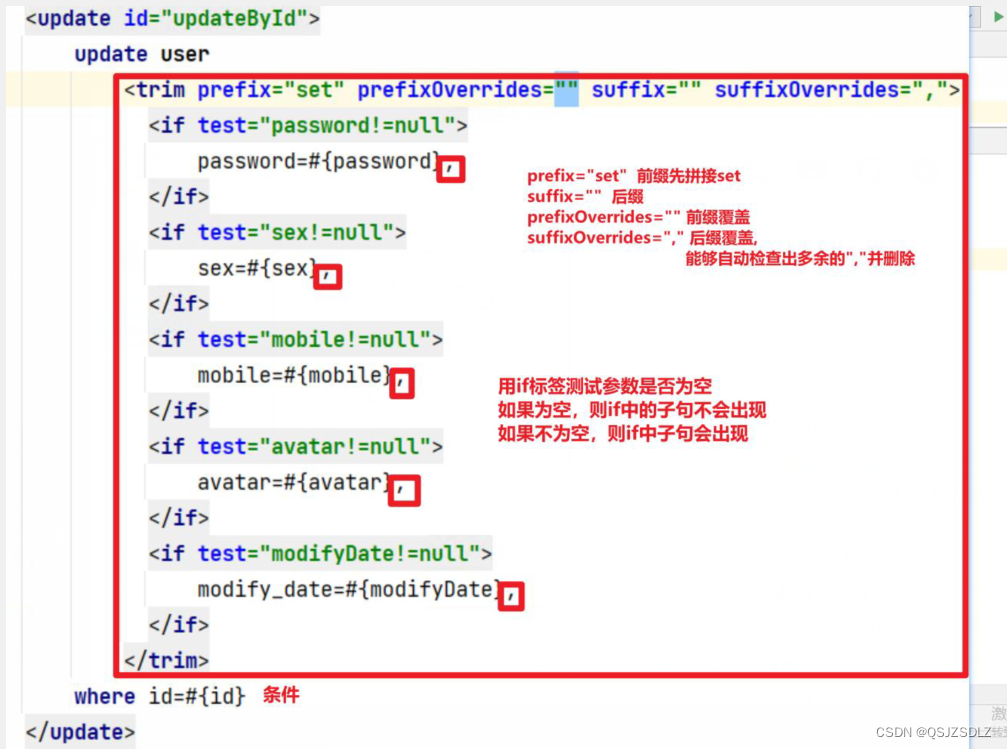

MyBatis 写 SQL 语句的几种方式
1.在绑定 XML 文件中写
上面就是第一种
2.不需要 XML 文件,使用注解写
@insert
@Update
@Delete
@Select
动态SQL 语句还是 xml 文件中写比较方便
3.不绑定 XML 文件
!!!!!重点用这种

pom.xml
安装JSP依赖

- <dependency>
- <groupId>org.apache.tomcat.embedgroupId>
- <artifactId>tomcat-embed-jasperartifactId>
- <scope>providedscope>
- dependency>
- <dependency>
- <groupId>jstlgroupId>
- <artifactId>jstlartifactId>
- <version>1.2version>
- <scope>providedscope>
- dependency>
- <dependency>
- <groupId>taglibsgroupId>
- <artifactId>standardartifactId>
- <version>1.1.2version>
- <scope>providedscope>
- dependency>
mysql 连接 java 的依赖
- <dependency>
- <groupId>mysqlgroupId>
- <artifactId>mysql-connector-javaartifactId>
- <version>5.1.47version>
- dependency>

- <resources>
- <resource>
- <directory>src/main/webdirectory>
- <targetPath>META-INF/resourcestargetPath>
- <includes>
- <include>**/*.*include>
- includes>
- resource>
- <resource>
- <directory>src/main/resourcesdirectory>
- <includes>
- <include>**/*.xmlinclude>
- <include>**/*.propertiesinclude>
- includes>
- resource>
- resources>
把mapper全路径放进去


在application.properties


- spring.application.name=springboot-mybatisplus-02
- spring.datasource.driver-class-name=com.mysql.jdbc.Driver
- spring.datasource.name=defaultDataSource
- spring.datasource.url=jdbc:mysql://localhost:3306/shop?useUnicode=true&characterEncoding=utf-8&useSSL=false\
- &serverTimezone=UTC
- spring.datasource.username=root
- spring.datasource.password=root
- mybatis-plus.configuration.log-impl=org.apache.ibatis.logging.stdout.StdOutImpl
- server.port=8080
- spring.mvc.view.prefix=/jsp/
- spring.mvc.view.suffix=.jsp

- package com.iweb.springbootmybatisplus02;
- import com.baomidou.mybatisplus.core.toolkit.Assert;
- import com.iweb.springbootmybatisplus02.entity.Animal;
- import com.iweb.springbootmybatisplus02.mapper.AnimalMapper;
- import org.junit.jupiter.api.Test;
- import org.springframework.boot.test.context.SpringBootTest;
- import javax.annotation.Resource;
- import java.util.ArrayList;
- import java.util.HashMap;
- import java.util.List;
- @SpringBootTest
- public class AnimalMapperTest {
- @Resource
- private AnimalMapper animalMapper;
- @Test
- public void insert(){
- Animal animal = new Animal();
- animal.setName("皮卡丘");
- animal.setSex("男");
- animal.setLevel("100");
- animal.setPrice("10000");
- animal.setStock("1");
- int row = animalMapper.insert(animal);
- Assert.isTrue(row>0,"测试失败");
- }
- @Test
- public void deleteById(){
- animalMapper.deleteById(1);
- }
- @Test
- public void deleteByMap(){
- HashMap
- map.put("name","animal_user_0");
- animalMapper.deleteByMap(map);
- }
- @Test
- public void deleteBathlds(){
- List
idList = new ArrayList<>(); - idList.add(2);
- idList.add(3);
- idList.add(4);
- animalMapper.deleteBatchIds(idList);
- }
- @Test
- public void updateById(){
- Animal animal = new Animal();
- animal.setId(6);
- animal.setName("杰尼龟");
- animalMapper.updateById(animal);
- }
- @Test
- public void selectById(){
- System.out.println(animalMapper.selectById(5));
- }
- @Test
- public void selectBatchIds(){
- List
idList = new ArrayList<>(); - idList.add(5);
- idList.add(6);
- idList.add(7);
- System.out.println(animalMapper.selectBatchIds(idList));
- }
- @Test
- public void selectByMap(){
- HashMap
- // map.put("name","杰尼龟");
- map.put("sex","男");
- List
list = animalMapper.selectByMap(map); - for (int i = 0; i < list.size(); i++) {
- System.out.println(list.get(i));
- }
- }
- }

-
相关阅读:
如何使用家庭网络运行Aleo Prover
GMS地下水数值模拟及溶质(包含反应性溶质)运移模拟技术
AIGC技术周报|图灵测试不是AGI的智力标准;SegGPT:在上下文中分割一切;ChatGPT能玩好文字游戏吗?
Autosar CAN硬件配置-Tc27x基于Davinci Cfg
【计算机视觉】OpenCV3编程入门-笔记(一)
Linux下的的GDB调试技巧一 —— 基础知识和介绍
【初试404分】杭电843学长经验分享
cpolar内网穿透
数据集笔记:芝加哥共享单车OD数据
java计算机毕业设计航帆学院网站MyBatis+系统+LW文档+源码+调试部署
- 原文地址:https://blog.csdn.net/ZSDLZ37/article/details/126114523
