-
Mybatis-Plus
几种配置文件
1.新建springboot项目-pom文件
引入依赖- 1
<dependency> <groupId>com.baomidougroupId> <artifactId>mybatis-plus-boot-starterartifactId> <version>3.0.5version> dependency> <dependency> <groupId>mysqlgroupId> <artifactId>mysql-connector-javaartifactId> dependency> <dependency> <groupId>org.projectlombokgroupId> <artifactId>lombokartifactId> dependency> dependencies>- 1
- 2
- 3
- 4
- 5
- 6
- 7
- 8
- 9
- 10
- 11
- 12
- 13
- 14
- 15
- 16
- 17
- 18
- 19
2.application.properties
1.mysql 8下
spring.datasource.driver-class-name=com.mysql.cj.jdbc.Driver spring.datasource.url=jdbc:mysql://localhost:3306/mybatis_plus?serverTimezone=GMT%2B8 spring.datasource.username=root spring.datasource.password=123456- 1
- 2
- 3
- 4
- 5
2.mysql 5下
#mysql数据库连接 spring.datasource.driver-class-name=com.mysql.jdbc.Driver spring.datasource.url=jdbc:mysql://localhost:3306/mybatis_plus spring.datasource.username=root spring.datasource.password=00000- 1
- 2
- 3
- 4
- 5
3.简单测试一下
3.1 pojo
package com.atguigu.mpdemo1010.pojo; import lombok.Data; @Data public class User { private Long id; private String name; private Integer age; private String email; }- 1
- 2
- 3
- 4
- 5
- 6
- 7
- 8
- 9
- 10
3.2 mapper
@Repository public interface UserMapper extends BaseMapper<User> { }- 1
- 2
- 3
3.3 测试类
package com.atguigu.mpdemo1010; import com.atguigu.mpdemo1010.mapper.UserMapper; import com.atguigu.mpdemo1010.pojo.User; import org.junit.jupiter.api.Test; import org.springframework.beans.factory.annotation.Autowired; import org.springframework.boot.test.context.SpringBootTest; import java.util.List; @SpringBootTest class Mpdemo1010ApplicationTests { @Autowired private UserMapper userMapper; @Test void contextLoads() { List<User> users = userMapper.selectList(null); System.out.println(users); } }- 1
- 2
- 3
- 4
- 5
- 6
- 7
- 8
- 9
- 10
- 11
- 12
- 13
- 14
- 15
- 16
- 17
- 18
- 19
- 20
- 21
- 22
- 23
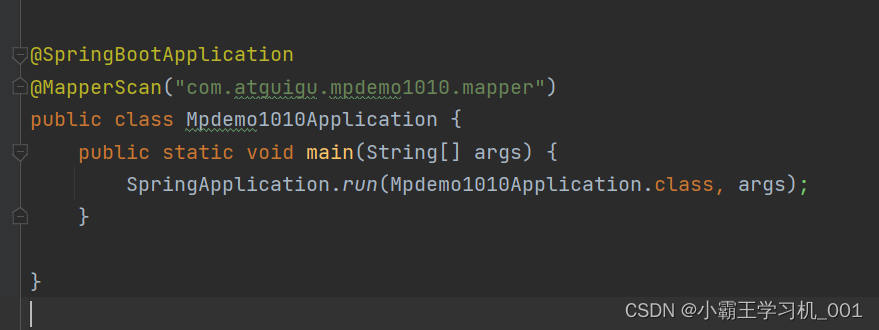
注意:若是启动报错找不到bean,需要在启动类上添加mapperScan注解,或者mapper接口添加@mapper

4.在调用mapper时发现好多方法

这说明基本的单表的增删改查Mybatis-Plus已经帮我们做好了,但是复杂的业务还需要我们手动写xml
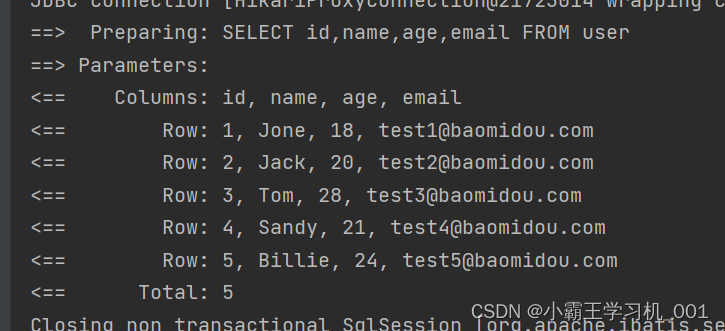
我们还可以配置sql日志
#mybatis日志 mybatis-plus.configuration.log-impl=org.apache.ibatis.logging.stdout.StdOutImpl- 1
- 2
控制台效果
-
相关阅读:
<二>Qt斗地主游戏开发:过场动画的实现
TCP--三次握手和四次挥手
[k8s] 常见yml配置和详细解释
NAS文件的名称或路径过长导致文件同步被挂起
Flutter 的状态管理
嵌入式面试笔试刷题(day14)
正则表达式 - 语法
【数字图像处理】数字图像获取(MOOC)
【LeetCode-282】给表达式添加运算符 [难度:困难]
python安装的第三方库
- 原文地址:https://blog.csdn.net/weixin_45156514/article/details/126090358

- 最新文章
-
沪漂五周年了:我越来越迷茫了
Agentic Skill Routing 实战:别再把所有 Skill 塞进 AI Agent 上下文
MySQL-Seconds_behind_master的精度误差
[MAF预定义ChatClient中间件-03]CachingChatClient——利用缓存省钱省时间
AI的至暗历史:从万众期待到被政府撤资,AI的两次死亡徘徊
Agent OS :五种驯服不确定性的范式
PortSwigger SQL注入LAB11
数据库即时编译JIT
[Begin]AI Learn Data Day 0
深度学习进阶(二十七)现代 LLM 的核心架构设计其二:SwiGLU