-
SpringBoot配置文件
目录
1.配置文件作用
整个项目中所有重要的数据都是在配置文件中配置的,比如:
- 数据库的连接信息;
- 项目的启动端口;
- 第三方系统的调用秘钥等信息;
- 用于发现和定位问题的普通日志和异常日志等。
2.配置文件的格式
Spring Boot 配置文件主要分为以下两种格式:
.properties.yml
如下图所示:
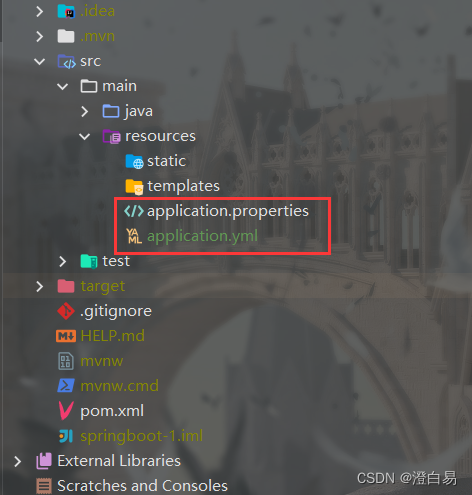
properties 类型的配置文件就属于旧版配置类型,也是创建 Spring Boot 项目时默认的文件格式,而 yml 属于新版配置类型。特殊说明
理论上讲 properties 可以和 yml 起存在于个项目当中,当 properties 和 yml 起存在个项目中时,如果配置文件中出现了同样的配置,那么这个时候会以 properties 中的配置为主,也就是
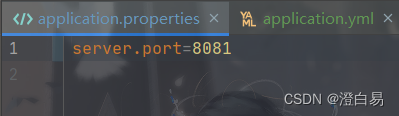
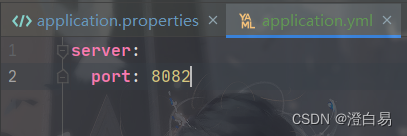
.properties配置文件的优先级最高,但加载完.properties文件之后,也会加载.yml文件的配置信息。例如,properties 和 yml 中都配置了“server.port”
.properties将port配置为8081:
.yml将port配置为8082:
启动项目后可以看到端口为8081

3.properties 配置文件
properties配置文件是最早期的配置文件格式,也是创建 Spring Boot 项目默认的配置文件。3.1 properties 基本语法
properties是以键值的形式配置的,key 和 value 之间是以“=”连接的,如:# 配置项?端?号 server.port=8084 spring.datasource.url=jdbc:mysql://127.0.0.1:3306/testdb? characterEncoding=utf8 spring.datasource.username=root spring.datasource.password=root- 1
- 2
- 3
- 4
- 5
- 6
3.2 读取配置文件
如果在项目中,想要主动的读取配置文件中的内容,可以使用
@Value注解来实现,@Value注解使用“${}”的格式读取,如下代码所示:@Component public class ReadController { @Value("${server.port}") private String port; @PostConstruct public void postConstruct() { System.out.println("read port:" + port); } }- 1
- 2
- 3
- 4
- 5
- 6
- 7
- 8
- 9
- 10
执行结果:
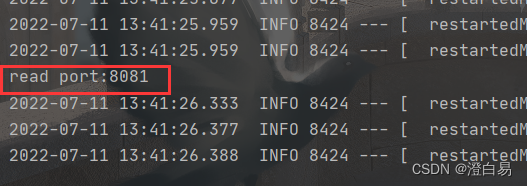
@Component 在 Spring Boot 启动时候会注入到框架中,注入到框架中时会执行 @PostConstruct 初始化方法,这个时候就能读取到配置信息了。
3.3 properties 缺点
properties配置是以key-value的形式配置的,properties 配置文件中会有很多的冗余的信息,比如这些:

想要解决这个问题,就可以使用 yml 配置文件的格式化了。4.yml 配置文件
yml是YMAL是缩写,它的全称 Yet Another Markup Language, 翻译成中就是“另种标记语言”。yml是一个可读性高,易于理解,用来表达数据序列化的格式。它的语法和其他高级语言类似,并且可以简单表达清单(数组)、散列表,标量等数据形态。它使用空白符号缩进和大量依赖外观的特色,特别适合用来表达或编辑数据结构、各种配置文件等。
yml最大的优势是可以跨语言,不止是 Java 中可以使用, golang、python 都可以使用yml作为配置文件。4.1 yml 基本语法
yml是树形结构的配置文件,它的基础语法是“key: value”,注意key和value之间使用英文冒号加空格的方式组成的,这里的空格是不能省略的。# 配置端口 server: port: 8082 # 配置数据库 spring: datasource: url: jdbc:mysql://127.0.0.1:3306/database?charsetEncoding=utf8 username: root password: 12345678- 1
- 2
- 3
- 4
- 5
- 6
- 7
- 8
- 9
4.2 yml 配置读取
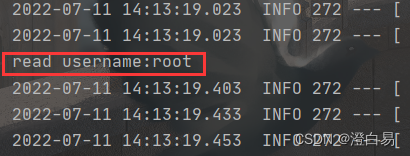
yml 读取配置的方式和 properties 相同,使用
@Value注解即可,实现代码如下:@Component public class ReadController { @Value("${spring.datasource.username}") private String username; @PostConstruct public void postConstruct() { System.out.println("read username:" + username); } }- 1
- 2
- 3
- 4
- 5
- 6
- 7
- 8
- 9
- 10
执行结果:
4.3 yml 使用进阶
4.3.1 配置不同数据类型及 null
# 字符串 string.value: yml # 布尔值,true或false boolean.value: true boolean.value1: false # 整数 int.value: 666 int.value1: 0b1010_0111_0100_1010_1110 # ?进制 # 浮点数 float.value: 3.14159 float.value1: 314159e-5 # 科学计数法 # Null,~代表null null.value: ~- 1
- 2
- 3
- 4
- 5
- 6
- 7
- 8
- 9
- 10
- 11
- 12
- 13
- 14
- 15
- 16
- 17
注意:value 值加单双引号
字符串默认不用加上单引号或者双引号,如果加英文的单双引号可以表示特殊的含义。
例如:string: str1: Hello Spring Boot. str2: 'Hello Spring Boot.' str3: "Hello Spring Boot."- 1
- 2
- 3
- 4
- 5
- 6
- 7
读取代码如下:
@Component public class ReadController { @Value("${string.str1}") private String str1; @Value("${string.str2}") private String str2; @Value("${string.str3}") private String str3; @PostConstruct public void postConstruct() { System.out.println("string.str1:" + str1); System.out.println("string.str2:" + str2); System.out.println("string.str3:" + str3); } }- 1
- 2
- 3
- 4
- 5
- 6
- 7
- 8
- 9
- 10
- 11
- 12
- 13
- 14
- 15
- 16
执行结果:
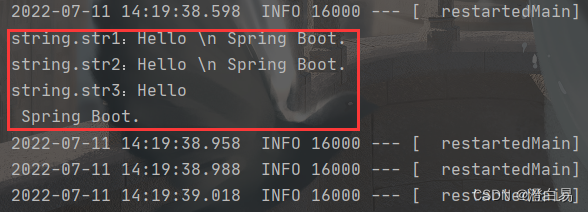
从上述结果可以看出:
- 字符串默认不用加上单引号或者双引号。
- 单引号会转义特殊字符,特殊字符最终只是一个普通的字符串数据。
- 双引号不会转义字符串里的特殊字符;特殊字符会作为本身想表示的意思。
4.3.2 配置对象
也可以在 yml 中配置对象,如下配置:
student: id: 1 name: Java age: 20- 1
- 2
- 3
- 4
或者是使用行内写法(与上面的写法作用致):
student: {id: 1,name: Java,age: 18}- 1
这个时候就不能用
@Value来读取配置中的对象了,此时要使用另个注解@ConfigurationProperties来读取,具体实现如下:
Student类:@Component @Data @ConfigurationProperties(prefix = "student") public class Student { private int id; private String name; private int age; }- 1
- 2
- 3
- 4
- 5
- 6
- 7
- 8
调用类:
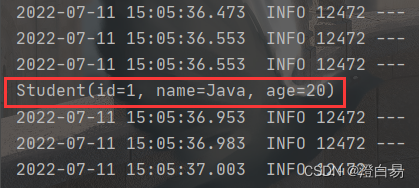
@Component public class ReadController { @Autowired private Student student; @PostConstruct public void postConstruct() { System.out.println(student); } }- 1
- 2
- 3
- 4
- 5
- 6
- 7
- 8
- 9
- 10
执行结果:
4.3.3 配置集合
配置文件也可以配置 list 集合,如下所示:
dbtypes: name: - Java - C++ - Python- 1
- 2
- 3
- 4
- 5
或者是使用行内写法(与上面的写法作用致):
dbtypes: {name: [Java,C++,Python]}- 1
集合的读取和对象样,也是使用 @ConfigurationProperties 来读取的,具体实现如下:
@Component @Data @ConfigurationProperties(prefix = "dbtypes") public class DBTypes { private Listname; } - 1
- 2
- 3
- 4
- 5
- 6
打印类:
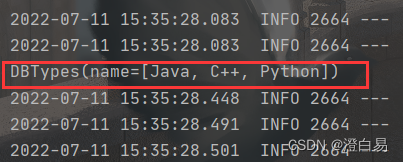
@Component public class ReadController { @Autowired private DBTypes dbTypes; @PostConstruct public void postConstruct() { System.out.println(dbTypes); } }- 1
- 2
- 3
- 4
- 5
- 6
- 7
- 8
- 9
- 10
执行结果:
5.properties VS yml
properties是以key=value的形式配置的键值类型的配置件,而yml使用的是类似json 格式的树形配置方式进行配置的,yml 层级之间使用换行缩进的方式配置,key 和 value 之间使用“:”英文冒号加空格的方式设置,并且空格不可省略。properties为早期并且默认的配置文件格式,但其配置存在定的冗余数据,使用 yml 可以很好的解决数据冗余的问题。yml通用性更好,持更多语言,如 Java、Go、Python 等,如果是云服务器开发,可以使用份配置文件作为 Java 和 Go 的共同配置文件。yml虽然可以和properties共存,但个项目中建议使用统的配置类型文件。
-
相关阅读:
关于大模型对未来影响的一点看法
1.读写点云文件
ThreadLocal源码解析学习
六、RTMP协议 时间戳
【Unity3D】3D 物体概念 ① ( 轴心点概念 | 物体的父子关系 | 子节点相对坐标 )
PDF/X、PDF/A、PDF/E:有什么区别,为什么有这么多格式?
服务器制作RAID磁盘阵列并管理
LCR 027.回文链表
【数据结构】24种常见算法题
849. Dijkstra求最短路 I
- 原文地址:https://blog.csdn.net/emgexgb_sef/article/details/126041509

- 最新文章
-
沪漂五周年了:我越来越迷茫了
Agentic Skill Routing 实战:别再把所有 Skill 塞进 AI Agent 上下文
MySQL-Seconds_behind_master的精度误差
[MAF预定义ChatClient中间件-03]CachingChatClient——利用缓存省钱省时间
AI的至暗历史:从万众期待到被政府撤资,AI的两次死亡徘徊
Agent OS :五种驯服不确定性的范式
PortSwigger SQL注入LAB11
数据库即时编译JIT
[Begin]AI Learn Data Day 0
深度学习进阶(二十七)现代 LLM 的核心架构设计其二:SwiGLU