码农知识堂 - 1000bd
  •   Python
  •   PHP
  •   JS/TS
  •   JAVA
  •   C/C++
  •   C#
  •   GO
  •   Kotlin
  •   Swift
  • Django自动生成docs接口文档


    1.创建Django项目

    python manage.py startproject django2025
    
    • 1

    2.创建子应用

    python manage.py startapp api
    
    • 1

    3.安装依赖包

    pip install coreapi
    
    • 1

    4.创建urls.py

    from django.contrib import admin
    from django.urls import path, include
    from rest_framework import routers
    from api.views import MyAPIView
    from rest_framework.schemas import get_schema_view
    from rest_framework.documentation import include_docs_urls
    from drf_yasg.views import get_schema_view
    from drf_yasg import openapi
    schema_view = get_schema_view(
        openapi.Info(
            title="API Documentation",
            default_version='v1',
        ),
        public=False
    )
    urlpatterns = [
        path('admin/', admin.site.urls),
        path(r'docs/', include_docs_urls(title='API文档')),
        path('api/hello/', MyAPIView.as_view()),
    ]
    
    
    • 1
    • 2
    • 3
    • 4
    • 5
    • 6
    • 7
    • 8
    • 9
    • 10
    • 11
    • 12
    • 13
    • 14
    • 15
    • 16
    • 17
    • 18
    • 19
    • 20
    • 21

    5.编写view.py视图

    from rest_framework.views import APIView
    from rest_framework.response import Response
    from rest_framework.schemas import AutoSchema
    
    
    class MyAPIView(APIView):
        """
        A simple API View with GET and POST methods.
        """
        schema = AutoSchema()  # 自动创建API文档的Schema
    
        def get(self, request, *args, **kwargs):
            response = {'message': 'Hello, World!'}
            return Response(response)
    
        def post(self, request, *args, **kwargs):
            response = {'message': 'Got some data!', 'data': request.data}
            return Response(response)


    • 1
    • 2
    • 3
    • 4
    • 5
    • 6
    • 7
    • 8
    • 9
    • 10
    • 11
    • 12
    • 13
    • 14
    • 15
    • 16
    • 17
    • 18
    • 19
    • 20

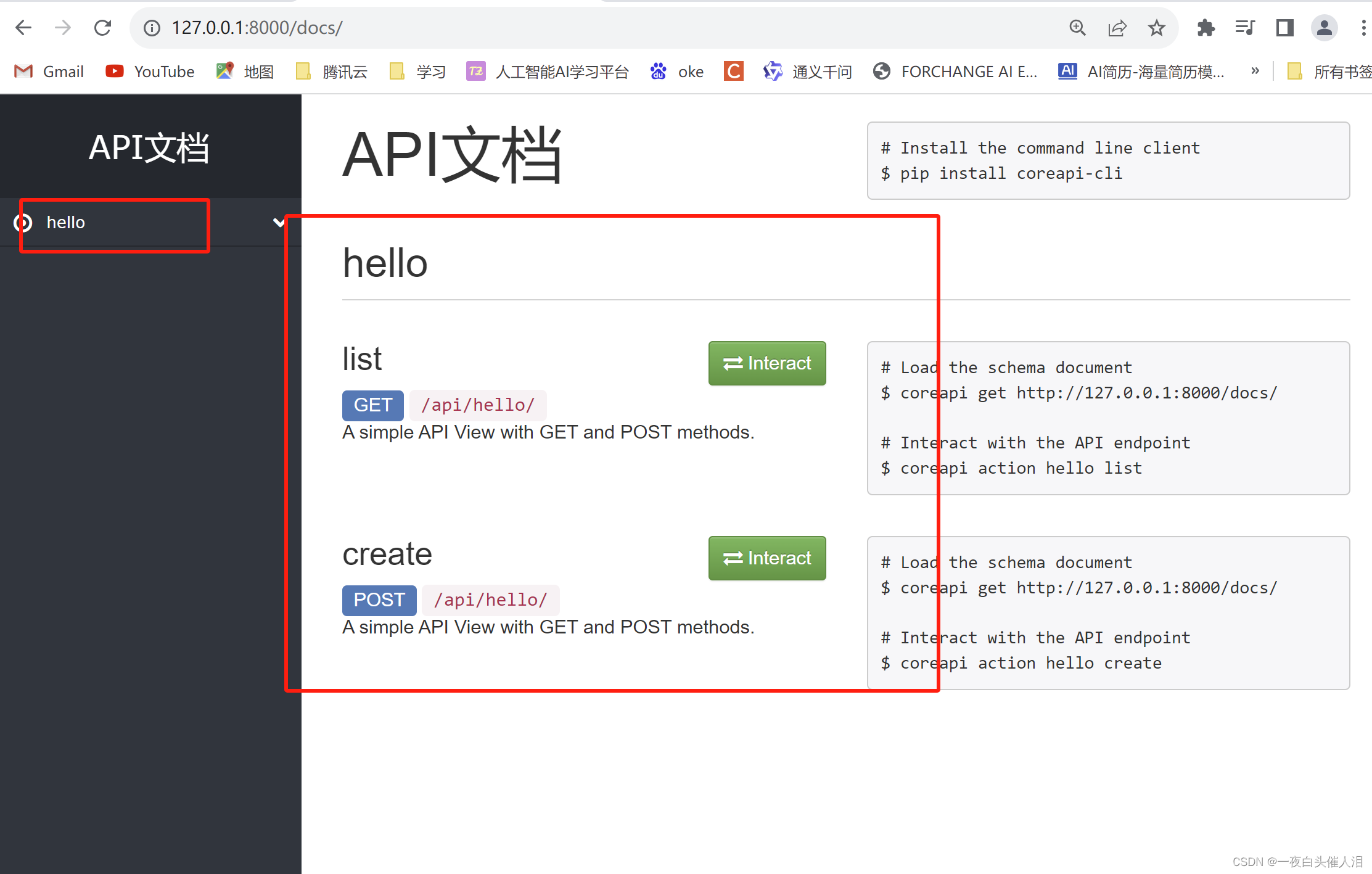
    6.访问页面检查

    http://127.0.0.1:8000/docs/
    
    • 1

    在这里插入图片描述

  • 相关阅读:
    Hive特殊函数的使用
    极速理解ML交叉验证
    谈谈我写作生涯的画图技巧
    MasaFramework -- 更优雅的获取配置信息
    打造 Web3 品牌灵魂三问:Why、What、How?
    厚积薄发!安全狗再次获得科技成果转化认证!
    推进生态社会化分工 与伙伴共担未来 数商云受邀出席京东科技合作伙伴论坛
    通过zookeeper浅谈一致性算法
    这把联网智能门锁体验感A+
    汽车流通行业4S门店生存性指标:零服吸收率
  • 原文地址:https://blog.csdn.net/cxl0406/article/details/134489262
  • 最新文章
  • 攻防演习之三天拿下官网站群
    数据安全治理学习——前期安全规划和安全管理体系建设
    企业安全 | 企业内一次钓鱼演练准备过程
    内网渗透测试 | Kerberos协议及其部分攻击手法
    0day的产生 | 不懂代码的"代码审计"
    安装scrcpy-client模块av模块异常,环境问题解决方案
    leetcode hot100【LeetCode 279. 完全平方数】java实现
    OpenWrt下安装Mosquitto
    AnatoMask论文汇总
    【AI日记】24.11.01 LangChain、openai api和github copilot
  • 热门文章
  • 十款代码表白小特效 一个比一个浪漫 赶紧收藏起来吧!!!
    奉劝各位学弟学妹们,该打造你的技术影响力了!
    五年了,我在 CSDN 的两个一百万。
    Java俄罗斯方块,老程序员花了一个周末,连接中学年代!
    面试官都震惊,你这网络基础可以啊!
    你真的会用百度吗?我不信 — 那些不为人知的搜索引擎语法
    心情不好的时候,用 Python 画棵樱花树送给自己吧
    通宵一晚做出来的一款类似CS的第一人称射击游戏Demo!原来做游戏也不是很难,连憨憨学妹都学会了!
    13 万字 C 语言从入门到精通保姆级教程2021 年版
    10行代码集2000张美女图,Python爬虫120例,再上征途
Copyright © 2022 侵权请联系2656653265@qq.com    京ICP备2022015340号-1
正则表达式工具 cron表达式工具 密码生成工具

京公网安备 11010502049817号