-
ansible中常用模块
1.ansible实现管理的方式##
Ad-Hoc ##利用ansible命令直接完成管理,主要用于临时命令使用场景
playbook ##ansible脚本,主要用于大型项目场景,需要前期的规划
2.Ad-Hoc执行方式中如何获得帮助##
ansible-doc ##显示模块帮助的指令
格式:
ansible-doc [参数] [模块...]
- ansible命令运行方式及常用参数
ansible 清单 -m 模块 -a 模块参数
--version
显示版本
-m module
指定模块,默认为command模块
-v
详细过程 -vv -vvv更详细过程
--list
显示主机列表,也可以用--list-hosts
-k
提示输入ssh连接密码,默认key认证
-C
预执行检测
-T
执行命令的超时时间,默认10s
-u
指定远程执行的用户
-b
执行sudo切换身份操作
-become-user=USERNAME
指定sudo的用户
-K
提示输入sudo密码


4.ansible的基本颜色代表信
绿色 执行成功但为对远程主机做任何改变
黄色 执行成功并对远程主机做改变
红色 执行失败
5.ansible中的常用模块##
1).command功能: 在远程主机执行命令,此模块为默认模块
常用参数:
chdir
执行命令前先进入到指定目录
cmd
运行命令指定
creates
如果文件存在将不运行
removes
如果文件存在在将运行
free_form
远程主机中执行的命令,此参数不需要加
##注意##
#Linux中的很多通配符在command模块中不支持
[devops@westos_server .ansible]$ ansible westos -m command -a 'chdir=/mnt pwd'
[devops@westos_server .ansible]$ ansible westos -m command -a ' pwd'
[devops@westos_server .ansible]$ ansible westos -m command -a 'creates=/mnt pwd'
[devops@westos_server .ansible]$ ansible westos -m command -a 'removes=/mnt pwd'

2).shell
常用参数
chdir
执行命令前先进入到指定目录
cmd
运行命令指定
creates
如果文件存在将不运行
removes
如果文件存在在将运行
free_form
远程主机中执行的命令,此参数不需要加
xecutable
指定执行环境,默认为sh
[devops@westos_server .ansible]$ ansible westos -m shell -a 'executable=/bin/sh ps aux | grep $$'
[devops@westos_server .ansible]$ ansible westos -m shell -a 'ls /mnt'
[devops@westos_server .ansible]$ ansible westos -m shell -a 'rm -rf /mnt/*'

3)..script## 功能: 在ansible主机中写好的脚本在受控主机中执行
[devops@westos_server .ansible]$ ansible all -m script -a 'test.sh‘

).copy## 功能 :从ansible主机复制文件到受控主机
常用参数
src
源文件
dest
目的地文件
owner
指定目的地文件所有人
group
mode
指定目的地文件权限
backup=yes
当受控主机中存在文件时备份原文件
content
指定文本内容直接在受控主机中生成文件
[devops@westos_server .ansible]$ ansible westos -m copy -a 'dest=/mnt/file content=" hello westos"'
[devops@westos_server .ansible]$ ansible westos -m shell -a 'cat /mnt/file'

[devops@westos_server .ansible]$ ansible westos -m copy -a 'src=inventory dest=/mnt/file owner=westos group=devops mode=777 backup=yes'
[devops@westos_server .ansible]$ ansible westos -m shell -a 'cat /mnt/file'

5.fetch#功能 :从受控主机把文件复制到ansible主机,但不支持目录
#常用参数
src
受控主机的源文件
dest
本机目录
flat
基本名称功能
[devops@westos_server .ansible]$ ansible all -m fetch -a 'src=/mnt/file dest=/tmp'
[devops@westos_server .ansible]$ ansible all -m fetch -a 'src=/mnt/file dest=/tmp/westos flat=yes'

6).file## #功能 :设置文件的属性
path
指定文件名称
state
指定操作状态
mode
设定权限
owner
设定文件用户
group
设定文件组
src
原文件
dest
目标文件
recurse=yes
递归更改
[devops@westos_server .ansible]$ ansible westos -m file -a 'path=/mnt/westos state=directory'
[devops@westos_server .ansible]$ ansible all -m shell -a 'ls /mnt'
[devops@westos_server .ansible]$ ansible all -m file -a 'path=/mnt/westos mode=700'
[devops@westos_server .ansible]$ ansible all -m shell -a 'ls /mnt -l'
[devops@westos_server .ansible]$ ansible westos -m file -a 'path=/mnt/westosfile state=touch'
[devops@westos_server .ansible]$ ansible westos -m file -a 'path=/mnt/westos/file state=touch'
[devops@westos_server .ansible]$ ansible westos -m file -a 'path=/mnt/westos/file1 state=touch'
[devops@westos_server .ansible]$ ansible all -m shell -a 'ls /mnt -l -R'
[devops@westos_server .ansible]$ ansible westos -m file -a 'path=/mnt/westos mode=777'
[devops@westos_server .ansible]$ ansible all -m shell -a 'ls /mnt -l -R'

[devops@westos_server .ansible]$ ansible westos -m file -a 'path=/mnt/westos mode=777 recurse=yes'
[devops@westos_server .ansible]$ ansible all -m shell -a 'ls /mnt -l -R'

7.unarchive## #功能 :解压缩
copy
默认为yes 从ansible主机复制文件到受控主机
设定为no 从受控主机中寻找src源文件
remote_src
功能同copy且相反
##设定为yes 表示包在受控主机
##设定为no表示包在ansible主机
src
包路径,可以使ansible主机也可以使受控主机
dest
受控主机目录
mode
#加压后文件权限 <copy=yes>
[devops@westos_server .ansible]$ ansible all -m unarchive -a 'copy=no src=/mnt/etc.tar.gz dest=/mnt'

8.archive## #作用 :压缩
#常用参数
path
打包目录名称
dest
打包文件名称
format
打包格式
owner
指定文件所属人
mode
指定文件权限
[devops@westos_server .ansible]$ ansible all -m archive -a 'path=/etc dest=/mnt/etc.tar.gz format=gz owner=devops mode=777'

9).cron #作用 :计划(定时)任务
minute
分钟
hour
小时
day
天
month
月
weekday
周
name
任务名称
job
任务脚本命令
disabled
##yes 禁用计划任务
##no 启动计划任务
state
absent 删除计划任务
[devops@westos_server .ansible]$ ansible westos -m cron -a 'job="rm -rf /mnt/*" name=clean minute=*/2'
[devops@westos_server .ansible]$ ansible westos -m shell -a 'crontab -l'

[devops@westos_server .ansible]$ ansible westos -m cron -a 'job="rm -rf /mnt/*" name=clean minute=*/2 disabled=yes'
[devops@westos_server .ansible]$ ansible westos -m shell -a 'crontab -l'

[devops@westos_server .ansible]$ ansible westos -m cron -a 'job="rm -rf /mnt/*" name=clean minute=*/2 state=absent'

10).yum_repository## #作用 :配置系统软件仓库源文件
name
指定仓库名称
baseurl
指定源路径
description
指定仓库描述
file
指定仓库文件名称
enabled
仓库是否启用
gpgcheck
仓库是否检测gpgkey
state
##默认值present 建立
#absent 为删除
[devops@westos_server .ansible]$ ansible all -m yum_repository -a 'file=westos name=AppStream description=AppStream gpgcheck=no baseurl=file:///zcx/AppStream'
[devops@westos_server .ansible]$ ansible all -m yum_repository -a 'file=westos name=BaseOS description=BaseOS gpgcheck=no baseurl=file:///zcx/BaseOS'
[devops@westos_server .ansible]$ ansible all -m shell -a 'cat /etc/yum.repos.d/westos.repo’

[devops@westos_server .ansible]$ ansible all -m yum_repository -a 'name=Base file=westos state=absent'删掉Base仓库
11).dnf## #作用 :管理系统中的dnf仓库及管理软件
name
#指定包
state
指定动作
#present 安装
#latest 更新
#absent 删除
list
列出指定信息
# httpd
# installed
# all
# available
disable_gpg_check
禁用gpgkey检测
enablerepo
指定安装包来源
disablerepo
禁用安装包来源
[devops@westos_server .ansible]$ ansible westos -m dnf -a 'name=vsftpd state=latest'
[devops@westos_server .ansible]$ ansible westos -m dnf -a 'name=vsftpd state=absent en'aautoremove=yes'同时删除依赖性
[devops@westos_server .ansible]$ ansible westos -m dnf -a 'name=httpd state=latest disable_gpg_check=yes' 安装时不进行gpgcheck检测
12).service #作用 :管理系统服务状态
name
指定服务名称
state
##指定对服务的动作
#started
#stoped
#restarted
enabled
##设定服务开机是否启动
#yes开启启动
#no开机不启动
[devops@westos_server .ansible]$ ansible westos -m service -a 'name=httpd state=started enabled=yes'
13).firewalld
常用参数
zone
##火墙的域
service
##服务名称
permanent
##永久生效
state
enabled ##允许
disabled ##拒绝
immediate
#立即生效
[devops@westos_server .ansible]$ ansible westos -m firewalld -a 'zone=public service=http permanent=yes state=enabled immediate=yes'
14).user #作用 :模块可以帮助我们管理远程主机上的用户,比如创建用户、修改用户、删除用户、为用户创建密钥对等操作
#常用参数
name
必须参数,用于指定要操作的用户名称。
group
#指定用户所在的基本组。
gourps
指定用户所在的附加组
append
指定添加附加组默认值为no
shell
指定用户的默认 shell。
uid
指定用户的 uid 号。
comment
指定用户的注释信息
state
用于指定用户是否存在于远程主机
#present 建立
#absent 删除
remove
#当删除用户是删除用户家目录,默认值为no
password
##此参数用于指定用户的密码。但密码为明文,
##可以用openssl password -6 '密码'生成加密字符
generate_ssh_key
##生成sshkey
[devops@westos_server .ansible]$ ansible all -m user -a 'name=lee uid=666 password="$6$1z71vXEJJHR6MLsJ$VvCnpK.flRQSrw75gJcz1mdhjogHQUECbDjzdzQGdKI2mLWwsM4s8L/QEd0wAXrRkSRmlv1Y/xNyLGLA5/bpd1" ‘
[devops@westos_server .ansible]$ ansible all -m user -a 'name=lee state=absent'
[devops@westos_server .ansible]$ ansible all -m user -a 'name=lee uid=6666 group=72 groups=21'
[devops@westos_server .ansible]$ ansible all -m shell -a 'id lee'
[devops@westos_server .ansible]$ ansible all -m user -a 'name=lee uid=6666 groups="0,4"'
[devops@westos_server .ansible]$ ansible all -m user -a 'name=lee uid=6666 groups=21 append=yes'
[devops@westos_server .ansible]$ ansible all -m user -a 'name=lee state=absent remove=yes'
[devops@westos_server .ansible]$ ansible all -m user -a 'name=lee state=present generate_ssh_key=yes'
15).group #作用 :group 模块可以帮助我们管理远程主机上的组。
name
用于指定要操作的组名称。
state
##用于指定组的状态
#present 建立
#absent 删除
gid
##用于指定组的gid。
[devops@westos_server .ansible]$ ansible all -m group -a 'name=westoslinux'
[devops@westos_server .ansible]$ ansible all -m group -a 'name=westoslinux state=absent'
[devops@westos_server .ansible]$ ansible all -m group -a 'name=westoslinux gid=6666'
16).lineinfile
path
##指定要操作的文件。
line
##指定文本内容。 "|+" 表示格式化输入
regexp
##使用正则表达式匹配对应的行当替换文本时
##如果有多行文本都能被匹配
##则只有最后面被匹配到的那行文本才会被替换
##当删除文本时,如果有多行文本都能被匹配
##这么这些行都会被删除
state
##当想要删除对应的文本时需要将state参数的值设置为absent
#state的默认值为present。
backrefs
##当内容无匹配规则时不对文件做任何更改,默认值为no
##向后引用regexp变量信息
insertafter
##借助insertafter参数可以将文本插入到“指定的行”之后
##insertafter参数的值可以设置为EOF或者正则表达式
insertbefore
##借助insertbefore参数可以将文本插入到“指定的行”之前
#insertbefore参数的值可以设置为BOF或者正则表达式
backup
##是否在修改文件之前对文件进行备份。
create
##当要操作的文件并不存在时,是否创建对应的文件。
[devops@westos_server .ansible]$ vim westos
[devops@westos_server .ansible]$ ansible all -m copy -a 'src=westos dest=/mnt/westos'
[devops@westos_server .ansible]$ ansible all -m lineinfile -a 'path=/mnt/test regexp="westos" line="hello linux" create=yes '

[devops@westos_server .ansible]$ ansible all -m shell -a 'cat /mnt/test'
[devops@westos_server .ansible]$ ansible all -m lineinfile -a 'path=/mnt/test regexp="hello" line="westos hello"'
[devops@westos_server .ansible]$ ansible all -m shell -a 'cat /mnt/test'

[devops@westos_server .ansible]$ ansible all -m lineinfile -a 'path=/mnt/test regexp="test" line="linux" backrefs=no'
[devops@westos_server .ansible]$ ansible all -m lineinfile -a 'path=/mnt/test line="@@@@@@@" insertafter=EOF'
[devops@westos_server .ansible]$ ansible all -m lineinfile -a 'path=/mnt/test line="@@@@@@@@@@" insertafter=hello'
[devops@westos_server .ansible]$ ansible all -m lineinfile -a 'path=/mnt/test line="@@@@@@@@@###@" insertbefore=BOF'

[devops@westos_server .ansible]$ ansible all -m lineinfile -a 'path=/mnt/westos regexp="(h.{4}).*(w.{5})"line="\1" backrefs=yes'
[devops@westos_server .ansible]$ ansible all -m shell -a 'cat /mnt/test'

17).replace #作用 :replace 模块可以根据我们指定的正则表达式替换文件中的字符串,文件中所有被匹配到的字符串都会被替换
path
指定要操作的文件
regexp
##指定一个正则表达式
#文件中与正则匹配的字符串将会被替换。
replace
##指定最终要替换成的字符串。
backup
##是否在修改文件之前对文件进行备份,最好设置为yes。
[devops@westos_server .ansible]$ ansible all -m replace -a 'path=/mnt/westos regexp=hello replace="westos" backup=yes'
[devops@westos_server .ansible]$ ansible all -m shell -a 'cat /mnt/westos'

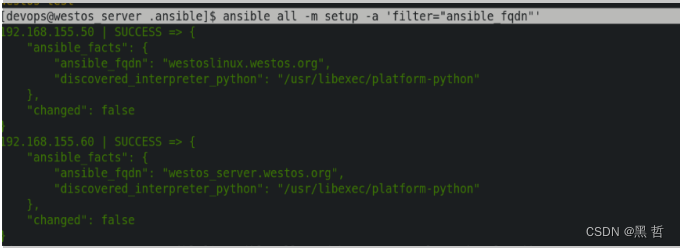
18).setup# #作用 :setup模块用于收集远程主机的一些基本信息
filter
##用于进行条件过滤。如果设置,仅返回匹配过滤条件的信息。
[devops@westos_server .ansible]$ ansible all -m setup -a 'filter="ansible_fqdn"'
19).debug# #作用 :调试模块,用于在调试中输出信息
msg:
##调试输出的消息
var:
##将某个任务执行的输出作为变量传递给debug模块
##debug会直接将其打印输出
verbosity:
##debug的级别(默认是0级,全部显示)
[devops@westos_server .ansible]$ ansible all -m debug -a 'msg="love shenglongjiao"'
-
相关阅读:
华为云 CodeArts Snap 智能编程助手 PyCharm 插件安装与使用指南
【操作系统】孤儿/僵尸/守护进程
ARM32开发——GPIO输入
Google Earth Engine APP——影像条带色差、色调不均匀等现象解决方案Landsat5 NDWI Image Restoration APP
博客停更,已开公众号-《GIS杂谈》,之后会在公众号持续更新相关知识,敬请关注,欢迎讨论~
C语言实例_调用SQLITE数据库完成数据增删改查
【无标题】Delayed延迟队列不工作
编写基于maven的IDEA插件,实现根据现有代码生成流程图的 pom(2)
Java框架-SpringMVC(基础使用+运行流程+拦截器+统一异常处理等详解)
AlphaFold-multimer 复合物结构预测
- 原文地址:https://blog.csdn.net/z17609273238/article/details/125961565
- 最新文章
-
沪漂五周年了:我越来越迷茫了
Agentic Skill Routing 实战:别再把所有 Skill 塞进 AI Agent 上下文
MySQL-Seconds_behind_master的精度误差
[MAF预定义ChatClient中间件-03]CachingChatClient——利用缓存省钱省时间
AI的至暗历史:从万众期待到被政府撤资,AI的两次死亡徘徊
Agent OS :五种驯服不确定性的范式
PortSwigger SQL注入LAB11
数据库即时编译JIT
[Begin]AI Learn Data Day 0
深度学习进阶(二十七)现代 LLM 的核心架构设计其二:SwiGLU