-
SpringCloudAlibaba 微服务整合分布式事务Seata
基于AT模式
创建
undo_log(回滚日志表)表, 每个数据库需要创建注意:UNDO_LOG Table:不同数据库在类型上会略有差别。详见官网-- 注意此处0.7.0+ 增加字段 context CREATE TABLE `undo_log` ( `id` bigint(20) NOT NULL AUTO_INCREMENT, `branch_id` bigint(20) NOT NULL, `xid` varchar(100) NOT NULL, `context` varchar(128) NOT NULL, `rollback_info` longblob NOT NULL, `log_status` int(11) NOT NULL, `log_created` datetime NOT NULL, `log_modified` datetime NOT NULL, PRIMARY KEY (`id`), UNIQUE KEY `ux_undo_log` (`xid`,`branch_id`) ) ENGINE=InnoDB AUTO_INCREMENT=1 DEFAULT CHARSET=utf8;- 1
- 2
- 3
- 4
- 5
- 6
- 7
- 8
- 9
- 10
- 11
- 12
- 13
下载部署Seata的TC服务端(本次教程下载的版本是 1.5.1)
-
Linux/Mac 服务器安装
- 解压
 -
- /seata-server.sh启动,默认是8091端口(记得防火墙开放端口,也可以守护进程启动)
- 解压
-
TC需要存储全局事务和分支事务的记录,支持三种存储模式
-
file模式 (默认):性能高, 适合单机模式,在内存中读写,并持久化到本地文件中
- 在
bin/sessionStore/root.data文件
- 在
-
db模式 :性能较差,适合tc集群模式
-
redis模式:性能较高,适合tc集群模式
-
常见问题
seata 在 JDK11下运行报错
解决: 下载下来的seata 默认没有存放日志文件的目录, 手动创建
seata/logs/seata_gc.log目录和文件SpringCloudAlibaba整合分布式事务seata
各项目添加依赖
出现的问题:
no available service 'null' found, please make sure registry config correct
安装的服务端版本必须要和你客户端的版本保持一样- 不可行导入依赖方式
<dependency> <groupId>com.alibaba.cloudgroupId> <artifactId>spring-cloud-starter-alibaba-seataartifactId> dependency>- 1
- 2
- 3
- 4
- 5
- 合理的依赖方式(
seata-spring-boot-starter 版本与 部署的TC服务端版本一致)
<dependency> <groupId>com.alibaba.cloudgroupId> <artifactId>spring-cloud-starter-alibaba-seataartifactId> <exclusions> <exclusion> <groupId>io.seatagroupId> <artifactId>seata-spring-boot-starterartifactId> exclusion> exclusions> dependency> <dependency> <groupId>io.seatagroupId> <artifactId>seata-spring-boot-starterartifactId> <version>1.5.1version> dependency>- 1
- 2
- 3
- 4
- 5
- 6
- 7
- 8
- 9
- 10
- 11
- 12
- 13
- 14
- 15
- 16
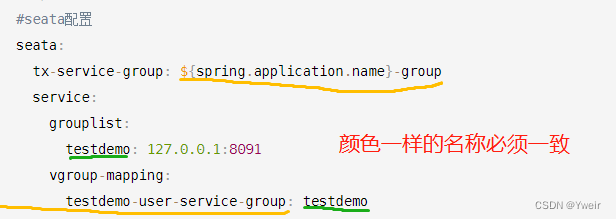
各微服务配置文件修改
#seata配置 seata: tx-service-group: ${spring.application.name}-group service: grouplist: testdemo: 127.0.0.1:8091 vgroup-mapping: testdemo-user-service-group: testdemo- 1
- 2
- 3
- 4
- 5
- 6
- 7
- 8
启动事务
在开始业务方法上添加
@GlobalTransactional注解

-
相关阅读:
5分钟了解LangChain的路由链
华为杯数学建模比赛经验分享第二期——编程手篇
el-upload 上传&表单校验成功后再触发上传
物联网Lora模块从入门到精通(五)光照与温湿度传感器
AI 编程探索- iOS动态标签控件
java成员等讲解
项目版本号大小比较,找出最大版本号
SpringBoot+vue+elementui实现前后端分离的化妆品销售商城网站
C语言:动态内存分配(2)
Docker build 技巧 —— 筑梦之路
- 原文地址:https://blog.csdn.net/laow1314/article/details/125863143
- 最新文章
-
沪漂五周年了:我越来越迷茫了
Agentic Skill Routing 实战:别再把所有 Skill 塞进 AI Agent 上下文
MySQL-Seconds_behind_master的精度误差
[MAF预定义ChatClient中间件-03]CachingChatClient——利用缓存省钱省时间
AI的至暗历史:从万众期待到被政府撤资,AI的两次死亡徘徊
Agent OS :五种驯服不确定性的范式
PortSwigger SQL注入LAB11
数据库即时编译JIT
[Begin]AI Learn Data Day 0
深度学习进阶(二十七)现代 LLM 的核心架构设计其二:SwiGLU