-
基于Java+SpringBoot+小程序实现的小说阅读管理系统
🔥作者主页:疯狂行者🔥 💖✌java领域优质创作者,专注于Java技术领域技术交流✌💖
💖文末获取源码💖
精彩专栏推荐订阅:在 下方专栏👇🏻👇🏻👇🏻👇🏻Java精彩实战项目案例
Java精彩新手项目案例
前言
本次文章主要是介绍springboot_书籍阅读小程序的功能,系统分类两个角色,管理员
一、系统功能
1.1 开发环境
- 开发语言:Java - 技术:Springboot+小程序
- 数据库:MySQL - 架构:B/S - 源码类型: Web
- 编译工具:Idea、Eclipse、MyEclipse (选其一)
- 其他:jdk1.8、Tomcat8.5 【内置】、Navicat
二、系统设计
2.1 研究思路分析
在系统流程分析当中调查分析它是比较重要的环节,因为在这个系统当中它都涉及到每个环节的业务流程,所以从Java+SpringBoot+小程序实现的小说阅读管理系统的设计的整体设计上要保证各个信息的正确输入和输出以及对数据储存的完整,并结合实际的操作步骤来绘制出具体的流程图。具体流程图如下图所示:

2.2 系统功能结构设计
通过系统需求分析,本小说阅读管理系统小程序的设计主要实现功能包括;管理员: -统计分析-管理员管理 -用户管理-广告管理-分类管理-书籍管理 -章节管理;前台首页:-登录注册-我的信息【编辑】-我的阅读 -书架-书籍分类-书籍阅读等功能。其功能结构图如下图所示:

三、部分功能展示
☀️前台小程序用户书籍分类:可以通过分类来查询小说信息,如玄幻、武侠、科幻等类别,也可以自己改变此分类:☀️

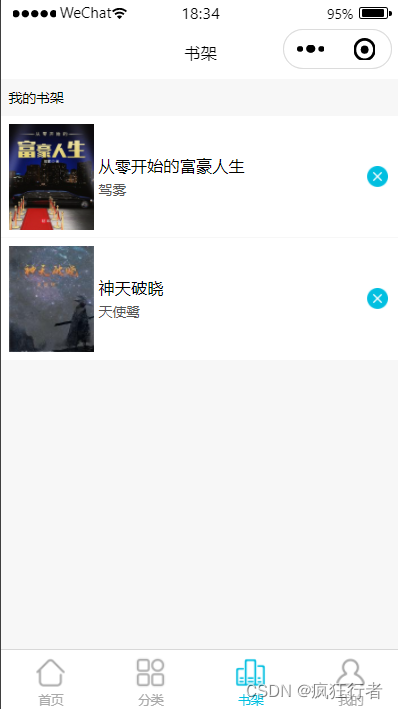
☀️小程序前端用户书籍书架展示:点击小程序端我的书籍后进入此页面,其中可以查询到书架中的书籍信息来展示给用户☀️
☀️我的信息:此功能包含可以编辑用户的个人信息、查看自己阅读的历史记录等☀️

☀️书籍管理:后台管理员书籍管理,主要是对书籍信息进行增删改查的操作☀️

三、部分代码设计
3.1.生成验证码【代码如下(示例):】
@RequestMapping("captcha.jpg") public void captcha(HttpServletResponse response)throws ServletException, IOException { response.setHeader("Cache-Control", "no-store, no-cache"); response.setContentType("image/jpeg"); //生成文字验证码 String text = producer.createText(); //生成图片验证码 BufferedImage image = producer.createImage(text); //保存到shiro session ShiroUtils.setSessionAttribute(Constants.KAPTCHA_SESSION_KEY, text); ServletOutputStream out = response.getOutputStream(); ImageIO.write(image, "jpg", out); IOUtils.closeQuietly(out); }- 1
- 2
- 3
- 4
- 5
- 6
- 7
- 8
- 9
- 10
- 11
- 12
- 13
- 14
- 15
- 16
- 17
3.2.查询书籍分类数据【代码如下(示例):】
@RequestMapping("/List") public R list(@RequestParam Map<String, Object> params){ //查询列表数据 params.put("sidx", "sort"); params.put("order", "ASC"); Query query = new Query(params); List<CategoryEntity> categoryList = categoryService.queryList(query); int total = categoryService.queryTotal(query); return R.ok().put("rows", categoryList).put("total", total); }- 1
- 2
- 3
- 4
- 5
- 6
- 7
- 8
- 9
- 10
- 11
- 12
3.3.阅读历史查询【代码如下(示例):】
/** * 列表 */ @RequestMapping("/list") public R list(@RequestParam Map<String, Object> params){ //查询列表数据 Query query = new Query(params); List<HistoryEntity> historyList = historyService.queryList(query); int total = historyService.queryTotal(query); return R.ok().put("rows", historyList).put("total", total); }- 1
- 2
- 3
- 4
- 5
- 6
- 7
- 8
- 9
- 10
- 11
- 12
- 13
3.4.分类查询【代码如下(示例):】
@RequestMapping("/query") public R query(@RequestParam Map<String, Object> params){ Integer memberTotal = userService.queryTotal(params); Integer bookTotal = bookService.queryTotal(params); Integer historyTotal = historyService.queryTotal(params); Map<String, Object> result = new HashMap<String, Object>(); result.put("memberTotal", memberTotal); result.put("bookTotal", bookTotal); result.put("historyTotal", historyTotal); // 近7天订单数 List<Map<String, String>> historyCountList = historyService.queryHistoryCount(); List<Map<String, String>> newHistoryCountList = new ArrayList<>(); if (historyCountList == null || historyCountList.size() < 7) { for (int i = -7; i < 0; i++) { // 补齐近7天数据,值为0 Date now = new Date(); Map<String, String> c = hasDate(DateUtils.format(DateUtils.add(now, i)), historyCountList); if(c == null) { Map<String, String> m = new HashMap<>(); m.put("createTime", DateUtils.format(DateUtils.add(now, i))); m.put("count", "0"); newHistoryCountList.add(m); }else { newHistoryCountList.add(c); } } result.put("historyCountList", newHistoryCountList); }else { result.put("historyCountList", historyCountList); } return R.ok().put("statistics", result); } private Map<String, String> hasDate(String date, List<Map<String, String>> list) { for (Map<String, String> map : list) { if(date.equals(map.get("createTime"))) { return map; } } return null; }- 1
- 2
- 3
- 4
- 5
- 6
- 7
- 8
- 9
- 10
- 11
- 12
- 13
- 14
- 15
- 16
- 17
- 18
- 19
- 20
- 21
- 22
- 23
- 24
- 25
- 26
- 27
- 28
- 29
- 30
- 31
- 32
- 33
- 34
- 35
- 36
- 37
- 38
- 39
- 40
- 41
- 42
- 43
- 44
总结
源码获取:
大家点赞、收藏、关注、评论啦 、
打卡 文章 更新 33/ 365天
精彩专栏推荐订阅:在 下方专栏👇🏻👇🏻👇🏻👇🏻
Java精彩实战项目案例
Java精彩新手项目案例
-
相关阅读:
软件测试内卷?都停一停,我测试员要出圈......
多帧三角化原理
C++入门之缺省参数与函数重载
JZ47 礼物的最大价值
作业分析的步骤有哪些?如何做好作业分析
前端怎么解决跨域问题
【Transformer系列】深入浅出理解Attention和Self-Attention机制
goland 2022 取消自动格式化代码
京东商品质量分检测,如何一键检测全店?
看到一本Spring源码笔记,里面的源码竟如此通俗易懂,原来是阿里产的
- 原文地址:https://blog.csdn.net/QinTao9961220/article/details/125620389
- 最新文章
-
沪漂五周年了:我越来越迷茫了
Agentic Skill Routing 实战:别再把所有 Skill 塞进 AI Agent 上下文
MySQL-Seconds_behind_master的精度误差
[MAF预定义ChatClient中间件-03]CachingChatClient——利用缓存省钱省时间
AI的至暗历史:从万众期待到被政府撤资,AI的两次死亡徘徊
Agent OS :五种驯服不确定性的范式
PortSwigger SQL注入LAB11
数据库即时编译JIT
[Begin]AI Learn Data Day 0
深度学习进阶(二十七)现代 LLM 的核心架构设计其二:SwiGLU