-
【Vue3】computed计算属性和watch监视
目录
computed函数
- 与Vue2.x中computed配置功能一致
- 写法:
- <template>
- <h1>一个人的信息</h1>
- 姓:<input type="text" v-model="person.firstName">
- 名:<input type="text" v-model="person.lastName">
- <br>
- <span>全名:{{person.fullName}}</span>
- </template>
- <script>
- import {reactive,computed} from 'vue'
- export default {
- name: 'HelloWorld',
- setup(){
- //数据
- let person = reactive({
- firstName:'张',
- lastName:'三'
- })
- //计算属性(简写 没有考虑计算属性被修改的情况)
- person.fullName = computed(()=>{
- return person.firstName +'-'+person.lastName
- })
- //计算属性(完整写法 考虑读和写)
- person.fullName = computed({
- get(){
- return person.firstName +'-'+person.lastName
- },
- set(){
- const nameArr = value.split('-')
- person.firstName = nameArr[0]
- person.lastName = nameArr[1]
- }
- })
- //返回一个对象(常用)
- return {
- person,
- }
- }
- }
- </script>
watch函数
- 与Vue2.x中watch配置功能一致
- 两个小坑:
- 监视reactive定义的响应式数据时,oldValue无法正确获取、强制开启了深度监视(deep配置无效)
- 监视reactive定义的响应式数据中某个属性时:deep配置有效。
下面有六种情况:
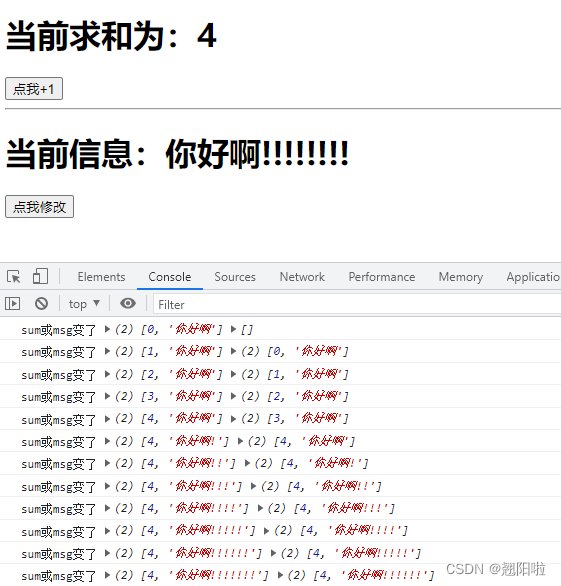
监视ref所定义的响应式数据
- <template>
- <h1>当前求和为:{{sum}}</h1>
- <button @click="sum++">点我+1</button>
- <hr>
- <h1>当前信息:{{msg}}</h1>
- <button @click="msg+='!'">点我修改</button>
- </template>
- <script>
- import {ref,watch} from 'vue'
- export default {
- name: 'HelloWorld',
- setup(){
- //数据
- let sum = ref(0)
- let msg = ref('你好啊')
- //情况1:监视ref所定义的一个响应式数据
- watch(sum,(newValue,oldValue)=>{
- console.log('sum变了',newValue,oldValue)
- },{immediate:true})
- //情况2:监视ref所定义的多个响应式数据
- watch([sum,msg],(newValue,oldValue)=>{
- console.log('sum或msg变了',newValue,oldValue)
- },{immediate:true})
- //返回一个对象(常用)
- return {
- sum,
- msg
- }
- }
- }
- </script>
- <!-- Add "scoped" attribute to limit CSS to this component only -->
监视reactive所定义的响应式数据
- <template>
- <h1>姓名:{{person.name}}</h1>
- <h1>年龄:{{person.age}}</h1>
- <h1>薪资:{{person.job.j1.salary}}</h1>
- <button @click="person.name+='!'">点我改姓名</button>
- <button @click="person.age++">点我增长年龄</button>
- <button @click="person.job.j1.salary++">增长薪资</button>
- </template>
- <script>
- import {reactive,watch} from 'vue'
- export default {
- name: 'HelloWorld',
- setup(){
- //数据
- let person = reactive({
- name:'张三',
- age:18,
- job:{
- j1:{
- salary:20
- }
- }
- })
- //情况3:监视reactive所定义的一个响应式数据
- // 1、注意:此处无法正确获取oldValue
- // 2、注意:强制开启了深度监视(deep配置无效)
- watch(person,(newValue,oldValue)=>{
- console.log('peson变了',newValue,oldValue)
- },{deep:false}) //此处的deep配置无效
- //情况4:监视reactive所定义的一个响应式数据中的某一个属性
- watch(()=>person.name,(newValue,oldValue)=>{
- console.log('peson的name变了',newValue,oldValue)
- })
- //情况5:监视reactive所定义的一个响应式数据中的某些属性
- watch([()=>person.name,()=>person.age],(newValue,oldValue)=>{
- console.log('peson的name和age变了',newValue,oldValue)
- })
- //特殊情况
- watch(()=>person.job,(newValue,oldValue)=>{
- console.log('peson的job变了',newValue,oldValue)
- },{deep:true}) //此处由于监视的是reactive所定义的对象的某个属性,所以deep
- 配置有效
- //返回一个对象(常用)
- return {
- person
- }
- }
- }
- </script>

watchEffect函数
- watch的套路是:既要指明监视的属性,也要指明监视的回调
- watchEffect的套路是:不用指明监视的属性,监视的回调中用到哪个属性,那就监视哪个属性
- watchEffect有点像computed:
- 但是computed注重的是计算出来的值(回调函数的返回值),所以要写返回值
- 而watchEffect更注重的是过程(回调函数的函数体),所以不用写返回值
- //watchEffect所指定的回调中用到的数据只要发生了变化,则直接重新执行回调。
- watchEffect(()=>{
- const x1 = sum.value
- const x2 = person.job.j1.salary
- console.log('watchEffect执行了')
- })
函数内用到了sum和person下的salary,所以只要这两个数据变化了,就会执行监视。点击其他的就不会执行。

-
相关阅读:
OKK---生物信息研究之ClinVar的下载,Annovar的下载和使用
卷积神经网络超详细介绍(转载)
医疗服务全面升级,这个方法绝了!
年度顶级赛事来袭:2023 CCF大数据与计算智能大赛首批赛题上线!
《征服数据结构》栈
AOP的切入点Pointcut中的execution表达式详解
目录自动清洗
软件测试的方法详细介绍
Halcon中涉及的数字图像十大理论知识
sparksql insertinto 源码解析
- 原文地址:https://blog.csdn.net/qiaoyangla/article/details/125509306

- 最新文章
-
沪漂五周年了:我越来越迷茫了
Agentic Skill Routing 实战:别再把所有 Skill 塞进 AI Agent 上下文
MySQL-Seconds_behind_master的精度误差
[MAF预定义ChatClient中间件-03]CachingChatClient——利用缓存省钱省时间
AI的至暗历史:从万众期待到被政府撤资,AI的两次死亡徘徊
Agent OS :五种驯服不确定性的范式
PortSwigger SQL注入LAB11
数据库即时编译JIT
[Begin]AI Learn Data Day 0
深度学习进阶(二十七)现代 LLM 的核心架构设计其二:SwiGLU