-
打卡web基础学习
6.26-6.27HTML
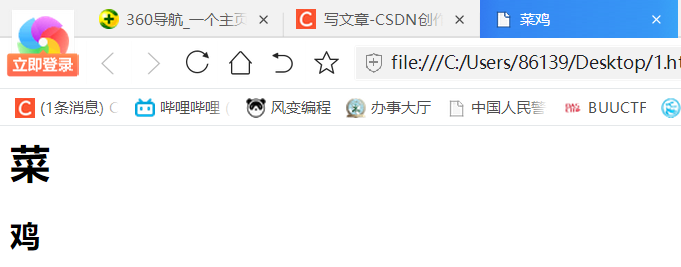
最简单的格式
- <html>
- <head>
- <title>菜鸡</title>
- <body>
- <h1>菜</h1>
- <h2>鸡</h2>
- </body>
- </html>
h后面的数字越小字体越大
JavaScript
位于script标签中间
1、var定义变量

感觉写法跟python差不多,输出不同
2、标识符
javascript对大小写敏感,目前见到的好像就sql对大小写不敏感
3、赋值运算符
=是赋值,==是等于
4、DOM操作
(1)获取HTML元素:getElementById()
- <html>
- <head>
- <title>
- 中国
- </title>
- </head>
- <body>
- <p id="taiwan">台湾是中国领土主权不可分割的一部分</p>
- <script>x=document.getElementById("taiwan")</script>
- </body>
- </html>

(2)获取HTML元素内容:innerHTML()
- <html>
- <head>
- <title>
- 中国
- </title>
- </head>
- <body>
- <p id="taiwan">台湾是中国领土主权不可分割的一部分</p>
- <script>
- x=document.getElementById("taiwan");
- alert('id为taiwan元素的内容是:'+x.innerHTML);
- </script>
- </body>
- </html>

(3)添加动态效果
document.write() 写入 HTML 输出,会清除已有html
console.log() 写入浏览器控制台document.write(Date())写入时间

document.write("<iframe src='http://www.heetian.com'></iframe>");写入框架

onclick事件属性
- <html>
- <head>
- <title>
- 菜鸡本鸡
- </title>
- </head>
- <body>
- <p id="taiwan"><h1>菜鸡</h1></p>
- <script>
- function ti(id)
- {
- id.innerHTML="是你";
- }
- </script>
- <h2 onclick="ti(this)">点击这里</h2>
- </body>
- </html>
5、BOM操作
alert()警告弹窗

confirm() 确定弹窗

prompt()提示弹窗

document.cookie获取cookie信息
window:客户端JavaScript中的顶层对象。每当<body>或<frameset>标签出现时,window对象就会被自动创建
navigator:包含客户端有关浏览器的信息
screen:包含客户端显示屏的信息
history:包含浏览器窗口访问过的URL信息
location:包含当前网页文档的URL信息
document:包含整个HTML文档,可被用来访问文档内容,及其所有页面元素HTTP协议
http://www.runoob.com/http/http-tutorial.html
web服务端架构 -
相关阅读:
video记录视频播放时长
MySQL--函数
npm插件安装插件失败问题解决办法
达梦 dameng 数据库之升级打怪数据库兼容问题记录(1)
Linux C/C++ 学习笔记(四):MYSQL安装与远程连接
Flutter 精品项目大全之 仿instagram项目支持横向和纵向滚动(教程含源码)
Java基础
从零开始 DIY 智能家居 - AC791N通过单线SPI驱动WS2812
百度率先在元宇宙举办大会,李彦宏:中国迎来AI黄金十年
【ML on Kubernetes】第 7 章:模型部署和自动化
- 原文地址:https://blog.csdn.net/wow0524/article/details/125456914

- 最新文章
-
沪漂五周年了:我越来越迷茫了
Agentic Skill Routing 实战:别再把所有 Skill 塞进 AI Agent 上下文
MySQL-Seconds_behind_master的精度误差
[MAF预定义ChatClient中间件-03]CachingChatClient——利用缓存省钱省时间
AI的至暗历史:从万众期待到被政府撤资,AI的两次死亡徘徊
Agent OS :五种驯服不确定性的范式
PortSwigger SQL注入LAB11
数据库即时编译JIT
[Begin]AI Learn Data Day 0
深度学习进阶(二十七)现代 LLM 的核心架构设计其二:SwiGLU