-
给 Angular 服务器端渲染应用设置一个渲染超时时间
我们用
setTimeout模拟一个需要 5 秒钟才能完成调用的 API:const express = require('express'); const app = express(); app.get('/api/fast', (req, res) => { console.log('fast endpoint hit'); res.send({response: 'fast'}); }); app.get('/api/slow', (req, res) => { setTimeout(() => { console.log('slow endpoint hit'); res.send({response: 'slow'}); }, 5000); }); app.listen(8081, () => { console.log('Listening'); });- 1
- 2
- 3
- 4
- 5
- 6
- 7
- 8
- 9
- 10
- 11
- 12
- 13
- 14
- 15
- 16
- 17
- 18
- 19
然后新建一个 Angular service,调用这个
/api/slow:import { Injectable } from '@angular/core'; import { HttpClient } from '@angular/common/http'; import { Observable } from 'rxjs'; @Injectable({ providedIn: 'root' }) export class CustomService { constructor(private http: HttpClient) {} public getFast(): Observable<any> { return this.http.get<any>('http://localhost:8081/api/fast'); } public getSlow(): Observable<any> { return this.http.get<any>('http://localhost:8081/api/slow'); } }- 1
- 2
- 3
- 4
- 5
- 6
- 7
- 8
- 9
- 10
- 11
- 12
- 13
- 14
- 15
- 16
- 17
- 18
- 19
在服务器端渲染模式下,等待这个 API 调用的返回,至少需要花费 5 秒钟。我们可以给这个 API 调用设置一个超时机制。如果服务器端渲染时超过我们指定的超时间隔,还没有得到 API 响应,我们就放弃这次 API 调用,让其在客户端渲染模式下继续进行。
我们使用 RouteResolver 来实现。
从 Angular route 框架导入
router:import { Resolve } from '@angular/router';- 1
从 Angular common 开发包导入 Angular 运行环境监测的 API:
import { isPlatformBrowser } from '@angular/common';- 1
导入 injection token,获得当前运行的 platform id:
import { Injectable, Inject, PLATFORM_ID } from '@angular/core';- 1
新建一个 service class:
import { Injectable, Inject, PLATFORM_ID } from '@angular/core'; import { Resolve } from '@angular/router'; import { Observable, timer } from 'rxjs'; import { isPlatformBrowser } from '@angular/common'; import { CustomService } from './custom.service'; import { takeUntil } from 'rxjs/operators'; @Injectable({ providedIn: 'root' }) export class SlowComponentResolverService implements Resolve<any> { constructor(private service: CustomService, @Inject(PLATFORM_ID) private platformId: any) { } public resolve(): Observable<any> { if (isPlatformBrowser(this.platformId)) { return this.service.getSlow(); }- 1
- 2
- 3
- 4
- 5
- 6
- 7
- 8
- 9
- 10
- 11
- 12
- 13
- 14
- 15
- 16
- 17
- 18
如果当前应用运行于浏览器端,上图的
isPlatformBrowser(this.platformId)返回 true,因此直接调用慢速 API.否则创建一个 Observable,500 毫秒后发射值:
const watchdog: Observable<number> = timer(500);- 1
我们将这个 watchDog Observable 通过 pipe 设置到 this.service.getSlow 的下游。这样,如果 this.service.getSlow() 返回的 Observable 在 500 毫秒之内不 emit 值的话,watchdog 就会向 Component push null 值,否则,API 的真实 response 会推送给 Component.

我们需要更新应用相关的 routing 代码来消费这个 Resolver.
给 slowComponent 分配一个 resolver:
const routes: Routes = [ {path: '', redirectTo: 'fast', pathMatch: 'full'}, {path: 'fast', component: FastComponent}, {path: 'slow', component: SlowComponent, resolve: {response: SlowComponentResolverService}} ];- 1
- 2
- 3
- 4
- 5
在 slowComponent 的实现代码里,从分配的 Route resolver 里读取 API response 数据:
import { Component } from '@angular/core'; import { ActivatedRoute } from '@angular/router'; @Component({ selector: 'app-slow', template: ` <p> Response is: {{response | json}} </p> `, styles: [] }) export class SlowComponent { public response: any = this.router.snapshot.data.response; constructor(private router: ActivatedRoute) {} }- 1
- 2
- 3
- 4
- 5
- 6
- 7
- 8
- 9
- 10
- 11
- 12
- 13
- 14
- 15
- 16
- 17
注意这里并没有直接访问 Route Resolver:
this.router.snapshot.data.response当 API 在 500 毫秒之内返回时,所有的 slowComponent 源代码都由服务器端生成:
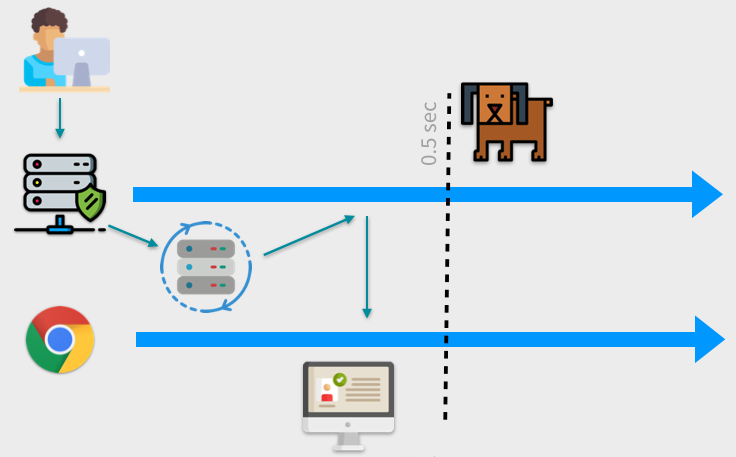
当 API 500 毫秒未能成功返回数据,则客户端会再次调用该 API,然后在客户端完成渲染:
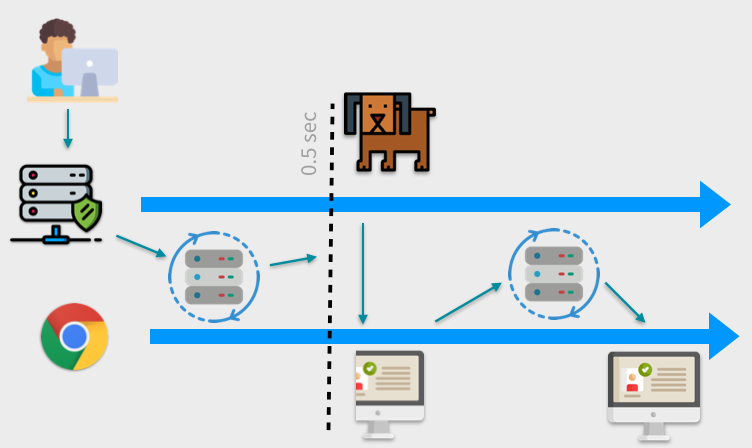
-
相关阅读:
DOM- 节点操作
k8s 使用ingress-nginx访问集群内部应用
CSDN博客编写的相关操作
关于一个屏幕取词程序,AI给的创建思路及指导
03.2 线性回归的从零开始实现
K-Means
互联网快讯:人民币对美元汇率跌破7.2关口;长春新区一餐厅液化气泄漏引发爆炸
[线性dp]leetcode198:打家劫舍(medium)
【js&vue】联合gtp仿写一个简单的vue框架,以此深度学习JavaScript
基本工具-NETCAT(telnet-banner、传输文本信息)
- 原文地址:https://blog.csdn.net/i042416/article/details/124903170