-
docker-部署 redis 主从复制(一主,一从)tag:redis:6.2.6
前言
在分布式情况下,我们可以考虑使用主从模式进行提高数据的读写效率,并且可以利用主从复制可以做到数据的高可用。把数据写入多个节点会提高数据的冗余备份,也更加安全。
小编的理解
主从复制,是指将一台Redis服务器的数据,复制到其他的Redis服务器。前者称为主节点(Master),后者称为从节点(Slave),数据的复制是单向的,只能由主节点到从节点。Master以写为主,Slave 以读为主。环境准备
拉取redis:6.2.6 镜像
docker pull redis:6.2.6- 1
新建文件夹
mkdir redis
-在home文件夹下新建redis文件夹
- 在redis文件夹下新建下图目录
//执行如下命令即可
mkdir -p /home/redis/ conf data redis02Data

新建配置文件
进入/home/redis/conf 目录下新建两个配置文件如下
//执行如下命令,新建配置文件。
touch myredis.conf
myredis.conf# nd 192.168.1.100 10.0.0.1 # bind 127.0.0.1 ::1 bind 0.0.0.0 # 取消保护模式 protected-mode no # 端口号 port 6379 tcp-backlog 511 # 密码 requirepass ksh@@@ timeout 0 tcp-keepalive 300 daemonize no supervised no pidfile /var/run/redis_6379.pid loglevel notice logfile "" databases 30 always-show-logo yes save 900 1 save 300 10 save 60 10000 stop-writes-on-bgsave-error yes rdbcompression yes rdbchecksum yes dbfilename dump.rdb dir ./ replica-serve-stale-data yes replica-read-only yes repl-diskless-sync no repl-disable-tcp-nodelay no replica-priority 100 lazyfree-lazy-eviction no lazyfree-lazy-expire no lazyfree-lazy-server-del no replica-lazy-flush no appendonly yes appendfilename "appendonly.aof" no-appendfsync-on-rewrite no auto-aof-rewrite-percentage 100 auto-aof-rewrite-min-size 64mb aof-load-truncated yes aof-use-rdb-preamble yes lua-time-limit 5000 slowlog-max-len 128 notify-keyspace-events "" hash-max-ziplist-entries 512 hash-max-ziplist-value 64 list-max-ziplist-size -2 list-compress-depth 0 set-max-intset-entries 512 zset-max-ziplist-entries 128 zset-max-ziplist-value 64 hll-sparse-max-bytes 3000 stream-node-max-bytes 4096 stream-node-max-entries 100 activerehashing yes hz 10 dynamic-hz yes aof-rewrite-incremental-fsync yes rdb-save-incremental-fsync yes- 1
- 2
- 3
- 4
- 5
- 6
- 7
- 8
- 9
- 10
- 11
- 12
- 13
- 14
- 15
- 16
- 17
- 18
- 19
- 20
- 21
- 22
- 23
- 24
- 25
- 26
- 27
- 28
- 29
- 30
- 31
- 32
- 33
- 34
- 35
- 36
- 37
- 38
- 39
- 40
- 41
- 42
- 43
- 44
- 45
- 46
- 47
- 48
- 49
- 50
- 51
- 52
- 53
- 54
- 55
- 56
- 57
- 58
- 59
- 60
- 61
- 62
- 63
- 64
- 65
- 66
- 67
- 68
- 69
- 70
- 71
- 72
- 73
- 74
- 75
- 76
- 77
- 78
- 79
- 80
- 81
- 82
- 83
- 84
- 85
- 86
- 87
- 88
- 89
- 90
- 91
- 92
- 93
- 94
- 95
- 96
- 97
- 98
- 99
- 100
- 101
- 102
- 103
- 104
//执行如下命令,新建配置文件。
touch myredis02.conf
myredis02.conf# nd 192.168.1.100 10.0.0.1 # bind 127.0.0.1 ::1 bind 0.0.0.0 protected-mode no port 6379 tcp-backlog 511 requirepass ksh@@@ timeout 0 tcp-keepalive 300 daemonize no supervised no pidfile /var/run/redis_6379.pid loglevel notice logfile "" databases 30 always-show-logo yes save 900 1 save 300 10 save 60 10000 stop-writes-on-bgsave-error yes rdbcompression yes rdbchecksum yes dbfilename dump.rdb dir ./ replica-serve-stale-data yes replica-read-only yes repl-diskless-sync no repl-disable-tcp-nodelay no replica-priority 100 lazyfree-lazy-eviction no lazyfree-lazy-expire no lazyfree-lazy-server-del no replica-lazy-flush no appendonly yes appendfilename "appendonly.aof" no-appendfsync-on-rewrite no auto-aof-rewrite-percentage 100 auto-aof-rewrite-min-size 64mb aof-load-truncated yes aof-use-rdb-preamble yes lua-time-limit 5000 slowlog-max-len 128 notify-keyspace-events "" hash-max-ziplist-entries 512 hash-max-ziplist-value 64 list-max-ziplist-size -2 list-compress-depth 0 set-max-intset-entries 512 zset-max-ziplist-entries 128 zset-max-ziplist-value 64 hll-sparse-max-bytes 3000 stream-node-max-bytes 4096 stream-node-max-entries 100 activerehashing yes hz 10 dynamic-hz yes aof-rewrite-incremental-fsync yes rdb-save-incremental-fsync yes- 1
- 2
- 3
- 4
- 5
- 6
- 7
- 8
- 9
- 10
- 11
- 12
- 13
- 14
- 15
- 16
- 17
- 18
- 19
- 20
- 21
- 22
- 23
- 24
- 25
- 26
- 27
- 28
- 29
- 30
- 31
- 32
- 33
- 34
- 35
- 36
- 37
- 38
- 39
- 40
- 41
- 42
- 43
- 44
- 45
- 46
- 47
- 48
- 49
- 50
- 51
- 52
- 53
- 54
- 55
- 56
- 57
- 58
- 59
- 60
- 61
- 62
- 63
- 64
- 65
- 66
- 67
- 68
- 69
- 70
- 71
- 72
- 73
- 74
- 75
- 76
- 77
- 78
- 79
- 80
- 81
- 82
- 83
- 84
- 85
- 86
- 87
- 88
- 89
- 90
- 91
- 92
- 93
- 94
- 95
- 96
- 97
- 98
- 99
- 100
- 101
- 102
- 103
- 104
master(主节点,以写为主)
Run
docker run -d --name myredis -p 6379:6379 -v /home/redis/conf/myredis.conf:/etc/redis/redis.conf -v /home/redis/Data/:/data redis:6.2.6 /etc/redis/redis.conf- 1
如下效果
主节点成功运行

slave(从节点,以读为主)
查看主节点ip地址
docker inspect myredsi- 1
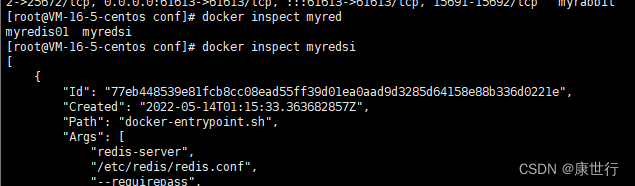

配置从节点指向主节点配置,修改myredis02.conf 配置文件 。在末尾添加下面内容
# 主从复制-指向主节点地址:ip:端口号,都可以从上面查询ip地址处获取 replicaof 主节点ip 6379 # 由于主节点设置了密码,所以需要使用主节点的密码 masterauth ksh@@@- 1
- 2
- 3
- 4
Run
docker run -d --name myredis01 -p 6378:6379 -v /home/redis/conf/myredis02.conf:/etc/redis/redis.conf -v /home/redis/redis02Data/:/data redis:6.2.6 /etc/redis/redis.conf- 1
如下效果
从节点运行成功

验证此节点是否已经指向01 主节点//连接redis02 客户端指向如下命令 info replication- 1
- 2
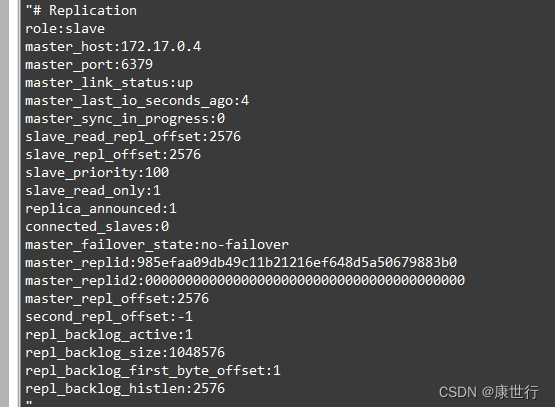
从上面图片中可以看出,当前节点已经从master 状态切换为slave 状态
使用infoReplicatio查看主节点状态

验证效果
此时可以在主节点写入一个内容,在从节点获取

感谢阅读~docker部署redis主从复制(一主,一从)到此结束!
-
相关阅读:
免费SSL证书
2022年安全员-B证试题及模拟考试
鸿鹄工程项目管理系统 Spring Cloud+Spring Boot+前后端分离构建工程项目管理系统
matlab习题 —— 符号运算相关练习
用c语言将文件中十六进制数据与二进制数据相互转换
PyTorch 二维多通道卷积运算方式
Debian篇——系统安装在SD卡上如何调整系统分区大小
最新电容笔推荐,2022年电容笔十大品牌排行榜
Linux防火墙学习笔记1
【CGSize Objecive-C语言】
- 原文地址:https://blog.csdn.net/kangshihang1998/article/details/125460248
- 最新文章
-
沪漂五周年了:我越来越迷茫了
Agentic Skill Routing 实战:别再把所有 Skill 塞进 AI Agent 上下文
MySQL-Seconds_behind_master的精度误差
[MAF预定义ChatClient中间件-03]CachingChatClient——利用缓存省钱省时间
AI的至暗历史:从万众期待到被政府撤资,AI的两次死亡徘徊
Agent OS :五种驯服不确定性的范式
PortSwigger SQL注入LAB11
数据库即时编译JIT
[Begin]AI Learn Data Day 0
深度学习进阶(二十七)现代 LLM 的核心架构设计其二:SwiGLU