-
Learn Git Branching:在游戏中学会Git
Learn Git Branching:在游戏中学会Git
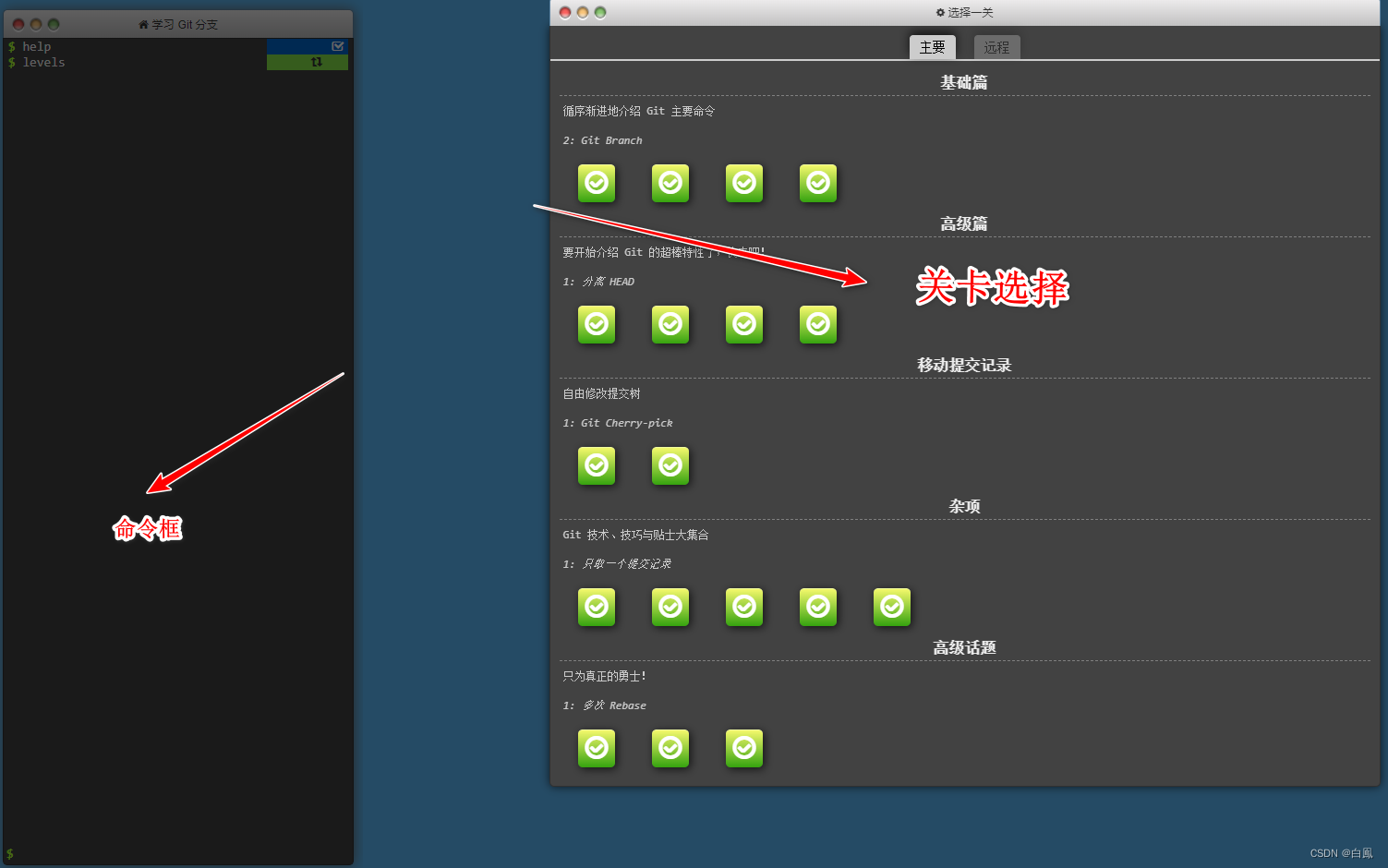
Learn Git Branching是一个学习Git操作的教程,作者为不同的命令设计了相应的关卡,它并不枯燥乏味,相反,我们每通过一个关卡,自信心就会提升,兴趣也会加深,带着满满的成就感去学习,真的很有趣!考虑到自我思考的重要性,作者将相关隐藏命令陆续放在了后面的关卡中,不至于让玩家一开始就急于看答案,而且配上优雅的动图,看起来真的舒心。作者考虑真的很周到,必须点个赞~
每个关卡的答案不唯一,只要发挥你的想象达到目标即可。下面是我的关卡挑战合集。
快去玩转Git吧!(https://learngitbranching.js.org)
链接💨💨💨Learn Git Branching
文章目录

基础篇
1️⃣ git commit
git commit- 1
2️⃣ git branch
git branch 分支名创建分支git checkout 分支名切换分支,即将HEAD移动到分支上创建并移动到分支上:
git branch bugFix git checkout bugFix --- git checkout -b bugFix- 1
- 2
- 3
- 4
3️⃣ git merge
git merge合并分支git checkout -b bugFix git commit git checkout main git commit git merge bugFix- 1
- 2
- 3
- 4
- 5
4️⃣ git rebase
合并分支并返回主线
git checkout -b bugFix git commit git checkout main git commit git checkout bugFix git rebase main- 1
- 2
- 3
- 4
- 5
- 6
高级篇
1️⃣ 分离 HEAD
HEAD总是指向当前分支上最近一次提交记录,大多数修改提交树的Git命令都是从改变HEAD的指向开始的,HEAD通常情况下是指向分支名的(如 bugFix)。分离的
HEAD就是让其指向了某个具体的提交记录而不是分支名。查看HEAD指向 cat .git/HEAD 指向引用 git symbolio-ref HEAD ------------------------------ git checkout C4- 1
- 2
- 3
- 4
2️⃣ 相对引用(^)
git log查看提交记录的哈希值(基于SHA-1,共40位),仅输入前几个字符即可。- 使用
^向上移动1个提交记录,把^加到引用名称的后面,表示让git寻找指定提交记录的父提交,比如切换到main的父节点git checkout main^ - 使用
~<num>向上移动多个记录,如~3,完整如git checkout main~3
git checkout bugFix git checkout C4 git checkout HEAD^ --- git checkout C4^ --- git checkout C4~1- 1
- 2
- 3
- 4
- 5
- 6
- 7
3️⃣ 相对引用(~)
- 使用
~<num>向上移动多个记录,如~3,完整如git checkout HEAD~3
强行修改分支位置
-
使用
-f选项让分支指向另一个提交,如
git branch -f main HEAD~3,将main分支强制指向HEAD的第3级父提交
git branch -f main C6 git checkout HEAD^ git branch -f bugFix HEAD~1- 1
- 2
- 3
4️⃣ 撤销变更
-
本地分支的撤销:
git reset,通过把分支记录回退几个提交记录来实现撤销改动。例如,
git reset HEAD~1 -
远程分支的撤销:
git revert,例如git revert HEAD
git reset HEAD^ git checkout pushed git revert HEAD- 1
- 2
- 3
移动提交记录
1️⃣ git cherry-pick
git cherry-pick <...>,如果想将一些提交复制到当前所在的位置(HEAD)下面的话,该命令非常实用,如git cherry-pick C2 C4是将C2和C4分支复制到当前位置
git cherry-pick C3 C4 C7- 1
2️⃣ 交互式rebase
git rebase -i HEAD~4
git rebase -i HEAD~4 (pick C4 并 移动顺序)- 1
杂项
1️⃣ 只做一个提交记录
git rebase -igit cherry-pick
git rebase -i HEAD~3 git checkout main git rebase bugFix -- git rebase -i HEAD~3 git branch -f main HEAD- 1
- 2
- 3
- 4
- 5
- 6
2️⃣ 提交的技巧#1
- 在
newImage分支上进行了一次提交,基于它又创建了option分支,然后又提交了一次。现在我们想修改newImage中的内容- 使用
git rebase -i将提交重排 - 使用
git commit --amend进行小修改 - 再使用
git rebase -i移动到原来的顺序 - 将
main移动到HEAD
- 使用
git rebase -i HEAD~2 git rebase -i HEAD git rebase -i HEAD~2 git branch -f main HEAD- 1
- 2
- 3
- 4
3️⃣ 提交的技巧#2
cherry-pick可以将提交树上任何地方的提交记录取过来追加到HEAD上(只要不是HEAD上游的提交就没问题)git checkout C1 git cherry-pick C2 git checkout C1 git cherry-pick C2 C3 git branch -f main HEAD --- git checkout C1 git cherry-pick C2 git checkout main git cherry-pick C2 C3- 1
- 2
- 3
- 4
- 5
- 6
- 7
- 8
- 9
- 10
4️⃣ git tag
-
标签
tag在代码库中起着锚点的作用 -
git tag v1 C1创建一个指向C1的标签v1
git tag v0 C1 git tag v1 C2 git checkout v1- 1
- 2
- 3
5️⃣ git describe
-
git describe <ref>描述离当前(ref)最近的标签,输出为
<tag>_<numCommits>_g<hash>
git describe C5 git commit- 1
- 2
高级话题
1️⃣ 多次rebase
git checkout bugFix git rebase main git checkout side git rebase bugFix git checkout another git rebase -i side git branch -f main HEAD --- git rebase main bugFix git rebase bugFix side git rebase side another git rebase another main- 1
- 2
- 3
- 4
- 5
- 6
- 7
- 8
- 9
- 10
- 11
- 12
2️⃣ 两个父节点
^后面也可以跟数字,表示指定合并提交记录的某个父提交(一个以上的父分支),如git checkout main^2- 操作符
~和^支持链式操作,如git checkout HEAD~^2~2
git checkout main~1^2^ git branch bugWork git checkout main --- (分支不存在会主动创建) git branch -f bugWork main^^2^- 1
- 2
- 3
- 4
- 5
- 6
3️⃣ 纠缠不清的分支
git checkout one git cherry-pick C4 C3 C2 git checkout two git cherry-pick C5 C4 C3 C2 git branch -f three C2- 1
- 2
- 3
- 4
- 5
Push & Pull —— Git 远程仓库
1️⃣ git clone
远程仓库的特点:
- 数据备份
- 代码社交化(为项目做贡献)
git clone在本地创建一个远程仓库的克隆git clone- 1
2️⃣ 远程分支
- 远程仓库名一般设置为
origin,且git默认将远程仓库设置为origin - 路径
<remote name>/<branch name>,如o/main,origin/main
git commit git checkout o/main git commit- 1
- 2
- 3
3️⃣ git fetch
git fetch从远程仓库获取更新的分支,主要做了两步- 从远程仓库下载本地仓库中缺失的提交记录
- 更新远程分支(如
origin/main)
git fetch实际上将本地仓库中的远程分支更新成了远程仓库相应分支最新的状态。远程分支反映了远程仓库在你最后一次与它通信时的状态,git fetch就是你与远程仓库通信的方。git fetch通常通过互联网(使用http://或git://协议) 与远程仓库通信。==
git fetch并不会改变本地仓库的状态,也不会更新main分支,也不会修改磁盘上的文件。==所以可以将git fetch理解为单纯的下载操作。git fetch- 1
4️⃣ git pull
git pull抓取更新并合并到本地分支git fetch ; git merge orign/main等价于git pull
git fetch git merge o/main --- git pull- 1
- 2
- 3
- 4
5️⃣ 模拟团队合作
git clone git fakeTeamwork main 2 git fetch git commit git merge o/main --- git clone git fakeTeamwork main 2 git commit git pull- 1
- 2
- 3
- 4
- 5
- 6
- 7
- 8
- 9
- 10
6️⃣ git push
git push负责将你的变更上传到指定的远程仓库- 注意——
git push不带任何参数时的行为与 Git 的一个名为push.default的配置有关。它的默认值取决于你正使用的 Git 的版本。
git commit git commit git push- 1
- 2
- 3
7️⃣ 偏离的提交历史
假如你克隆了一个仓库,研发某个新功能完毕准备提交时,发现你的同事更新了好多分支并且已经推送到远程仓库了,因此你的工作就变成了基于项目旧版的代码,与远程仓库最新的代码不匹配了。
解决办法:调整你的工作使你的工作基于最新的远程分支
-
使用
git fetch更新本地仓库中的远程分支,然后用rebase将我们的工作移动到最新的提交记录下git fetch; git rebase o/main等价于git pull --rebase -
更新本地仓库中的远程分支,然后合并新变更到我们的本地分支
git fetch; git merge o/main等价于git pull
git clone git fakeTeamwork main git commit git fetch git rebase o/main git push -- git clone git fakeTeamwork main git commit git fetch git merge o/main git push --- git clone git fakeTeamwork main git commit git pull --rebase git push --- git clone git fakeTeamwork main git commit git pull git push- 1
- 2
- 3
- 4
- 5
- 6
- 7
- 8
- 9
- 10
- 11
- 12
- 13
- 14
- 15
- 16
- 17
- 18
- 19
- 20
- 21
- 22
- 23
- 24
- 25
8️⃣ 锁定的main(locked main)
main被锁定时需要一些pull request流程来合并修改。新建一个分支
feature,推送到远程服务器。然后reset你的main分支和远程服务器保持一致,否则下次你pull并且他人的提交和你冲突的时候就会有问题。git branch feature git branch -f main o/main git checkout feature git push --- git branch -f main o/main git branch -f feature C2 git checkout feature git push --- git checkout -b feature git branch -f main o/main git push --- show solution (在本程序中默认的行为是 --hard 硬重置,可以尽情省略掉那个选项以避免麻烦!但是要记录 Git 中默认的是 --mixed) git reset --hard o/main git checkout -b feature C2 git push origin feature- 1
- 2
- 3
- 4
- 5
- 6
- 7
- 8
- 9
- 10
- 11
- 12
- 13
- 14
- 15
- 16
- 17
- 18
- 19
关于 origin 和它的周边 —— Git 远程仓库高级操作
1️⃣ 推送主分支
git checkout main git pull --rebase git rebase main side1 git rebase HEAD side2 git rebase HEAD side3 git branch -f main side3 git checkout main git push --- git fetch git rebase o/main side1 git rebase side1 side2 git rebase side2 side3 git rebase side3 main git push- 1
- 2
- 3
- 4
- 5
- 6
- 7
- 8
- 9
- 10
- 11
- 12
- 13
- 14
- 15
2️⃣ 合并远程分支
- 为了 push 新变更到远程仓库,你要做的就是包含远程仓库中最新变更。意思就是只要你的本地分支包含了远程分支(如
o/main)中的最新变更就可以了,至于具体是用 rebase 还是 merge,并没有限制
rebase的优点是使你的提交树变得很干净,所有的提交都在一条线上,缺点是修改了树的提交历史。git fetch git branch -f main o/main git checkout main git merge side1 git merge side2 git merge side3 git push --- git fetch git rebase o/main main git merge side1 git merge side2 git merge side3 git push --- git checkout main git pull git merge side1 git merge side2 git merge side3 git push- 1
- 2
- 3
- 4
- 5
- 6
- 7
- 8
- 9
- 10
- 11
- 12
- 13
- 14
- 15
- 16
- 17
- 18
- 19
- 20
- 21
3️⃣ 远程追踪
pull操作时, 提交记录会被先下载到o/main上,之后再合并到本地的main分支。隐含的合并目标由这个关联确定的。push操作时, 我们把工作从main推到远程仓库中的main分支(同时会更新远程分支o/main) 。
main和o/main的关联关系就是由分支的“remote tracking”属性决定的。main被设定为跟踪o/main—— 这意味着为main分支指定了推送的目的地以及拉取后合并的目标。当你克隆时, Git 会为远程仓库中的每个分支在本地仓库中创建一个远程分支(比如o/main)。然后再创建一个跟踪远程仓库中活动分支的本地分支,默认情况下这个本地分支会被命名为main。克隆完成后,你会得到一个本地分支(如果没有这个本地分支的话,你的目录就是“空白”的)。我们可以让任意分支跟踪
o/main, 然后该分支会像main分支一样得到隐含的 push 目的地以及merge的目标。 这意味着可以在分支totallyNotMain上执行git push,将工作推送到远程仓库的main分支上。创建名为totallyNotMain的分支,来跟踪远程分支
o/main,有两证方式可实现:git checkout -b totallyNotMain o/maingit branch -u o/main totallyNotMain
git checkout -b side o/main git commit git pull --rebase git push- 1
- 2
- 3
- 4
4️⃣ git push的参数
为
git push指定参数,语法为git push <remote> <place>例如
git push origin main的意思是:切换到本地仓库中的main分支,获取所有的提交,再到远程仓库origin中找到main分支,将远程仓库中没有的提交都添加上去。git push origin main git push origin foo- 1
- 2
5️⃣ git push的参数2
git push origin <source>:<destination>是将本地source分支推送到远程destination分支。并且source是git可识别的位置,如name~3、name^,name^2等。如果推送的目的分支不存在git会在远程仓库中自动创建这个分支。git push origin foo:main git push origin main^:foo- 1
- 2
6️⃣ git fetch的参数
git fetch同样具有参数,只是方向相反,例如命令git fetch origin foo会到远程仓库foo分支上,获取本地不存在的提交,放到本地的o/foo上。- 如果
git fetch没有参数,它会下载所有的提交记录到各个远程分支
git fetch origin main~:foo git fetch origin foo:main git checkout foo git merge main- 1
- 2
- 3
- 4
7️⃣ 没有source的source
git有两种关于<source>的用法是比较诡异的,即你可以在git push或git fetch时不指定任何source,方法就是仅保留冒号和destination部分,source部分留空。git push origin :foo操作是删除远程分支foogit fetch origin :bar操作是创建本地分支bar
git push origin :foo git fetch origin :bar- 1
- 2
8️⃣ git pull的参数
git pull即git fetch和git merge的缩写。git pull origin foo相当于git fetch origin foo; git merge o/foogit pull origin bar~1:bugFix相当于git fetch origin bar~1:bugFix; git merge bugFix
git pull origin bar:foo git pull origin main:side- 1
- 2
恭喜通关!!!

-
相关阅读:
科目二倒车入库
Python 配置pyqt5开发环境
Netty+SpringBoot 打造一个 TCP 长连接通讯方案
【无标题】
github私有仓库开发,公开仓库发布版本
Windows Server安全配置
【CTF机器人】文件头字节查询(Nonebot2+CQHTTP)
C练习百题之求阶层
(Research)泛癌单细胞分析揭示肿瘤微环境中癌相关成纤维细胞的异质性和可塑性
详细介绍Redis RDB和AOF两种持久化方式
- 原文地址:https://blog.csdn.net/weixin_44368437/article/details/125450190