-
第三方资源配置管理(九)
文章目录
`
一、druid
1.导入druid坐标
<dependency> <groupId>com.alibaba</groupId> <artifactId>druid</artifactId> <version>1.1.16</version> </dependency>- 1
- 2
- 3
- 4
- 5
2.配置数据源对象作为Spring管理的Bean
<bean id="datasource" class="com.alibaba.druid.pool.DruidDataSource"> <property name="driverClassName" value="com.mysql.jdbc.Driver"></property> <property name="url" value="jdbc:mysql://localhost:3306/spring"></property> <property name="username" value="root"></property> <property name="password" value="root"></property> </bean>- 1
- 2
- 3
- 4
- 5
- 6
二、c3p0
1.导入c3p0坐标
<dependency> <groupId>c3p0</groupId> <artifactId>c3p0</artifactId> <version>0.9.1.2</version> </dependency>- 1
- 2
- 3
- 4
- 5
2.配置数据源对象
<bean id="c3p0" class="com.mchange.v2.c3p0.ComboPooledDataSource"> <property name="driverClass" value="com.mysql.jdbc.Driver"></property> <property name="jdbcUrl" value="jdbc:mysql://localhost:3306/spring"></property> <property name="user" value="root"></property> <property name="password" value="root"></property> </bean>- 1
- 2
- 3
- 4
- 5
- 6
三、加载properties
首先在resource资源包下创建jdbc.properties
jdbc.properties:jdbc.driver=com.mysql.jdbc.Driver jdbc.url=jdbc:mysql://localhost:3306/spring jdbc.username=root jdbc.password=root- 1
- 2
- 3
- 4
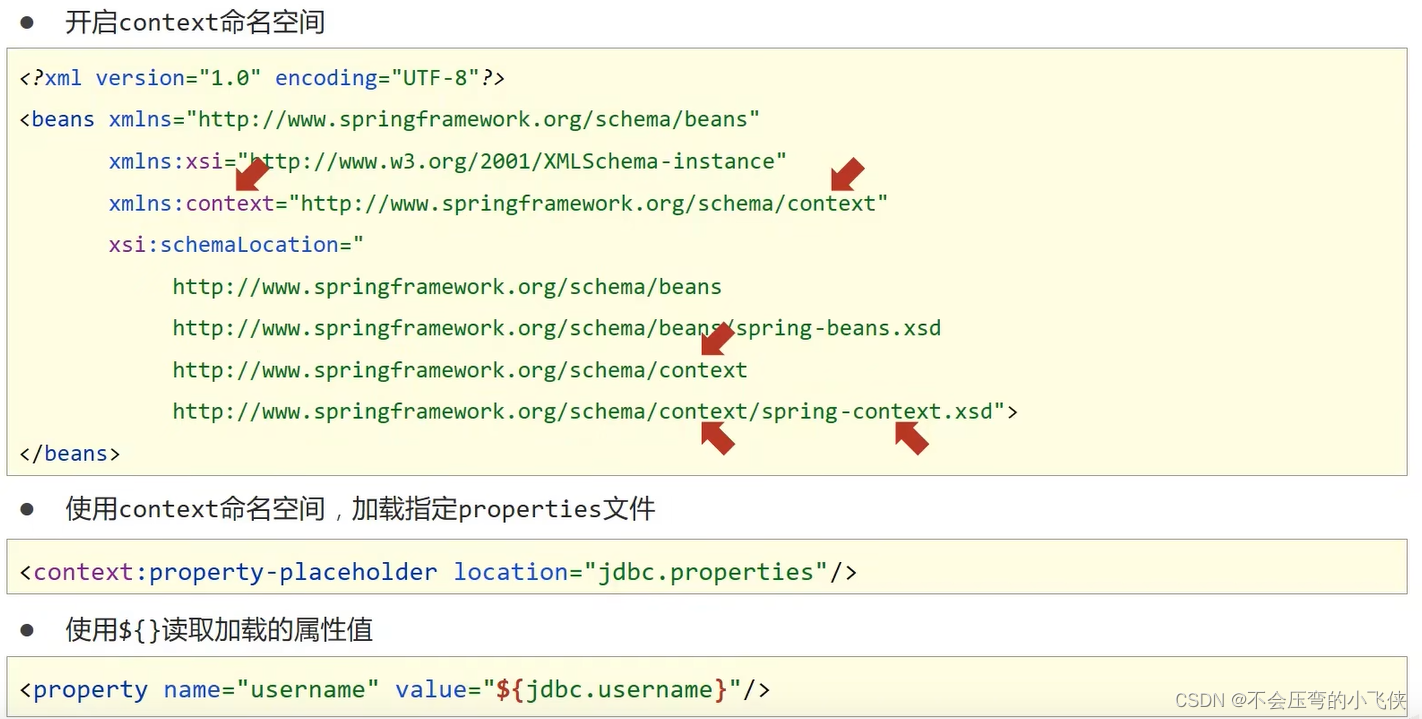
1.开启context命名空间
<beans xmlns="http://www.springframework.org/schema/beans" xmlns:xsi="http://www.w3.org/2001/XMLSchema-instance" xmlns:context="http://www.springframework.org/schema/context" xsi:schemaLocation="http://www.springframework.org/schema/beans https://www.springframework.org/schema/beans/spring-beans.xsd http://www.springframework.org/schema/context https://www.springframework.org/schema/context/spring-context.xsd">- 1
- 2
- 3
- 4
- 5
- 6
- 7
2.使用context命名空间,加载指定的properties文件
<context:property-placeholder location="jdbc.properties"></context:property-placeholder>- 1
3.使用${}读取加载的属性值
<bean id="datasource" class="com.alibaba.druid.pool.DruidDataSource"> <property name="driverClassName" value="${jdbc.driver}"></property> <property name="url" value="${jdbc.url}"></property> <property name="username" value="${jdbc.username}"></property> <property name="password" value="${jdbc.password}"></property> </bean>- 1
- 2
- 3
- 4
- 5
- 6
- 7
4.注意

四、容器总结
1.Bean相关

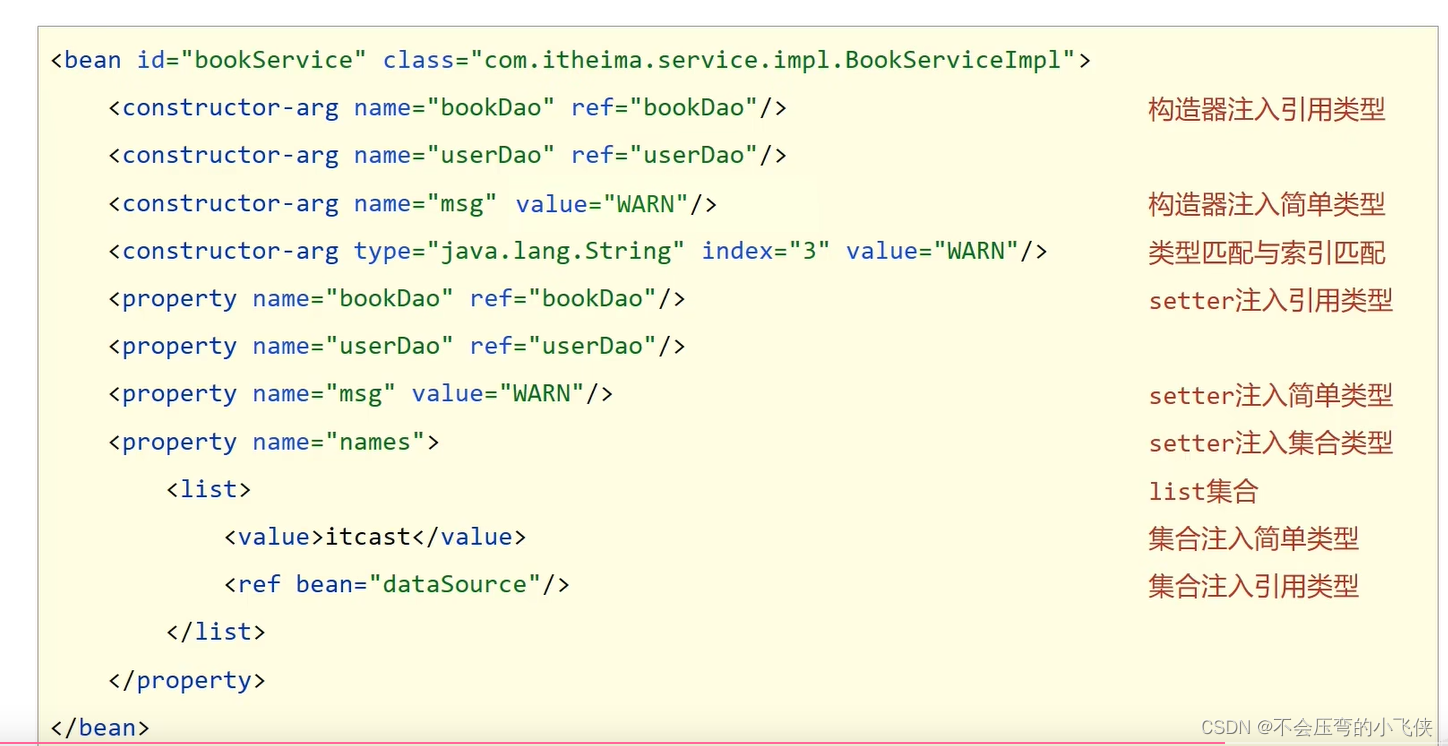
2.依赖注入
-
相关阅读:
23种设计模式之命令模式(Command Pattern)
美狐美颜SDK动态贴纸代码浅析
链路状态路由协议OSPF的LSA头部讲解
性能监控-grafana+prometheus+node_exporter
React版/Vue版都齐了,开源一套【特别】的后台管理系统...
基于jsp+ssm的家政服务系统-计算机毕业设计
GLTF编辑器:在线模型材质编辑工具
高效!启科量子线路模拟器 QuSprout 与 Amazon HPC 集成,赋能量子计算
Java编译多个目录下的文件
【无标题】
- 原文地址:https://blog.csdn.net/qq_43514330/article/details/125424576
- 最新文章
-
沪漂五周年了:我越来越迷茫了
Agentic Skill Routing 实战:别再把所有 Skill 塞进 AI Agent 上下文
MySQL-Seconds_behind_master的精度误差
[MAF预定义ChatClient中间件-03]CachingChatClient——利用缓存省钱省时间
AI的至暗历史:从万众期待到被政府撤资,AI的两次死亡徘徊
Agent OS :五种驯服不确定性的范式
PortSwigger SQL注入LAB11
数据库即时编译JIT
[Begin]AI Learn Data Day 0
深度学习进阶(二十七)现代 LLM 的核心架构设计其二:SwiGLU