-
最新版的Python写春联,支持行书隶书楷书,不再有缺失汉字
1. 前言
两年前的今天,我写过一篇名为《用Python写春联:抒写最真诚的祝福和最美好的祈愿》的文章,吸引了很多书法爱好者的关注。该文用的是田英章老师的楷书,我在网上总共找到了1600个汉字,因此,春联用字被限制在这1600个汉字的小字库中。
近日,随着春节临近,这篇旧文又再次被网友们翻出,每日浏览量超过5000人次。由于字库过小,连很多常用字都没有收入,很多朋友留言,要求扩容字库以及支持其他字体。我个人精力有限,同时受知识产权保护的限制,不可能制作完整的毛笔字库。那么,能否借用现有的矢量字库,满足朋友们的要求呢?
经过一番尝试,发现操作系统自带的某些矢量字库,是可以作为毛笔字库使用的。以下是简单的演示代码,仅供学习编程技术之用,绝无侵犯字体权利人之权力的故意,特此声明。
2. 选择矢量字库
虽然有很多方法可以帮你呈现出系统支持的所有字体文件,我建议最直接的方式是去查看操作系统的字体目录。以Windows为例,我直接在C:\Windows\Fonts这个路径下找到了“华文隶书”这个字库文件,查看属性可知,该文件名为STLITI.TTF。找到了喜欢的字库文件,只需要将其全路径文件名替换到代码中的FONT_FILE常量即可,不需要做其他操作。

3. 选择一款喜欢的春联背景图案
还是以“龙凤呈祥”这个图案为例吧。如果换用其他的图案,请确保图案是.png格式(背景透明),且是方形的。同字体文件一样,我们需要将这个背景图案的全路径文件名替换到代码中的BG_FILE常量即可。

4. 完整代码
全部代码总共70余行,使用方法请看注释。
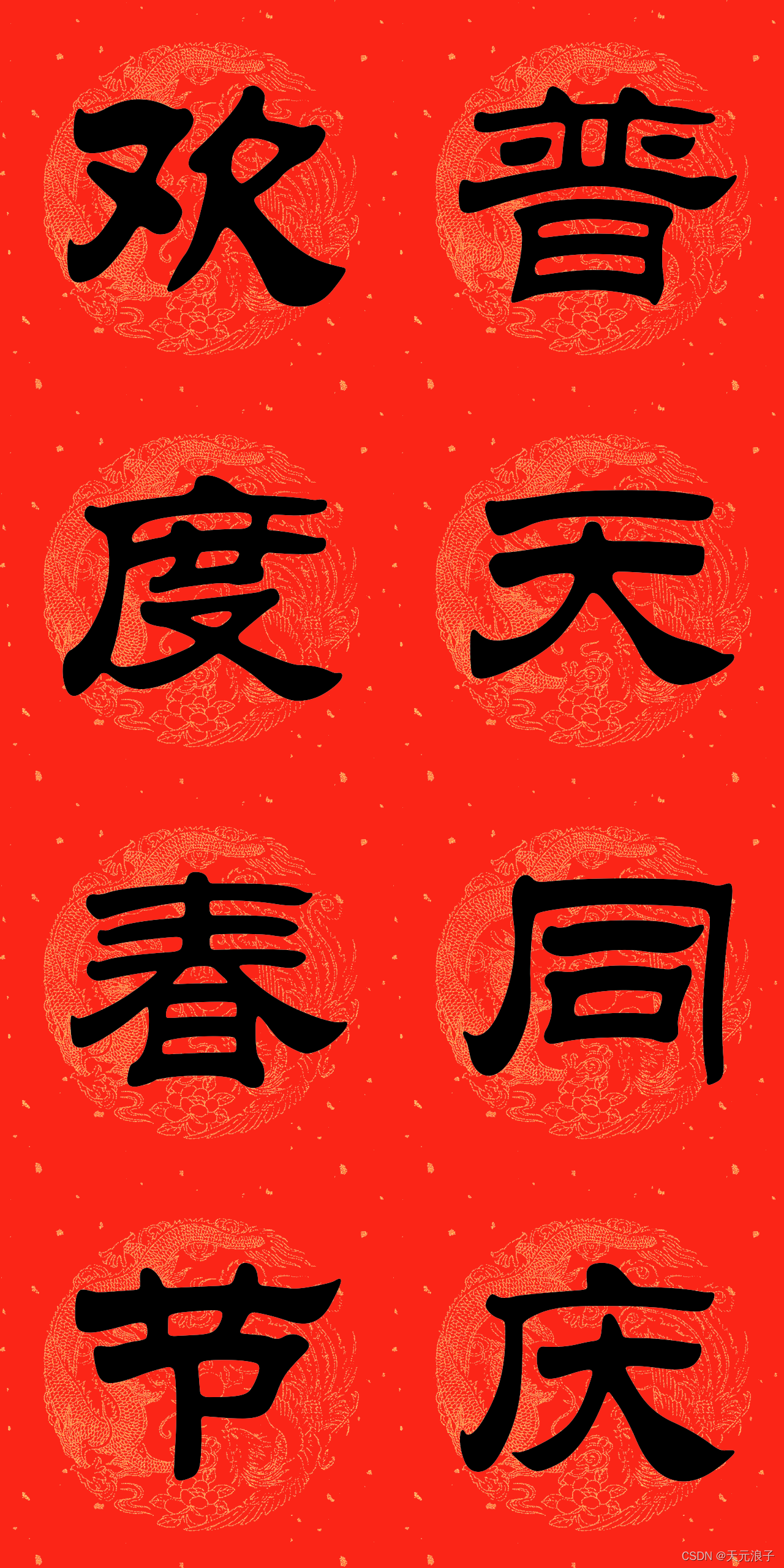
# -*- coding: utf-8 -*- import os import freetype import numpy as np from PIL import Image FONT_FILE = r'C:\Windows\Fonts\STLITI.TTF' BG_FILE = r'D:\temp\bg.png' def text2image(word, font_file, size=128, color=(0,0,0)): """使用指定字库将单个汉字转为图像 word - 单个汉字字符串 font_file - 矢量字库文件名 size - 字号,默认128 color - 颜色,默认黑色 """ face = freetype.Face(font_file) face.set_char_size(size*size) face.load_char(word) btm_obj = face.glyph.bitmap w, h = btm_obj.width, btm_obj.rows pixels = np.array(btm_obj.buffer, dtype=np.uint8).reshape(h, w) dx = int(face.glyph.metrics.horiBearingX/64) if dx > 0: patch = np.zeros((pixels.shape[0], dx), dtype=np.uint8) pixels = np.hstack((patch, pixels)) r = np.ones(pixels.shape) * color[0] * 255 g = np.ones(pixels.shape) * color[1] * 255 b = np.ones(pixels.shape) * color[2] * 255 im = np.dstack((r, g, b, pixels)).astype(np.uint8) return Image.fromarray(im) def write_couplets(text, horv='V', quality='L', out_file=None, bg=BG_FILE): """写春联 text - 春联字符串 bg - 背景图片路径 horv - H-横排,V-竖排 quality - 单字分辨率,H-640像素,L-320像素 out_file - 输出文件名 """ size, tsize = (320, 128) if quality == 'L' else (640, 180) ow, oh = (size, size*len(text)) if horv == 'V' else (size*len(text), size) im_out = Image.new('RGBA', (ow, oh), '#f0f0f0') im_bg = Image.open(BG_FILE) if size < 640: im_bg = im_bg.resize((size, size)) for i, w in enumerate(text): im_w = text2image(w, FONT_FILE, size=tsize, color=(0,0,0)) w, h = im_w.size dw, dh = (size - w)//2, (size - h)//2 if horv == 'V': im_out.paste(im_bg, (0, i*size)) im_out.paste(im_w, (dw, i*size+dh), mask=im_w) else: im_out.paste(im_bg, (i*size, 0)) im_out.paste(im_w, (i*size+dw, dh), mask=im_w) im_out.save('%s.png'%text) os.startfile('%s.png'%text) if __name__ == '__main__': write_couplets('普天同庆', horv='V', quality='H') write_couplets('欢度春节', horv='V', quality='H') write_couplets('国泰民安', horv='H', quality='H')- 1
- 2
- 3
- 4
- 5
- 6
- 7
- 8
- 9
- 10
- 11
- 12
- 13
- 14
- 15
- 16
- 17
- 18
- 19
- 20
- 21
- 22
- 23
- 24
- 25
- 26
- 27
- 28
- 29
- 30
- 31
- 32
- 33
- 34
- 35
- 36
- 37
- 38
- 39
- 40
- 41
- 42
- 43
- 44
- 45
- 46
- 47
- 48
- 49
- 50
- 51
- 52
- 53
- 54
- 55
- 56
- 57
- 58
- 59
- 60
- 61
- 62
- 63
- 64
- 65
- 66
- 67
- 68
- 69
- 70
- 71
- 72
- 73
- 74
- 75
5. 样例

-
相关阅读:
第 2 篇:绘制一个窗口
# 从浅入深 学习 SpringCloud 微服务架构(三)注册中心 Eureka(3)
5.软件测试-----自动化测试
10.数学环境排列数学公式
Python实现带图形界面的计算器
RabbitMQ 部署及配置详解(集群部署)
Vue2学习笔记(尚硅谷天禹老师)
点云从入门到精通技术详解100篇-基于点云数据的机器人动态分拣
Qt之语言家的简单使用(一)(Qt翻译UI,Qt Linguist的使用,含源码+注释)
Linux内存管理(二十二):页面回收简介和 kswapd(1)
- 原文地址:https://blog.csdn.net/xufive/article/details/122623982
- 最新文章
-
沪漂五周年了:我越来越迷茫了
Agentic Skill Routing 实战:别再把所有 Skill 塞进 AI Agent 上下文
MySQL-Seconds_behind_master的精度误差
[MAF预定义ChatClient中间件-03]CachingChatClient——利用缓存省钱省时间
AI的至暗历史:从万众期待到被政府撤资,AI的两次死亡徘徊
Agent OS :五种驯服不确定性的范式
PortSwigger SQL注入LAB11
数据库即时编译JIT
[Begin]AI Learn Data Day 0
深度学习进阶(二十七)现代 LLM 的核心架构设计其二:SwiGLU