这篇文章用来介绍,如何画出好看的流程图。
本文地址:https://www.cnblogs.com/hchengmx/p/16367169.html
一个PlantUML时序图的效果图
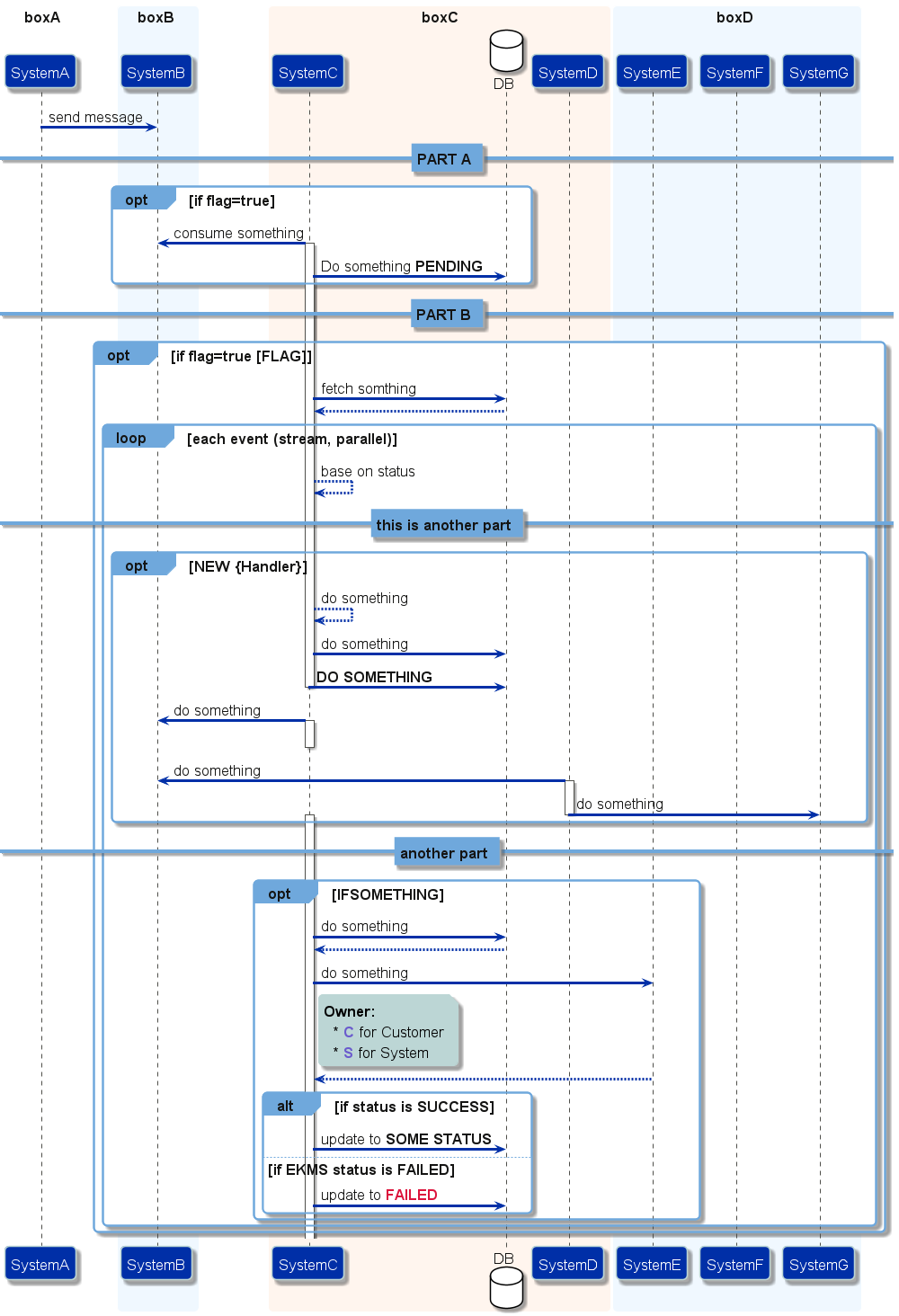
1. 选择合适的组件
在流程图中,plantUML图最上方是组件,标识该流程图有多少参与方
首先,不能用 Participant 一概所有,针对不同的情况应该选择合适的组件。
1.1 plantuml官方提供的组件
官方提供了以下几种参与者
参考:Sequence Diagram syntax and features - PlantUml1
Sample 1:
@startuml
participant Participant as Foo
actor       Actor       as Foo1
boundary    Boundary    as Foo2
control     Control     as Foo3
entity      Entity      as Foo4
database    Database    as Foo5
collections Collections as Foo6
queue       Queue       as Foo7
Foo -> Foo1 : To actor
Foo -> Foo2 : To boundary
Foo -> Foo3 : To control
Foo -> Foo4 : To entity
Foo -> Foo5 : To database
Foo -> Foo6 : To collections
Foo -> Foo7: To queue
@enduml
note: as关键字用来重命名
1.2 加载图片
要是觉得官方提供的图标不好看,或者没有想要的图标,ES、Azure、防火墙等、比如实际参与者实际是有图标的,就可引入该图标显示在参与者里 。
这样情况下,我们则可以通过引用外部图片的方式来加载图标。
plantuml提供了两种引入图片的方式,引入本地文件或引入网络图片。
1.2.1 加载本地图片
- 保存矢量图标到本地
建议专门创建一个文件夹来放所有的图片
e.g. {YOUR_PLANTUML_WORKSPACE}\image\XXXX.png
- 引用图片
Sample 2
@startuml
participant "\nMerchant\nSystem\n<img:../image/merchant.png>\n" as merchantsystem
participant "\nPayment\nSystem\n<img:../image/payement.png>\n" as paymentsystem

merchantsystem -> paymentsystem: do something
@enduml
1.2.2 加载网络图片
Sample 3:
@startuml
title Office Icons Example

package "Images" {
    rectangle "<img:https://raw.githubusercontent.com/Roemer/plantuml-office/master/office2014/Servers/database_server.png>\r DB" as db2
    rectangle "<img:https://raw.githubusercontent.com/Roemer/plantuml-office/master/office2014/Servers/application_server.png>\r App-Server" as app2
    rectangle "<img:https://raw.githubusercontent.com/Roemer/plantuml-office/master/office2014/Concepts/firewall_orange.png>\r Firewall" as fw2
    rectangle "<img:https://raw.githubusercontent.com/Roemer/plantuml-office/master/office2014/Clouds/cloud_disaster_red.png>\r Cloud" as cloud2
    db2 <-> app2
    app2 <-\-> fw2
    fw2 <.left.> cloud2
}
@enduml
1.2.3 图片资源
常见的图片资源有:
- 阿里云产品图标-阿里云2
- plantuml-stdlib/Azure-PlantUML: PlantUML sprites, macros, and other includes for Azure services3
- milo-minderbinder/AWS-PlantUML: PlantUML sprites, macros, and other includes for AWS components.4
- Roemer/plantuml-office: Office Icons for PlantUML5
2. 背景以及颜色优化
2.1 通用设置
首先包括一些通用设置,包括 背景颜色、字体大小、字体颜色、字体等
skinparam backgroundColor White
skinparam defaultFontName MarkForMCNrw
skinparam defaultFontSize 17
skinparam defaultFontColor #141413
skinparam roundCorner 10
2.2 对每个组件的样式进行设置
其他的组件,包括 Participant、Collection、Actor、Database、Box、Vertical Line、Arrow、Alt、Loop、Group box、Ref box、Notes、Divider 都可以设置 背景颜色、字体颜色、粗细等属性。
所有的属性可参考
- Changing colors and fonts - PlantUML6
- All Skin Parameters — Ashley's PlantUML Doc 0.2.01 documentation7
2.3 引入文件
2.3.1 引用本地模板文件
以上的其实都是配置项,配置项不适合放在脚本文件中,可以把所有的配置项放在一个配置文件中,我们在脚本文件中只需要引用配置文件,就可以使得配置生效。
- include 关键字
2.3.2 引用网页模板文件
- includeurl 关键字
2.3.3 模板文件资源
github上一些现成的模板文件可用于参考使用。
plantuml/themes at master · plantuml/plantuml9
3. 使用关键字
plantuml提供了很多关键字,下面介绍一些常用的关键字
3.1 条件选择关键字
包括 opt/if/ifelse/loop
3.2 组合关键字
3.2.1 box
box关键字适用于participant,比如关联方有一个大系统,但是大系统里面又有几个微服务,需要把这几个微服务都标出来。但是又要标明这三个微服务的关系,就可以使用box关键字。
box "系统" #
participant "服务A" as ServiceA
database "DB" as DB
participant "服务B" as ServiceB
end box
3.2.2 Group关键字
适用于组合会话,要是会话特别长,可分为十几个步骤,但是十几个步骤中,又大体可以分为三个部分,就可以在这三个部分里面用会话。
group XX接口 [接口名1]
    cnb -> scmchannel: 授信申请校验
    alt 有记录
        return 上次申请记录
    else 无记录
        scmchannel -> cnb: 空
    end
end
3.3 注释关键字
note right MCBPDdelivery:

note left MCBPDelivery

note over
note也支持markdown语法
e.g.
nore over Instance, Participation
This is a note accross serveral participants and with several lines
    This is **bold**
        This is //italics//
            This is ""monospaced""
                This is --stroked--
                    This is __underlined__
This is the end
end note
box boxB #aliceblue
participant "SystemB" as Axon
end box
3.4 分割关键字 ==
== Another Part ==
3.5 其他优化
3.5.1 使用副标题
有的情况,participant的描述可能会比较长,就可以用副标题的形式,突出主标题。
@startuml
participant Participant [
    =Title
    ----
    ""SubTitle""
]

participant Bob

Participant -> Bob
@enduml
3.5.2 自动标注时序图序号
要是时序图想标注一下走到了哪个是第一步、哪个是第二步…… 就可以用以下关键字
@startuml
autonumber
Bob -> Alice : Authentication Request
Bob <- Alice : Authentication Response
@enduml
3.5.3 区分同步和异步
时序图中,有活动图 -> 或者 --> 的区分。
一般约定, ->代表同步,-->代表异步
@startuml
Alice -> Bob: Authentication Request
Bob --> Alice: Authentication Response

Alice -> Bob: Another authentication Request
Alice <-- Bob: Another authentication Response
@enduml
3.5.4 字体颜色
所有支持的颜色可参考:[Choosing colors - PlantUML10](#Choosing colors-PlantUML)
<color: crimson>**FAILED**
4. 参考文档
1. Sequence Diagram syntax and features - PlantUml
3. plantuml-stdlib/Azure-PlantUML: PlantUML sprites, macros, and other includes for Azure services
4. milo-minderbinder/AWS-PlantUML: PlantUML sprites, macros, and other includes for AWS components.
5. Roemer/plantuml-office: Office Icons for PlantUML
6. Changing colors and fonts - PlantUML
7. All Skin Parameters — Ashley's PlantUML Doc 0.2.01 documentation
8. bschwarz/puml-themes: This repository is used to hold themes for plantuml (www.plantuml.com) diagraming tool. Users can use these themes to give there diagrams different looks.
9. plantuml/themes at master · plantuml/plantuml
10. Choosing colors - Plantuml
11. 从60年代回到2021:美化PlantUML画图风格(附源码)_Tooooooong的博客-CSDN博客_plantuml 主题
12. PlantUML 的介绍和使用 - InfoQ 写作平台
13. qjebbs/vscode-plantuml: Rich PlantUML support for Visual Studio Code.
14. 在线运行PlantUML文件 - WebSequenceDiagrams
15. PlantUML Web Server