-
IEDA使用maven搭建ssh框架步骤详解
IEDA使用maven搭建ssh框架步骤详解
闲来无事,在网上跟着教程搭建了一个shh框架,中间也遇到一些头疼的问题,现将我的搭建过程分享一下,并且将中途遇到的问题和解决方法发出来一起探讨一下.
ssh简单介绍:
ssh即spring+struts+hibernate整合,这是一套在ssm(spring+springMVC+mybatis)之前非常流行的企业级开发框架,现在的话用的人比较少,一般是一些比较老的项目在使用.但用不用是一回事,至少得了解一下.
前期准备:
1.java环境(这个没有的可以在网上找一下教程,很简单的)
2.安装IDEA(我使用的是2020版本)
3.安装MySQL数据库(我用的8.0版本)
4.tomcat
建立项目
idea新建一个maven项目,勾选Create from archetype,选择maven-archetype-webapp,点击next。

之前看的教程里面没有这一步,直接使用默认的步骤新建的项目里面没有webapp文件夹,自己新建的话有点麻烦,并且小白的话容易搞错,导致项目无法运行,所以建议按这个步骤来一次
后面两个步骤就是给项目取一个名字,输入项目名直接next。

新建好的项目界面,项目文件夹里已经把webapp文件夹自动弄好了的

编辑pom.xml文件,导入依赖
<?xml version="1.0" encoding="UTF-8"?> <project xmlns="http://maven.apache.org/POM/4.0.0" xmlns:xsi="http://www.w3.org/2001/XMLSchema-instance" xsi:schemaLocation="http://maven.apache.org/POM/4.0.0 http://maven.apache.org/xsd/maven-4.0.0.xsd"> <modelVersion>4.0.0</modelVersion> <groupId>org.example</groupId> <artifactId>ssh-demo</artifactId> <version>1.0</version> <packaging>war</packaging> <name>ssh-demo Maven Webapp</name> <!-- FIXME change it to the project's website --> <url>http://www.example.com</url> <properties> <project.build.sourceEncoding>UTF-8</project.build.sourceEncoding> <maven.compiler.source>1.8</maven.compiler.source> <maven.compiler.target>1.8</maven.compiler.target> <project.build.sourcEncoding>UTF_8</project.build.sourcEncoding> <spring.version>3.1.1.RELEASE</spring.version> <hibernate.version>3.6.5.Final</hibernate.version> <struts2.version>2.3.1</struts2.version> </properties> <dependencies> <dependency> <groupId>junit</groupId> <artifactId>junit</artifactId> <version>4.11</version> <scope>test</scope> </dependency> <!--导入spring相关依赖--> <dependency> <groupId>org.springframework</groupId> <artifactId>spring-core</artifactId> <version>${spring.version}</version> </dependency> <dependency> <groupId>org.springframework</groupId> <artifactId>spring-context</artifactId> <version>${spring.version}</version> </dependency> <dependency> <groupId>org.springframework</groupId> <artifactId>spring-jdbc</artifactId> <version>${spring.version}</version> </dependency> <dependency> <groupId>org.springframework</groupId> <artifactId>spring-beans</artifactId> <version>${spring.version}</version> </dependency> <dependency> <groupId>org.springframework</groupId> <artifactId>spring-expression</artifactId> <version>${spring.version}</version> </dependency> <dependency> <groupId>org.springframework</groupId> <artifactId>spring-orm</artifactId> <version>${spring.version}</version> </dependency> <!--cglib动态代理--> <dependency> <groupId>cglib</groupId> <artifactId>cglib-nodep</artifactId> <version>2.1_3</version> </dependency> <!--hibernate--> <dependency> <groupId>org.hibernate</groupId> <artifactId>hibernate-core</artifactId> <version>${hibernate.version}</version> </dependency> <!--struts2--> <dependency> <groupId>org.apache.struts</groupId> <artifactId>struts2-core</artifactId> <version>${struts2.version}</version> </dependency> <dependency> <groupId>org.apache.struts</groupId> <artifactId>struts2-spring-plugin</artifactId> <version>${struts2.version}</version> </dependency> <!--添加数据库支持,8.x版本数据库尽量使用对应的8.x版本--> <dependency> <groupId>mysql</groupId> <artifactId>mysql-connector-java</artifactId> <version>8.0.27</version> </dependency> <!--添加数据库源的支持,数据量连接池--> <dependency> <groupId>c3p0</groupId> <artifactId>c3p0</artifactId> <version>0.9.1.2</version> </dependency> <dependency> <groupId>jstl</groupId> <artifactId>jstl</artifactId> <version>1.2</version> </dependency> <!--创建实体类时可使用@Data注解自动生成get、set等方法,根据自行需求导入--> <dependency> <groupId>org.projectlombok</groupId> <artifactId>lombok</artifactId> <version>RELEASE</version> <scope>compile</scope> </dependency> <dependency> <groupId>org.apache.taglibs</groupId> <artifactId>taglibs-standard-impl</artifactId> <version>1.2.5</version> </dependency> <dependency> <groupId>org.apache.taglibs</groupId> <artifactId>taglibs-standard-spec</artifactId> <version>1.2.5</version> </dependency> </dependencies> <!--下面是系统自动生成的,咱不是特别懂,就不动他--> <build> <finalName>ssh_student</finalName> <pluginManagement><!-- lock down plugins versions to avoid using Maven defaults (may be moved to parent pom) --> <plugins> <plugin> <artifactId>maven-clean-plugin</artifactId> <version>3.1.0</version> </plugin> <!-- see http://maven.apache.org/ref/current/maven-core/default-bindings.html#Plugin_bindings_for_war_packaging --> <plugin> <artifactId>maven-resources-plugin</artifactId> <version>3.0.2</version> </plugin> <plugin> <artifactId>maven-compiler-plugin</artifactId> <version>3.8.0</version> </plugin> <plugin> <artifactId>maven-surefire-plugin</artifactId> <version>2.22.1</version> </plugin> <plugin> <artifactId>maven-war-plugin</artifactId> <version>3.2.2</version> </plugin> <plugin> <artifactId>maven-install-plugin</artifactId> <version>2.5.2</version> </plugin> <plugin> <artifactId>maven-deploy-plugin</artifactId> <version>2.8.2</version> </plugin> </plugins> </pluginManagement> </build> </project>- 1
- 2
- 3
- 4
- 5
- 6
- 7
- 8
- 9
- 10
- 11
- 12
- 13
- 14
- 15
- 16
- 17
- 18
- 19
- 20
- 21
- 22
- 23
- 24
- 25
- 26
- 27
- 28
- 29
- 30
- 31
- 32
- 33
- 34
- 35
- 36
- 37
- 38
- 39
- 40
- 41
- 42
- 43
- 44
- 45
- 46
- 47
- 48
- 49
- 50
- 51
- 52
- 53
- 54
- 55
- 56
- 57
- 58
- 59
- 60
- 61
- 62
- 63
- 64
- 65
- 66
- 67
- 68
- 69
- 70
- 71
- 72
- 73
- 74
- 75
- 76
- 77
- 78
- 79
- 80
- 81
- 82
- 83
- 84
- 85
- 86
- 87
- 88
- 89
- 90
- 91
- 92
- 93
- 94
- 95
- 96
- 97
- 98
- 99
- 100
- 101
- 102
- 103
- 104
- 105
- 106
- 107
- 108
- 109
- 110
- 111
- 112
- 113
- 114
- 115
- 116
- 117
- 118
- 119
- 120
- 121
- 122
- 123
- 124
- 125
- 126
- 127
- 128
- 129
- 130
- 131
- 132
- 133
- 134
- 135
- 136
- 137
- 138
- 139
- 140
- 141
- 142
- 143
- 144
- 145
- 146
- 147
- 148
- 149
- 150
- 151
- 152
- 153
- 154
- 155
- 156
- 157
- 158
- 159
- 160
- 161
- 162
- 163
- 164
- 165
- 166
- 167
- 168
- 169
- 170
- 171
- 172
- 173
- 174
- 175
- 176
- 177
- 178
- 179
- 180
完善目录结构
使用这种方式创建的项目目录是没有java、和resources文件夹的,我们需要在src/mian目录下创建java文件夹和resources文件夹。
我的idea在新建文件夹的时候会提示需要的java、resources文件夹,直接点击红色框中的文件夹就可以快速创建。有的idea版本不会提示,这里我演示一下使用普通方式创建。

这是我没有点击,直接创建的文件夹,文件夹是灰色的

java文件夹右键点击Mark Directory as -->Sources Root

同理resources文件夹右键点击Mark Directory as -->Resources Root

这样你的java文件夹和resources文件夹就创建好了

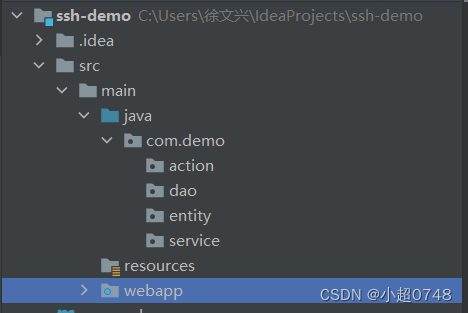
在java文件夹下创建com.demo文件夹,在demo文件夹下创建action、service、dao、entity文件夹
action就类似ssm框架中controller,用于接收请求匹配业务,页面跳转等
service就是业务层,处理所有业务
dao就是数据持久层
entity就是存放实体类的地方
这是创建好的目录大致结构
创建applicationContext.xml配置文件
在resources文件夹右键->NEW->XML Configuration File ->Spring Config,文件命名文applicationContext.xml,如果你没有这个选项就直接创建一个普通的applicationContext.xml文件,把我的内容复制进去就行。

新建好的applicationContext文件,如果你的文件前面没有一片绿叶子,那你需要检查一下spring依赖是否导入成功,或者你的命名错误。

创建db.properties文件
这里面存放数据库的连接数据(账号密码等)
在resources文件夹下新建一个普通文件,命名为db.properties

jdbc.driverClassName=com.mysql.jdbc.Driver jdbc.username=root jdbc.password=xxxxxx jdbc.url=jdbc:mysql://localhost:3306/student?characterEncoding=utf8&rewriteBatchedStatements=true&useUnicode=true- 1
- 2
- 3
- 4
编辑applicationContext.xml
注意这个:黄色标签提示,点击蓝色字体后选择Create new 巴拉巴拉。。。

点击ok

在创建context标签时会提示添加标签,Alt+回车键 选中就行。他会自动添加标签


嫌麻烦可以直接复制下面的,干货走起
<?xml version="1.0" encoding="UTF-8"?> <beans xmlns="http://www.springframework.org/schema/beans" xmlns:xsi="http://www.w3.org/2001/XMLSchema-instance" xmlns:context="http://www.springframework.org/schema/context" xmlns:tx="http://www.springframework.org/schema/tx" xsi:schemaLocation="http://www.springframework.org/schema/beans http://www.springframework.org/schema/beans/spring-beans.xsd http://www.springframework.org/schema/context http://www.springframework.org/schema/context/spring-context.xsd http://www.springframework.org/schema/tx http://www.springframework.org/schema/tx/spring-tx.xsd"> <!-- 引入db.properties配置 --> <context:property-placeholder location="classpath:db.properties" /> <!-- 使用annotation --> <context:annotation-config/> <!-- 使用annotation自动注册bean--> <context:component-scan base-package="com.demo.action"/> <context:component-scan base-package="com.demo.service"/> <context:component-scan base-package="com.demo.dao" /> <!-- 配置数据源 --> <bean id="dataSource" class="com.mchange.v2.c3p0.ComboPooledDataSource"> <property name="driverClass" value="${jdbc.driverClassName}"></property> <property name="jdbcUrl" value="${jdbc.url}"></property> <property name="user" value="${jdbc.username}"></property> <property name="password" value="${jdbc.password}"></property> <!-- 连接池的最大连接数 --> <property name="maxPoolSize"> <value>50</value> </property> <!-- 连接池的最小连接数 --> <property name="minPoolSize"> <value>5</value> </property> <!-- 连接池的初始化连接数 --> <property name="initialPoolSize"> <value>5</value> </property> <!-- 连接池的连接最大空闲时间 --> <property name="maxIdleTime"> <value>20</value> </property> <!-- c3p0缓存Statement的数量 --> <property name="maxStatements"> <value>50</value> </property> <!-- 当连接用完的时,C3P0获取新的连接数 --> <property name="acquireIncrement"> <value>20</value> </property> </bean> <!-- hibernate配置--> <bean id="sessionFactory" class="org.springframework.orm.hibernate3.annotation.AnnotationSessionFactoryBean"> <!-- 引用上面数据源 --> <property name="dataSource"> <ref bean="dataSource" /> </property> <property name="hibernateProperties"> <props> <prop key="hibernate.dialect">org.hibernate.dialect.MySQLDialect</prop> <prop key="hibernate.autoReconnect">true</prop> <prop key="hibernate.hbm2ddl.auto">update</prop> <prop key="hibernate.show_sql">true</prop> <prop key="hibernate.format_sql">true</prop> </props> </property> <!-- 包扫描的方式加载注解类 --> <property name="packagesToScan"> <list> <value>com.demo.entity</value> </list> </property> </bean> <!-- 用注解来实现事物管理 --> <bean id="transactionManager" class="org.springframework.orm.hibernate3.HibernateTransactionManager"> <property name="sessionFactory" ref="sessionFactory" /> </bean> <tx:annotation-driven transaction-manager="transactionManager" proxy-target-class="true"/> </beans>- 1
- 2
- 3
- 4
- 5
- 6
- 7
- 8
- 9
- 10
- 11
- 12
- 13
- 14
- 15
- 16
- 17
- 18
- 19
- 20
- 21
- 22
- 23
- 24
- 25
- 26
- 27
- 28
- 29
- 30
- 31
- 32
- 33
- 34
- 35
- 36
- 37
- 38
- 39
- 40
- 41
- 42
- 43
- 44
- 45
- 46
- 47
- 48
- 49
- 50
- 51
- 52
- 53
- 54
- 55
- 56
- 57
- 58
- 59
- 60
- 61
- 62
- 63
- 64
- 65
- 66
- 67
- 68
- 69
- 70
- 71
- 72
- 73
- 74
- 75
- 76
- 77
- 78
- 79
- 80
建立一个Database
1.右边侧边栏点击database,点击+号,DataSource,MySQL

输入账号密码、连接的数据库名、测试一下、ok

设计实体类(方法一)
@Data注解可以自动生成get、set等方法,@Column(name = “class”)代表此属性在数据库中对应的字段名为“class”。
package com.kevin.entity; import lombok.Data; import javax.persistence.*; import java.util.Objects; /** * @Author: XuWenXing * @Description: TODO * @DateTime: 2022/5/19 22:37 **/ @Data @Entity @Table(name = "user", schema = "student") public class User { @Id @Column(name = "id") private int id; @Column(name = "username") private String username; @Column(name = "password") private String password; @Column(name = "name") private String name; @Column(name = "class") private String classId; @Column(name = "sex") private String sex; }- 1
- 2
- 3
- 4
- 5
- 6
- 7
- 8
- 9
- 10
- 11
- 12
- 13
- 14
- 15
- 16
- 17
- 18
- 19
- 20
- 21
- 22
- 23
- 24
- 25
- 26
- 27
- 28
- 29
- 30
- 31
- 32
- 33
- 34
- 35
- 36
- 37
实体类编辑好后会出现一个问题,鼠标点击描红的部分,ALT+回车键,点击Assign Data Source

Data Source栏选择连接的数据库,ok。描红消失


设计实体类(方法二)
View --> IoolWindows --> Persistence 调出Persistence 窗口

File --> Project Structure… --> Modules --> + --> Hibernate -->ok

Persistence窗口中sessionfFactory右键 -->Geberate Per… --> by Database …


这是生成的实体类

个人喜欢使用方法一,看起来整洁一点
编辑数据层(DAO)代码
在dao目录下新建一个接口类(userDao)
package com.kevin.dao; import com.demo.entity.User; import java.util.List; /** * @Author: XuWenXing * @Description: TODO * @DateTime: 2022/5/20 16:38 **/ public interface UserDao { /** * 添加用户 * @param user */ public void add(User user); /** * 根据ID删除用户 * @param id */ public void del(int id); /** * 修改用户 */ public void update(User user); /** * 根据ID查询用户 */ public User getUser(int id); /** * 获取用户列表 */ public List<User> getUserList(); /** * 登录 */ public boolean login(User user); }- 1
- 2
- 3
- 4
- 5
- 6
- 7
- 8
- 9
- 10
- 11
- 12
- 13
- 14
- 15
- 16
- 17
- 18
- 19
- 20
- 21
- 22
- 23
- 24
- 25
- 26
- 27
- 28
- 29
- 30
- 31
- 32
- 33
- 34
- 35
- 36
- 37
- 38
- 39
- 40
- 41
- 42
- 43
- 44
- 45
- 46
在dao目录下新建一个impl目录,并新建一个userDao的实现类userDaoImpl
package com.kevin.dao.impl; import com.demo.dao.UserDao; import com.demo.entity.User; import org.hibernate.Query; import org.hibernate.SessionFactory; import org.springframework.stereotype.Repository; import org.springframework.transaction.annotation.Transactional; import java.util.List; import javax.annotation.Resource; import java.util.Iterator; /** * @Author: XuWenXing * @Description: TODO * @DateTime: 2022/5/20 16:38 **/ @Transactional(rollbackFor = Exception.class)//异常回滚 @Repository("UserDao")//注入 public class UserDaoImpl implements UserDao { @Resource(name = "sessionFactory") private SessionFactory sessionFactory; @Override public void add(User user) { sessionFactory.getCurrentSession().save(user);//添加用户 } @Override public void del(int id) { sessionFactory.getCurrentSession().delete(sessionFactory.getCurrentSession().get(User.class,id)); } @Override public void update(User user) { sessionFactory.getCurrentSession().update(user); } @Override public User getUser(int id) { return (User)sessionFactory.getCurrentSession().get(User.class,id); } @Override public List<User> getUserList() { List<User> userList = (List<User>) sessionFactory.getCurrentSession().createQuery("FROM User").list(); return userList; } @Override public boolean login(User user) { String sql = "FROM User u where u.username = ? and u.password = ?"; Query query = sessionFactory.getCurrentSession().createQuery(sql); query.setString(0, user.getUsername()); query.setString(1, user.getPassword()); Iterator iterate = query.iterate(); if (iterate.hasNext()){ return true; } return false; } }- 1
- 2
- 3
- 4
- 5
- 6
- 7
- 8
- 9
- 10
- 11
- 12
- 13
- 14
- 15
- 16
- 17
- 18
- 19
- 20
- 21
- 22
- 23
- 24
- 25
- 26
- 27
- 28
- 29
- 30
- 31
- 32
- 33
- 34
- 35
- 36
- 37
- 38
- 39
- 40
- 41
- 42
- 43
- 44
- 45
- 46
- 47
- 48
- 49
- 50
- 51
- 52
- 53
- 54
- 55
- 56
- 57
- 58
- 59
- 60
- 61
- 62
- 63
- 64
- 65
- 66
编辑业务层(service)
在service目录下创建userService接口,创建impl文件夹并创建userService的实现类userServiceImpl
package com.kevin.service.impl; import com.demo.dao.UserDao; import com.demo.entity.User; import com.demo.service.UserService; import org.springframework.stereotype.Repository; import java.util.List; import javax.annotation.Resource; import java.util.ArrayList; /** * @Author: XuWenXing * @Description: TODO * @DateTime: 2022/5/20 16:38 **/ @Repository("UserService") public class UserServiceImpl implements UserService { @Resource//自动注入 private UserDao userDao; @Override public boolean login(User user) { boolean login = this.userDao.login(user); return login; } @Override public List<User> getStuList() { List<User> userList = this.userDao.getUserList(); ArrayList<Object> objects = new ArrayList<>(); return userList; } }- 1
- 2
- 3
- 4
- 5
- 6
- 7
- 8
- 9
- 10
- 11
- 12
- 13
- 14
- 15
- 16
- 17
- 18
- 19
- 20
- 21
- 22
- 23
- 24
- 25
- 26
- 27
- 28
- 29
- 30
- 31
- 32
- 33
- 34
- 35
编辑action层代码
userAction
package com.demo.action; import com.demo.entity.User; import com.demo.service.UserService; import com.opensymphony.xwork2.ActionContext; import org.springframework.context.annotation.Scope; import org.springframework.stereotype.Controller; import javax.annotation.Resource; import java.util.List; import java.util.Map; import static com.opensymphony.xwork2.Action.ERROR; /** * @Author: XuWenXing * @Description: TODO * @DateTime: 2022/5/20 16:38 **/ @Controller("userAction") @Scope("prototype") public class UserAction { @Resource private UserService userService; private User user; public User getUser(){ return user; } public void setUser(User user){ this.user = user; } public String login(){ System.out.println("login收到请求"); if (userService.login(user)){ Map<String, Object> session = ActionContext.getContext().getSession(); session.put("user",user); return "homePage"; } return ERROR; } public String getStuList(){ List<User> stuList = userService.getStuList(); Map<String, Object> session = ActionContext.getContext().getSession(); session.put("stuList",stuList); return "stuForm";//在struts.xml中配置了视图解析,所以可以直接使用String字符串跳转 } }- 1
- 2
- 3
- 4
- 5
- 6
- 7
- 8
- 9
- 10
- 11
- 12
- 13
- 14
- 15
- 16
- 17
- 18
- 19
- 20
- 21
- 22
- 23
- 24
- 25
- 26
- 27
- 28
- 29
- 30
- 31
- 32
- 33
- 34
- 35
- 36
- 37
- 38
- 39
- 40
- 41
- 42
- 43
- 44
- 45
- 46
- 47
- 48
- 49
- 50
- 51
- 52
- 53
- 54
- 55
- 56
在webapp文件夹下创建jsp文件
index.jsp
<%-- Created by IntelliJ IDEA. User: 徐文兴 Date: 2022/5/20 Time: 16:44 To change this template use File | Settings | File Templates. --%> <%@ page contentType="text/html;charset=UTF-8" language="java" %> <html> <head> <title>Title</title> </head> <body> <form action="user_login.action" method="post"> <input type="text" name="user.username" placeholder="输入用户名" /> <br/> <input type="password" name="user.password" placeholder="输入密码" /> <br /> <input type="submit" value="登录"> <input type="reset" value="重置"> </form> </body> </html>- 1
- 2
- 3
- 4
- 5
- 6
- 7
- 8
- 9
- 10
- 11
- 12
- 13
- 14
- 15
- 16
- 17
- 18
- 19
- 20
- 21
- 22
- 23
- 24
homePage.jsp
<%-- Created by IntelliJ IDEA. User: 徐文兴 Date: 2022/5/20 Time: 16:44 To change this template use File | Settings | File Templates. --%> <%@ page contentType="text/html;charset=UTF-8" language="java" %> <html> <head> <title>Title</title> <h1>学生管理系统 - 详情页面</h1> <a href="user_getStuList.action">查看所有学生信息</a> </head> <body> </body> </html>- 1
- 2
- 3
- 4
- 5
- 6
- 7
- 8
- 9
- 10
- 11
- 12
- 13
- 14
- 15
- 16
- 17
- 18
- 19
stuForm.jsp
<%@ taglib prefix="c" uri="http://java.sun.com/jsp/jstl/core" %> <%@ page import="java.util.List" %> <%@ page import="com.demo.entity.User" %> <%-- Created by IntelliJ IDEA. User: 徐文兴 Date: 2022/5/20 Time: 16:44 To change this template use File | Settings | File Templates. --%> <%@ page contentType="text/html;charset=UTF-8" language="java" %> <html> <head> <title>Title</title> <h>学生详细信息</h> <table border="1"width="80%"> <tr> <th>学号</th> <th>姓名</th> <th>班级</th> <th>性别</th> </tr> <c:forEach var="stu" items="${sessionScope.stuList}"> <tr> <th>${stu.username}</th> <th>${stu.name}</th> <th>${stu.classId}</th> <th>${stu.sex}</th> </tr> </c:forEach> </table> </head> <body> </body> </html>- 1
- 2
- 3
- 4
- 5
- 6
- 7
- 8
- 9
- 10
- 11
- 12
- 13
- 14
- 15
- 16
- 17
- 18
- 19
- 20
- 21
- 22
- 23
- 24
- 25
- 26
- 27
- 28
- 29
- 30
- 31
- 32
- 33
- 34
- 35
- 36
- 37
- 38
- 39
- 40
- 41
error.jsp
<%-- Created by IntelliJ IDEA. User: 徐文兴 Date: 2022/5/20 Time: 16:47 To change this template use File | Settings | File Templates. --%> <%@ page contentType="text/html;charset=UTF-8" language="java" %> <html> <head> <title>Title</title> </head> <body> <h1>error</h1> </body> </html>- 1
- 2
- 3
- 4
- 5
- 6
- 7
- 8
- 9
- 10
- 11
- 12
- 13
- 14
- 15
- 16
创建sturts.xml配置文件
在resources目录下新建sturts.xml文件
<?xml version="1.0" encoding="UTF-8"?> <!DOCTYPE struts PUBLIC "-//Apache Software Foundation//DTD Struts Configuration 2.3//EN" "http://struts.apache.org/dtds/struts-2.3.dtd"> <struts> <constant name="struts.devMode" value="false"/> <constant name="struts.objectFactory" value="spring" /> <!--视图解析--> <package name="user" namespace="/" extends="struts-default"> <action name="user_*" class="userAction" method="{1}"> <result name="success">/success.jsp</result> <result name="error">/error.jsp</result> <result name="homePage">/homePage.jsp</result> <result name="stuForm">/stuForm.jsp</result> </action> </package> </struts>- 1
- 2
- 3
- 4
- 5
- 6
- 7
- 8
- 9
- 10
- 11
- 12
- 13
- 14
- 15
- 16
- 17
配置web.xml
webapp目录下WEB-INF目录下的web.xml配置
<!DOCTYPE web-app PUBLIC "-//Sun Microsystems, Inc.//DTD Web Application 2.3//EN" "http://java.sun.com/dtd/web-app_2_3.dtd" > <web-app xmlns="http://xmlns.jcp.org/xml/ns/javaee" xmlns:xsi="http://www.w3.org/2001/XMLSchema-instance" xsi:schemaLocation="http://xmlns.jcp.org/xml/ns/javaee http://xmlns.jcp.org/xml/ns/javaee/web-app_3_1.xsd" version="3.1"> <!-- struts2容器控制器 --> <filter> <filter-name>struts2</filter-name> <filter-class>org.apache.struts2.dispatcher.ng.filter.StrutsPrepareAndExecuteFilter</filter-class> </filter> <filter-mapping> <filter-name>struts2</filter-name> <url-pattern>/*</url-pattern> </filter-mapping> <!-- spring容器配置 --> <context-param> <param-name>contextConfigLocation</param-name> <param-value>classpath:applicationContext.xml</param-value> </context-param> <!-- spring容器监听器 --> <listener> <listener-class>org.springframework.web.context.ContextLoaderListener</listener-class> </listener> <!-- 欢迎页面 --> <welcome-file-list> <welcome-file>index.jsp</welcome-file> </welcome-file-list> </web-app>- 1
- 2
- 3
- 4
- 5
- 6
- 7
- 8
- 9
- 10
- 11
- 12
- 13
- 14
- 15
- 16
- 17
- 18
- 19
- 20
- 21
- 22
- 23
- 24
- 25
- 26
- 27
- 28
- 29
- 30
- 31
- 32
- 33
- 34
- 35
数据库表信息
/* Navicat Premium Data Transfer Source Server : erp-localhost Source Server Type : MySQL Source Server Version : 80027 Source Host : localhost:3306 Source Schema : student Target Server Type : MySQL Target Server Version : 80027 File Encoding : 65001 Date: 20/05/2022 16:48:18 */ SET NAMES utf8mb4; SET FOREIGN_KEY_CHECKS = 0; -- ---------------------------- -- Table structure for user -- ---------------------------- DROP TABLE IF EXISTS `user`; CREATE TABLE `user` ( `id` int NOT NULL AUTO_INCREMENT COMMENT 'id', `username` varchar(20) CHARACTER SET utf8 COLLATE utf8_general_ci NOT NULL COMMENT '学号、账号', `password` varchar(20) CHARACTER SET utf8 COLLATE utf8_general_ci NULL DEFAULT NULL COMMENT '密码', `name` varchar(20) CHARACTER SET utf8 COLLATE utf8_general_ci NULL DEFAULT NULL COMMENT '姓名', `class` varchar(20) CHARACTER SET utf8 COLLATE utf8_general_ci NULL DEFAULT NULL COMMENT '班级', `sex` varchar(10) CHARACTER SET utf8 COLLATE utf8_general_ci NULL DEFAULT NULL COMMENT '性别', `classId` varchar(255) CHARACTER SET utf8 COLLATE utf8_general_ci NULL DEFAULT NULL, PRIMARY KEY (`id`) USING BTREE ) ENGINE = InnoDB AUTO_INCREMENT = 10 CHARACTER SET = utf8 COLLATE = utf8_general_ci ROW_FORMAT = Dynamic; -- ---------------------------- -- Records of user -- ---------------------------- INSERT INTO `user` VALUES (1, '2018001', '123456', '老六', '三班', '男', NULL); INSERT INTO `user` VALUES (2, '2018002', '123456', '老八', '三班', '男', NULL); INSERT INTO `user` VALUES (3, '2018003', '123456', '狗蛋', '三班', '男', NULL); INSERT INTO `user` VALUES (4, '2018004', '123456', '二狗', '三班', '男', NULL); INSERT INTO `user` VALUES (5, '2018005', '123456', '西八', '三班', '女', NULL); INSERT INTO `user` VALUES (6, '2018006', '123456', '小明', '三班', '女', NULL); INSERT INTO `user` VALUES (7, '2018007', '123456', '张三', '三班', '男', NULL); INSERT INTO `user` VALUES (8, '2018008', '123456', '李四', '三班', '男', NULL); INSERT INTO `user` VALUES (9, '2018009', '123456', '麻子', '三班', '男', NULL); SET FOREIGN_KEY_CHECKS = 1;- 1
- 2
- 3
- 4
- 5
- 6
- 7
- 8
- 9
- 10
- 11
- 12
- 13
- 14
- 15
- 16
- 17
- 18
- 19
- 20
- 21
- 22
- 23
- 24
- 25
- 26
- 27
- 28
- 29
- 30
- 31
- 32
- 33
- 34
- 35
- 36
- 37
- 38
- 39
- 40
- 41
- 42
- 43
- 44
- 45
- 46
- 47
- 48
建立tomcat服务器


项目试运行

登录

登录成功

查看所有学生信息

搞定,整合完成。码字不易,各位给点关注,谢谢了
-
相关阅读:
皮革行业经销商在线系统:简化采购审批流程,轻松管控代理商
OpenCV教程:cv2图像逻辑运算
tensorrt高级2:YoloV5 模型导出、编译到推理(源码讲解)
pytes中fixture的scope: 决定可以在什么范围内共享fixture
Java使用Redis的几种客户端介绍
基于AI算法的5G多接入协同方案及关键技术
Java落寞了?7 月编程语言最新排行榜
TMUX设置鼠标滚轮滑动来浏览之前的前面内容
【二】2D测量 Metrology——set_metrology_model_param()算子
每日一题 2216. 美化数组的最少删除数(中等,贪心)
- 原文地址:https://blog.csdn.net/Chao0748/article/details/124887727