享元(Flyweight)模式:顾名思义就是被共享的单元。意图是复用对象,节省内存,提升系统的访问效率。比如在红白机冒险岛游戏中的背景花、草、树木等对象,实际上是可以多次被不同场景所复用共享,也是为什么以前的游戏占用那么小的内存,却让我们感觉地图很大的原因。

一、享元模式介绍#
1.1 享元模式的定义#
享元模式的定义是:运用共享技术来有效地支持大量细粒度对象的复用。
这里就提到了两个要求:细粒度和共享对象。而正是因为要求细粒度,那么势必会造成对象数量过多而且对象性质相近。所以我们可以将对象分为:内部状态和外部状态,内部状态指对象共享出来的信息,存储在享元信息内部,不会随着环境改变;外部状态指对象得以依赖的标记,会随着环境改变,不可以共享。根据是否共享,可以分成两种模式:
- 单纯享元模式:该模式中所有具体享元类都是可以共享,不存在非共享具体享元类
- 复合享元模式:将单纯享元对象使用组合模式加以组合,可以形成复合享元对象
实际上享元模式的本质就是缓存共享对象,降低内存消耗。
1.2 享元模式的结构#
我们可以根据享元模式的定义画出大概的结构图,如下所示:

FlyweightFactory:享元工厂,负责创建和管理享元角色Flyweight:抽象享元,是具体享元类的基类,提供具体享元需要的公共接口SharedFlyweight、UnSharedFlyweight:具体享元角色和具体非享元类Client:客户端,调用具体享元和非享元类
1.3 享元模式的实现#
根据上面的类图可以实现如下代码:
/**
 * @description: 抽象享元类
 * @author: wjw
 * @date: 2022/4/2
 */
public interface Flyweight {
    /**
     * 抽象享元方法
     * @param state 代码外部状态值
     */
    public void operation(int state);
}
/**
 * @description: 具体享元类
 * @author: wjw
 * @date: 2022/4/2
 */
public class SharedFlyweight implements Flyweight{

    private String key;

    public SharedFlyweight(String key) {
        System.out.println("具体的享元类:" + key + "已被创建");
    }

    @Override
    public void operation(int state) {
        System.out.println("具体的享元类被调用:" + state);
    }
}
/**
 * @description: 非共享的具体类,并不强制共享
 * @author: wjw
 * @date: 2022/4/2
 */
public class UnSharedFlyweight implements Flyweight{

    public UnSharedFlyweight() {
        System.out.println("非享元类已创建");
    }

    @Override
    public void operation(int state) {
        System.out.println("我是非享元类" + state);
    }
}
/**
 * @description: 享元工厂类,负责创建和管理享元类
 * @author: wjw
 * @date: 2022/4/2
 */
public class FlyweightFactory {

    private HashMap<String, Flyweight> flyweights = new HashMap<>();

    public FlyweightFactory() {
        flyweights.put("flyweight1", new SharedFlyweight("flyweight1"));
    }

    public Flyweight getFlyweight(String key) {

        return flyweights.get(key);
    }
}
/**
 * @description: 客户端类
 * @author: wjw
 * @date: 2022/4/2
 */
public class Client {
    public static void main(String[] args) {
        FlyweightFactory flyweightFactory = new FlyweightFactory();
        Flyweight flyweight1 = flyweightFactory.getFlyweight("flyweight1");
        flyweight1.operation(1);

        UnSharedFlyweight unSharedFlyweight = new UnSharedFlyweight();
        unSharedFlyweight.operation(2);
    }
}
测试结果:
具体的享元类:flyweight1已被创建
具体的享元类被调用:1
非享元类已创建
我是非享元类2
二、享元模式应用场景#
2.1 在文本编辑器中的应用#
如果按照每一个字符设置成一个对象,那么对于几十万的文字,存储几十万的对象显然是不可取,内存的利用率也不够高,这个时候可以将字符设置成一个共享对象,它同时可以在多个场景中使用。不同的场景用字体font、字符大小size和字符颜色colorRGB来进行区分。具体实现如下:
/**
 * @description: 字的格式,享元类
 * @author: wjw
 * @date: 2022/4/2
 */
public class CharacterStyle {
    private String font;
    private int size;
    private int colorRGB;

    public CharacterStyle(String font, int size, int colorRGB) {
        this.font = font;
        this.size = size;
        this.colorRGB = colorRGB;
    }

    @Override
    public boolean equals(Object obj) {
        CharacterStyle otherCharacterStyle = (CharacterStyle) obj;
        return font.equals(otherCharacterStyle.font)
                && size == otherCharacterStyle.size
                && colorRGB == otherCharacterStyle.colorRGB;
    }
}
/**
 * @description: 字风格工厂类,创建具体的字
 * @author: wjw
 * @date: 2022/4/2
 */
public class CharacterStyleFactory {
    private static final List<CharacterStyle> styles = new ArrayList<>();

    public static CharacterStyle getStyle(String font, int size, int colorRGB) {
        CharacterStyle characterStyle = new CharacterStyle(font, size, colorRGB);
        for (CharacterStyle style : styles) {
            if (style.equals(characterStyle)) {
                return style;
            }
        }
        styles.add(characterStyle);
        return characterStyle;
    }
}
/**
 * @description: 字类
 * @author: wjw
 * @date: 2022/4/2
 */
public class Character {
    private char c;
    private CharacterStyle style;

    public Character(char c, CharacterStyle style) {
        this.c = c;
        this.style = style;
    }

    @Override
    public String toString() {
        return style.toString() + c;
    }
}
/**
 * @description: 编辑输入字
 * @author: wjw
 * @date: 2022/4/2
 */
public class Editor {
    private List<Character> chars = new ArrayList<>();

    public void appendCharacter(char c, String font, int size, int colorRGB) {
        Character character = new Character(c, CharacterStyleFactory.getStyle(font, size, colorRGB));
        System.out.println(character);
        chars.add(character);
    }
}
/**
 * @description: 客户端测试类
 * @author: wjw
 * @date: 2022/4/2
 */
public class EditorTest {
    public static void main(String[] args) {
        Editor editor = new Editor();
        System.out.println("相同的字--------------------------------------");
        editor.appendCharacter('t', "宋体", 12, 7777);
        editor.appendCharacter('t', "宋体", 12, 7777);
        System.out.println("不相同的字------------------------------------");
        editor.appendCharacter('t', "宋体", 12, 7777);
        editor.appendCharacter('x', "宋体", 12, 7777);
    }
}
测试结果如下:
相同的字--------------------------------------
cn.ethan.design.flyweight.CharacterStyle@610455d6t
cn.ethan.design.flyweight.CharacterStyle@610455d6t
不相同的字------------------------------------
cn.ethan.design.flyweight.CharacterStyle@610455d6t
cn.ethan.design.flyweight.CharacterStyle@610455d6x
从结果可以看出,同一种风格的字用的是同一个享元对象。
2.2 在String 常量池中的应用#
从上一应用我们发现,很像Java String常量池的应用:对于创建过的String,直接指向调用即可,不需要重新创建。比如说这段代码:
String str1 = “abc”;
String str2 = “abc”;
String str3 = new String(“abc”);
String str4 = new String(“abc”);
在Java 运行时区域中:

2.3 在Java 包装类中的应用#
在Java中有Short、Long、Byte、Integer等包装类。这些类中都用到了享元模式,以Integer 为例进行讲解。
在介绍前先看看这段代码:
Integer i1 = 100;
Integer i2 = 100;
Integer i3 = 200;
Integer i4 = 200;
System.out.println(i1 == i2);
System.out.println(i3 == i4);
首先说明“==”是判断两个对象存储的地址是否相同
按照常理,最后输出应该都是true,然而最后的输出是:
true
false
这是因为Integer包装类型的自动装箱和拆箱、Integer中的享元模式的结果导致的。我们一步步来看:
2.3.1 包装类型的自动装箱(Autoboxing)和自动拆箱(Unboxing)#
-
自动装箱
就是自动将基本数据类型装换成包装类型。实际上
Integer i1 = 100底层是Integer i1 = Integer.valueOf(100)。看看这段源码:/** * Returns an {@code Integer} instance representing the specified * {@code int} value. If a new {@code Integer} instance is not * required, this method should generally be used in preference to * the constructor {@link #Integer(int)}, as this method is likely * to yield significantly better space and time performance by * caching frequently requested values. * * This method will always cache values in the range -128 to 127, * inclusive, and may cache other values outside of this range. * * @param i an {@code int} value. * @return an {@code Integer} instance representing {@code i}. * @since 1.5 */ public static Integer valueOf(int i) { if (i >= IntegerCache.low && i <= IntegerCache.high) return IntegerCache.cache[i + (-IntegerCache.low)]; return new Integer(i); }说明在装箱时,看似相同的值,但是创建了两个不同的Integer对象,因此两个100的值自然不相同了。所以上面代码创建的对象每个都不相同,所以应该都是false呀,但为什么
i1和i2还是相同的呢?我们再来看中间的这句话:
This method will always cache values in the range -128 to 127,
这个方法总是会缓存值在-128到127之间的值,
说明在[-128, 127]范围内的值,自动装箱不会创建对象,是利用享元模式进行共享。而
IntegerCache就相当于生成享元对象的工厂类,我们再看其源码:/** * Cache to support the object identity semantics of autoboxing for values between * -128 and 127 (inclusive) as required by JLS. * * The cache is initialized on first usage. The size of the cache * may be controlled by the {@code -XX:AutoBoxCacheMax=<size>} option. * During VM initialization, java.lang.Integer.IntegerCache.high property * may be set and saved in the private system properties in the * sun.misc.VM class. */ private static class IntegerCache { static final int low = -128; static final int high; static final Integer cache[]; static { // high value may be configured by property int h = 127; String integerCacheHighPropValue = sun.misc.VM.getSavedProperty("java.lang.Integer.IntegerCache.high"); if (integerCacheHighPropValue != null) { try { int i = parseInt(integerCacheHighPropValue); i = Math.max(i, 127); // Maximum array size is Integer.MAX_VALUE h = Math.min(i, Integer.MAX_VALUE - (-low) -1); } catch( NumberFormatException nfe) { // If the property cannot be parsed into an int, ignore it. } } high = h; cache = new Integer[(high - low) + 1]; int j = low; for(int k = 0; k < cache.length; k++) cache[k] = new Integer(j++); // range [-128, 127] must be interned (JLS7 5.1.7) assert IntegerCache.high >= 127; } private IntegerCache() {} } -
自动拆箱
是自动将包装类型转换成基本数据类型。实际上
int j1 = i1底层是int j1 = i1.intValue(),我们看其源码:/** * Returns the value of this {@code Integer} as an * {@code int}. */ public int intValue() { return value; }实际上也就是直接返回该值。
回到上面的四行代码:
- 前两行是因为它们的值在[-127, 128]之间,而且由于享元模式,
i1和i2共用一个对象,所以结果为true - 后两行则是因为它们值在范围之外,所以重新创建不同的对象,因此结果为false
其实在使用包装类判断值时,尽量不要使用“==”来判断,IDEA中也给我们提了醒:
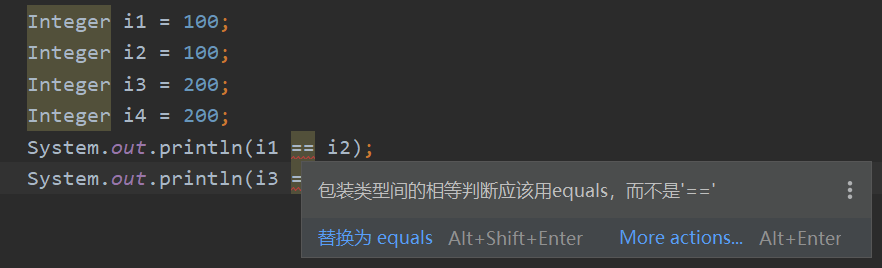
所以说在判断包装类时,应该尽量使用"equals"来进行判断,先判断两者是否为同一类型,然后再判断其值
public boolean equals(Object obj) {
    if (obj instanceof Integer) {
        return value == ((Integer)obj).intValue();
    }
    return false;
}
所以对于上面的四行代码,最后的结果就都会是true了。
三、享元模式和单例模式、缓存的区别#
3.1 和单例模式的区别#
单例模式中,一个类只能创建一个对象,而享元模式中一个类可以创建多个类。享元模式则有点单例的变体多例。但是从设计上讲,享元模式是为了对象复用,节省内存,而多例模式是为了限制对象的个数,设计意图不相同。
3.2 和缓存的区别#
在享元模式中,我们是通过工厂类来“缓存”已经创建好的对象,重点在对象的复用。
在缓存中,比如CPU的多级缓存,是为了提高数据的交换速率,提高访问效率,重点不在对象的复用
参考资料#
《重学Java设计模式》
《设计模式之美》专栏