前言
在生产环境中,应用性能监控是保障系统稳定运行的关键一环,特别是部署到云上的服务,但是,由于.Net Framework 4.8项目年代久远,无法实现一些无代码的方式集成获取日志数据。
而Azure Application Insights提供了两种方式:无代码 , 集成SDK的方式来实现日志收集。它提供了强大的请求追踪、依赖调用分析、异常捕获和性能指标收集能力。所以本文将详细介绍如何在 ASP.NET Framework 4.8 项目中集成 Application Insights SDK。
选择正确的 SDK 版本
ASP.NET Framework 与 ASP.NET Core 使用不同的 NuGet 包,请勿混淆:
|
框架 |
NuGet 包 |
当前推荐版本 |
|
ASP.NET Framework 4.6.2+ |
Microsoft.ApplicationInsights.Web |
2.22.x |
|
ASP.NET Core |
Microsoft.ApplicationInsights.AspNetCore |
2.22.x |
|
Worker Service / Console |
Microsoft.ApplicationInsights.WorkerService |
2.22.x |
对于 .NET Framework 4.8 项目,我们使用 Microsoft.ApplicationInsights.Web。
注意:请使用 Microsoft.ApplicationInsights.Web 2.23.0

安装该包后会自动引入以下组件:
- Microsoft.ApplicationInsights — 核心 SDK,提供 TelemetryClient
- Microsoft.AI.Web — 自动追踪 HTTP 请求和响应
- Microsoft.AI.DependencyCollector — 自动追踪 SQL 查询、HTTP 外部调用等依赖项
- Microsoft.AI.PerfCounterCollector — 收集 CPU、内存等性能计数器
- Microsoft.AspNet.TelemetryCorrelation — 分布式追踪关联

集成步骤
第一步:安装 NuGet 包
在 Visual Studio 中打开 Package Manager Console,执行:
Install-Package Microsoft.ApplicationInsights.Web -Version 2.23.0
或者通过 NuGet Package Manager UI 搜索 Microsoft.ApplicationInsights.Web 并安装2.23.0版。
第二步:配置 Connection String
安装完成后,项目根目录会自动生成 ApplicationInsights.config 文件。
打开该文件,配置 Connection String:

xml version="1.0" encoding="utf-8"?>
<ApplicationInsights xmlns="http://schemas.microsoft.com/ApplicationInsights/2013/Settings">
<ConnectionString>InstrumentationKey=xx-x-x-x-xxx;EndpointSuffix=applicationinsights.azure.cn;IngestionEndpoint=https://chinanorth3-0.in.applicationinsights.azure.cn/;LiveEndpoint=https://chinanorth3.livediagnostics.monitor.azure.cn/;AADAudience=https://monitor.azure.cn/;ApplicationId= xx-x-x-x-xxx ConnectionString>
  <TelemetryInitializers>

  TelemetryInitializers>

  <TelemetryModules>

  TelemetryModules>
ApplicationInsights>
PS:示例使用的是中国区的Azure Application Insights 服务,所以Connection String指向中国区 endpoint:IngestionEndpoint=https://dc.applicationinsights.azure.cn/;LiveEndpoint=https://live.applicationinsights.azure.cn/
也可以使用环境变量 APPLICATIONINSIGHTS_CONNECTION_STRING来保存连接字符串。
第三步:验证 web.config 配置
NuGet 包安装时会自动修改 web.config,添加两个关键的 HTTP Module。
请确认以下配置存在:
<configuration>
  <system.webServer>
    <modules>
      <remove name="TelemetryCorrelationHttpModule" />
      <add name="TelemetryCorrelationHttpModule"
           type="Microsoft.AspNet.TelemetryCorrelation.TelemetryCorrelationHttpModule, Microsoft.AspNet.TelemetryCorrelation"
           preCondition="managedHandler" />
      <remove name="ApplicationInsightsWebTracking" />
      <add name="ApplicationInsightsWebTracking"
           type="Microsoft.ApplicationInsights.Web.ApplicationInsightsHttpModule, Microsoft.AI.Web"
           preCondition="managedHandler" />
    modules>
  system.webServer>
configuration>
提示:这两个 Module 的顺序很重要 — TelemetryCorrelationHttpModule 必须在前,负责分布式追踪的上下文传播。

第四步:发送自定义遥测数据(可选)
SDK 安装后,请求、依赖、异常等已自动收集。

如需发送自定义事件或指标:
using Microsoft.ApplicationInsights;
using Microsoft.ApplicationInsights.DataContracts;

public class OrderController : Controller
{
    private readonly TelemetryClient _telemetryClient = new TelemetryClient();
…
            // 追踪自定义事件
            _telemetryClient.TrackEvent("test event", new Dictionary<string, string>
            {
                { "event ID", Guid.NewGuid().ToString() },
                { "event Title", "this is custome events title 20260514"   }
            });

            // 追踪自定义指标
            _telemetryClient.TrackMetric("customer metrics", (new Random()).NextDouble());
…
}
第五步:验证数据上报
1. 本地运行项目,触发几个页面请求
2. 打开 Azure Portal → Application Insights 资源
3. 进入Search,确认能看到请求遥测数据
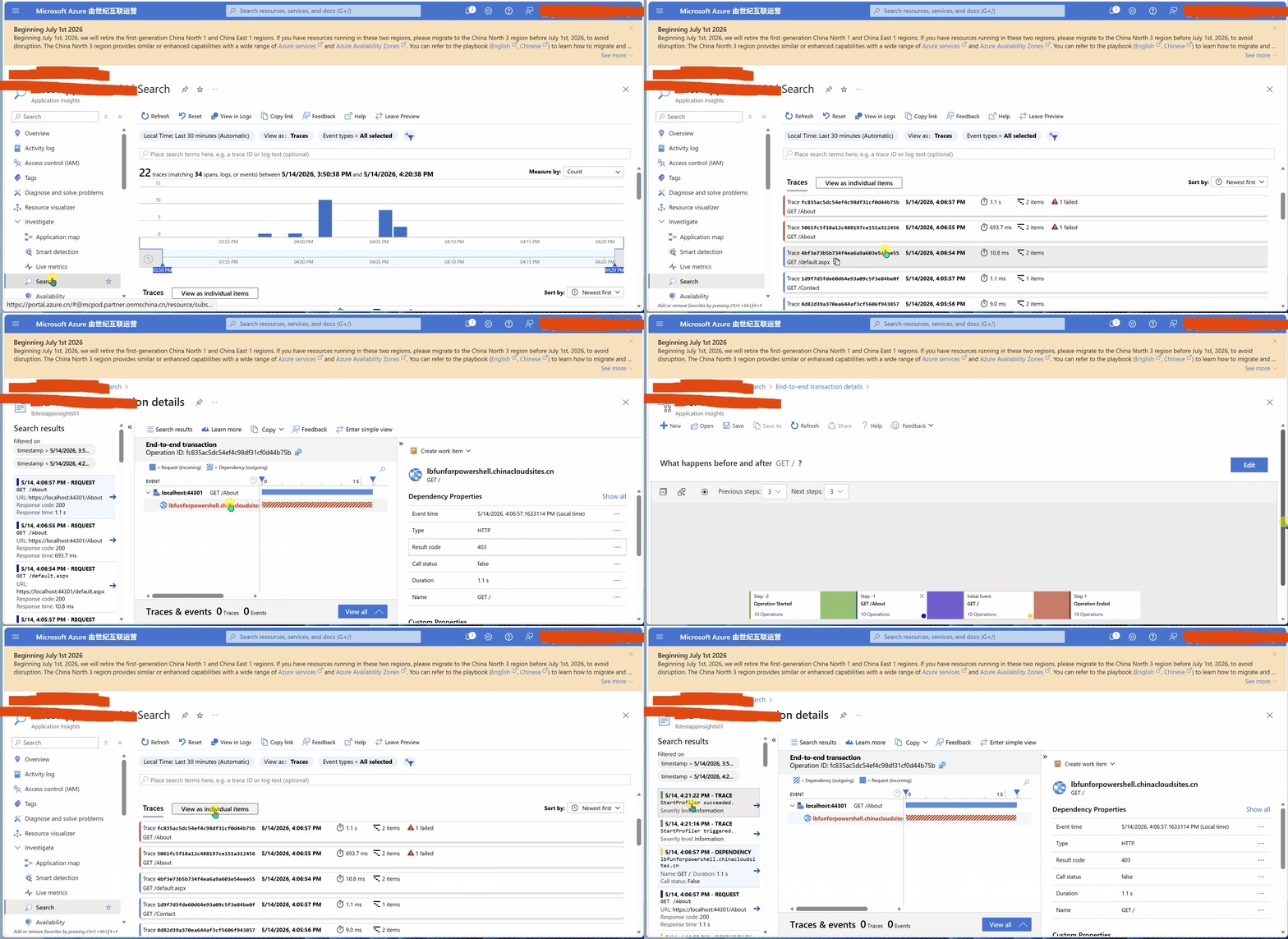
4. 检查 Live Metrics,确认实时数据流正常
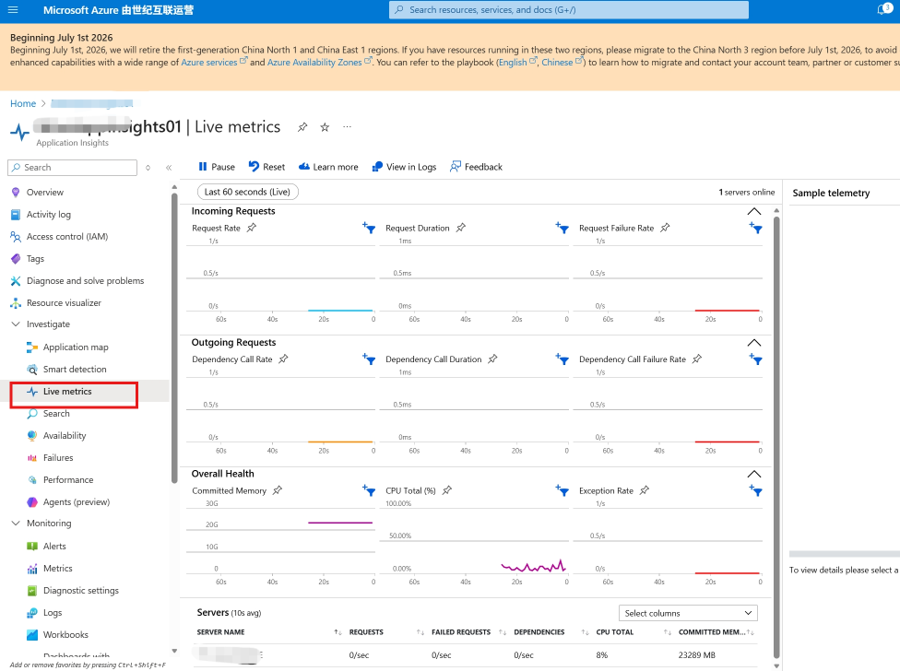
注意:数据从应用发送到 Portal 通常有 2-5 分钟延迟,Live Metrics 则是实时的。
常见问题与注意事项
1. App Service Auto-Instrumentation 冲突
如果你的应用部署在 Azure App Service 上,并且开启了 Application Insights 的 Auto-Instrumentation(代码无侵入式监控),不要同时在代码中安装 SDK。两者同时存在会导致:
- 重复的遥测数据
- 性能下降
- 依赖追踪异常
解决方案:二选一。推荐使用 SDK 方式(更灵活可控),并将 App Service 的 ApplicationInsightsAgent_EXTENSION_VERSION 设为 disabled。
2. 采样配置
生产环境中高流量场景下,建议配置自适应采样以控制成本:
<ApplicationInsights>
  <TelemetryProcessors>
    <Add Type="Microsoft.ApplicationInsights.WindowsServer.TelemetryChannel.AdaptiveSamplingTelemetryProcessor, Microsoft.AI.ServerTelemetryChannel">
      <MaxTelemetryItemsPerSecond>5MaxTelemetryItemsPerSecond>
    Add>
  TelemetryProcessors>
ApplicationInsights>
3. 关于 OpenTelemetry 迁移
微软目前推荐新项目使用 OpenTelemetry + Azure.Monitor.OpenTelemetry.Exporter。但该方案目前仅支持 ASP.NET Core。对于 .NET Framework 4.8 项目,Classic SDK(Microsoft.ApplicationInsights.Web)仍是官方支持的方案,短期内不会被废弃。
4. SDK 诊断日志
如遇到数据不上报的问题,可开启 SDK 自诊断:
<TelemetryModules>
  <Add Type="Microsoft.ApplicationInsights.Extensibility.Implementation.Tracing.FileDiagnosticsTelemetryModule, Microsoft.ApplicationInsights">
    <Severity>VerboseSeverity>
    <LogFileName>ai-sdk-diag.txtLogFileName>
    <LogFilePath>D:\home\LogFiles\ApplicationInsightsLogFilePath>
  Add>
TelemetryModules>
总结
|
步骤 |
操作 |
|
1 |
安装 Microsoft.ApplicationInsights.Web NuGet 包 |
|
2 |
在 ApplicationInsights.config 中配置 Connection String 或添加环境变量APPLICATIONINSIGHTS_CONNECTION_STRING |
|
3 |
确认 web.config 中 HTTP Module 已正确注册 |
|
4 |
(可选)通过 TelemetryClient 发送自定义遥测 |
|
5 |
在 Azure Portal 验证数据上报 |