-
【Vue】Vue3基础
1、简介
2、创建工程
2.1 基于vue-cli创建(脚手架webpack)
! 目前 vue-c1i 已处于维护模式,官方推荐基于 vite 创建项目

## 查看@vue/cli版本,确保@vue/cli版本在4.5.0以上vue --version
## 安装或者升级你的@vue/cli
npm install -g @vue/cli
## 执行创建命令
vue create vue test
## 随后选择3.x
## Choose a version of Vue.js that you want to start the project with (Use arrow keys)
....
2.2 基于vite创建(推荐)
## 1、创建命令
npm create vue@latest

## 2、具体配置
## 项目名称
V Project name: 名称(小写、数字、下划线)
## 是否添加TypeScript支持
V Add TypeScript? Yes
## 是否添加JSX支持
V Add jsx support? No
## 是否添加路由环境
V Add Vue Router for Single Page Application development? No
## 是否添加pinia环境
V Add Pinia for state management? No
## 是否添加单元测试
V Add Vitest for Unit Testing? No
## 是否添加端到端测试方案
V Add an End-to-End Testing Solution? ” No
## 是否添加ESLint语法检查
V Add ESLint for code quality? Yes
## 是否添加Prettiert代码格式化
V Add Prettier for code formatting? No
....
2.3 目录结构
public 脚手架
src 源代码文件
main.js
App.vue
components 组件
assets
env.d.ts 飘红时执行npm -i (安装依赖,node_modules)
index.html 入口文件
package-lock.json 包管理文件
package.json 包管理文件
vite.config.ts 工程的配置文件2.4 vscode插件推荐

3、核心语法
3.1 选项式(options API)和组合式(composition API)


3.2 拉开序幕的setup概述


3.3 响应式数据 - ref创建:可以定义基本类型、对象类型


3.4 响应式数据 - reactive:只能定义对象类型

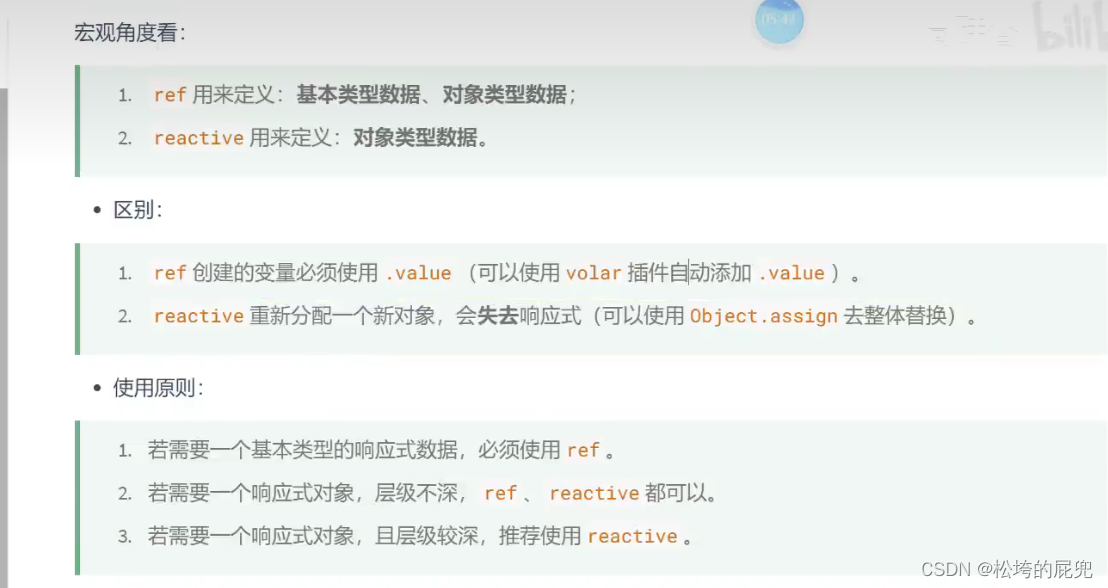
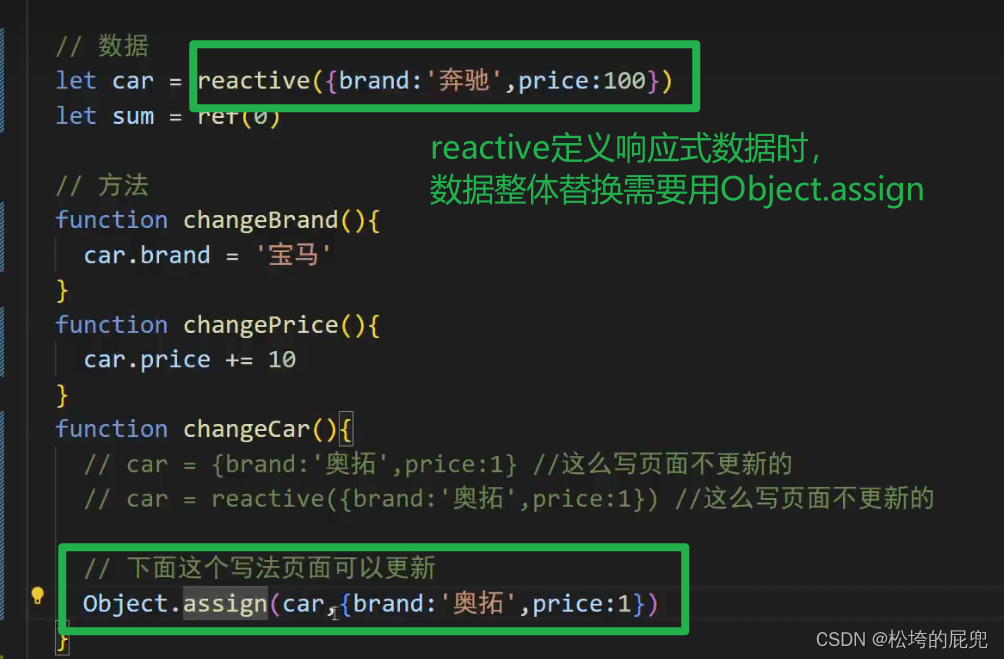
3.5 响应式数据 - ref 和 reactive 的对比



4、路由
5、pinia
6、组件通信
7、其它API
8、Vue3新组件
-
相关阅读:
在Spark中集成和使用Hudi
C#中一种使用临时文件,用完自动销毁的方法
Spring @Scheduled学习
Git安装与常用命令
[附源码]计算机毕业设计基于SpringBoot的党务管理系统
【智慧港口】NTP网络时间服务器助力数字化港口建设
java位运算及移位运算你还记得吗
STM32连接WIFI-ESP8266实战—AP模式运用
基于Python的医院信息管理系统
富格林:正确曝光做单欺诈套路
- 原文地址:https://blog.csdn.net/weixin_38517665/article/details/140015039
- 最新文章
-
沪漂五周年了:我越来越迷茫了
Agentic Skill Routing 实战:别再把所有 Skill 塞进 AI Agent 上下文
MySQL-Seconds_behind_master的精度误差
[MAF预定义ChatClient中间件-03]CachingChatClient——利用缓存省钱省时间
AI的至暗历史:从万众期待到被政府撤资,AI的两次死亡徘徊
Agent OS :五种驯服不确定性的范式
PortSwigger SQL注入LAB11
数据库即时编译JIT
[Begin]AI Learn Data Day 0
深度学习进阶(二十七)现代 LLM 的核心架构设计其二:SwiGLU