-
Django —— 用户名和密码配置
创建项目ProjectA:
django-admin startproject ProjectA
cd进入ProjectA文件夹运行项目:
- python manage.py runserver 0.0.0.0:8000
- Starting development server at http://0.0.0.0:8000/
- Quit the server with CTRL-BREAK.
访问http://localhost:8000/admin/login/?next=/admin/
初始用户名和密码是什么?

解决办法
执行python manage.py createsuperuser
可以通过以下命令创建用户并设置密码
python manage.py createsuperuser- (venv) E:\Python_Project\My_Django\All_Project>python manage.py createsuperuser
- System check identified some issues:
- WARNINGS:
- ?: (urls.W005) URL namespace 'admin' isn't unique. You may not be able to reverse all URLs in this namespace
- You have 18 unapplied migration(s). Your project may not work properly until you apply the migrations for app(s): admin, auth, contenttypes, sessions.
- Run 'python manage.py migrate' to apply them
由于还没有创建数据库表,需要使用python manage.py migrate 创建数据库表。
执行python manage.py migrate
- 执行python manage.py migrate
- E:\Python_Project\My_Django\All_Project>python manage.py migrate
- System check identified some issues:
- WARNINGS:
- ?: (urls.W005) URL namespace 'admin' isn't unique. You may not be able to reverse all URLs in this namespace
- Operations to perform:
- Apply all migrations: admin, auth, contenttypes, sessions
- Running migrations:
- Applying contenttypes.0001_initial... OK
- Applying auth.0001_initial... OK
- Applying admin.0001_initial... OK
- Applying admin.0002_logentry_remove_auto_add... OK
- Applying admin.0003_logentry_add_action_flag_choices... OK
- Applying contenttypes.0002_remove_content_type_name... OK
- Applying auth.0002_alter_permission_name_max_length... OK
- Applying auth.0003_alter_user_email_max_length... OK
- Applying auth.0004_alter_user_username_opts... OK
- Applying auth.0005_alter_user_last_login_null... OK
- Applying auth.0006_require_contenttypes_0002... OK
- Applying auth.0007_alter_validators_add_error_messages... OK
- Applying auth.0008_alter_user_username_max_length... OK
- Applying auth.0009_alter_user_last_name_max_length... OK
- Applying auth.0010_alter_group_name_max_length... OK
- Applying auth.0011_update_proxy_permissions... OK
- Applying auth.0012_alter_user_first_name_max_length... OK
- Applying sessions.0001_initial... OK
再次执行python manage.py createsuperuser
创建用户,例如用户名admin
- E:\Python_Project\My_Django\All_Project>python manage.py createsuperuser
- System check identified some issues:
- WARNINGS:
- ?: (urls.W005) URL namespace 'admin' isn't unique. You may not be able to reverse all URLs in this namespace
- Username (leave blank to use 'xxxxx'): admin
- Email address: xxxx@163.com
- Password:
- Password (again):
- Superuser created successfully.
使用刚创建的用户及设置的密码访问:http://localhost:8000/admin/login/?next=/admin/
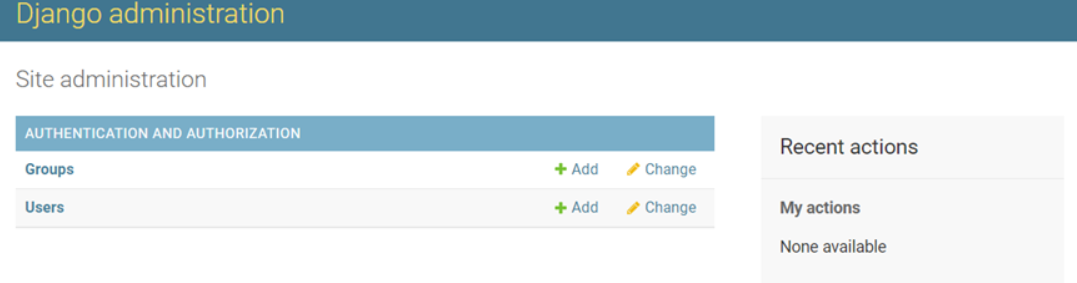
本次分享到此结束,感谢大家的阅读!
-
相关阅读:
CNN(卷积神经网络)、RNN(循环神经网络)、DNN(深度神经网络)的内部网络结构有什么区别?
贤鱼的刷题日常(数据结构栈学习)--P1175 表达式的转换--题目详解
kafka集群部署
盘点30个Python树莓派源码Python爱好者不容错过
互联网上门洗衣洗鞋小程序搭建
[附源码]计算机毕业设计数字乡村基础治理系统Springboot程序
1.springboot(Xml和JavaConfig的对比)
外贸人如何快速学好英语
一、什么是JAVA
flutter移植arm32位板子
- 原文地址:https://blog.csdn.net/xuezhe5212/article/details/140041913