-
Hadoop3:MapReduce中的Reduce Join和Map Join
一、概念说明
学过
MySQL的都知道,join和left join
这里的join含义和MySQL的join含义一样
就是对两张表的数据,进行关联查询Hadoop的MapReduce阶段,分为2个阶段
一个Map,一个Reduce
那么,join逻辑,就可以在这两个阶段实现。两者有什么区别了?
我们都知道,一般情况下,MapTask比ReduceTask线程数更多。
所以,当两张表,有一个表数据量非常大,一个表非常小的时候
我们建议放在Map阶段进行join,这样可以提高性能。二、需求说明
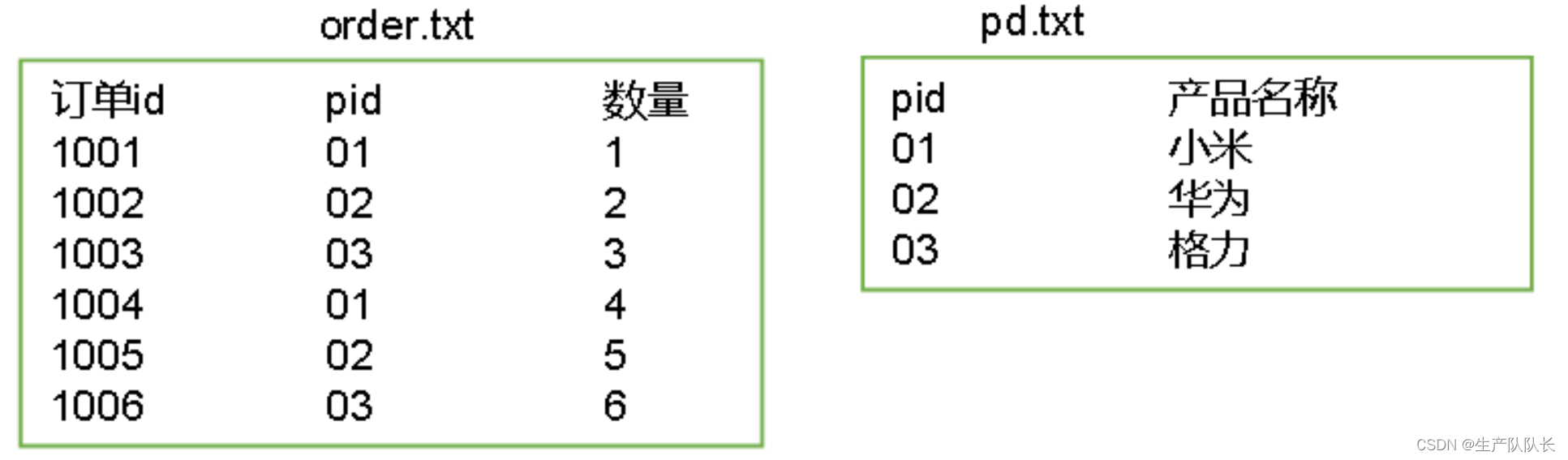
有两张表数据
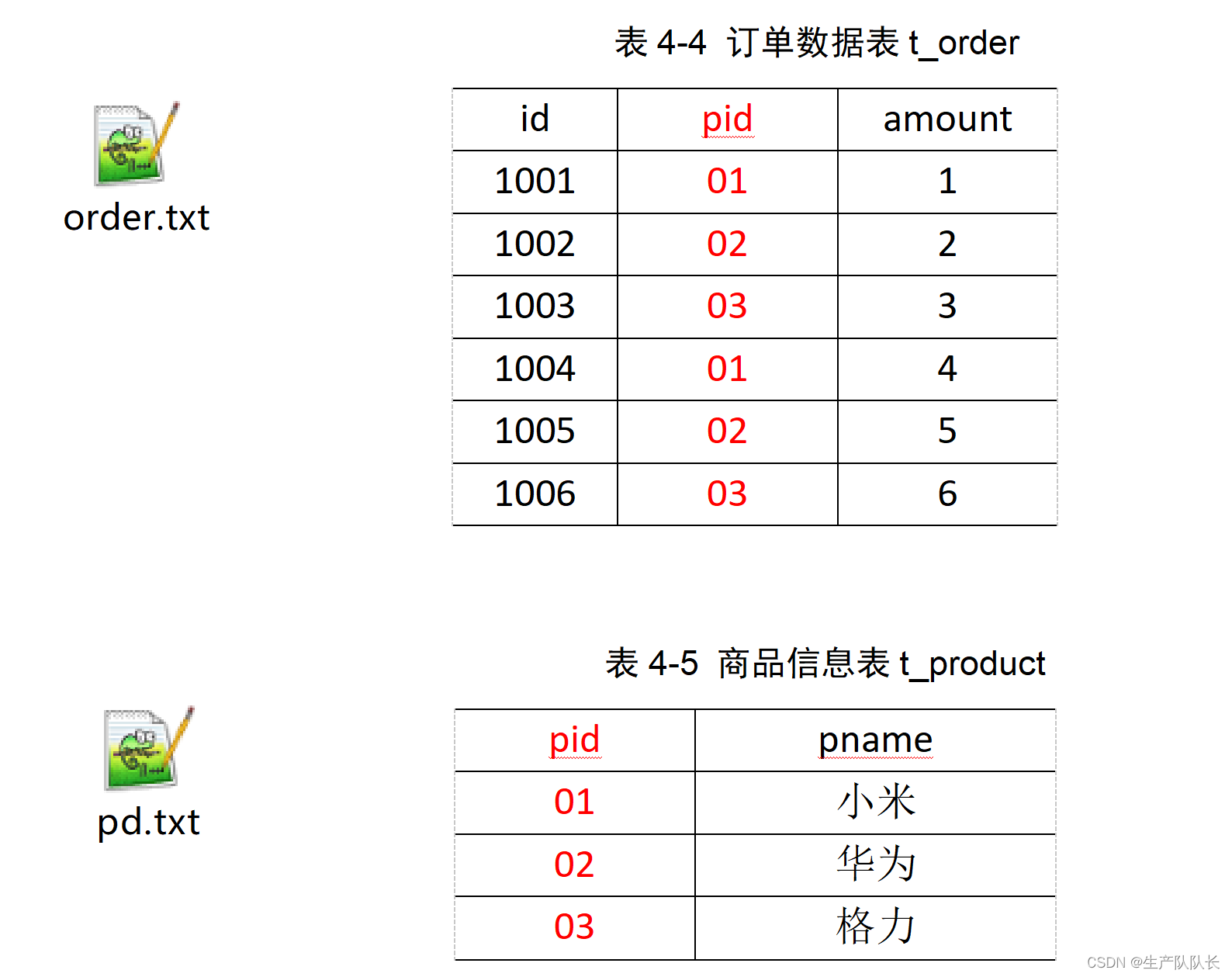
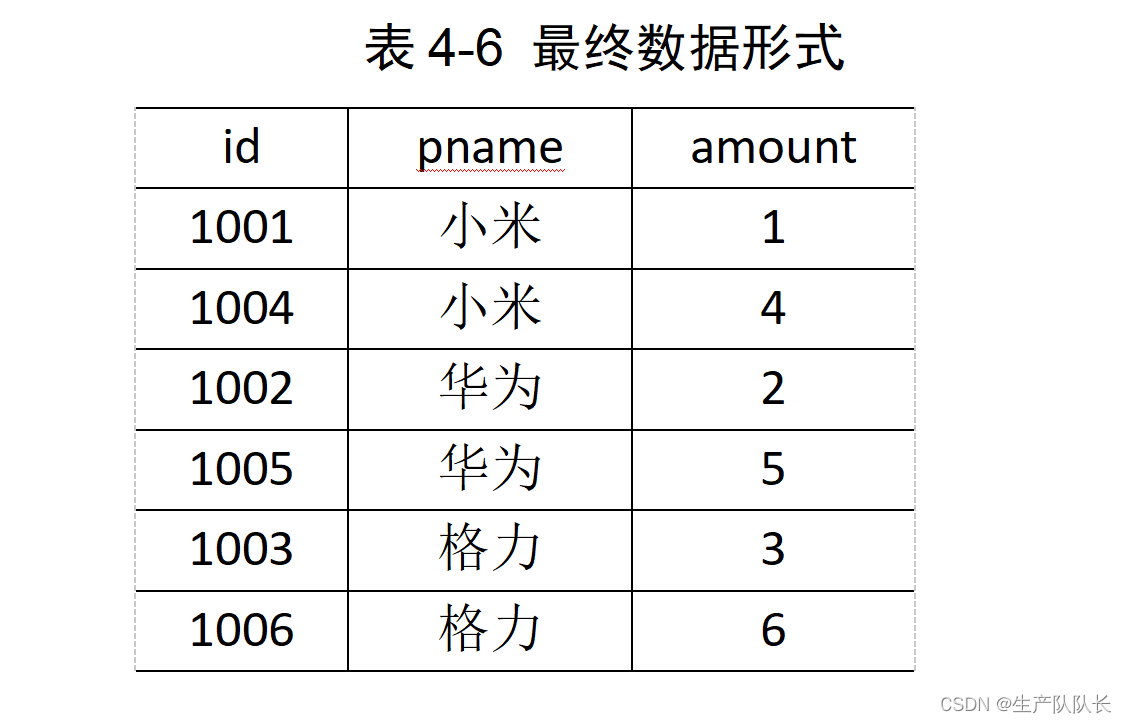
将商品信息表中数据根据商品pid合并到订单数据表中
三、代码实现
1、Reduce Join
TableBeanpackage com.atguigu.mapreduce.reduceJoin; import org.apache.hadoop.io.Writable; import java.io.DataInput; import java.io.DataOutput; import java.io.IOException; public class TableBean implements Writable { private String id; // 订单id private String pid; // 商品id private int amount; // 商品数量 private String pname;// 商品名称 private String flag; // 标记是什么表 order pd // 空参构造 public TableBean() { } public String getId() { return id; } public void setId(String id) { this.id = id; } public String getPid() { return pid; } public void setPid(String pid) { this.pid = pid; } public int getAmount() { return amount; } public void setAmount(int amount) { this.amount = amount; } public String getPname() { return pname; } public void setPname(String pname) { this.pname = pname; } public String getFlag() { return flag; } public void setFlag(String flag) { this.flag = flag; } @Override public void write(DataOutput out) throws IOException { out.writeUTF(id); out.writeUTF(pid); out.writeInt(amount); out.writeUTF(pname); out.writeUTF(flag); } @Override public void readFields(DataInput in) throws IOException { this.id = in.readUTF(); this.pid = in.readUTF(); this.amount = in.readInt(); this.pname = in.readUTF(); this.flag = in.readUTF(); } @Override public String toString() { // id pname amount return id + "\t" + pname + "\t" + amount ; } }TableMapper
源数据,是多个文件的时候,我们要在setup方法里,获取文件信息
这样才能在map方法里知道,当前读取的是哪个文件,从而实现区别处理。package com.atguigu.mapreduce.reduceJoin; import org.apache.hadoop.io.LongWritable; import org.apache.hadoop.io.Text; import org.apache.hadoop.mapreduce.InputSplit; import org.apache.hadoop.mapreduce.Mapper; import org.apache.hadoop.mapreduce.lib.input.FileSplit; import java.io.IOException; public class TableMapper extends Mapper<LongWritable, Text, Text, TableBean> { private String fileName; private Text outK = new Text(); private TableBean outV = new TableBean(); @Override protected void setup(Context context) throws IOException, InterruptedException { // 初始化 order pd FileSplit split = (FileSplit) context.getInputSplit(); fileName = split.getPath().getName(); } @Override protected void map(LongWritable key, Text value, Context context) throws IOException, InterruptedException { // 1 获取一行 String line = value.toString(); // 2 判断是哪个文件的 if (fileName.contains("order")){// 处理的是订单表 String[] split = line.split("\t"); // 封装k v outK.set(split[1]); outV.setId(split[0]); outV.setPid(split[1]); outV.setAmount(Integer.parseInt(split[2])); outV.setPname(""); outV.setFlag("order"); }else {// 处理的是商品表 String[] split = line.split("\t"); outK.set(split[0]); outV.setId(""); outV.setPid(split[0]); outV.setAmount(0); outV.setPname(split[1]); outV.setFlag("pd"); } // 写出 context.write(outK, outV); } }TableReducer这里要注意
for循环处理bean list的时候,我们要在循环里面,new一个bean,存入list中
因为,Hadoop中,Iterable里存放的是地址,所以,不在循环内new一个bean来存放
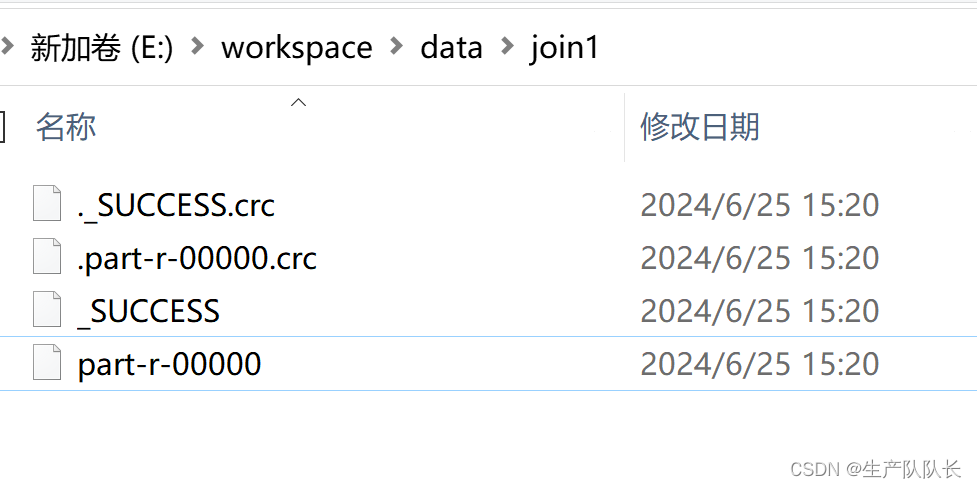
会导致数据覆盖,最终只是存了一个beanpackage com.atguigu.mapreduce.reduceJoin; import org.apache.commons.beanutils.BeanUtils; import org.apache.hadoop.io.NullWritable; import org.apache.hadoop.io.Text; import org.apache.hadoop.mapreduce.Reducer; import java.io.IOException; import java.lang.reflect.InvocationTargetException; import java.util.ArrayList; public class TableReducer extends Reducer<Text, TableBean,TableBean, NullWritable> { @Override protected void reduce(Text key, Iterable<TableBean> values, Context context) throws IOException, InterruptedException { // 01 1001 1 order // 01 1004 4 order // 01 小米 pd // 准备初始化集合 ArrayList<TableBean> orderBeans = new ArrayList<>(); TableBean pdBean = new TableBean(); // 循环遍历 for (TableBean value : values) { if ("order".equals(value.getFlag())){// 订单表 TableBean tmptableBean = new TableBean(); try { BeanUtils.copyProperties(tmptableBean,value); } catch (IllegalAccessException e) { e.printStackTrace(); } catch (InvocationTargetException e) { e.printStackTrace(); } orderBeans.add(tmptableBean); }else {// 商品表 try { BeanUtils.copyProperties(pdBean,value); } catch (IllegalAccessException e) { e.printStackTrace(); } catch (InvocationTargetException e) { e.printStackTrace(); } } } // 循环遍历orderBeans,赋值 pdname for (TableBean orderBean : orderBeans) { orderBean.setPname(pdBean.getPname()); context.write(orderBean,NullWritable.get()); } } }TableDriverpackage com.atguigu.mapreduce.reduceJoin; import org.apache.hadoop.conf.Configuration; import org.apache.hadoop.fs.Path; import org.apache.hadoop.io.NullWritable; import org.apache.hadoop.io.Text; import org.apache.hadoop.mapreduce.Job; import org.apache.hadoop.mapreduce.lib.input.FileInputFormat; import org.apache.hadoop.mapreduce.lib.output.FileOutputFormat; import java.io.IOException; public class TableDriver { public static void main(String[] args) throws IOException, ClassNotFoundException, InterruptedException { Job job = Job.getInstance(new Configuration()); job.setJarByClass(TableDriver.class); job.setMapperClass(TableMapper.class); job.setReducerClass(TableReducer.class); job.setMapOutputKeyClass(Text.class); job.setMapOutputValueClass(TableBean.class); job.setOutputKeyClass(TableBean.class); job.setOutputValueClass(NullWritable.class); FileInputFormat.setInputPaths(job, new Path("E:\\workspace\\data\\inputtable")); FileOutputFormat.setOutputPath(job, new Path("E:\\workspace\\data\\join1")); boolean b = job.waitForCompletion(true); System.exit(b ? 0 : 1); } }测试
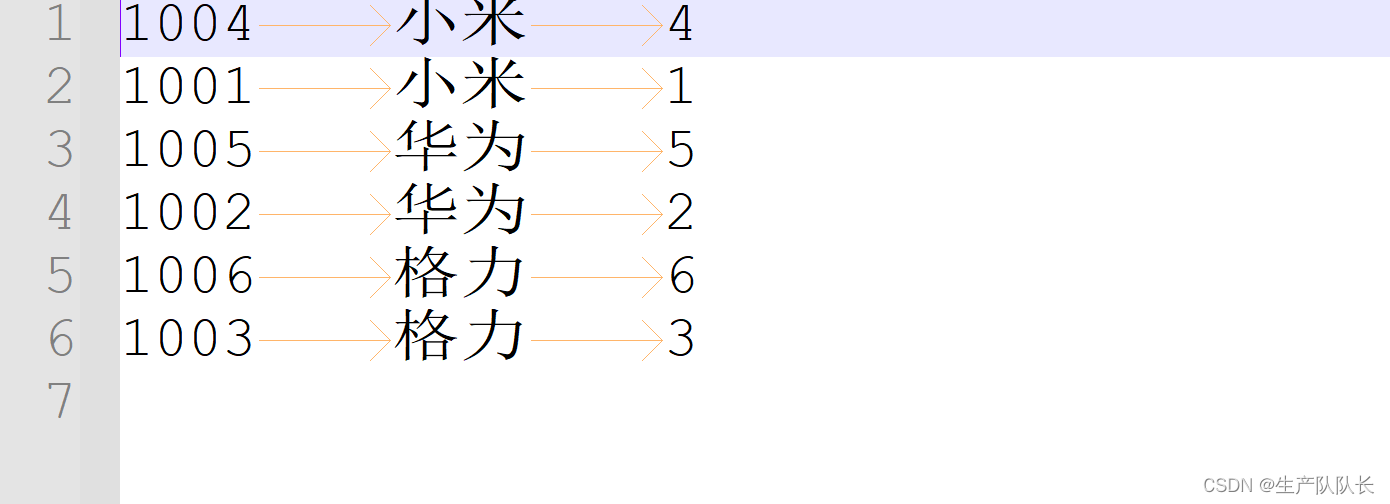
数据变化
1、源数据
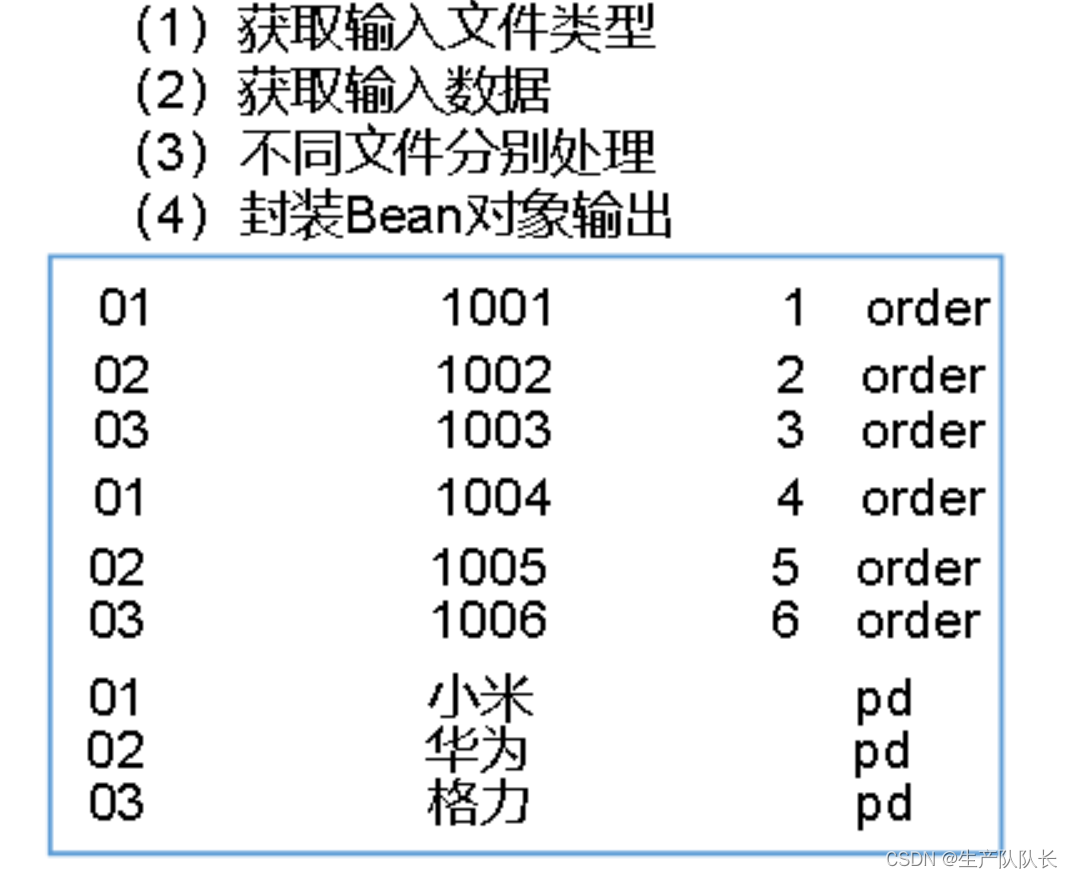
2、Map方法中,按行读取数据
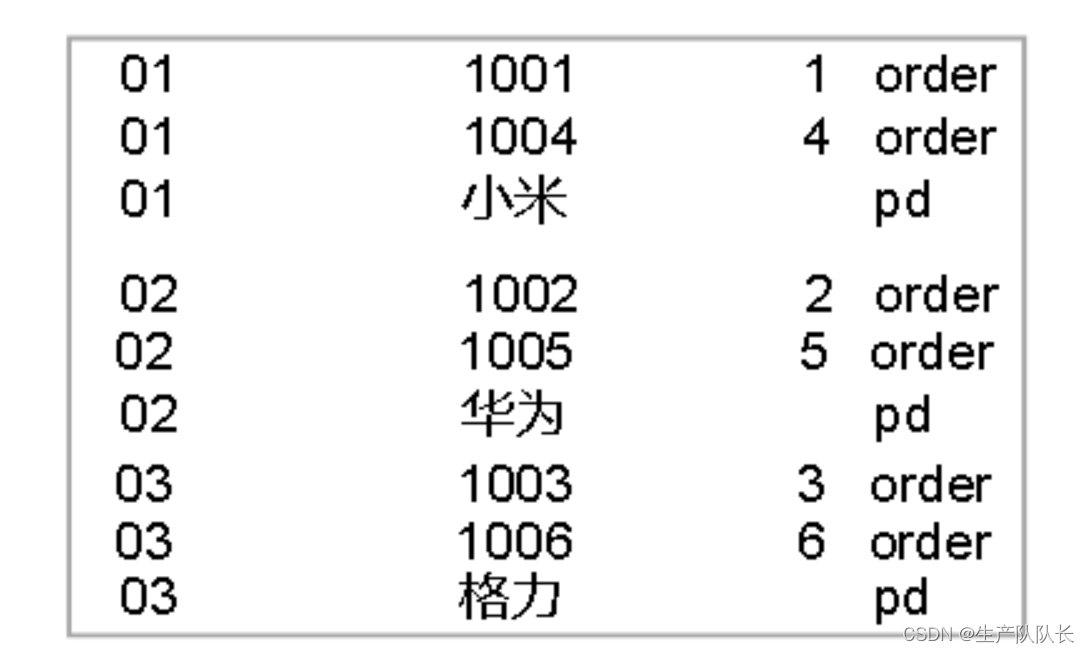
3、Shuffle阶段排序
因为,
map方法中,用pid作为key,所以,这里对pid进行排序
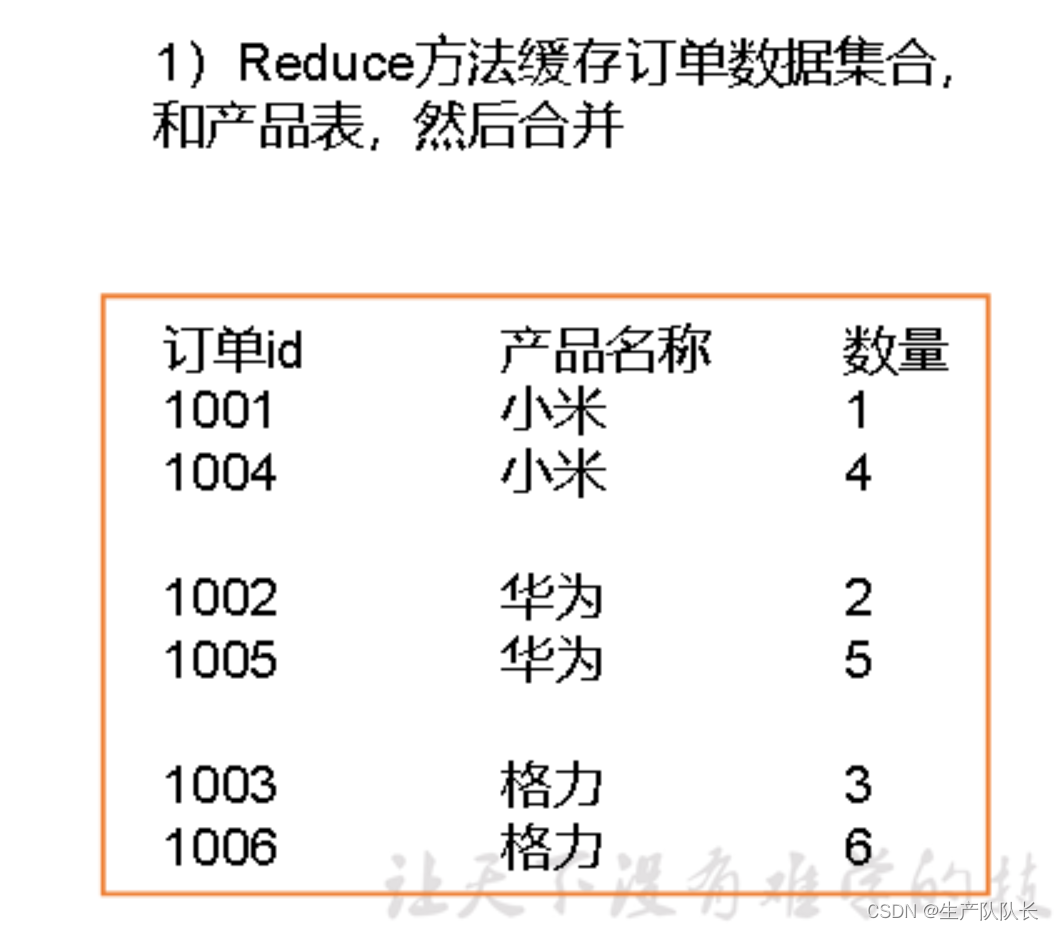
4、Reduce方法,按key读取数据
这里的
key只有3个,所以,reduce被调用了3次
每封装好一条数据,就write一次
reduce方法执行完毕后,进行归并排序,得到最终数据文件,输出到磁盘
2、Map Join
关键技术:
采用DistributedCache,在map阶段缓存小表数据
并且,取消reduce阶段MapJoinDriver
关键代码:// 加载缓存数据 job.addCacheFile(new URI("file:///D:/input/tablecache/pd.txt")); //缓存普通文件到Task运行节点。 //job.addCacheFile(new URI("file:///e:/cache/pd.txt")); //如果是集群运行,需要设置HDFS路径 //job.addCacheFile(new URI("hdfs://hadoop102:8020/cache/pd.txt")); // Map端Join的逻辑不需要Reduce阶段,设置reduceTask数量为0 job.setNumReduceTasks(0);package com.atguigu.mapreduce.mapjoin; import org.apache.hadoop.conf.Configuration; import org.apache.hadoop.fs.Path; import org.apache.hadoop.io.NullWritable; import org.apache.hadoop.io.Text; import org.apache.hadoop.mapreduce.Job; import org.apache.hadoop.mapreduce.lib.input.FileInputFormat; import org.apache.hadoop.mapreduce.lib.output.FileOutputFormat; import java.io.IOException; import java.net.URI; import java.net.URISyntaxException; public class MapJoinDriver { public static void main(String[] args) throws IOException, URISyntaxException, ClassNotFoundException, InterruptedException { // 1 获取job信息 Configuration conf = new Configuration(); Job job = Job.getInstance(conf); // 2 设置加载jar包路径 job.setJarByClass(MapJoinDriver.class); // 3 关联mapper job.setMapperClass(MapJoinMapper.class); // 4 设置Map输出KV类型 job.setMapOutputKeyClass(Text.class); job.setMapOutputValueClass(NullWritable.class); // 5 设置最终输出KV类型 job.setOutputKeyClass(Text.class); job.setOutputValueClass(NullWritable.class); // 加载缓存数据 job.addCacheFile(new URI("file:///D:/input/tablecache/pd.txt")); // Map端Join的逻辑不需要Reduce阶段,设置reduceTask数量为0 job.setNumReduceTasks(0); // 6 设置输入输出路径 FileInputFormat.setInputPaths(job, new Path("D:\\input\\inputtable2")); FileOutputFormat.setOutputPath(job, new Path("D:\\hadoop\\output8888")); // 7 提交 boolean b = job.waitForCompletion(true); System.exit(b ? 0 : 1); } }MapJoinMapper
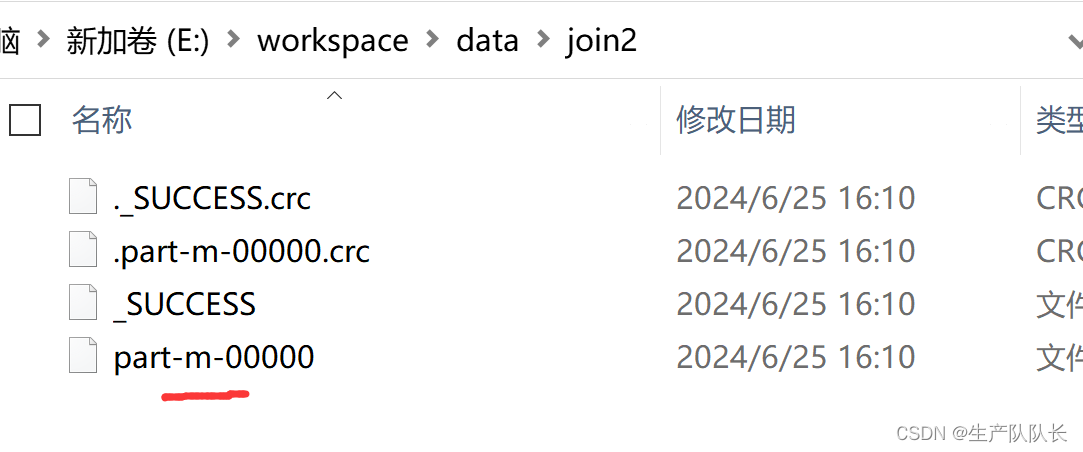
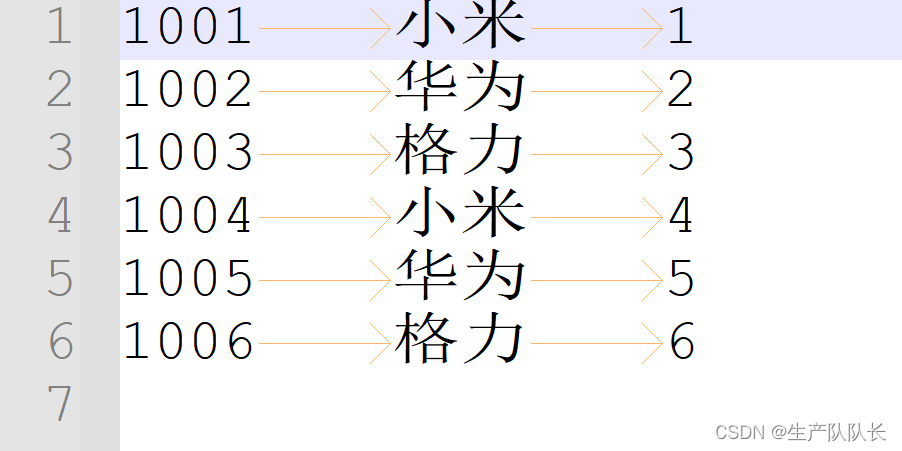
setup方法中,使用driver中配置的小表文件路径,创建流,并将数据缓存起来,供map方法使用。package com.atguigu.mapreduce.mapjoin; import org.apache.commons.lang.StringUtils; import org.apache.hadoop.fs.FSDataInputStream; import org.apache.hadoop.fs.FileSystem; import org.apache.hadoop.fs.Path; import org.apache.hadoop.io.IOUtils; import org.apache.hadoop.io.LongWritable; import org.apache.hadoop.io.NullWritable; import org.apache.hadoop.io.Text; import org.apache.hadoop.mapreduce.Mapper; import java.io.BufferedReader; import java.io.IOException; import java.io.InputStreamReader; import java.net.URI; import java.util.HashMap; public class MapJoinMapper extends Mapper<LongWritable, Text, Text, NullWritable> { private HashMap<String, String> pdMap = new HashMap<>(); private Text outK = new Text(); @Override protected void setup(Context context) throws IOException, InterruptedException { // 获取缓存的文件,并把文件内容封装到集合 pd.txt URI[] cacheFiles = context.getCacheFiles(); FileSystem fs = FileSystem.get(context.getConfiguration()); FSDataInputStream fis = fs.open(new Path(cacheFiles[0])); // 从流中读取数据 BufferedReader reader = new BufferedReader(new InputStreamReader(fis, "UTF-8")); String line; while (StringUtils.isNotEmpty(line = reader.readLine())) { // 切割 String[] fields = line.split("\t"); // 赋值 pdMap.put(fields[0], fields[1]); } // 关流 IOUtils.closeStream(reader); } @Override protected void map(LongWritable key, Text value, Context context) throws IOException, InterruptedException { // 处理 order.txt String line = value.toString(); String[] fields = line.split("\t"); // 获取pid String pname = pdMap.get(fields[1]); // 获取订单id 和订单数量 // 封装 outK.set(fields[0] + "\t" + pname + "\t" + fields[2]); context.write(outK, NullWritable.get()); } }测试
-
相关阅读:
关于我学习Go语言在CSDN分享的心得体会
Windows线程池使用方法
从零开始:开发知识付费小程序的入门指南
【数据结构】栈与队列
机器人制作开源方案 | 杠杆式6轮爬楼机器人
光线投射之伪3d
MongoDB备份与恢复
虚拟内存初探CSAPP
618过后,该如何做视频号?
消息队列概述
- 原文地址:https://blog.csdn.net/Brave_heart4pzj/article/details/139960366
- 最新文章
-
【FHE】我们如何实现同态加密推理(八):SiLU 的密文化——两条路径,和一个 8 字节的开关
SQLcl 中 c/old/new 替换变量为何失效?先定位再替换
不让模型写作文,直接从它脑子里读答案:Jev 决策在 .NET 的两条路线
Halo插件:支持GitHub的图床附件策略
电视投屏界的“一股清流”!SimpleTVCast 6.0.0-beta 抢先体验:无需TV端App,界面大换血!✨
华三VXLAN集中式网关实战指南:Spine多活网关 + 双活接入(M-LAG)
软件更好写之后口碑会更重要
大 O、大 Omega、大 Theta 的区别,O(n) 复杂度是什么意思
Java标签跳转:一个鲜为人知但却很实用的小技巧
多智能体系统论文速读