原创vue3+uniapp+uni-ui跨端仿ios桌面后台OA管理模板Uni-Vue3-WeOS。
uniapp-vue3-os一款基于uni-app+vite5.x+pinia等技术开发的仿ios手机桌面OA管理系统。实现了自定义桌面栅格磁贴布局、多分屏滑动管理、自定义桌面小部件、辅助触控悬浮球等功能。支持编译到H5+小程序端+App端。
预览效果
运行到H5/小程序端/APP端效果。
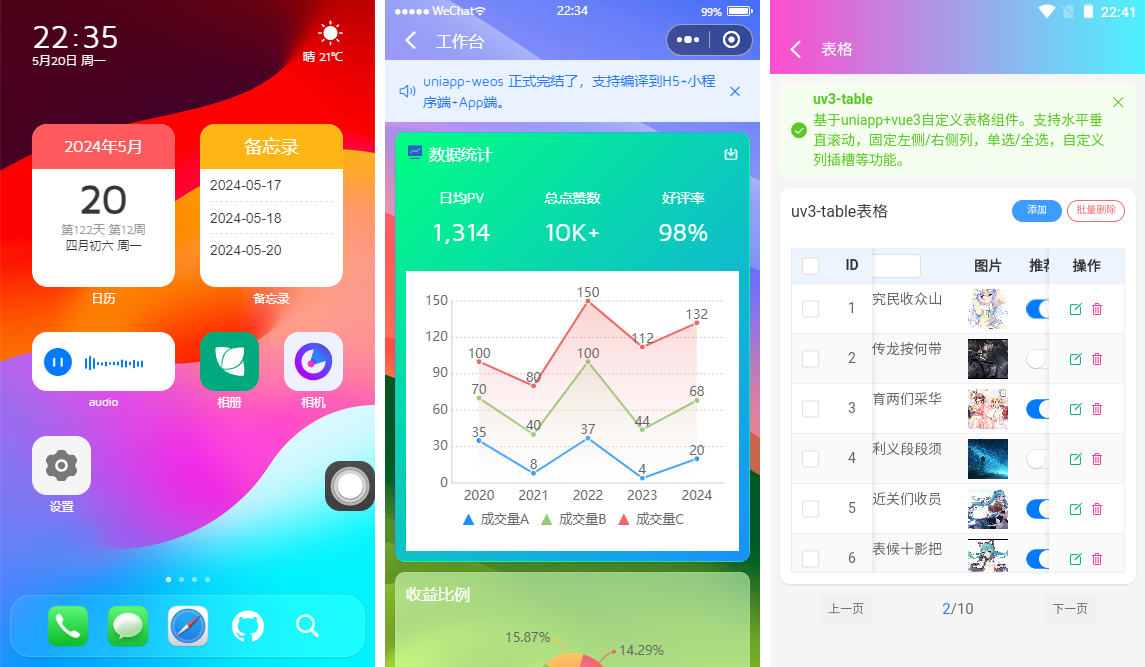
原创自研手机OA磁贴栅格卡片布局引擎。亲测在h5+小程序+App端效果基本保持一致。


使用技术
- 编辑器:HbuilderX 4.15
- 技术框架:uniapp+vite5.x+vue3+pinia2
- UI组件库:uni-ui+uv-ui(uniapp vue3组件库)
- 弹框组件:uv3-popup(基于uniapp+vue3自定义弹框组件)
- 表格组件:uv3-table(基于uniapp+vue3增强版表格)
- 模拟数据:mockjs(用于自定义表格模拟数据)
- 缓存技术:pinia-plugin-unistorage
- 支持编译:h5+小程序端+app端

另外在PC端则以750px布局显示,表现依然perfect~~

uni-vue3-oadmin项目使用到的table表格组件uv3Table。全新自研的一款跨多端(h5/小程序/App端)增强版自定义表格组件。
https://www.cnblogs.com/xiaoyan2017/p/18199130

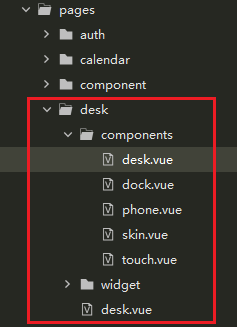
项目结构
使用hbuilderx4.15编辑器,采用vue3 setup语法编码开发。内置构建工具升级到了Vite5.2.8版本。


目前该项目已经上架到我的作品集,如果有需要的话,欢迎去下载使用。
https://gf.bilibili.com/item/detail/1105982011

公共布局模板Layout

<script setup>
    import { ref } from 'vue'
    import { appStore } from '@/pinia/modules/app'

    const appState = appStore()

    // #ifdef MP-WEIXIN
    defineOptions({
        /**
         * 解决小程序class、id透传问题(vue3写法)
         * manifest.json中配置mergeVirtualHostAttributes: true, 在微信小程序平台不生效,组件外部传入的class没有挂到组件根节点上
         * https://github.com/dcloudio/uni-ui/issues/753
         */
        options: { virtualHost: true }
    })
    // #endif
    const props = defineProps({
        showBackground: { type: [Boolean, String], default: true },
    })

    // 自定义变量(桌面图标)
    const deskVariable = ref({
        '--icon-radius': '15px', // 圆角
        '--icon-size': '118rpx', // 图标尺寸
        '--icon-gap-col': '25px', // 水平间距
        '--icon-gap-row': '45px', // 垂直间距
        '--icon-labelSize': '12px', // 标签文字大小
        '--icon-labelColor': '#fff', // 标签颜色
        '--icon-fit': 'contain', // 图标自适应模式
    })
script>

<template>
    <view class="uv3__container flexbox flex-col flex1" :style="deskVariable">

        <slot name="header" />


        <view class="uv3__scrollview flex1">
            <slot />
        view>


        <slot name="footer" />


        <image v-if="showBackground" class="fixwxbg" :src="appState.config.skin || '/static/skin/theme.png'" mode="scaleToFill" />
    view>
template>


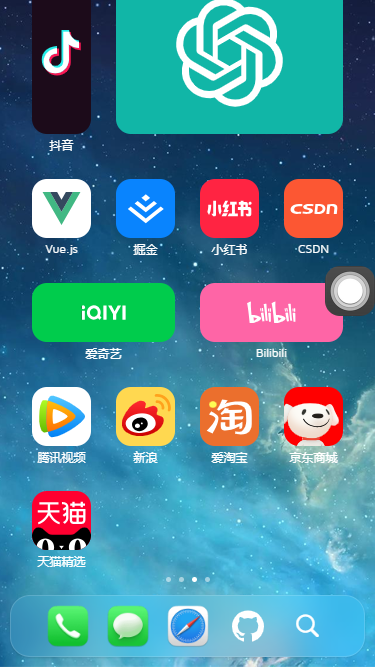


emmm,怎么样,是不是感觉还行~~ 哈哈,这也是经历了无数个日夜的爆肝开发,目前该项目正式的完结了。
桌面布局模板

<script setup>
    import { ref } from 'vue'

    import Desk from './components/desk.vue'
    import Dock from './components/dock.vue'
    import Touch from './components/touch.vue'
script>

<template>
    <uv3-layout>

        <Desk />

        <template #footer>

            <Dock />
        template>

        <Touch />
    uv3-layout>
template>
桌面卡片式栅格磁贴模板


桌面os菜单采用json配置
/**
 * label 图标标题
 * imgico 图标(本地或网络图片) 当type: 'icon'则为uni-icons图标名,当type: 'widget'则为自定义小部件标识名
 * type 图标类型(icon | widget) icon为uni-icons图标、widget为自定义小部件
 * path 跳转路由页面
 * link 跳转外部链接
 * hideLabel 是否隐藏图标标题
 * background 自定义图标背景色
 * size 栅格磁贴布局(16种) 1x1 1x2 1x3 1x4、2x1 2x2 2x3 2x4、3x1 3x2 3x3 3x4、4x1 4x2 4x3 4x4
 * onClick 点击图标回调函数
 * children 二级菜单
 */
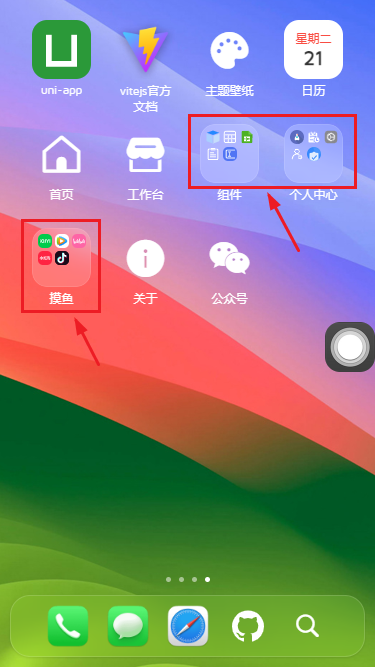
配置children参数,则以二级菜单弹窗展示。

<template>
    <swiper
        class="uv3__deskmenu"
        :indicator-dots="true"
        indicator-color="rgba(255,255,255,.5)"
        indicator-active-color="#fff"
    >
        <swiper-item v-for="(mitem, mindex) in deskMenu" :key="mindex">
            <view class="uv3__gridwrap">
                <view v-for="(item, index) in mitem.list" :key="index" class="uv3__gridwrap-item" @click="handleClickDeskMenu(item)">

                    <view class="ico" :style="{'background': item.background}">

                        <template v-if="Array.isArray(item.children)">
                            <view class="uv3__gridwrap-thumb">
                                ...
                            view>
                        template>
                        <template v-else>
                            <template v-if="item.type == 'widget'">

                                <component :is="item.imgico" />
                            template>
                            <template v-else>

                                ...
                            template>
                        template>
                    view>

                    <view v-if="!item.hideLabel" class="label clamp2">{{item.label}}view>
                view>
            view>
        swiper-item>
    swiper>


    <Popup v-model="deskPopupVisible">
        <view class="uv3__deskpopup">
            ...
        view>
    Popup>

    ...
template>
点击桌面菜单,打开链接地址、跳转路由页面、二级弹窗、自定义绑定事件等方式。当然也可以进行一些其它定制化逻辑处理。
const handleClickDeskMenu = (item) => {
    if(item.link) {
        // 链接
        openURL(item.link)
    }else if(item.path) {
        // 页面路由地址
        uni.navigateTo({
            url: item.path.substr(0, 1) == '/' ? item.path : '/' + item.path
        })
    }else if(Array.isArray(item.children)) {
        // 二级菜单
        deskPopupMenu.value = item
        deskPopupVisible.value = true
    }
    // 绑定点击事件
    typeof item.onClick === 'function' && item.onClick()
}
桌面菜单JSON配置项示例
const deskMenu = ref([
    {
        pid: 20240507001,
        list: [
            {label: '今日', imgico: 'today', type: 'widget', hideLabel: true, size: '2x1'},
            {label: '天气', imgico: 'weather', type: 'widget', hideLabel: true, size: '2x1'},
            {label: '日历', imgico: 'fullcalendar', type: 'widget', path: 'pages/calendar/index', size: '4x2'},
            // {label: '日历', imgico: 'date', type: 'widget', size: '2x2'},
            // {label: '备忘录', imgico: 'note', type: 'widget', size: '2x2'},
            {label: 'audio', imgico: 'audio', type: 'widget', size: '2x1'},
            {
                label: '相册', imgico: '/static/svg/huaban.svg', background: '#00aa7f',
                onClick: () => {
                    // ...
                }
            },
            ...
        ]
    },
    ...
    {
        pid: 20240510001,
        list: [
            {label: 'Github', imgico: '/static/svg/github.svg', background: '#607d8b', size: '3x1'},
            {label: '码云Gitee', imgico: '/static/svg/gitee.svg', background: '#bb2124',},
            {label: '抖音', imgico: '/static/svg/douyin.svg', background: '#1c0b1a', size: '1x2'},
            {label: 'ChatGPT', imgico: '/static/svg/chatgpt.svg', hideLabel: true, background: '#11b6a7', size: '3x2'},
            ...
        ]
    },
    {
        pid: 20240511003,
        list: [
            {label: 'uni-app', imgico: '/static/uni.png', link: 'https://uniapp.dcloud.net.cn/'},
            {label: 'vitejs官方文档', imgico: '/static/vite.png', link: 'https://vitejs.dev/'},
            {
                label: '主题壁纸', imgico: 'color-filled', type: 'icon',
                onClick: () => {
                    // ...
                }
            },
            {label: '日历', imgico: 'calendar', type: 'widget', path: 'pages/calendar/index', background: '#fff',},
            {label: '首页', imgico: 'home', type: 'icon', path: 'pages/index/index'},
            {label: '工作台', imgico: 'shop-filled', type: 'icon', path: 'pages/index/dashboard'},
            {
                label: '组件',
                'children': [
                    {label: '组件', imgico: '/static/svg/component.svg', path: 'pages/component/index'},
                    {label: '表格', imgico: '/static/svg/table.svg', path: 'pages/component/table'},
                    ...
                ]
            },
            ...
            {
                label: '关于', imgico: 'info-filled', type: 'icon',
                onClick: () => {
                    // ...
                }
            },
            {
                label: '公众号', imgico: 'weixin', type: 'icon',
                onClick: () => {
                    // ...
                }
            },
        ]
    }
])
整个项目采用毛玻璃模糊化UI视觉效果。简单的实现了表格、表单、编辑器、用户管理/角色管理等常用业务功能。旨在探索uniapp全新的手机后台管理系统方案,当然也可以在此基础上做一些其它创新,加上一些定制化功能模块。

OK,以上就是uniapp+vue3开发手机OA管理管理系统的一些分享,希望对大家有些帮助哈!
最后附上两个最新实例项目
https://www.cnblogs.com/xiaoyan2017/p/18165578
https://www.cnblogs.com/xiaoyan2017/p/18092224
