-
苍穹外卖-day12 - 工作台 - Apache POI - 导出运营数据Excel报表
课程内容
功能实现:工作台、数据导出
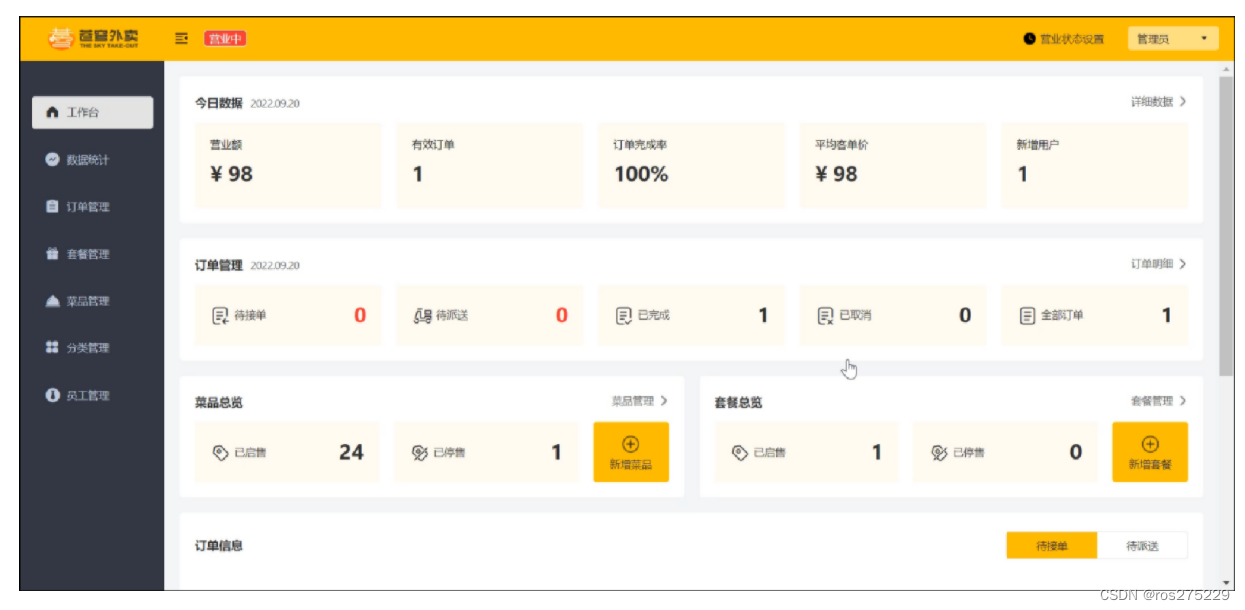
工作台效果图:
数据导出效果图:

在数据统计页面点击数据导出:生成Excel报表

1. 工作台
1.1 需求分析和设计
1.1.1 产品原型
工作台是系统运营的数据看板,并提供快捷操作入口,可以有效提高商家的工作效率。
工作台展示的数据:
-
今日数据
-
订单管理
-
菜品总览
-
套餐总览
-
订单信息
原型图:

名词解释:
-
营业额:已完成订单的总金额
-
有效订单:已完成订单的数量
-
订单完成率:有效订单数 / 总订单数 * 100%
-
平均客单价:营业额 / 有效订单数
-
新增用户:新增用户的数量
1.1.2 接口设计
通过上述原型图分析,共包含6个接口。
接口设计:
-
今日数据接口
-
订单管理接口
-
菜品总览接口
-
套餐总览接口
-
订单搜索(已完成)
-
各个状态的订单数量统计(已完成)
1). 今日数据的接口设计

2). 订单管理的接口设计

3). 菜品总览的接口设计

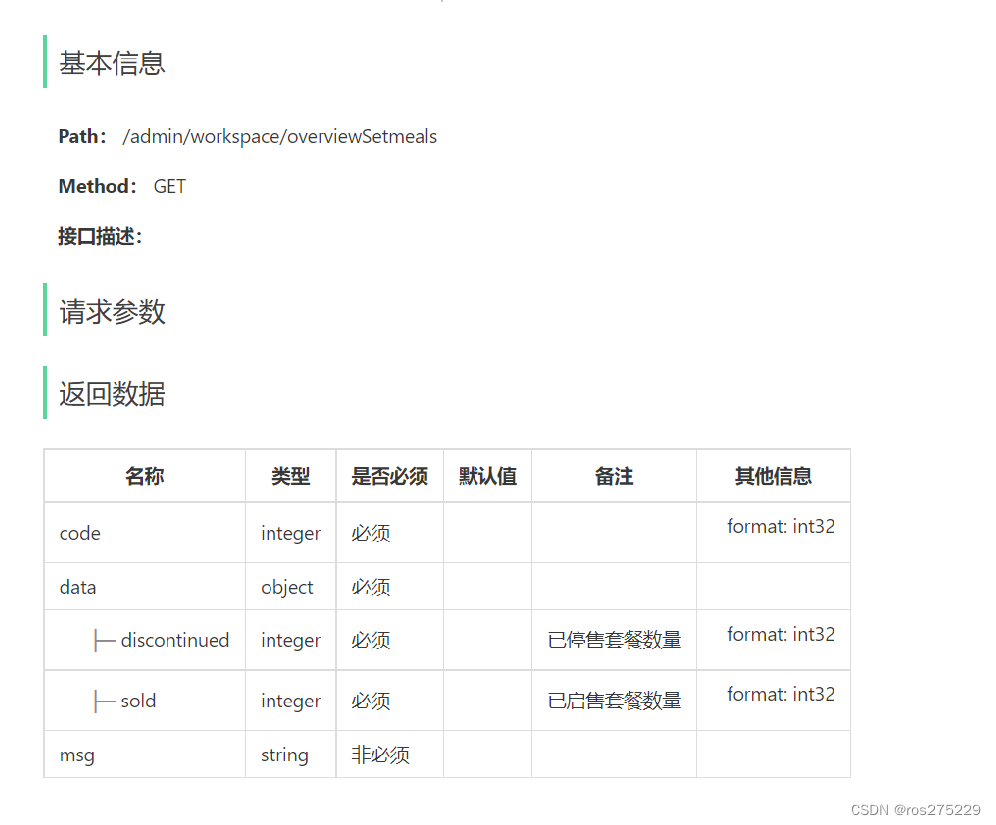
4). 套餐总览的接口设计
1.2 代码导入
直接导入课程资料中的工作台模块功能代码即可:
1.2.1 Controller层
添加WorkSpaceController.java
- package com.sky.controller.admin;
-
- import com.sky.result.Result;
- import com.sky.service.WorkspaceService;
- import com.sky.vo.BusinessDataVO;
- import com.sky.vo.DishOverViewVO;
- import com.sky.vo.OrderOverViewVO;
- import com.sky.vo.SetmealOverViewVO;
- import io.swagger.annotations.Api;
- import io.swagger.annotations.ApiOperation;
- import lombok.extern.slf4j.Slf4j;
- import org.springframework.beans.factory.annotation.Autowired;
- import org.springframework.web.bind.annotation.GetMapping;
- import org.springframework.web.bind.annotation.RequestMapping;
- import org.springframework.web.bind.annotation.RestController;
- import java.time.LocalDateTime;
- import java.time.LocalTime;
-
- /**
- * 工作台
- */
- @RestController
- @RequestMapping("/admin/workspace")
- @Slf4j
- @Api(tags = "工作台相关接口")
- public class WorkSpaceController {
-
- @Autowired
- private WorkspaceService workspaceService;
-
- /**
- * 工作台今日数据查询
- * @return
- */
- @GetMapping("/businessData")
- @ApiOperation("工作台今日数据查询")
- public Result<BusinessDataVO> businessData(){
- //获得当天的开始时间
- LocalDateTime begin = LocalDateTime.now().with(LocalTime.MIN);
- //获得当天的结束时间
- LocalDateTime end = LocalDateTime.now().with(LocalTime.MAX);
-
- BusinessDataVO businessDataVO = workspaceService.getBusinessData(begin, end);
- return Result.success(businessDataVO);
- }
-
- /**
- * 查询订单管理数据
- * @return
- */
- @GetMapping("/overviewOrders")
- @ApiOperation("查询订单管理数据")
- public Result<OrderOverViewVO> orderOverView(){
- return Result.success(workspaceService.getOrderOverView());
- }
-
- /**
- * 查询菜品总览
- * @return
- */
- @GetMapping("/overviewDishes")
- @ApiOperation("查询菜品总览")
- public Result<DishOverViewVO> dishOverView(){
- return Result.success(workspaceService.getDishOverView());
- }
-
- /**
- * 查询套餐总览
- * @return
- */
- @GetMapping("/overviewSetmeals")
- @ApiOperation("查询套餐总览")
- public Result<SetmealOverViewVO> setmealOverView(){
- return Result.success(workspaceService.getSetmealOverView());
- }
- }
1.2.2 Service层接口
添加WorkspaceService.java
- package com.sky.service;
-
- import com.sky.vo.BusinessDataVO;
- import com.sky.vo.DishOverViewVO;
- import com.sky.vo.OrderOverViewVO;
- import com.sky.vo.SetmealOverViewVO;
- import java.time.LocalDateTime;
-
- public interface WorkspaceService {
-
- /**
- * 根据时间段统计营业数据
- * @param begin
- * @param end
- * @return
- */
- BusinessDataVO getBusinessData(LocalDateTime begin, LocalDateTime end);
-
- /**
- * 查询订单管理数据
- * @return
- */
- OrderOverViewVO getOrderOverView();
-
- /**
- * 查询菜品总览
- * @return
- */
- DishOverViewVO getDishOverView();
-
- /**
- * 查询套餐总览
- * @return
- */
- SetmealOverViewVO getSetmealOverView();
-
- }
1.2.3 Service层实现类
添加WorkspaceServiceImpl.java
- package com.sky.service.impl;
-
- import com.sky.constant.StatusConstant;
- import com.sky.entity.Orders;
- import com.sky.mapper.DishMapper;
- import com.sky.mapper.OrderMapper;
- import com.sky.mapper.SetmealMapper;
- import com.sky.mapper.UserMapper;
- import com.sky.service.WorkspaceService;
- import com.sky.vo.BusinessDataVO;
- import com.sky.vo.DishOverViewVO;
- import com.sky.vo.OrderOverViewVO;
- import com.sky.vo.SetmealOverViewVO;
- import lombok.extern.slf4j.Slf4j;
- import org.springframework.beans.factory.annotation.Autowired;
- import org.springframework.stereotype.Service;
- import java.time.LocalDateTime;
- import java.time.LocalTime;
- import java.util.HashMap;
- import java.util.Map;
-
- @Service
- @Slf4j
- public class WorkspaceServiceImpl implements WorkspaceService {
-
- @Autowired
- private OrderMapper orderMapper;
- @Autowired
- private UserMapper userMapper;
- @Autowired
- private DishMapper dishMapper;
- @Autowired
- private SetmealMapper setmealMapper;
-
- /**
- * 根据时间段统计营业数据
- * @param begin
- * @param end
- * @return
- */
- public BusinessDataVO getBusinessData(LocalDateTime begin, LocalDateTime end) {
- /**
- * 营业额:当日已完成订单的总金额
- * 有效订单:当日已完成订单的数量
- * 订单完成率:有效订单数 / 总订单数
- * 平均客单价:营业额 / 有效订单数
- * 新增用户:当日新增用户的数量
- */
-
- Map map = new HashMap();
- map.put("begin",begin);
- map.put("end",end);
-
- //查询总订单数
- Integer totalOrderCount = orderMapper.countByMap(map);
-
- map.put("status", Orders.COMPLETED);
- //营业额
- Double turnover = orderMapper.sumByMap(map);
- turnover = turnover == null? 0.0 : turnover;
-
- //有效订单数
- Integer validOrderCount = orderMapper.countByMap(map);
-
- Double unitPrice = 0.0;
-
- Double orderCompletionRate = 0.0;
- if(totalOrderCount != 0 && validOrderCount != 0){
- //订单完成率
- orderCompletionRate = validOrderCount.doubleValue() / totalOrderCount;
- //平均客单价
- unitPrice = turnover / validOrderCount;
- }
-
- //新增用户数
- Integer newUsers = userMapper.countByMap(map);
-
- return BusinessDataVO.builder()
- .turnover(turnover)
- .validOrderCount(validOrderCount)
- .orderCompletionRate(orderCompletionRate)
- .unitPrice(unitPrice)
- .newUsers(newUsers)
- .build();
- }
-
-
- /**
- * 查询订单管理数据
- *
- * @return
- */
- public OrderOverViewVO getOrderOverView() {
- Map map = new HashMap();
- map.put("begin", LocalDateTime.now().with(LocalTime.MIN));
- map.put("status", Orders.TO_BE_CONFIRMED);
-
- //待接单
- Integer waitingOrders = orderMapper.countByMap(map);
-
- //待派送
- map.put("status", Orders.CONFIRMED);
- Integer deliveredOrders = orderMapper.countByMap(map);
-
- //已完成
- map.put("status", Orders.COMPLETED);
- Integer completedOrders = orderMapper.countByMap(map);
-
- //已取消
- map.put("status", Orders.CANCELLED);
- Integer cancelledOrders = orderMapper.countByMap(map);
-
- //全部订单
- map.put("status", null);
- Integer allOrders = orderMapper.countByMap(map);
-
- return OrderOverViewVO.builder()
- .waitingOrders(waitingOrders)
- .deliveredOrders(deliveredOrders)
- .completedOrders(completedOrders)
- .cancelledOrders(cancelledOrders)
- .allOrders(allOrders)
- .build();
- }
-
- /**
- * 查询菜品总览
- *
- * @return
- */
- public DishOverViewVO getDishOverView() {
- Map map = new HashMap();
- map.put("status", StatusConstant.ENABLE);
- Integer sold = dishMapper.countByMap(map);
-
- map.put("status", StatusConstant.DISABLE);
- Integer discontinued = dishMapper.countByMap(map);
-
- return DishOverViewVO.builder()
- .sold(sold)
- .discontinued(discontinued)
- .build();
- }
-
- /**
- * 查询套餐总览
- *
- * @return
- */
- public SetmealOverViewVO getSetmealOverView() {
- Map map = new HashMap();
- map.put("status", StatusConstant.ENABLE);
- Integer sold = setmealMapper.countByMap(map);
-
- map.put("status", StatusConstant.DISABLE);
- Integer discontinued = setmealMapper.countByMap(map);
-
- return SetmealOverViewVO.builder()
- .sold(sold)
- .discontinued(discontinued)
- .build();
- }
- }
1.2.4 Mapper层
在SetmealMapper中添加countByMap方法定义
- /**
- * 根据条件统计套餐数量
- * @param map
- * @return
- */
- Integer countByMap(Map map);
在SetmealMapper.xml中添加对应SQL实现
- <select id="countByMap" resultType="java.lang.Integer">
- select count(id) from setmeal
- <where>
- <if test="status != null">
- and status = #{status}
- </if>
- <if test="categoryId != null">
- and category_id = #{categoryId}
- </if>
- </where>
- </select>
在DishMapper中添加countByMap方法定义
- /**
- * 根据条件统计菜品数量
- * @param map
- * @return
- */
- Integer countByMap(Map map);
在DishMapper.xml中添加对应SQL实现
- <select id="countByMap" resultType="java.lang.Integer">
- select count(id) from dish
- <where>
- <if test="status != null">
- and status = #{status}
- </if>
- <if test="categoryId != null">
- and category_id = #{categoryId}
- </if>
- </where>
- </select>
1.3 功能测试
可以通过如下方式进行测试:
-
通过接口文档测试
-
前后端联调测试
接下来我们使用上述两种方式分别测试。
1.3.1 前后端联调测试
启动nginx,访问 http://localhost,进入工作台

进入开发者模式,分别查看今日数据、订单管理、菜品总览、套餐总览
1). 今日数据查询

2). 订单管理数据查询

3). 菜品总览查询

4). 套餐总览查询

2. Apache POI
2.1 介绍
Apache POI 是一个处理Miscrosoft Office各种文件格式的开源项目。简单来说就是,我们可以使用 POI 在 Java 程序中对Miscrosoft Office各种文件进行读写操作。 一般情况下,POI 都是用于操作 Excel 文件。
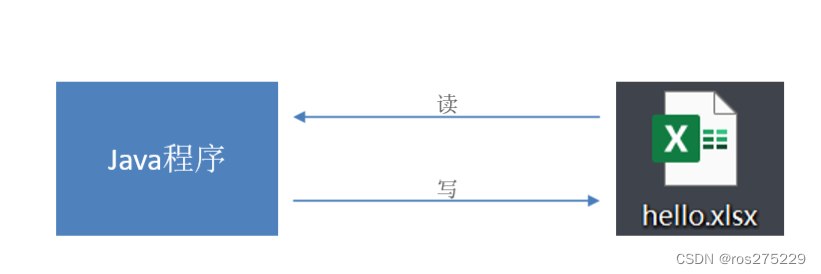
Apache POI 的应用场景:
-
银行网银系统导出交易明细

-
各种业务系统导出Excel报表

-
批量导入业务数据

2.2 入门案例
Apache POI既可以将数据写入Excel文件,也可以读取Excel文件中的数据,接下来分别进行实现。
Apache POI的maven坐标:(项目中已导入)
- <dependency>
- <groupId>org.apache.poi</groupId>
- <artifactId>poi</artifactId>
- <version>3.16</version>
- </dependency>
- <dependency>
- <groupId>org.apache.poi</groupId>
- <artifactId>poi-ooxml</artifactId>
- <version>3.16</version>
- </dependency>
2.2.1 将数据写入Excel文件
1). 代码开发
- package com.sky.test;
-
- import org.apache.poi.xssf.usermodel.XSSFCell;
- import org.apache.poi.xssf.usermodel.XSSFRow;
- import org.apache.poi.xssf.usermodel.XSSFSheet;
- import org.apache.poi.xssf.usermodel.XSSFWorkbook;
- import java.io.File;
- import java.io.FileInputStream;
- import java.io.FileOutputStream;
-
- public class POITest {
-
- /**
- * 基于POI向Excel文件写入数据
- * @throws Exception
- */
- public static void write() throws Exception{
- //在内存中创建一个Excel文件对象
- XSSFWorkbook excel = new XSSFWorkbook();
- //创建Sheet页
- XSSFSheet sheet = excel.createSheet("itcast");
-
- //在Sheet页中创建行,0表示第1行
- XSSFRow row1 = sheet.createRow(0);
- //创建单元格并在单元格中设置值,单元格编号也是从0开始,1表示第2个单元格
- row1.createCell(1).setCellValue("姓名");
- row1.createCell(2).setCellValue("城市");
-
- XSSFRow row2 = sheet.createRow(1);
- row2.createCell(1).setCellValue("张三");
- row2.createCell(2).setCellValue("北京");
-
- XSSFRow row3 = sheet.createRow(2);
- row3.createCell(1).setCellValue("李四");
- row3.createCell(2).setCellValue("上海");
-
- FileOutputStream out = new FileOutputStream(new File("D:\\itcast.xlsx"));
- //通过输出流将内存中的Excel文件写入到磁盘上
- excel.write(out);
-
- //关闭资源
- out.flush();
- out.close();
- excel.close();
- }
- public static void main(String[] args) throws Exception {
- write();
- }
- }
2). 实现效果
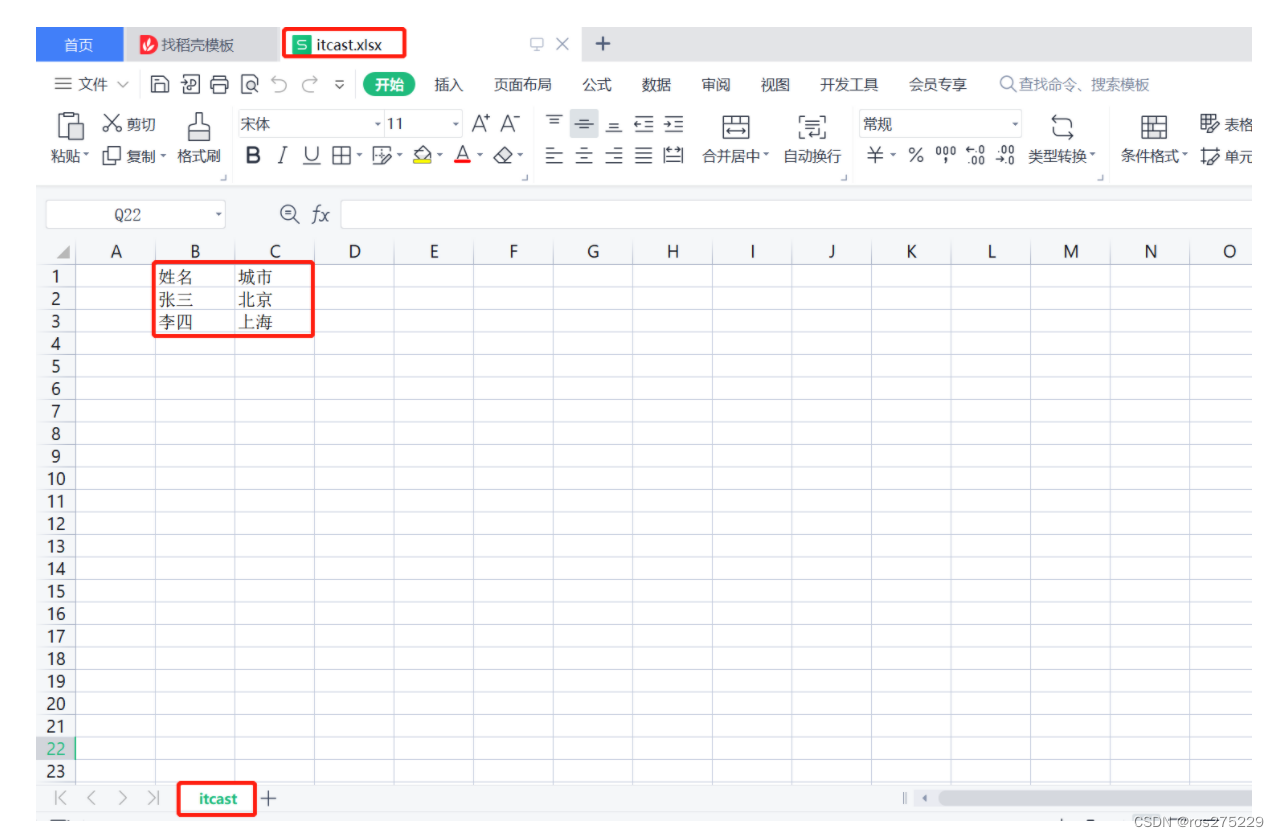
在D盘中生成itcast.xlsx文件,创建名称为itcast的Sheet页,同时将内容成功写入。
2.2.2 读取Excel文件中的数据
1). 代码开发
- package com.sky.test;
-
- import org.apache.poi.xssf.usermodel.XSSFCell;
- import org.apache.poi.xssf.usermodel.XSSFRow;
- import org.apache.poi.xssf.usermodel.XSSFSheet;
- import org.apache.poi.xssf.usermodel.XSSFWorkbook;
- import java.io.File;
- import java.io.FileInputStream;
- import java.io.FileOutputStream;
-
- public class POITest {
- /**
- * 基于POI读取Excel文件
- * @throws Exception
- */
- public static void read() throws Exception{
- FileInputStream in = new FileInputStream(new File("D:\\itcast.xlsx"));
- //通过输入流读取指定的Excel文件
- XSSFWorkbook excel = new XSSFWorkbook(in);
- //获取Excel文件的第1个Sheet页
- XSSFSheet sheet = excel.getSheetAt(0);
-
- //获取Sheet页中的最后一行的行号
- int lastRowNum = sheet.getLastRowNum();
-
- for (int i = 0; i <= lastRowNum; i++) {
- //获取Sheet页中的行
- XSSFRow titleRow = sheet.getRow(i);
- //获取行的第2个单元格
- XSSFCell cell1 = titleRow.getCell(1);
- //获取单元格中的文本内容
- String cellValue1 = cell1.getStringCellValue();
- //获取行的第3个单元格
- XSSFCell cell2 = titleRow.getCell(2);
- //获取单元格中的文本内容
- String cellValue2 = cell2.getStringCellValue();
-
- System.out.println(cellValue1 + " " +cellValue2);
- }
-
- //关闭资源
- in.close();
- excel.close();
- }
-
- public static void main(String[] args) throws Exception {
- read();
- }
- }
2). 实现效果
将itcast.xlsx文件中的数据进行读取
3. 导出运营数据Excel报表
3.1 需求分析和设计
3.1.1 产品原型
在数据统计页面,有一个数据导出的按钮,点击该按钮时,其实就会下载一个文件。这个文件实际上是一个Excel形式的文件,文件中主要包含最近30日运营相关的数据。表格的形式已经固定,主要由概览数据和明细数据两部分组成。真正导出这个报表之后,相对应的数字就会填充在表格中,就可以进行存档。
原型图:

导出的Excel报表格式:

业务规则:
-
导出Excel形式的报表文件
-
导出最近30天的运营数据
3.1.2 接口设计
通过上述原型图设计对应的接口。

注意:
-
当前接口没有传递参数,因为导出的是最近30天的运营数据,后端计算即可,所以不需要任何参数
-
当前接口没有返回数据,因为报表导出功能本质上是文件下载,服务端会通过输出流将Excel文件下载到客户端浏览器
3.2 代码开发
3.2.1 实现步骤
1). 设计Excel模板文件
2). 查询近30天的运营数据
3). 将查询到的运营数据写入模板文件
4). 通过输出流将Excel文件下载到客户端浏览器

3.2.2 Controller层
根据接口定义,在ReportController中创建export方法:
- /**
- * 导出运营数据报表
- * @param response
- */
- @GetMapping("/export")
- @ApiOperation("导出运营数据报表")
- public void export(HttpServletResponse response){
- reportService.exportBusinessData(response);
- }
3.2.3 Service层接口
在ReportService接口中声明导出运营数据报表的方法:
- /**
- * 导出近30天的运营数据报表
- * @param response
- **/
- void exportBusinessData(HttpServletResponse response);
3.2.4 Service层实现类
在ReportServiceImpl实现类中实现导出运营数据报表的方法:
提前将资料中的运营数据报表模板.xlsx拷贝到项目的resources/template目录中
- /**导出近30天的运营数据报表
- * @param response
- **/
- public void exportBusinessData(HttpServletResponse response) {
- LocalDate begin = LocalDate.now().minusDays(30);
- LocalDate end = LocalDate.now().minusDays(1);
- //查询概览运营数据,提供给Excel模板文件
- BusinessDataVO businessData = workspaceService.getBusinessData(LocalDateTime.of(begin,LocalTime.MIN), LocalDateTime.of(end, LocalTime.MAX));
- InputStream inputStream = this.getClass().getClassLoader().getResourceAsStream("template/运营数据报表模板.xlsx");
- try {
- //基于提供好的模板文件创建一个新的Excel表格对象
- XSSFWorkbook excel = new XSSFWorkbook(inputStream);
- //获得Excel文件中的一个Sheet页
- XSSFSheet sheet = excel.getSheet("Sheet1");
-
- sheet.getRow(1).getCell(1).setCellValue(begin + "至" + end);
- //获得第4行
- XSSFRow row = sheet.getRow(3);
- //获取单元格
- row.getCell(2).setCellValue(businessData.getTurnover());
- row.getCell(4).setCellValue(businessData.getOrderCompletionRate());
- row.getCell(6).setCellValue(businessData.getNewUsers());
- row = sheet.getRow(4);
- row.getCell(2).setCellValue(businessData.getValidOrderCount());
- row.getCell(4).setCellValue(businessData.getUnitPrice());
- for (int i = 0; i < 30; i++) {
- LocalDate date = begin.plusDays(i);
- //准备明细数据
- businessData = workspaceService.getBusinessData(LocalDateTime.of(date,LocalTime.MIN), LocalDateTime.of(date, LocalTime.MAX));
- row = sheet.getRow(7 + i);
- row.getCell(1).setCellValue(date.toString());
- row.getCell(2).setCellValue(businessData.getTurnover());
- row.getCell(3).setCellValue(businessData.getValidOrderCount());
- row.getCell(4).setCellValue(businessData.getOrderCompletionRate());
- row.getCell(5).setCellValue(businessData.getUnitPrice());
- row.getCell(6).setCellValue(businessData.getNewUsers());
- }
- //通过输出流将文件下载到客户端浏览器中
- ServletOutputStream out = response.getOutputStream();
- excel.write(out);
- //关闭资源
- out.flush();
- out.close();
- excel.close();
-
- }catch (IOException e){
- e.printStackTrace();
- }
- }
3.3 功能测试
直接使用前后端联调测试。
进入数据统计
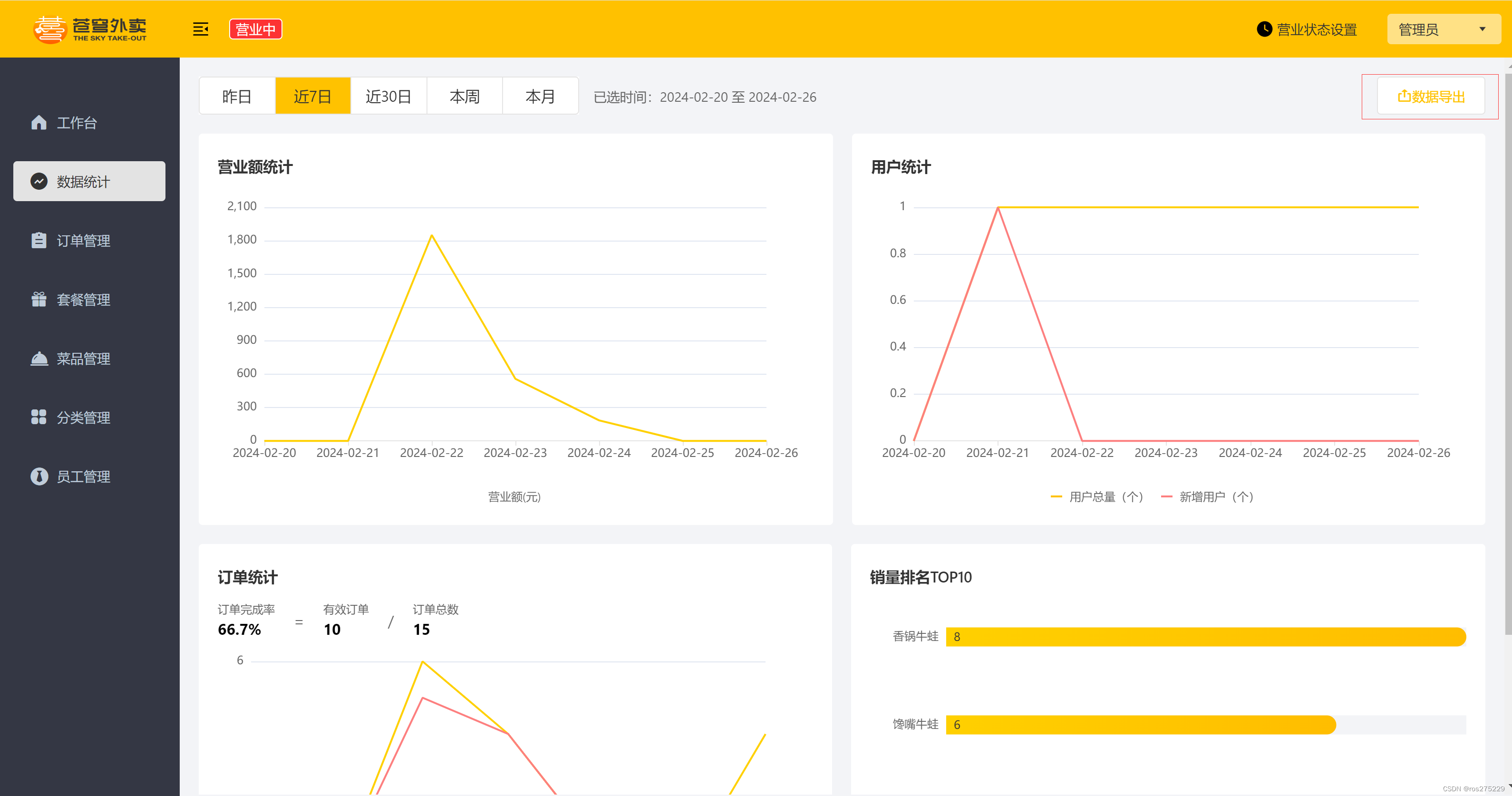
点击数据导出:Excel报表下载成功

-
-
相关阅读:
【力客热题HOT100】-【052】146 LRU缓存
kubernetes——快速部署
uniapp封装mixins实现H5和微信小程序的微信支付
【Java基础知识 46】GET和POST的区别,java模拟postman发post请求
北斗导航 | 最小二乘模糊度估计方法(LSAR:Least Squares Ambiguity Resolution)
【算法 | 模拟No.4】AcWing 756. 蛇形矩阵 & AcWing 40. 顺时针打印矩阵
【深度学习1】 BGD梯度下降算法
MongoDB综合实战篇(超容易)
java 字符串练习(罗马数字的转换)
《爆肝整理》保姆级系列教程-玩转Charles抓包神器教程(16)-Charles其他骚操作之大结局
- 原文地址:https://blog.csdn.net/ros275229/article/details/136311985
