-
Swift Combine 使用 handleEvents 操作符调试管道 从入门到精通二十五
Combine 系列
- Swift Combine 从入门到精通一
- Swift Combine 发布者订阅者操作者 从入门到精通二
- Swift Combine 管道 从入门到精通三
- Swift Combine 发布者publisher的生命周期 从入门到精通四
- Swift Combine 操作符operations和Subjects发布者的生命周期 从入门到精通五
- Swift Combine 订阅者Subscriber的生命周期 从入门到精通六
- Swift 使用 Combine 进行开发 从入门到精通七
- Swift 使用 Combine 管道和线程进行开发 从入门到精通八
- Swift Combine 使用 sink, assign 创建一个订阅者 从入门到精通九
- Swift Combine 使用 dataTaskPublisher 发起网络请求 从入门到精通十
- Swift Combine 用 Future 来封装异步请求 从入门到精通十一
- Swift Combine 有序的异步操作 从入门到精通十二
- Swift Combine 使用 flatMap 和 catch错误处理 从入门到精通十三
- Swift Combine 网络受限时从备用 URL 请求数据 从入门到精通十四
- Swift Combine 通过用户输入更新声明式 UI 从入门到精通十五
- Swift Combine 级联多个 UI 更新,包括网络请求 从入门到精通十六
- Swift Combine 合并多个管道以更新 UI 元素 从入门到精通十七
- Swift Combine 通过包装基于 delegate 的 API 创建重复发布者 从入门到精通十八
- Swift Combine 响应NotificationCenter 的更新 从入门到精通十九
- Swift Combine 使用 ObservableObject 与 SwiftUI 模型作为发布源 从入门到精通二十
- Swift Combine 使用 XCTestExpectation 测试发布者 从入门到精通二十一
- Swift Combine 使用 PassthroughSubject 测试订阅者 从入门到精通二十二
- Swift Combine 使用从 PassthroughSubject 预定好的发送的事件测试订阅者 从入门到精通二十三
- Swift Combine 使用 print 操作符调试管道 从入门到精通二十四
1. 使用 handleEvents 操作符调试管道
目的: 使用断点、打印、记录语句或其他额外的逻辑,以便更有针对性地了解管道内发生的情况。
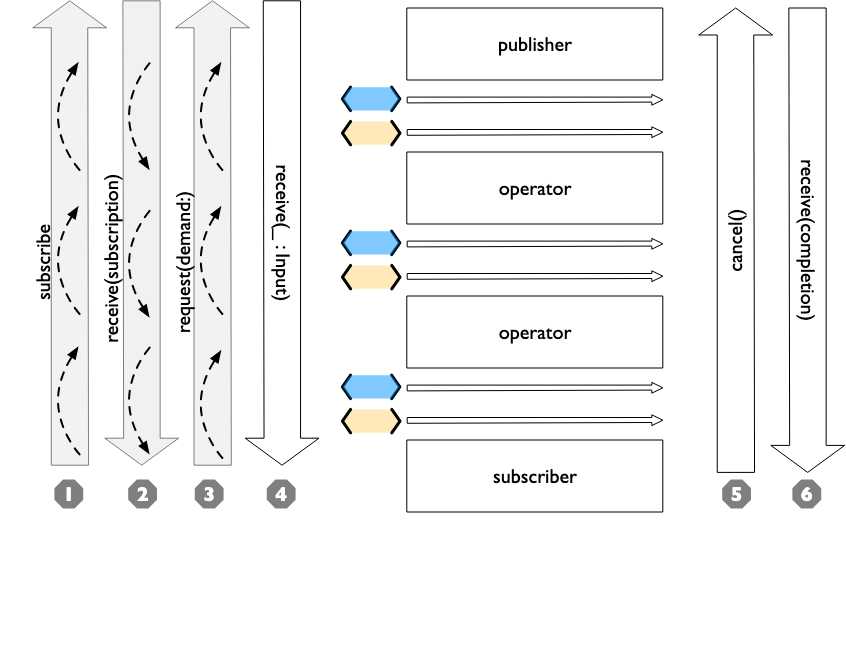
handleEvents传入数据,不对输出和失败类型或数据进行任何修改。 当你在管道中加入该操作符时,可以指定一些可选的闭包,从而让你能够专注于你想要看到的信息。 具有特定闭包的handleEvents操作符是一个打开新窗口的好方法,通过该窗口可以查看管道取消、出错或以其他预期的方式终止时发生的情况。可以指定的闭包包括:
receiveSubscriptionreceiveRequestreceiveCancelreceiveOutputreceiveCompletion
如果每个闭包都包含打印语句,则该操作符将非常像
print操作符,具体表现在 使用 print 操作符调试管道。使用
handleEvents调试的强大之处在于可以选择要查看的内容、减少输出量或操作数据以更好地了解它。在 UIKit-Combine/GithubViewController.swift 的示例 viewcontroller 中,订阅、取消和 completion 的事件被用于启动或停止 UIActivityIndicatorView。
如果你只想看到管道上传递的数据,而不关心控制消息,那么为 receiveOutput 提供单个闭包并忽略其他闭包可以让你专注于这些详细信息。
handleEvents 的单元测试示例展示了所有可提供的闭包:
UsingCombineTests/HandleEventsPublisherTests.swift
.handleEvents(receiveSubscription: { aValue in print("receiveSubscription event called with \(String(describing: aValue))") // 2 }, receiveOutput: { aValue in // 3 print("receiveOutput was invoked with \(String(describing: aValue))") }, receiveCompletion: { aValue in // 4 print("receiveCompletion event called with \(String(describing: aValue))") }, receiveCancel: { // 5 print("receiveCancel event invoked") }, receiveRequest: { aValue in // 1 print("receiveRequest event called with \(String(describing: aValue))") })- 1
- 2
- 3
- 4
- 5
- 6
- 7
- 8
- 9
- 10
- 11
- 第一个被调用的闭包是
receiveRequest,所需要的值(the demandvalue)将传递给它。 - 第二个闭包
receiveSubscription通常是从发布者返回的订阅消息,它将对订阅的引用传递给发布者。 此时,管道已运行,发布者将根据原始请求中请求的数据量提供数据。 - 当发布者提供这些数据时,这些数据将传递到
receiveOutput中,每次有值传递过来都将调用该闭包。 这将随着发布者发送更多的值而重复调用。 - 如果管道正常关闭或因失败而终止,receiveCompletion 闭包将收到 completion 事件。 就像 sink 闭包一样,你可以对提供的 completion 事件使用 switch,如果它是一个 .failure completion,那么你可以检查附带的错误。
- 如果管道被取消,则将调用 receiveCancel 闭包。 不会有任何数据传递到该取消闭包中。
虽然你还可以使用 breakpoint 和 breakpointOnError 操作符进入调试模式(如使用调试器调试管道 中所示),带有闭包的 handleEvents() 操作符允许你在 Xcode 内设置断点。 这允许你立即进入调试器,检查流经管道的数据,或获取订阅者的引用,或在失败的 completion 事件中获取错误信息。
参考
https://heckj.github.io/swiftui-notes/index_zh-CN.html
代码
https://github.com/heckj/swiftui-notes
-
相关阅读:
ZynqMp Sysmon 记录
ignoreDependencyInterface与registerResolvableDependency
数据分析与应用:微信-情人节红包流向探索分析
Python自动化办公(二) —— 查看文件夹中的PDF文件数量
生成模型的两大代表:VAE和GAN
流程记录:
刚学习网格布局写一个计算器模型
ElasticSearch之查询性能分析
修过书上的建网站用的CMS程序源码,增加在文章中插入图片功能
学习笔记20--汽车运动控制
- 原文地址:https://blog.csdn.net/zgpeace/article/details/136200557