-
【Ubuntu】Ubuntu arm64 部署 Blazor Server 应用
部署步骤
- 发布
- 安装运行环境:
dotnet-sdk(必装)、aspnetcore-runtime、dotnet-runtime - 安装证书
- 设置环境变量:
临时变量、当前用户永久变量、所有用户的永久变量 - 运行:
终端运行、后台运行
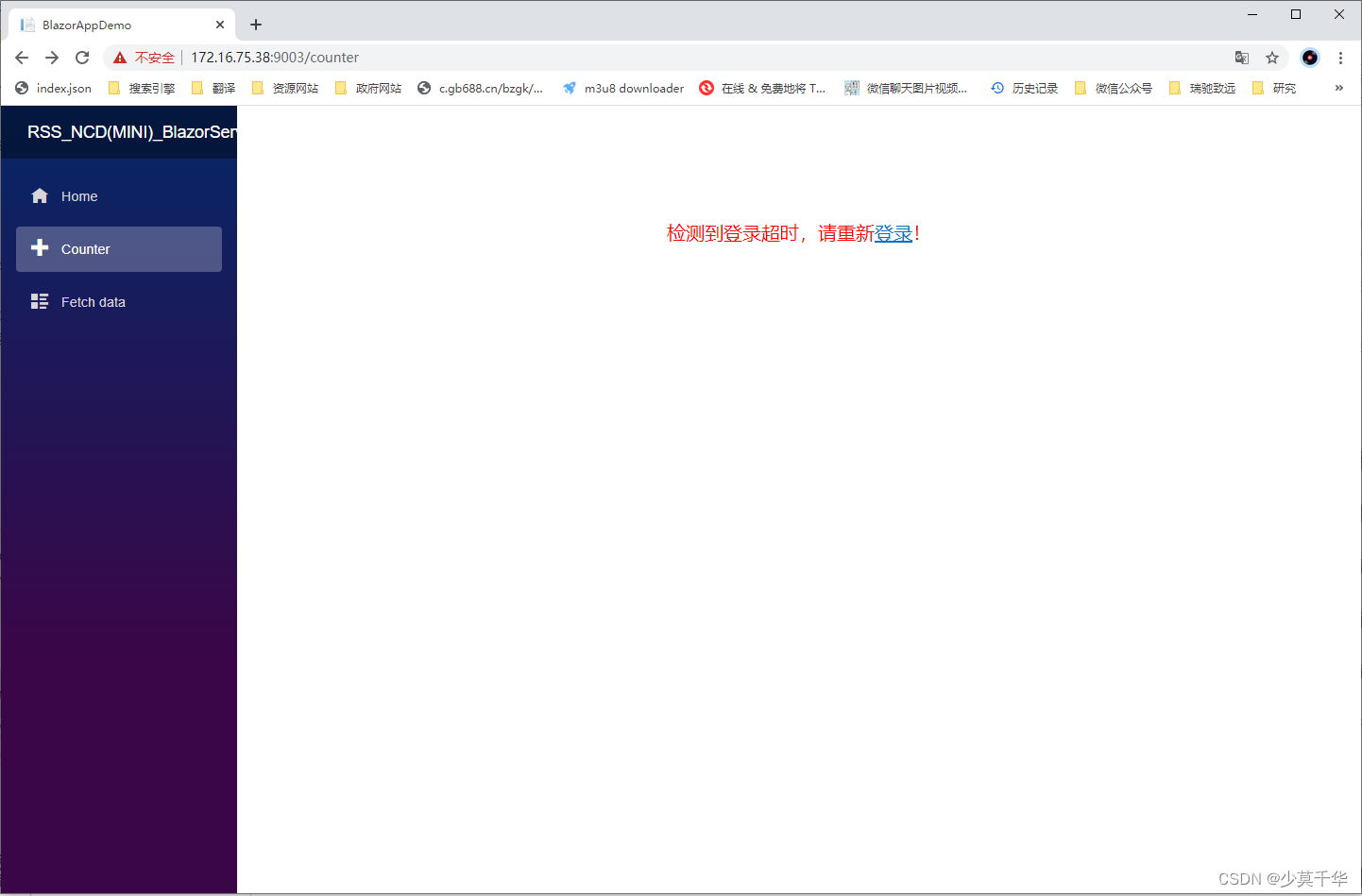
基本情况
开发系统环境
- 系统:Windows 10 专业版 22H2 19045.3693
- 开发软件IDE:Microsoft Visual Studio Community 2022 (64 位) - Current 版本 17.6.5
- 项目框架:Blazor Server 应用
- 目标框架:.NET 6.0
- 系统架构:x64

发布系统环境
- 系统:Ubuntu 20.04.6 LTS focal
- 架构:arm64
系统信息
lsb_release -a- 1
No LSB modules are available. Distributor ID: Ubuntu Description: Ubuntu 20.04.6 LTS Release: 20.04 Codename: focal- 1
- 2
- 3
- 4
- 5
查看架构
sudo dpkg --print-architecture- 1
arm64- 1
二、部署
2.1 准备部署文件
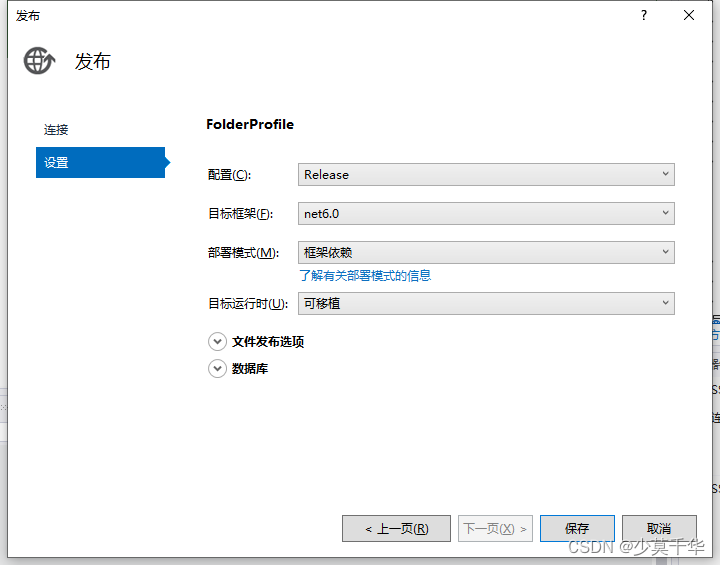
2.1.1 发布
- 配置: Release
- 目标框架(F): net6.0
- 部署模式(M): 框架依赖
- 目标运行时(U): 可移植
2.1.2 打包文件 - 压缩zip
如:
RSS_NCD_MINI_BlazorServer.zip2.1.3 将打包文件从Windows拷贝到Ubuntu系统
推荐将文件放在
/home/<用户>/<新建公司名/产品名>/<项目名>目录下
如:/home/signway/rsszy/webapp3/2.1.4 释放文件 - 解压zip
- 打开Ubuntu终端
- 跳转到
RSS_NCD_MINI_BlazorServer.zip所在目录
cd /home/signway/rsszy/webapp3/- 1
- 使用
unzip指令解压RSS_NCD_MINI_BlazorServer.zip文件
unzip RSS_NCD_MINI_BlazorServer.zip- 1
Archive: RSS_NCD_MINI_BlazorServer.zip inflating: Microsoft.IdentityModel.Protocols.OpenIdConnect.dll inflating: Microsoft.IdentityModel.Tokens.dll inflating: RSS_NCD(MINI)_BlazorServer.deps.json inflating: RSS_NCD(MINI)_BlazorServer.dll inflating: RSS_NCD(MINI)_BlazorServer.exe inflating: RSS_NCD(MINI)_BlazorServer.pdb inflating: RSS_NCD(MINI)_BlazorServer.runtimeconfig.json inflating: System.IdentityModel.Tokens.Jwt.dll inflating: web.config creating: wwwroot/ creating: wwwroot/css/ creating: wwwroot/css/bootstrap/ inflating: wwwroot/css/bootstrap/bootstrap.min.css inflating: wwwroot/css/bootstrap/bootstrap.min.css.map creating: wwwroot/css/open-iconic/ creating: wwwroot/css/open-iconic/font/ creating: wwwroot/css/open-iconic/font/css/ inflating: wwwroot/css/open-iconic/font/css/open-iconic-bootstrap.min.css creating: wwwroot/css/open-iconic/font/fonts/ inflating: wwwroot/css/open-iconic/font/fonts/open-iconic.eot inflating: wwwroot/css/open-iconic/font/fonts/open-iconic.otf inflating: wwwroot/css/open-iconic/font/fonts/open-iconic.svg inflating: wwwroot/css/open-iconic/font/fonts/open-iconic.ttf inflating: wwwroot/css/open-iconic/font/fonts/open-iconic.woff inflating: wwwroot/css/open-iconic/FONT-LICENSE inflating: wwwroot/css/open-iconic/ICON-LICENSE inflating: wwwroot/css/open-iconic/README.md inflating: wwwroot/css/site.css inflating: wwwroot/favicon.ico inflating: wwwroot/RSS_NCD(MINI)_BlazorServer.styles.css inflating: appsettings.Development.json inflating: appsettings.json inflating: Microsoft.AspNetCore.Authentication.JwtBearer.dll inflating: Microsoft.IdentityModel.JsonWebTokens.dll inflating: Microsoft.IdentityModel.Logging.dll inflating: Microsoft.IdentityModel.Protocols.dll- 1
- 2
- 3
- 4
- 5
- 6
- 7
- 8
- 9
- 10
- 11
- 12
- 13
- 14
- 15
- 16
- 17
- 18
- 19
- 20
- 21
- 22
- 23
- 24
- 25
- 26
- 27
- 28
- 29
- 30
- 31
- 32
- 33
- 34
- 35
- 36
- 37
2.2 安装框架
2.2.1 下载框架
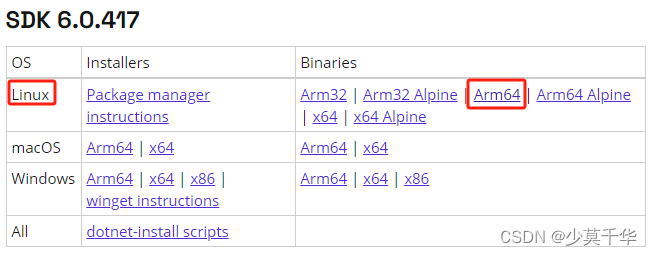
注意: 必须安装SDK,才能使用dotnet指令运行程序。2.2.2 安装dotnet-sdk
- 将下载的文件拷贝到Ubuntu系统目录
推荐将文件放在/home/<用户>/<功能>/<框架名>目录下
如:/home/signway/install/dotnet/ - 打开终端跳转到文件目录
cd /home/signway/install/dotnet/- 1
- 安装
dotnet-sdk、dotnet-runtime、aspnetcore-runtime
mkdir -p $HOME/dotnet && tar zxf dotnet-sdk-6.0.417-linux-arm64.tar.gz -C $HOME/dotnet mkdir -p $HOME/dotnet && tar zxf dotnet-runtime-6.0.25-linux-arm64.tar.gz -C $HOME/dotnet mkdir -p $HOME/dotnet && tar zxf aspnetcore-runtime-6.0.25-linux-arm64.tar.gz -C $HOME/dotnet export DOTNET_ROOT=$HOME/dotnet export PATH=$PATH:$HOME/dotnet- 1
- 2
- 3
- 4
- 5
上述指令只会在运行它的终端生效。
你可以编辑shell配置文件以永久添加命令。Linux有几个不同的shell,每个shell都有不同的配置文件。例如:- Bash Shell:
~/.bash_profile或~/.bashrc - Korn Shell:
~/.kshrc或.profile - Z Shell:
~/.zshrc或.zprofile
编辑shell的相应源文件,并在现有PATH语句的末尾添加:
$HOME/dotnet。如果没有包含PATH语句,则添加一个新行,export DOTNET_ROOT=$HOME/dotnet。同时将export PATH=$PATH:$HOME/dotnet添加到文件末尾。# ... export DOTNET_ROOT=$HOME/dotnet export PATH=$PATH:$HOME/dotnet- 1
- 2
- 3
2.3 安装证书
2.3.1 安装证书
dotnet dev-certs https --trust dotnet dev-certs https -t- 1
- 2
signway@RK3588:~/rsszy/webapp2$ dotnet dev-certs https --trust
A valid HTTPS certificate is already present.Trusting the HTTPS development certificate was requested. Trusting the certificate
on Linux distributions automatically is not supported. For instructions on how to
manually trust the certificate on your Linux distribution, go to
https://aka.ms/dev-certs-trust
2.3.2 未安装会出现什么情况?
The command could not be loaded, possibly because: * You intended to execute a .NET application: The application 'dev-certs' does not exist. * You intended to execute a .NET SDK command: No .NET SDKs were found. Download a .NET SDK: https://aka.ms/dotnet-download Learn about SDK resolution: https://aka.ms/dotnet/sdk-not-found- 1
- 2
- 3
- 4
- 5
- 6
- 7
- 8
- 9
- 10
- 11
Unable to configure HTTPS endpoint. No server certificate was specified, and the default developer certificate could not be found or is out of date. Unhandled exception. System.InvalidOperationException: Unable to configure HTTPS endpoint. No server certificate was specified, and the default developer certificate could not be found or is out of date. To generate a developer certificate run 'dotnet dev-certs https'. To trust the certificate (Windows and macOS only) run 'dotnet dev-certs https --trust'. For more information on configuring HTTPS see https://go.microsoft.com/fwlink/?linkid=848054. at Microsoft.AspNetCore.Server.Kestrel.KestrelConfigurationLoader.Reload() at Microsoft.AspNetCore.Server.Kestrel.KestrelConfigurationLoader.Load() at Microsoft.AspNetCore.Server.Kestrel.Core.KestrelServerImpl.BindAsync(CancellationToken cancellationToken) at Microsoft.AspNetCore.Server.Kestrel.Core.KestrelServerImpl.StartAsync[TContext](IHttpApplication`1 application, CancellationToken cancellationToken) at Microsoft.AspNetCore.Hosting.GenericWebHostService.StartAsync(CancellationToken cancellationToken) at Microsoft.Extensions.Hosting.Internal.Host.StartAsync(CancellationToken cancellationToken) at Microsoft.Extensions.Hosting.HostingAbstractionsHostExtensions.RunAsync(IHost host, CancellationToken token) at Microsoft.Extensions.Hosting.HostingAbstractionsHostExtensions.RunAsync(IHost host, CancellationToken token) at Microsoft.Extensions.Hosting.HostingAbstractionsHostExtensions.Run(IHost host) at Microsoft.AspNetCore.Builder.WebApplication.Run(String url) at Program.<Main>$(String[] args) in E:\SVN\RCSoft1\RSS_NCD(MINI)\RSS_NCD(MINI)_BlazorServer\RSS_NCD(MINI)_BlazorServerAPI\Program.cs:line 85 已放弃 (核心已转储)- 1
- 2
- 3
- 4
- 5
- 6
- 7
- 8
- 9
- 10
- 11
- 12
- 13
- 14
- 15
- 16
- 17
2.4 添加环境变量
2.4.1 临时运行
每次打开终端运行以下命令来设置临时变量
export DOTNET_ROOT=$HOME/dotnet export PATH=$PATH:$HOME/dotnet- 1
- 2
2.4.2 永久添加 - 当前登录用户
1. 打开 ~/.bashrc文件
vi ~/.bashrc- 1
# ~/.bashrc: executed by bash(1) for non-login shells. # see /usr/share/doc/bash/examples/startup-files (in the package bash-doc) # for examples # If not running interactively, don't do anything case $- in *i*) ;; *) return;; esac # don't put duplicate lines or lines starting with space in the history. # See bash(1) for more options HISTCONTROL=ignoreboth # append to the history file, don't overwrite it shopt -s histappend # for setting history length see HISTSIZE and HISTFILESIZE in bash(1) HISTSIZE=1000 HISTFILESIZE=2000 # check the window size after each command and, if necessary, # update the values of LINES and COLUMNS. shopt -s checkwinsize # If set, the pattern "**" used in a pathname expansion context will # match all files and zero or more directories and subdirectories. #shopt -s globstar # make less more friendly for non-text input files, see lesspipe(1) [ -x /usr/bin/lesspipe ] && eval "$(SHELL=/bin/sh lesspipe)" # set variable identifying the chroot you work in (used in the prompt below) if [ -z "${debian_chroot:-}" ] && [ -r /etc/debian_chroot ]; then debian_chroot=$(cat /etc/debian_chroot) fi # set a fancy prompt (non-color, unless we know we "want" color) case "$TERM" in xterm-color|*-256color) color_prompt=yes;; esac # uncomment for a colored prompt, if the terminal has the capability; turned # off by default to not distract the user: the focus in a terminal window # should be on the output of commands, not on the prompt #force_color_prompt=yes if [ -n "$force_color_prompt" ]; then if [ -x /usr/bin/tput ] && tput setaf 1 >&/dev/null; then # We have color support; assume it's compliant with Ecma-48 # (ISO/IEC-6429). (Lack of such support is extremely rare, and such # a case would tend to support setf rather than setaf.) color_prompt=yes else color_prompt= fi fi if [ "$color_prompt" = yes ]; then PS1='${debian_chroot:+($debian_chroot)}\[\033[01;32m\]\u@\h\[\033[00m\]:\[\033[01;34m\]\w\[\033[00m\]\$ ' else PS1='${debian_chroot:+($debian_chroot)}\u@\h:\w\$ ' fi unset color_prompt force_color_prompt # If this is an xterm set the title to user@host:dir case "$TERM" in xterm*|rxvt*) PS1="\[\e]0;${debian_chroot:+($debian_chroot)}\u@\h: \w\a\]$PS1" ;; *) ;; esac # enable color support of ls and also add handy aliases if [ -x /usr/bin/dircolors ]; then test -r ~/.dircolors && eval "$(dircolors -b ~/.dircolors)" || eval "$(dircolors -b)" alias ls='ls --color=auto' #alias dir='dir --color=auto' #alias vdir='vdir --color=auto' alias grep='grep --color=auto' alias fgrep='fgrep --color=auto' alias egrep='egrep --color=auto' fi # colored GCC warnings and errors #export GCC_COLORS='error=01;31:warning=01;35:note=01;36:caret=01;32:locus=01:quote=01' # some more ls aliases alias ll='ls -alF' alias la='ls -A' alias l='ls -CF' # Add an "alert" alias for long running commands. Use like so: # sleep 10; alert alias alert='notify-send --urgency=low -i "$([ $? = 0 ] && echo terminal || echo error)" "$(history|tail -n1|sed -e '\''s/^\s*[0-9]\+\s*//;s/[;&|]\s*alert$//'\'')"' # Alias definitions. # You may want to put all your additions into a separate file like # ~/.bash_aliases, instead of adding them here directly. # See /usr/share/doc/bash-doc/examples in the bash-doc package. if [ -f ~/.bash_aliases ]; then . ~/.bash_aliases fi # enable programmable completion features (you don't need to enable # this, if it's already enabled in /etc/bash.bashrc and /etc/profile # sources /etc/bash.bashrc). if ! shopt -oq posix; then if [ -f /usr/share/bash-completion/bash_completion ]; then . /usr/share/bash-completion/bash_completion elif [ -f /etc/bash_completion ]; then . /etc/bash_completion fi fi export PATH=$PATH:$HOME/dotnet export DOTNET_ROOT=$HOME/dotnet- 1
- 2
- 3
- 4
- 5
- 6
- 7
- 8
- 9
- 10
- 11
- 12
- 13
- 14
- 15
- 16
- 17
- 18
- 19
- 20
- 21
- 22
- 23
- 24
- 25
- 26
- 27
- 28
- 29
- 30
- 31
- 32
- 33
- 34
- 35
- 36
- 37
- 38
- 39
- 40
- 41
- 42
- 43
- 44
- 45
- 46
- 47
- 48
- 49
- 50
- 51
- 52
- 53
- 54
- 55
- 56
- 57
- 58
- 59
- 60
- 61
- 62
- 63
- 64
- 65
- 66
- 67
- 68
- 69
- 70
- 71
- 72
- 73
- 74
- 75
- 76
- 77
- 78
- 79
- 80
- 81
- 82
- 83
- 84
- 85
- 86
- 87
- 88
- 89
- 90
- 91
- 92
- 93
- 94
- 95
- 96
- 97
- 98
- 99
- 100
- 101
- 102
- 103
- 104
- 105
- 106
- 107
- 108
- 109
- 110
- 111
- 112
- 113
- 114
- 115
- 116
- 117
- 118
- 119
- 120
- 121
- 122
2. 设置环境变量
按I键,退出命令模式进入编辑模式, ~/.bashrc文件末尾添加以下内容设置环境变量。
export PATH=$PATH:$HOME/dotnet export DOTNET_ROOT=$HOME/dotnet- 1
- 2
3. 保存退出
按Esc键,退出编辑模式进入命令模式,输入以下指令保存。
:wq!- 1
2.4.3 永久添加 - 所有用户
1. 打开 /etc/profile文件
sudo vim /etc/profile- 1
# /etc/profile: system-wide .profile file for the Bourne shell (sh(1)) # and Bourne compatible shells (bash(1), ksh(1), ash(1), ...). if [ "${PS1-}" ]; then if [ "${BASH-}" ] && [ "$BASH" != "/bin/sh" ]; then # The file bash.bashrc already sets the default PS1. # PS1='\h:\w\$ ' if [ -f /etc/bash.bashrc ]; then . /etc/bash.bashrc fi else if [ "`id -u`" -eq 0 ]; then PS1='# ' else PS1='$ ' fi fi fi if [ -d /etc/profile.d ]; then for i in /etc/profile.d/*.sh; do if [ -r $i ]; then . $i fi done unset i fi- 1
- 2
- 3
- 4
- 5
- 6
- 7
- 8
- 9
- 10
- 11
- 12
- 13
- 14
- 15
- 16
- 17
- 18
- 19
- 20
- 21
- 22
- 23
- 24
- 25
- 26
- 27
- 28
2. 设置环境变量
按I键,退出命令模式进入编辑模式, ~/.bashrc文件末尾添加以下内容设置环境变量。
export PATH=$PATH:$HOME/dotnet export DOTNET_ROOT=$HOME/dotnet- 1
- 2
3. 保存退出
按Esc键,退出编辑模式进入命令模式,输入以下指令保存。
:wq!- 1
4. 重新加载
执行以下指令生效
source /etc/profile- 1
2.4.4 查看设置的环境变量
1 只看
PATH变量echo $PATH- 1
/sbin:/bin:/usr/bin:/usr/local/bin:/snap/bin:/home/signway/dotnet- 1
2 查看所有环境变量
env- 1
SHELL=/bin/bash SESSION_MANAGER=local/RK3588:@/tmp/.ICE-unix/20779,unix/RK3588:/tmp/.ICE-unix/20779 QT_ACCESSIBILITY=1 COLORTERM=truecolor XDG_MENU_PREFIX=gnome- GNOME_DESKTOP_SESSION_ID=this-is-deprecated GNOME_KEYRING_CONTROL=/home/signway/.cache/keyring-ZRVEE2 DOTNET_ROOT=/home/signway/dotnet SSH_AUTH_SOCK=/home/signway/.cache/keyring-ZRVEE2/ssh XMODIFIERS=@im=ibus SSH_AGENT_PID=20915 GTK_MODULES=gail:atk-bridge PWD=/home/signway LOGNAME=signway XDG_SESSION_TYPE=x11 GPG_AGENT_INFO=/run/user/1000/gnupg/S.gpg-agent:0:1 PULSE_SCRIPT=/etc/xrdp/pulse/default.pa HOME=/home/signway LANG=zh_CN.UTF-8 LS_COLORS=rs=0:di=01;34:ln=01;36:mh=00:pi=40;33:so=01;35:do=01;35:bd=40;33;01:cd=40;33;01:or=40;31;01:mi=00:su=37;41:sg=30;43:ca=30;41:tw=30;42:ow=34;42:st=37;44:ex=01;32:*.tar=01;31:*.tgz=01;31:*.arc=01;31:*.arj=01;31:*.taz=01;31:*.lha=01;31:*.lz4=01;31:*.lzh=01;31:*.lzma=01;31:*.tlz=01;31:*.txz=01;31:*.tzo=01;31:*.t7z=01;31:*.zip=01;31:*.z=01;31:*.dz=01;31:*.gz=01;31:*.lrz=01;31:*.lz=01;31:*.lzo=01;31:*.xz=01;31:*.zst=01;31:*.tzst=01;31:*.bz2=01;31:*.bz=01;31:*.tbz=01;31:*.tbz2=01;31:*.tz=01;31:*.deb=01;31:*.rpm=01;31:*.jar=01;31:*.war=01;31:*.ear=01;31:*.sar=01;31:*.rar=01;31:*.alz=01;31:*.ace=01;31:*.zoo=01;31:*.cpio=01;31:*.7z=01;31:*.rz=01;31:*.cab=01;31:*.wim=01;31:*.swm=01;31:*.dwm=01;31:*.esd=01;31:*.jpg=01;35:*.jpeg=01;35:*.mjpg=01;35:*.mjpeg=01;35:*.gif=01;35:*.bmp=01;35:*.pbm=01;35:*.pgm=01;35:*.ppm=01;35:*.tga=01;35:*.xbm=01;35:*.xpm=01;35:*.tif=01;35:*.tiff=01;35:*.png=01;35:*.svg=01;35:*.svgz=01;35:*.mng=01;35:*.pcx=01;35:*.mov=01;35:*.mpg=01;35:*.mpeg=01;35:*.m2v=01;35:*.mkv=01;35:*.webm=01;35:*.ogm=01;35:*.mp4=01;35:*.m4v=01;35:*.mp4v=01;35:*.vob=01;35:*.qt=01;35:*.nuv=01;35:*.wmv=01;35:*.asf=01;35:*.rm=01;35:*.rmvb=01;35:*.flc=01;35:*.avi=01;35:*.fli=01;35:*.flv=01;35:*.gl=01;35:*.dl=01;35:*.xcf=01;35:*.xwd=01;35:*.yuv=01;35:*.cgm=01;35:*.emf=01;35:*.ogv=01;35:*.ogx=01;35:*.aac=00;36:*.au=00;36:*.flac=00;36:*.m4a=00;36:*.mid=00;36:*.midi=00;36:*.mka=00;36:*.mp3=00;36:*.mpc=00;36:*.ogg=00;36:*.ra=00;36:*.wav=00;36:*.oga=00;36:*.opus=00;36:*.spx=00;36:*.xspf=00;36: XDG_CURRENT_DESKTOP=GNOME VTE_VERSION=6003 XRDP_SOCKET_PATH=/run/xrdp/sockdir XRDP_PULSE_SOURCE_SOCKET=xrdp_chansrv_audio_in_socket_10 GNOME_TERMINAL_SCREEN=/org/gnome/Terminal/screen/af8cf72d_9406_4502_87df_7737e813f8a2 LESSCLOSE=/bin/lesspipe %s %s XDG_SESSION_CLASS=user TERM=xterm-256color LESSOPEN=| /bin/lesspipe %s USER=signway GNOME_TERMINAL_SERVICE=:1.393 XRDP_SESSION=1 DISPLAY=:10.0 XRDP_PULSE_SINK_SOCKET=xrdp_chansrv_audio_out_socket_10 SHLVL=1 QT_IM_MODULE=ibus XDG_DATA_DIRS=/usr/share/gnome:/usr/local/share:/usr/share:/var/lib/snapd/desktop PATH=/sbin:/bin:/usr/bin:/usr/local/bin:/snap/bin:/home/signway/dotnet DBUS_SESSION_BUS_ADDRESS=unix:abstract=/tmp/dbus-LY2CUzKESO,guid=88d0510cbc94cdf2015ed92765542918 UID=1000 _=/bin/env- 1
- 2
- 3
- 4
- 5
- 6
- 7
- 8
- 9
- 10
- 11
- 12
- 13
- 14
- 15
- 16
- 17
- 18
- 19
- 20
- 21
- 22
- 23
- 24
- 25
- 26
- 27
- 28
- 29
- 30
- 31
- 32
- 33
- 34
- 35
- 36
- 37
- 38
- 39
- 40
- 41
- 42
2.5 运行
**注意:一定要到根目录下运行,不要使用全路径,不然一些资源加载不了导致页面显示不正常**2.5.1 临时变量运行程序
export DOTNET_ROOT=$HOME/dotnet export PATH=$PATH:$HOME/dotnet cd /home/signway/rsszy/webapp2/ dotnet 'RSS_NCD(MINI)_BlazorServer.dll'- 1
- 2
- 3
- 4
2.5.2 永久变量运行程序
cd /home/signway/rsszy/webapp2/ dotnet 'RSS_NCD(MINI)_BlazorServer.dll'- 1
- 2
signway@RK3588:~$ cd /home/signway/rsszy/webapp2/
signway@RK3588:~/rsszy/webapp2$
signway@RK3588:~/rsszy/webapp2$ dotnet 'RSS_NCD(MINI)_BlazorServer.dll'
info: Microsoft.Hosting.Lifetime[14]
      Now listening on: http://[::]:9002
info: Microsoft.Hosting.Lifetime[14]
      Now listening on: https://[::]:9003
info: Microsoft.Hosting.Lifetime[0]
      Application started. Press Ctrl+C to shut down.
info: Microsoft.Hosting.Lifetime[0]
      Hosting environment: Production
info: Microsoft.Hosting.Lifetime[0]
      Content root path: /home/signway/rsszy/webapp2/
2.5.3 永久变量静默运行(后台运行)
cd /home/signway/rsszy/webapp2/ nohup dotnet 'RSS_NCD(MINI)_BlazorServer.dll' > /dev/null 2>&1 &- 1
- 2
signway@RK3588:~/rsszy/webapp2$ cd /home/signway/rsszy/webapp2/
signway@RK3588:~/rsszy/webapp2$
signway@RK3588:~/rsszy/webapp2$ nohup dotnet 'RSS_NCD(MINI)_BlazorServer.dll' > /dev/null 2>&1 &
[1] 70286
signway@RK3588:~/rsszy/webapp2$
2.5.4 查看后台运行
ps aux | grep <运行程序名称>ps aux | grep BlazorServer- 1
signway@RK3588:~/rsszy/webapp2$ ps aux | grep BlazorServer
signway    70286  0.6  2.2 24527624 90396 pts/2  Sl   17:59   0:01 dotnet RSS_NCD(MINI)_BlazorServer.dll
signway    70327  0.0  0.0  11664   664 pts/2    S+   18:03   0:00 grep --color=auto BlazorServer
2.5.5 终止运行程序
killkill 70286- 1
signway@RK3588:~/rsszy/webapp2$ kill 70286
signway@RK3588:~/rsszy/webapp2$
2.5.6 强制终止运行程序
kill -9kill -9 70286- 1
signway@RK3588:~/rsszy/webapp2$ kill -9 70336
signway@RK3588:~/rsszy/webapp2$
-
相关阅读:
SDUT 2022 summer team contest 5th(for 21)
python用pandas库写入xlsx文件时速度过慢如何优化
如何在 Windows 上安装Protocol Buffers (Protobuf) ?
力扣(LeetCode)116. 填充每个节点的下一个右侧节点指针(C++)
网络安全辅助工具:免费MD5解密网站
Wireshark TS | TCP 握手异常问题
React-组件通信
“全宇宙首个”用中文编写的操作系统,作者还自创了甲、乙、丙编程语言?
【内网渗透】vulnhub三个基础靶场wp
GIT 分支管理办法
- 原文地址:https://blog.csdn.net/chenlu5201314/article/details/134532128


