-
vue3 uniapp h5 安卓和iOS开发适配踩坑记录

font-size适配屏幕大小及iOS和安卓状态栏及安全距离的处理
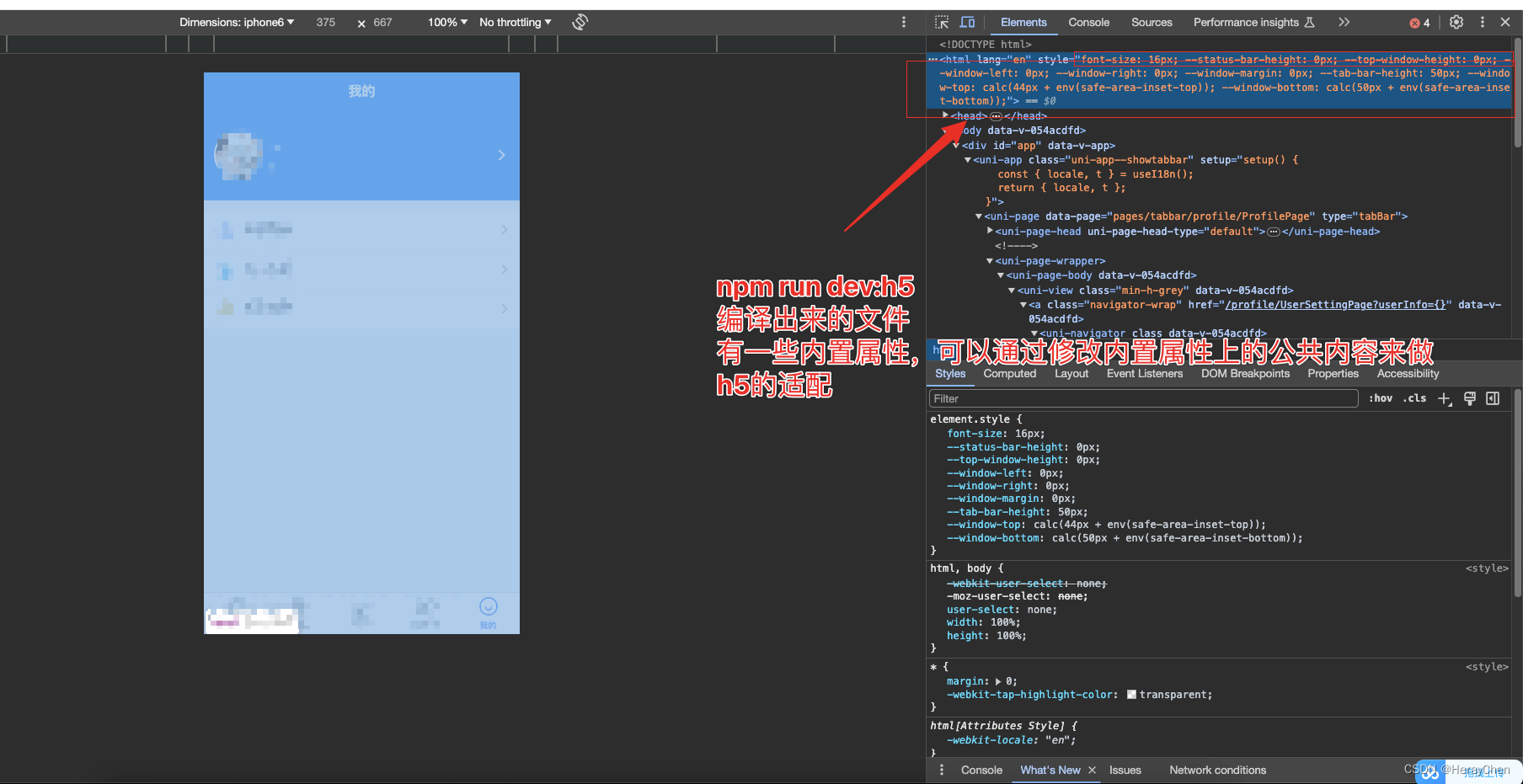

App.vue<script setup lang="ts"> import { onLaunch, onShow, onHide } from "@dcloudio/uni-app"; import './main.scss' onLaunch(() => { console.log("App Launch"); var width = document.documentElement.clientWidth; const fontSize = width / 750 + 'px'; // 这样写是不生效的h5编译运行的文件是有默认的style样式的 // 一个标签上不能同时出现两个style,不符合编译原则 // document.documentElement.style.fontSize = fontSize; // 解决方法 // 1. 利用html的默认style来实现 // 2. 在html上添加--gobal-font-size(注意-gobal-font-size变量仅适用于css文件),设置文字的大小 // 1. 在 static 文件夹下创建 css/public.css 文件 // 2. 在 main.ts 文件中引入 public.css (import './static/css/public.css';) document.documentElement.className = 'gobal-font-size'; // 3. 然后将设置文字大小的类添加到html标签上 document.documentElement.style.setProperty("--gobal-font-size", fontSize); // 处理系统不同兼容性问题 uni.getSystemInfo({ success: function (res) { const statusBarHeight = res.statusBarHeight; document.documentElement.style.setProperty("--statusBarHeight", statusBarHeight + 'px'); console.log('状态栏的高度', statusBarHeight) if (res.platform === "android") { document.body.classList.add('android'); } else if (res.platform === "ios") { document.body.classList.add('ios'); // 处理安全区域的距离 const safeArea = res.safeArea; const bottomDistance = res.screenHeight - safeArea.bottom; document.documentElement.style.setProperty("--safe-area", bottomDistance + 'px'); console.log('底部安全区域距离:', bottomDistance); } else { document.body.classList.add('other'); } } }) }); onShow(() => { console.log("App Show"); }); onHide(() => { console.log("App Hide"); }); </script> <style> @import "@/static/fonts/iconfont.css"; </style>- 1
- 2
- 3
- 4
- 5
- 6
- 7
- 8
- 9
- 10
- 11
- 12
- 13
- 14
- 15
- 16
- 17
- 18
- 19
- 20
- 21
- 22
- 23
- 24
- 25
- 26
- 27
- 28
- 29
- 30
- 31
- 32
- 33
- 34
- 35
- 36
- 37
- 38
- 39
- 40
- 41
- 42
- 43
- 44
- 45
- 46
- 47
- 48
- 49
- 50
- 51
- 52
- 53
- 54
public.css
html { --gobal-font-size: 0.45px; /*状态栏的高度*/ --statusBarHeight: 44px; /*在竖屏正方向下的安全区域*/ --safe-area: 34px; } .gobal-font-size { font-size: var(--gobal-font-size) !important; } #app { padding-bottom: var(--safe-area); } /* 安卓兼容性单独处理*/ .android { /* 处理状态栏的间距 */ padding-top: var(--statusBarHeight); } /* ios兼容性单独处理*/ .ios { /* 处理状态栏的间距 */ padding-top: var(--statusBarHeight); } /* 其它兼容性单独处理*/ .other { }- 1
- 2
- 3
- 4
- 5
- 6
- 7
- 8
- 9
- 10
- 11
- 12
- 13
- 14
- 15
- 16
- 17
- 18
- 19
- 20
- 21
- 22
- 23
- 24
- 25
- 26
- 27
- 28
- 29
记得在
main.ts中引入public.css哟~

提醒:
能做全局的就千万不要单独写,后续维护是个麻烦。iOS position:fixed失效
iOS的position: fixed是根据距离最近的scroll来定位的, 如果自定义弹窗是通过position: fixed来实现的,就不要在scroll-view里面调用,可以通过自定义样式(overflow: auto)来实现滚动。

calc 100vh 计算高度
最好不要使用
height: calc(100vh - 44px)这种方式来计算高度,系统不一样,高度的计算方法也不一样,iOS有时候没问题,安卓会莫名的出现滚动条。body 上使用 padding-top: env(safe-area-inset-top)
只针对主页有用,对tabbar页面无效,tabbar页面要单独处理。
页面设置100vh高度后Android会出现滚动条(body上添加padding处理状态栏的距离后出现的问题)
解决方法:
body { box-sizing: border-box; }- 1
- 2
- 3
在安卓上浏览器会将body元素的宽高设置为视口的宽高,并将任何添加到body元素上的padding会增加在总宽高上面,就会出现滚动条。
pinyin包实现省市区的选择
使用pinyin-pro包比pinyin包小


实现方法:- 调用接口查看省市区的数据
- 处理省市区的数据
import {pinyin} from 'pinyin-pro'; // 声明变量存储处理的数据 let list = []; // 数据处理 if (res.data?.length > 0) { res.data?.map(item => { // 将中文字符串转换成拼音数组 const pinyinArray = pinyin(item?.name, { // 设置拼音首字母的风格 style: pinyin.STYLE_FIRST_LETTER }) // 获取拼音数组的第一个字母(这里有些多音字翻译的不准确要单独处理) const firstLetter = pinyinArray[0][0]; // 将获取的第一个字母转换成大写字母 const upFont = firstLetter.toUpperCase(); // 判断拼音数组的第一个字母是否存在在list中 const listIndex = list.findIndex(i => i?.letter === upFont); if (listIndex > 0) { // 相同首字母的数据合并在一起 list[listIndex].data = [item, ...list[listIndex].data]; } else { list.push({ letter: upFont, data: [item] }) } }) } // 将处理过的数据从小到大排列 const sortList = list.sort((a, b) => { return a.letter.localeCompare(b.letter); })- 1
- 2
- 3
- 4
- 5
- 6
- 7
- 8
- 9
- 10
- 11
- 12
- 13
- 14
- 15
- 16
- 17
- 18
- 19
- 20
- 21
- 22
- 23
- 24
- 25
- 26
- 27
- 28
- 29
- 30
- 31
- 32
手机号实现344格式

注意:必须用input才能实现时候号码格式化。<input v-model="mobileText" @input="mobileChange"/> <div class="clear" v-if="mobileText.length > 0"></div> mobileChange() { // 手机号码 this.mobile = e.detail.value.replace(/[^0-9_]/g, ''); // 页面显示的数据 this.mobileText = this.mobile; // 实现344格式 if (this.mobileText.length > 3 && this.mobileText.length < 8) { this.mobileText = this.mobileText.replace(/^(\d{3})/g, '$1 '); } else if this.mobileClear.length > 7) { this.mobileText = this.mobileText.replace(/^(\d{3})(\d{4})/g, '$1 $2 ') } }- 1
- 2
- 3
- 4
- 5
- 6
- 7
- 8
- 9
- 10
- 11
- 12
- 13
- 14
- 15
-
相关阅读:
设计模式01:创建型
Linux服务器安装MariaDB数据库,配置linux防火墙策略
swift UI 和UIKIT 如何配合使用
为什么哈希加密后还要加盐?
react 生命周期讲解
【八大排序之插入和选择排序】
堆排序-java
UG\NX二次开发 隐藏菜单、隐藏菜单中的按钮
分布式系统常见理论讲解
Java中的泛型是什么?
- 原文地址:https://blog.csdn.net/qq_45832807/article/details/134533296

- 最新文章
-
沪漂五周年了:我越来越迷茫了
Agentic Skill Routing 实战:别再把所有 Skill 塞进 AI Agent 上下文
MySQL-Seconds_behind_master的精度误差
[MAF预定义ChatClient中间件-03]CachingChatClient——利用缓存省钱省时间
AI的至暗历史:从万众期待到被政府撤资,AI的两次死亡徘徊
Agent OS :五种驯服不确定性的范式
PortSwigger SQL注入LAB11
数据库即时编译JIT
[Begin]AI Learn Data Day 0
深度学习进阶(二十七)现代 LLM 的核心架构设计其二:SwiGLU