-
【Android】画面卡顿优化列表流畅度五之下拉刷新上拉加载更多组件RefreshLayout修改
之前也写过类似组件的介绍:
地址:下拉刷新&上拉加载更多组件SmartRefreshLayout

本来打算用这个替换的,但在进行仔细研究发现不太合适。功能都很好,但嵌入不了当前的工程体系里。原因就是那啥体制懂的都懂。这样的组件需要改的工程配置参数会有不兼容。所以也就暂时用不了。
如果能用这个替换也不会组件问题了,大概是这样吧。
当前也是一款开源组件
回顾一下列表布局和逻辑处理:
xml布局<android.support.v4.widget.NestedScrollView android:id="@+id/nestedScrollView" android:layout_width="match_parent" android:layout_height="match_parent" android:fillViewport="true" app:layout_behavior="@string/appbar_scrolling_view_behavior"> <live.bingoogolapple.refreshlayout.BGARefreshLayout android:id="@+id/mRefreshLayout" android:layout_width="match_parent" android:layout_height="match_parent" app:layout_behavior="@string/appbar_scrolling_view_behavior"> <android.support.v7.widget.RecyclerView android:id="@+id/recycleView_playback" android:layout_width="match_parent" android:layout_height="wrap_content" android:background="#FFFFFFFF" android:nestedScrollingEnabled="false" android:paddingLeft="20dp" android:paddingRight="10dp" android:paddingBottom="8dp" app:layout_behavior="@string/appbar_scrolling_view_behavior" /> live.bingoogolapple.refreshlayout.BGARefreshLayout> android.support.v4.widget.NestedScrollView>- 1
- 2
- 3
- 4
- 5
- 6
- 7
- 8
- 9
- 10
- 11
- 12
- 13
- 14
- 15
- 16
- 17
- 18
- 19
- 20
- 21
- 22
- 23
- 24
- 25
- 26
java逻辑处理:
BGARefreshViewHolder bgaNormalRefreshViewHolder = new BGANormalRefreshViewHolder(this, true); mRefreshLayout.setRefreshViewHolder(bgaNormalRefreshViewHolder); nestedScrollView = findViewById(R.id.nestedScrollView); if (Build.VERSION.SDK_INT >= Build.VERSION_CODES.M) { nestedScrollView.setOnScrollChangeListener(new View.OnScrollChangeListener() { @Override public void onScrollChange(View view, int scrollX, int scrollY, int oldScrollX, int oldScrollY) { NestedScrollView toNesstedScrollView = (NestedScrollView) view; if (scrollY < 5 || toNesstedScrollView.getChildAt(0).getMeasuredHeight() == view.getMeasuredHeight()) { return; } int height = toNesstedScrollView.getChildAt(0).getMeasuredHeight() - view.getMeasuredHeight(); if (scrollY == height) { // 为BGARefreshLayout 设置代理 if(mRefreshLayout.getDelegate()==null){ mRefreshLayout.setDelegate(XXXXActivity.this); } mRefreshLayout.beginLoadingMore(); } } }); }- 1
- 2
- 3
- 4
- 5
- 6
- 7
- 8
- 9
- 10
- 11
- 12
- 13
- 14
- 15
- 16
- 17
- 18
- 19
- 20
- 21
- 22
- 23
- 24
- 25
- 26
- 27
- 28
- 29
这个布局是为了达到类似如下图这样的头部效果的:
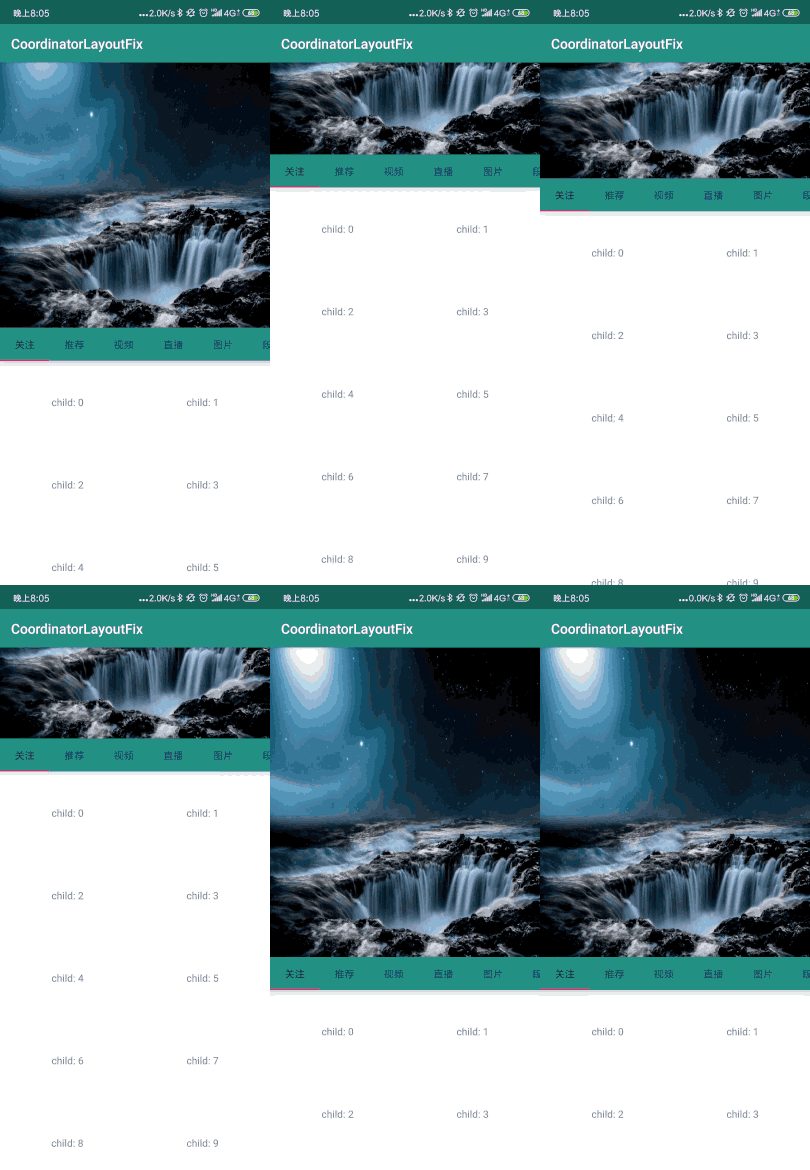
这个之前也有过这样布局的博客介绍:【Android】折叠效果CoordinatorLayout+AppBarLayout首页效果&& CoordinatorLayout抖动问题解决方案–100个经典UI设计模板(95/100)问题症结点
NestedScrollView嵌套子组件BGARefreshLayout;BGARefreshLayout嵌套子组件:RecyclerView;
滑动控制监听器是NestedScrollView组件里的OnScrollChangeListener:nestedScrollView = findViewById(R.id.nestedScrollView); if (Build.VERSION.SDK_INT >= Build.VERSION_CODES.M) { nestedScrollView.setOnScrollChangeListener(new View.OnScrollChangeListener() { @Override public void onScrollChange(View view, int scrollX, int scrollY, int oldScrollX, int oldScrollY) { NestedScrollView toNesstedScrollView = (NestedScrollView) view; if (scrollY < 5 || toNesstedScrollView.getChildAt(0).getMeasuredHeight() == view.getMeasuredHeight()) { return; } int height = toNesstedScrollView.getChildAt(0).getMeasuredHeight() - view.getMeasuredHeight(); if (scrollY == height) { // 为BGARefreshLayout 设置代理 if(mRefreshLayout.getDelegate()==null){ mRefreshLayout.setDelegate(XXXXActivity.this); mRefreshLayout.setParentView(nestedScrollView); } mRefreshLayout.beginLoadingMore(); } } }); }- 1
- 2
- 3
- 4
- 5
- 6
- 7
- 8
- 9
- 10
- 11
- 12
- 13
- 14
- 15
- 16
- 17
- 18
- 19
- 20
- 21
- 22
- 23
- 24
- 25
导致了上拉刷新和下拉加载更多出现了监听问题。
BGARefreshLayout里监听逻辑如下:@Override protected void onAttachedToWindow() { super.onAttachedToWindow(); // 被添加到窗口后再设置监听器,这样开发者就不必烦恼先初始化RefreshLayout还是先设置自定义滚动监听器 if (!mIsInitedContentViewScrollListener && mLoadMoreFooterView != null) { setRecyclerViewOnScrollListener(); setAbsListViewOnScrollListener(); addView(mLoadMoreFooterView, getChildCount()); mIsInitedContentViewScrollListener = true; } }- 1
- 2
- 3
- 4
- 5
- 6
- 7
- 8
- 9
- 10
- 11
- 12
- 13
- 14
- 15
预期setRecyclerViewOnScrollListener()里的设置就没有生效:
/** * * 具体效果要看xml布局结构 * 比如下面这样的就不适用: * NestedScrollView * BGARefreshLayout * RecyclerView * * */ private void setRecyclerViewOnScrollListener() { if (mRecyclerView != null) { mRecyclerView.addOnScrollListener(new RecyclerView.OnScrollListener() { @Override public void onScrollStateChanged(RecyclerView recyclerView, int newState) { if ((newState == RecyclerView.SCROLL_STATE_IDLE || newState == RecyclerView.SCROLL_STATE_SETTLING) && shouldHandleRecyclerViewLoadingMore(mRecyclerView)) { beginLoadingMore(); return; } } /** * dx : 水平滚动距离 * dy : 垂直滚动距离 * */ @Override public void onScrolled(RecyclerView recyclerView, int dx, int dy) { super.onScrolled(recyclerView, dx, dy); // Log.d(TAG, "dx = " + dx + " ,dy= " + dy); if (dy < 0) {//时为手指向下滚动,列表滚动显示上面的内容 mLoadMoreFooterView.setVisibility(GONE); } } }); } }- 1
- 2
- 3
- 4
- 5
- 6
- 7
- 8
- 9
- 10
- 11
- 12
- 13
- 14
- 15
- 16
- 17
- 18
- 19
- 20
- 21
- 22
- 23
- 24
- 25
- 26
- 27
- 28
- 29
- 30
- 31
- 32
- 33
- 34
- 35
- 36
- 37
- 38
- 39
找谁说理去,不生效就算了,问题是如果不留意。根本就发现不了这样的组件问题
NestedScrollView组件里的OnScrollChangeListener和RecyclerView.OnScrollListener效果是一致的都是开始加载更多逻辑beginLoadingMore():/** * 开始上拉加载更多,会触发delegate的onBGARefreshLayoutBeginRefreshing方法 */ public void beginLoadingMore() { Log.d(TAG, "beginLoadingMore: called!"); if (!mIsLoadingMore && mLoadMoreFooterView != null && mDelegate != null && mDelegate.onBGARefreshLayoutBeginLoadingMore(this)) { mIsLoadingMore = true; Log.d(TAG, "run:mIsLoadingMore=" + mIsLoadingMore); if (mIsShowLoadingMoreView) { showLoadingMoreView(); } } } /** * 显示上拉加载更多控件 */ public void showLoadingMoreView() { mRefreshViewHolder.changeToLoadingMore(); mLoadMoreFooterView.setVisibility(VISIBLE); mLoadMoreFooterView.findViewById(R.id.layout_loading).setVisibility(VISIBLE); mLoadMoreFooterView.findViewById(R.id.tv_normal_refresh_footer_status_finish).setVisibility(GONE); BGARefreshScrollingUtil.scrollToBottom(mParentNestedScrollView); BGARefreshScrollingUtil.scrollToBottom(mScrollView); BGARefreshScrollingUtil.scrollToBottom(mRecyclerView); BGARefreshScrollingUtil.scrollToBottom(mAbsListView); if (mStickyNavLayout != null) { mStickyNavLayout.scrollToBottom(); } }- 1
- 2
- 3
- 4
- 5
- 6
- 7
- 8
- 9
- 10
- 11
- 12
- 13
- 14
- 15
- 16
- 17
- 18
- 19
- 20
- 21
- 22
- 23
- 24
- 25
- 26
- 27
- 28
- 29
- 30
- 31
- 32
- 33
BGARefreshScrollingUtil.scrollToBottom(mParentNestedScrollView) 这个是优化后新加的;
如果没有这个就会出现了滑到底部就直接进行加载更多了,不会出现加载更多进度条的提示。需要在滑动到列表底部后再次向上拉一下才能有提示UI画面。这个太隐蔽了,每次感觉怪怪的,但就是没有发现这个交互画面有情况。主要是也不会朝这方面去想。因为看上去都很自然且正常。showLoadingMoreView里这句代码
BGARefreshScrollingUtil.scrollToBottom(mParentNestedScrollView)是告诉列表当滑动到底部的时候显示提示mLoadMoreFooterView视图后再自动的向上滑动一下,把LoadMoreFooterView显示在屏幕里。BGARefreshScrollingUtil.scrollToBottom(mParentNestedScrollView)逻辑如下:
/** * nestedScrollView 滚动组件设置滚动到底部 * 采用post(new runnable)方式在滚动组件渲染完成之后滚动到底部 * * @param nestedScrollView 滚动组件 * */ public static void scrollToBottom(final NestedScrollView nestedScrollView) { if (nestedScrollView != null) { nestedScrollView.post(new Runnable() { @Override public void run() { nestedScrollView.fullScroll(ScrollView.FOCUS_DOWN); } }); } }- 1
- 2
- 3
- 4
- 5
- 6
- 7
- 8
- 9
- 10
- 11
- 12
- 13
- 14
- 15
- 16
小结一下
就是因为这个滑动效果不兼容所以导致了后面一系列的魔幻情况:
1、加载更多上拉交互的时候看不到加载更多提示UI,因为没有自动向上滑动到底;所以很多时候是没有看到
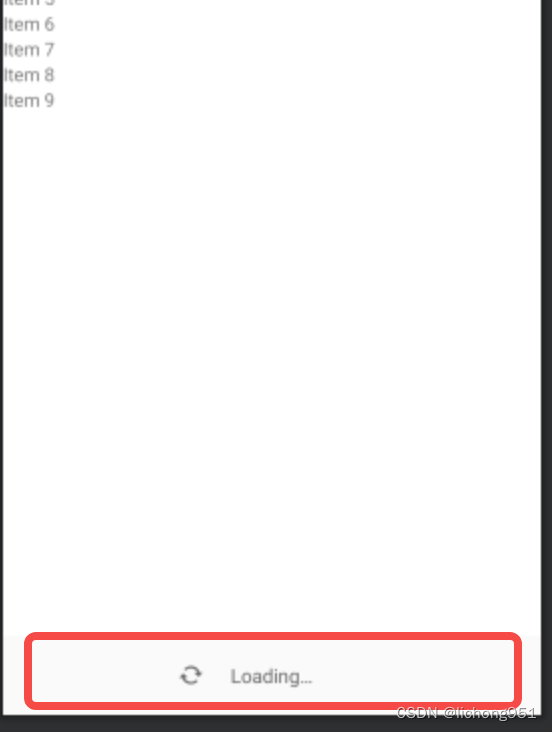
2、然后就会导致发起新一页数据的api请求调用的间隔时间混乱,有在短时间内多次调用的情况发生,然后再这个时间段内加载了大量的数据导致了页面卡住了。页面越卡,发起请求连续性导致的问题就越严重。然后用户会滑动更多次。陷入了死循环里了。检测到的某次调试的时候发起的连续的和预期不符的api数据请求记录如下图。

3、然后必然的内存消耗急剧加大,内存压力在很短的时间陡然上升(事实上优化到最后和内存的关系不是特别大,优化完以后也不过是使用了clearMemory)以上这些问题都是RefreshLayout使用不当导致的。但不投入大量的精力去仔细的分析网络数据、内存、交互等几乎发现不了。因为手机画面表现的很像是内存问题,因此在内存上折腾了两三天也没起到缓解卡顿的预期。
解决方案
最后附上优化后的RefreshLayout逻辑处理:
import live.bingoogolapple.refreshlayout.util.BGARefreshScrollingUtil; /** * 作者:王浩 邮件:bingoogolapple@gmail.com * 创建时间:15/5/21 22:35 * 描述:下拉刷新、上拉加载更多、可添加自定义(固定、可滑动)头部控件(例如慕课网app顶部的广告位) */ public class BGARefreshLayout extends LinearLayout { /** * 目前已经适配的滚动组件有: * AbsListView * ScrollView * NestedScrollView * RecyclerView * * 在滚动到底部时自动在底部增加弹出"正在加载中的"进度条提示 * */ private AbsListView mAbsListView; private ScrollView mScrollView; private NestedScrollView mParentNestedScrollView;// 外层父组件嵌套 NestedScrollView private RecyclerView mRecyclerView; private View mNormalView; private WebView mWebView; private BGAStickyNavLayout mStickyNavLayout; private View mContentView; private float mInterceptTouchDownX = -1; private float mInterceptTouchDownY = -1; /** * 按下时整个头部控件的paddingTop */ private int mWholeHeaderViewDownPaddingTop = 0; /** * 记录开始下拉刷新时的downY */ private int mRefreshDownY = -1; /** * 是否已经设置内容控件滚动监听器 */ 。。。 /** * xml布局中构造 * */ public BGARefreshLayout(Context context, AttributeSet attrs) { super(context, attrs); setOrientation(LinearLayout.VERTICAL); mTouchSlop = ViewConfiguration.get(context).getScaledTouchSlop(); mHandler = new Handler(Looper.getMainLooper()); initWholeHeaderView(); } 。。。 /** * {@link BGARefreshLayout} 外层嵌套一个父滚动组件适配 * 目前适配了NestedScrollView 作为父组件 * * */ public void setParentView(View view) { if (null == view) return; /** * 布局嵌套为 * NestedScrollView * BGARefreshLayout * RecyclerView * */ if (view instanceof NestedScrollView) { mParentNestedScrollView = (NestedScrollView) view; } } /** * 初始化上拉加载更多控件 * * @return */ private void initLoadMoreFooterView() { mLoadMoreFooterView = mRefreshViewHolder.getLoadMoreFooterView(); if (mLoadMoreFooterView != null) { // 测量上拉加载更多控件的高度 mLoadMoreFooterView.measure(0, 0); mLoadMoreFooterViewHeight = mLoadMoreFooterView.getMeasuredHeight(); mLoadMoreFooterView.setVisibility(GONE); mLoadMoreFooterView.findViewById(R.id.layout_loading).setVisibility(GONE); mLoadMoreFooterView.findViewById(R.id.tv_normal_refresh_footer_status_finish).setVisibility(GONE); } } /** * * 具体效果要看xml布局结构 * 比如下面这样的就不适用: * NestedScrollView * BGARefreshLayout * RecyclerView * * */ private void setRecyclerViewOnScrollListener() { if (mRecyclerView != null) { mRecyclerView.addOnScrollListener(new RecyclerView.OnScrollListener() { @Override public void onScrollStateChanged(RecyclerView recyclerView, int newState) { if ((newState == RecyclerView.SCROLL_STATE_IDLE || newState == RecyclerView.SCROLL_STATE_SETTLING) && shouldHandleRecyclerViewLoadingMore(mRecyclerView)) { beginLoadingMore(); return; } } /** * dx : 水平滚动距离 * dy : 垂直滚动距离 * */ @Override public void onScrolled(RecyclerView recyclerView, int dx, int dy) { super.onScrolled(recyclerView, dx, dy); // Log.d(TAG, "dx = " + dx + " ,dy= " + dy); if (dy < 0) {//时为手指向下滚动,列表滚动显示上面的内容 mLoadMoreFooterView.setVisibility(GONE); } } }); } } /** /** * 开始上拉加载更多,会触发delegate的onBGARefreshLayoutBeginRefreshing方法 */ public void beginLoadingMore() { Log.d(TAG, "beginLoadingMore: called!"); if (!mIsLoadingMore && mLoadMoreFooterView != null && mDelegate != null && mDelegate.onBGARefreshLayoutBeginLoadingMore(this)) { mIsLoadingMore = true; Log.d(TAG, "run:mIsLoadingMore=" + mIsLoadingMore); if (mIsShowLoadingMoreView) { showLoadingMoreView(); } } } /** * 显示上拉加载更多控件 */ public void showLoadingMoreView() { mRefreshViewHolder.changeToLoadingMore(); mLoadMoreFooterView.setVisibility(VISIBLE); mLoadMoreFooterView.findViewById(R.id.layout_loading).setVisibility(VISIBLE); mLoadMoreFooterView.findViewById(R.id.tv_normal_refresh_footer_status_finish).setVisibility(GONE); BGARefreshScrollingUtil.scrollToBottom(mParentNestedScrollView); BGARefreshScrollingUtil.scrollToBottom(mScrollView); BGARefreshScrollingUtil.scrollToBottom(mRecyclerView); BGARefreshScrollingUtil.scrollToBottom(mAbsListView); if (mStickyNavLayout != null) { mStickyNavLayout.scrollToBottom(); } } /** * 结束上拉加载更多 */ public void endLoadingMore() { if (mIsShowLoadingMoreView) { // 避免WiFi环境下请求数据太快,加载更多控件一闪而过 mRecyclerView.postDelayed(mDelayHiddenLoadingMoreViewTask, 300); } } public void setStatusFinish() { mLoadMoreFooterView.setVisibility(VISIBLE); mLoadMoreFooterView.findViewById(R.id.tv_normal_refresh_footer_status_finish) .setVisibility(VISIBLE); BGARefreshScrollingUtil.scrollToBottom(mParentNestedScrollView); BGARefreshScrollingUtil.scrollToBottom(mScrollView); BGARefreshScrollingUtil.scrollToBottom(mRecyclerView); BGARefreshScrollingUtil.scrollToBottom(mAbsListView); if (mStickyNavLayout != null) { mStickyNavLayout.scrollToBottom(); } }- 1
- 2
- 3
- 4
- 5
- 6
- 7
- 8
- 9
- 10
- 11
- 12
- 13
- 14
- 15
- 16
- 17
- 18
- 19
- 20
- 21
- 22
- 23
- 24
- 25
- 26
- 27
- 28
- 29
- 30
- 31
- 32
- 33
- 34
- 35
- 36
- 37
- 38
- 39
- 40
- 41
- 42
- 43
- 44
- 45
- 46
- 47
- 48
- 49
- 50
- 51
- 52
- 53
- 54
- 55
- 56
- 57
- 58
- 59
- 60
- 61
- 62
- 63
- 64
- 65
- 66
- 67
- 68
- 69
- 70
- 71
- 72
- 73
- 74
- 75
- 76
- 77
- 78
- 79
- 80
- 81
- 82
- 83
- 84
- 85
- 86
- 87
- 88
- 89
- 90
- 91
- 92
- 93
- 94
- 95
- 96
- 97
- 98
- 99
- 100
- 101
- 102
- 103
- 104
- 105
- 106
- 107
- 108
- 109
- 110
- 111
- 112
- 113
- 114
- 115
- 116
- 117
- 118
- 119
- 120
- 121
- 122
- 123
- 124
- 125
- 126
- 127
- 128
- 129
- 130
- 131
- 132
- 133
- 134
- 135
- 136
- 137
- 138
- 139
- 140
- 141
- 142
- 143
- 144
- 145
- 146
- 147
- 148
- 149
- 150
- 151
- 152
- 153
- 154
- 155
- 156
- 157
- 158
- 159
- 160
- 161
- 162
- 163
- 164
- 165
- 166
- 167
- 168
- 169
- 170
- 171
- 172
- 173
- 174
- 175
- 176
- 177
- 178
- 179
- 180
- 181
- 182
- 183
- 184
- 185
- 186
- 187
- 188
- 189
- 190
- 191
- 192
- 193
- 194
- 195
- 196
- 197
主要是新增了对NestedScrollView的处理逻辑;也是为了适配如下这样的xml布局:
/** * 布局嵌套为 * NestedScrollView * BGARefreshLayout * RecyclerView * */- 1
- 2
- 3
- 4
- 5
- 6
再加上 BGARefreshScrollingUtil.scrollToBottom(mParentNestedScrollView);处理完成了这个上拉加载更多的数据分页加载逻辑衔接处理。
优化这个组件之后加载顺滑度立马就干到数据量800条以内滑动和加载都没有明显的卡顿感了。
但问题还没有彻底解决,因为数据量干到1000条左右就出现了ANR问题和OOM内存问题了。虽然这两个问题没有得到彻底的解决,但大致的解决方案也有方向。
先到这里歇一歇,后面还有一篇smartApi接口开发工具推荐
历时一年半多开发终于smartApi-v1.0.0版本在2023-09-15晚十点正式上线
smartApi是一款对标国外的postman的api调试开发工具,由于开发人力就作者一个所以人力有限,因此v1.0.0版本功能进行精简,大功能项有:- api参数填写
- api请求响应数据展示
- PDF形式的分享文档
- Mock本地化解决方案
- api列表数据本地化处理
- 再加上UI方面的打磨
下面是一段smartApi使用介绍:

下载地址:
-
相关阅读:
【html-CSS布局】简单设计一个静态网页
小白跟做江科大32单片机之定时器
Redis(四)——Jedis操作Redis6、Redis6与SpringBoot整合
SAP PI 导入SSL证书 快速解决 iaik.security.ssl.SSLCertificateException 接口报错
项目持续集成配置流程
数据结构—堆(C语言实现)
selenium常见异常以及处理方法
Qt excel 操作使用说明
【AI核心能力】第2讲 机器学习初探
【RV1106/RV1103】RV1103增加RTL8723BS
- 原文地址:https://blog.csdn.net/lichong951/article/details/134398047
- 最新文章
-
沪漂五周年了:我越来越迷茫了
Agentic Skill Routing 实战:别再把所有 Skill 塞进 AI Agent 上下文
MySQL-Seconds_behind_master的精度误差
[MAF预定义ChatClient中间件-03]CachingChatClient——利用缓存省钱省时间
AI的至暗历史:从万众期待到被政府撤资,AI的两次死亡徘徊
Agent OS :五种驯服不确定性的范式
PortSwigger SQL注入LAB11
数据库即时编译JIT
[Begin]AI Learn Data Day 0
深度学习进阶(二十七)现代 LLM 的核心架构设计其二:SwiGLU