-
el-table 多表格弹窗嵌套数据显示异常错乱问题
1、业务背景
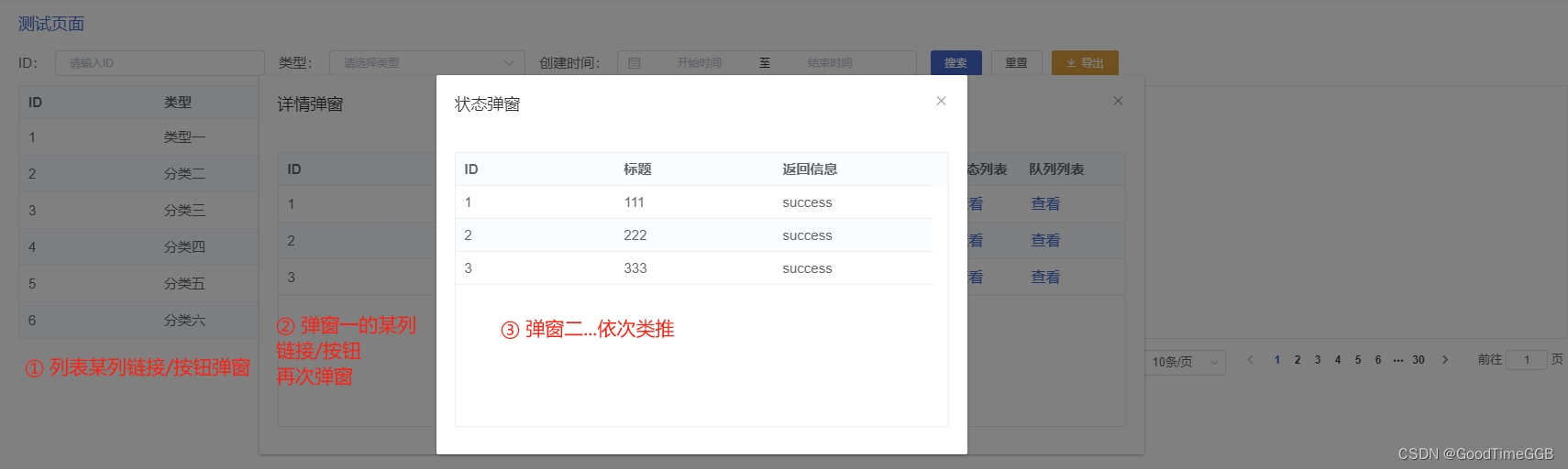
使用vue+element开发报表功能时,需要列表上某列的超链接按钮弹窗展示,在弹窗的el-table列表某列中再次使用超链接按钮点开弹窗,以此类推多表格弹窗嵌套,本文以弹窗两次为例
最终效果如下示例页面
2、具体实现和问题抛出
<template> <div class="el_main"> <el-table stripe style="width: 100%" v-loading="loading" row-key="Id" :data="list" > <el-table-column label="ID" prop="Id" min-width="3"> el-table-column> <el-table-column label="类型" prop="Type" min-width="5"> <template slot-scope="scope"> {{ formatTaskType(scope.row.Type) }} template> el-table-column> <el-table-column label="详情" prop="TaskTitle" min-width="10" show-overflow-tooltip="true">el-table-column> <el-table-column label="详情弹窗" min-width="3"> <template slot-scope="scope"> <el-button @click="handleClick(scope.row)" type="text">查看el-button> template> el-table-column> <el-table-column label="创建时间" prop="AddTime" min-width="5"> <template slot-scope="scope" v-if="scope.row.AddTime"> {{ (scope.row.AddTime * 1000) | formatDate(2) }} template> el-table-column> el-table> div> <el-dialog title="详情弹窗" :visible.sync="detailInfoDialogVisible" append-to-body width="50%"> <el-table stripe style="width: 100%" v-loading="loading" row-key="Id" height="300" max-height="650" :data="detailInfo"> <el-table-column label="ID" prop="TaskId" min-width="80">el-table-column> <el-table-column label="名称" prop="TaskName" min-width="65">el-table-column> <el-table-column label="成功数量" prop="SuccessNum" min-width="22">el-table-column> <el-table-column label="失败数量" prop="ErrorNum" min-width="22">el-table-column> <el-table-column label="状态列表" min-width="22"> <template slot-scope="scope"> <el-button @click="handleStatusListClick(scope.row)" type="text">查看el-button> template> el-table-column> <el-table-column label="队列列表" min-width="30"> <template slot-scope="scope"> <el-button @click="handleQueueDataClick(scope.row)" type="text">查看el-button> template> el-table-column> el-table> el-dialog> <el-dialog title="状态弹窗" :visible.sync="statusListDialogVisible" append-to-body width="30%"> <el-table stripe style="width: 100%" v-loading="loading" row-key="Id" height="300" max-height="300" :data="statusListInfo"> <el-table-column label="ID" prop="Id" min-width="80" show-overflow-tooltip="true"> el-table-column> <el-table-column label="标题" prop="Title" min-width="80" show-overflow-tooltip="true">el-table-column> <el-table-column label="返回信息" prop="Msg" min-width="80" show-overflow-tooltip="true">el-table-column> el-table> el-dialog> <el-dialog title="队列弹窗" :visible.sync="queueDataDialogVisible" append-to-body width="30%"> <el-table stripe style="width: 100%" v-loading="loading" row-key="Id" height="300" max-height="300" :data="queueDataInfo"> <el-table-column label="ID" prop="Id" min-width="80" show-overflow-tooltip="true"> el-table-column> <el-table-column label="名称" prop="Name" min-width="80" show-overflow-tooltip="true">el-table-column> el-table> el-dialog> template> <script type="text/ecmascript-6"> import { GetXXXReportList, ExportXXXReportList } from '@/api/reportManage' const urlQuery = [ 'id|number', 'type|number', 'currPage|number', 'pageSize|number', ] export default { components: { }, data () { return { id: '', type: '', collectTime: '', loading: false, list: [], currPage: 1, pageSize: 10, counts: 0, detailInfo: [], // 详情弹窗 detailInfoDialogVisible: false, statusListInfo: [], // 状态列表弹窗 statusListDialogVisible: false, queueDataInfo: [], // 队列列表弹窗 queueDataDialogVisible: false, typeArray: [ { value: 1, label: '类型一', }, { value: 2, label: '分类二', }, { value: 3, label: '分类三', }, { value: 4, label: '分类四', }, { value: 5, label: '分类五', }, { value: 6, label: '分类六', }, ], exportLoading: false, } }, created () { this._getList(true) }, methods: { async _getList (init = false) { this.loading = true if (init) { this.currPage = 1 } let startTime, endTime if (this.collectTime) { startTime = this.collectTime[0] / 1000 endTime = this.collectTime[1] / 1000 + 86399 } this._setQuery(urlQuery) try { const data = await GetXXXReportList({ Id: this.id || 0, StartTime: startTime || 0, EndTime: endTime || 0, Type: this.type || 0, CurrPage: this.currPage, PageSize: this.pageSize, }) this.list = data.List this.counts = data.Counts } catch (error) { this.counts = 0 this.list = [] } this.loading = false }, search () { this._getList(true) }, reset () { this.id = '' this.type = '' this.collectTime = '' this.list = [] this.counts = 0 this._getList(true) }, pageChange () { this._getList() }, pageSizeChange (val) { this.pageSize = val this._getList(true) }, handleClick (row) { if (row.Type === 1) { this.detailInfoDialogVisible = true this.detailInfo = row.detailInfo } else if (row.Type === 2) { this.xxxDialogVisible = true this.xxxInfo = row.xxx } else if (row.Type === 3) { this.xxxDialogVisible = true this.xxxInfo = row.xxx } }, handleStatusListClick (row) { this.statusListDialogVisible = true this.statusListInfo = row.StatusList }, handleQueueDataClick (row) { this.queueDataDialogVisible = true this.queueDataInfo = row.queueData }, // 导出 async exportData () { this.exportLoading = true let startTime, endTime if (this.collectTime) { startTime = this.collectTime[0] / 1000 endTime = this.collectTime[1] / 1000 + 86399 } try { const data = await ExportXXXReportList({ Id: this.id || 0, StartTime: startTime || 0, EndTime: endTime || 0, Type: this.type || 0, }) var raw = window.atob(data) var uInt8Array = new Uint8Array(data.length) for (var i = 0; i < raw.length; i++) { uInt8Array[i] = raw.charCodeAt(i) } const url = window.URL.createObjectURL(new Blob([ uInt8Array ], { type: 'application/vnd.ms-excel' })) const link = document.createElement('a') link.style.display = 'none' link.href = url link.setAttribute('download', 'xxxx报表.xlsx') document.body.appendChild(link) link.click() document.body.removeChild(link) } catch (error) { this.exportLoading = false } this.exportLoading = false }, }, } script> <style lang="scss"> style>- 1
- 2
- 3
- 4
- 5
- 6
- 7
- 8
- 9
- 10
- 11
- 12
- 13
- 14
- 15
- 16
- 17
- 18
- 19
- 20
- 21
- 22
- 23
- 24
- 25
- 26
- 27
- 28
- 29
- 30
- 31
- 32
- 33
- 34
- 35
- 36
- 37
- 38
- 39
- 40
- 41
- 42
- 43
- 44
- 45
- 46
- 47
- 48
- 49
- 50
- 51
- 52
- 53
- 54
- 55
- 56
- 57
- 58
- 59
- 60
- 61
- 62
- 63
- 64
- 65
- 66
- 67
- 68
- 69
- 70
- 71
- 72
- 73
- 74
- 75
- 76
- 77
- 78
- 79
- 80
- 81
- 82
- 83
- 84
- 85
- 86
- 87
- 88
- 89
- 90
- 91
- 92
- 93
- 94
- 95
- 96
- 97
- 98
- 99
- 100
- 101
- 102
- 103
- 104
- 105
- 106
- 107
- 108
- 109
- 110
- 111
- 112
- 113
- 114
- 115
- 116
- 117
- 118
- 119
- 120
- 121
- 122
- 123
- 124
- 125
- 126
- 127
- 128
- 129
- 130
- 131
- 132
- 133
- 134
- 135
- 136
- 137
- 138
- 139
- 140
- 141
- 142
- 143
- 144
- 145
- 146
- 147
- 148
- 149
- 150
- 151
- 152
- 153
- 154
- 155
- 156
- 157
- 158
- 159
- 160
- 161
- 162
- 163
- 164
- 165
- 166
- 167
- 168
- 169
- 170
- 171
- 172
- 173
- 174
- 175
- 176
- 177
- 178
- 179
- 180
- 181
- 182
- 183
- 184
- 185
- 186
- 187
- 188
- 189
- 190
- 191
- 192
- 193
- 194
- 195
- 196
- 197
- 198
- 199
- 200
- 201
- 202
- 203
- 204
- 205
- 206
- 207
- 208
- 209
- 210
- 211
- 212
- 213
- 214
- 215
- 216
- 217
- 218
- 219
- 220
- 221
- 222
- 223
- 224
- 225
- 226
- 227
- 228
- 229
- 230
- 231
- 232
- 233
- 234
- 235
- 236
- 237
- 238
- 239
- 240
- 241
- 242
- 243
- 244
- 245
- 246
- 247
- 248
- 249
- 250
- 251
- 252
- 253
- 254
- 255
- 256
- 257
- 258
- 259
- 260
- 261
- 262
- 263
- 264
- 265
3、分析问题
这里有几个可能的原因和建议来解决这个问题:
①数据问题:首先确保你的数据源是正确的。检查你的表格数据是否有任何错误或遗漏。
②嵌套表格的渲染时机:如果你的嵌套表格(子表格)是在父表格的某一行展开时才渲染的,那么你需要确保子表格的数据在正确的时机进行加载。如果数据加载过早,可能会导致异常。
③弹窗的v-if与v-show:如果你使用了v-if来控制弹窗的显示与隐藏,那么每次弹窗打开都会重新渲染弹窗内的内容。这可能会导致表格的重新初始化,使用v-show可能会避免这个问题。但需要注意的是,v-show只是在视觉上隐藏元素,元素仍然会被渲染。
④表格的key:如前面所说,Vue使用key来追踪节点的身份。如果在嵌套表格的场景中,你使用了相同的key,可能会导致身份识别混乱。确保每个表格都有一个独特的key。
⑤样式冲突:确保没有其他样式影响到表格或弹窗的正常显示。特别是当你使用了自定义样式或与Element UI样式冲突的其他UI库时。
⑥组件版本:确保你使用的Element UI是最新的版本。旧版本可能存在已知的错误,而在新版本中可能已经被修复。4、解决问题
下面我从表格的key角度解决下问题
1)尝试给每个弹窗的el-table加个key – 未解决数据错乱的问题
示例代码如下:<el-table :key="Id" stripe style="width: 100%" v-loading="loading" row-key="Id" height="300" max-height="300"> el-table>- 1
- 2
- 3
- 4
- 5
- 6
- 7
- 8
2)尝试给每个弹窗的el-table加个唯一的key – 解决数据错乱的问题
示例代码如下:<el-table :key="Id" stripe style="width: 100%" v-loading="loading" row-key="Id" height="300" max-height="300"> el-table>- 1
- 2
- 3
- 4
- 5
- 6
- 7
- 8
虽然此种方法解决了我们的问题,但是考虑到每次打开弹窗都会生成随机数存在一定风险性,具体分析如下:
随机数改变了每次渲染时的key值,打破了Vue的节点身份追踪机制。
在这种情况下,由于每次渲染都有一个新的随机数作为key,Vue会将该组件视为全新的节点,从而重新渲染。这样可以避免由于身份追踪导致的问题,例如在嵌套表格场景中可能出现的报错。
然而,需要注意的是,使用随机数作为key并不是一个推荐的做法。因为key的主要作用是帮助Vue高效地识别和追踪节点的身份,以便进行差异化更新。随机数作为key会破坏这一机制,可能导致性能下降和潜在的问题。
因此,尽管使用随机数作为key可以解决某些情况下的报错,但并不是一个优雅的解决方案。更好的方式是仔细排查问题,找到导致报错的根本原因,并采取相应的措施进行修复。如果实在无法找到其他解决方案,再考虑使用随机数作为临时方案。但在长期开发中,仍然建议寻求更合适、更稳定的解决方案。3)尝试给每个弹窗的el-table加个唯一的key(固定不是随机数) – 解决数据错乱的问题(推荐)
示例代码如下:<el-table :key="generateKey(scheduledDataDownloadInfo)" stripe header-row-class-name="bos_table_header" style="width: 100%" v-loading="loading" row-key="Id" height="300" max-height="650" :data="scheduledDataDownloadInfo"> el-table>- 1
- 2
- 3
- 4
- 5
- 6
- 7
- 8
- 9
- 10
在methods中添加方法
// 生成唯一的key,可以根据具体情况定义 generateKey (data) { const uniqueIdentifier = data.map(item => item.Id).join('_') return `table_${uniqueIdentifier}` },- 1
- 2
- 3
- 4
- 5
至此,更合适、更稳定的解决方案完成,我们开头提到的问题得以解决。有更好办法或者见解的同学欢迎评论区留言,互相学习。
若本文有帮助到阅读本文的同学,欢迎点赞、关注、收藏,互相学习交流
-
相关阅读:
朱松纯教授场景理解相关文章简介
Swift 学习笔记
Cesium 拖拽3D模型
8.谈谈线程安全:活跃性问题(死锁、活锁、饥饿)
页面的动静分离
java AbstractProcessor 编译时注解 (JSR 269)
人工智能对就业的影响:机遇与挑战
【web自动化测试】Playwright快速入门,5分钟上手
云课五分钟-09Linux基础命令实践-AI助力快速入门
Upload-labs(1-21关详细教程)【简单易懂】【万字教程】
- 原文地址:https://blog.csdn.net/sunshineGGB/article/details/134332830
