-
MyBatis Generator - 快速生成 实体类 和 映射文件
目录
1.1.2、根据 configurationFile 标签中配置的路径 创建 generatorConfig.xml 文件
1.1.5、扫描配置:添加 @Mapper 注解 / 添加扫描注解
一、MyBatis Generator 的使用
1.1、生成类和映射文件
1.1.1、在 pom.xml 中引入依赖
在 properties 标签中加入版本号.
<mybatis-generator-plugin-version>1.4.1mybatis-generator-plugin-version>在 build => plugins 标签中加入如下配置
- <plugin>
- <groupId>org.mybatis.generatorgroupId>
- <artifactId>mybatis-generator-maven-pluginartifactId>
- <version>${mybatis-generator-plugin-version}version>
- <executions>
- <execution>
- <id>Generate MyBatis Artifactsid>
- <phase>deployphase>
- <goals>
- <goal>generategoal>
- goals>
- execution>
- executions>
- <configuration>
- <verbose>trueverbose>
- <overwrite>trueoverwrite>
- <configurationFile>
- src/main/resources/mybatis/generatorConfig.xml
- configurationFile>
- configuration>
- plugin>
上述配置中需要注意的是 “配置文件路径”,这个路径就是用来生成 实体类和映射文件 配置规则的位置.
1.1.2、根据 configurationFile 标签中配置的路径 创建 generatorConfig.xml 文件
这个文件就是用来描述生成规则的.
根据路径(src/main/resources/mybatis),在 mybatis 目录下创建 generatorConfig.xml 文件.
Ps:下述配置文件中需要修改的有 数据库连接、实体类和映射文件的路径、数据库表名
- "1.0" encoding="UTF-8"?>
- generatorConfiguration
- PUBLIC "-//mybatis.org//DTD MyBatis Generator Configuration 1.0//EN"
- "http://mybatis.org/dtd/mybatis-generator-config_1_0.dtd">
- <generatorConfiguration>
- <classPathEntry location="D:\class\source\mysql-connector-java-5.1.49.jar"/>
- <context id="DB2Tables" targetRuntime="MyBatis3">
- <commentGenerator>
- <property name="suppressAllComments" value="true"/>
- <property name="suppressDate" value="true"/>
- commentGenerator>
- <jdbcConnection driverClass="com.mysql.jdbc.Driver"
- connectionURL="jdbc:mysql://127.0.0.1:3306/javanav_db?
- characterEncoding=utf8&useSSL=false"
- userId="root"
- password="1111">
- jdbcConnection>
- <javaTypeResolver>
- <property name="forceBigDecimals" value="false"/>
- javaTypeResolver>
- <javaModelGenerator targetPackage="com.example.cyk.model"
- targetProject="src/main/java">
- <property name="enableSubPackages" value="true"/>
- <property name="trimStrings" value="true"/>
- javaModelGenerator>
- <sqlMapGenerator targetPackage="mapper"
- targetProject="src/main/resources">
- <property name="enableSubPackages" value="true"/>
- sqlMapGenerator>
- <javaClientGenerator type="XMLMAPPER"
- targetPackage="com.example.cyk.mapper" targetProject="src/main/java">
- <property name="enableSubPackages" value="true"/>
- javaClientGenerator>
- <table tableName="j_article" domainObjectName="Article"
- enableSelectByExample="false"
- enableDeleteByExample="false" enableDeleteByPrimaryKey="false"
- enableCountByExample="false"
- enableUpdateByExample="false">
- <property name="useActualColumnNames" value="true"/>
- table>
- <table tableName="j_article_reply" domainObjectName="ArticleReply"
- enableSelectByExample="false"
- enableDeleteByExample="false" enableDeleteByPrimaryKey="false"
- enableCountByExample="false"
- enableUpdateByExample="false">
- <property name="useActualColumnNames" value="true"/>
- table>
- <table tableName="j_board" domainObjectName="Board"
- enableSelectByExample="false" enableDeleteByExample="false"
- enableDeleteByPrimaryKey="false" enableCountByExample="false"
- enableUpdateByExample="false">
- <property name="useActualColumnNames" value="true"/>
- table>
- <table tableName="j_message" domainObjectName="Message"
- enableSelectByExample="false"
- enableDeleteByExample="false" enableDeleteByPrimaryKey="false"
- enableCountByExample="false"
- enableUpdateByExample="false">
- <property name="useActualColumnNames" value="true"/>
- table>
- <table tableName="j_user" domainObjectName="User"
- enableSelectByExample="false" enableDeleteByExample="false"
- enableDeleteByPrimaryKey="false" enableCountByExample="false"
- enableUpdateByExample="false">
- <property name="useActualColumnNames" value="true"/>
- table>
- context>
- generatorConfiguration>
注意:
驱动包路径是自己本地仓库的路径

但一定注意!! 需要在非中文的目录下,因此你可以把这个驱动包拷贝出来,放到一个非中文的目录中即可.

1.1.3、自动生成类 和 映射文件
重新加载Maven项⽬,在Plugins节点下出现mybatis-generator,双击运⾏,在对应的目录下⽣成相应的类与映射⽂件:
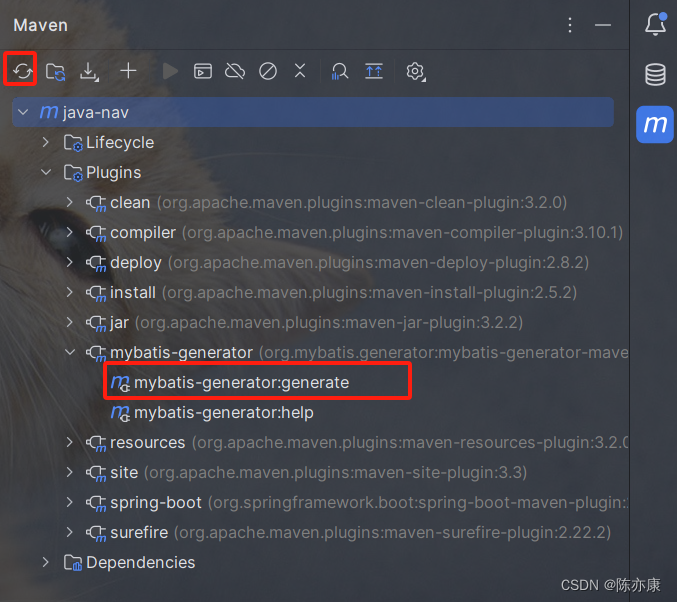
接着你就可以看到对应的生成了

1.1.4、在 Insert 标签中添加获取主键值的选项
在生成的 xml 文件中,给每一个 insert 标签都添加以下属性:useGeneratedKeys="true" keyProperty="id"
- <insert id="insert" parameterType="com.example.cyk.model.User"
- useGeneratedKeys="true" keyProperty="id" >
Ps:这个选项也可以自动生成,但是不理想(有些问题)
1.1.5、扫描配置:添加 @Mapper 注解 / 添加扫描注解
有两种方式配置扫描 Mapper 接口.
1)给每个 mapper 包下的 mapper 接口都添加 @Mapper 注解.

2)给启动类上 或者 新建一个配置类(有 @Configuration 注解)加上 @MapperScan("com.example.cyk.mapper") 注解.
1.1.6、配置 mybatis
在 yml 文件中配置
- mybatis:
- mapper-locations: classpath:mapper/**/*Mapper.xml
1.1.7、测试
- @SpringBootTest
- public class TestMapper {
- @Autowired
- private UserMapper userMapper;
- @Test
- public void select() {
- User user = userMapper.selectByPrimaryKey(1L);
- System.out.println(user);
- }
- }


-
相关阅读:
FPS游戏之漫谈Shader.globalMaximumLOD
计算机毕业设计springboot基于SpringBoot的窈窕之求食单平台的设计与实现9u8k6源码+系统+程序+lw文档+部署
自学JavaScript第五天- JS 进阶:jQuery
CSS常用的基础知识点
MacOS系统Chrome开发者模式下载在线视频
【go】依赖注入
【高效开发工具系列】Windows 系统下将 Windows 键盘的 ctrl 和 alt 互换
Python文件操作1--知识点
学习计算机网络中的一些疑问及解答
第七章《Java的异常处理》第1节:异常的概念及处理方式
- 原文地址:https://blog.csdn.net/CYK_byte/article/details/133974232
- 最新文章
-
沪漂五周年了:我越来越迷茫了
Agentic Skill Routing 实战:别再把所有 Skill 塞进 AI Agent 上下文
MySQL-Seconds_behind_master的精度误差
[MAF预定义ChatClient中间件-03]CachingChatClient——利用缓存省钱省时间
AI的至暗历史:从万众期待到被政府撤资,AI的两次死亡徘徊
Agent OS :五种驯服不确定性的范式
PortSwigger SQL注入LAB11
数据库即时编译JIT
[Begin]AI Learn Data Day 0
深度学习进阶(二十七)现代 LLM 的核心架构设计其二:SwiGLU