-
Minio 文件上传(后端处理同文件判断,同一文件秒传)
记录minio 文件上传
MinIO提供多个语言版本SDK的支持,下边找到java版本的文档:
地址:https://docs.min.io/docs/java-client-quickstart-guide.html
maven依赖如下:
XML<dependency> <groupId>io.minio</groupId> <artifactId>minio</artifactId> <version>8.4.3</version> </dependency> <dependency> <groupId>com.squareup.okhttp3</groupId> <artifactId>okhttp</artifactId> <version>4.8.1</version> </dependency>- 1
- 2
- 3
- 4
- 5
- 6
- 7
- 8
- 9
- 10
需要三个参数才能连接到minio服务。
参数 说明
Endpoint 对象存储服务的URL
Access Key Access key 就像用户ID,可以唯一标识你的账户。
Secret Key Secret key 是你账户的密码。1.上传
1.1 配置注入
package com.zhan.Config; import io.minio.MinioClient; import lombok.Data; import org.springframework.boot.context.properties.ConfigurationProperties; import org.springframework.context.annotation.Bean; import org.springframework.context.annotation.Configuration; /** * minio 配置注入 */ @Data @ConfigurationProperties(prefix = "minio") @Configuration public class MinioConfiguration { private String endpoint; private String accessKey; private String secretKey; private String bucketName; @Bean public MinioClient minioClient() { return MinioClient.builder() .endpoint(endpoint) .credentials(accessKey, secretKey) .build(); } }- 1
- 2
- 3
- 4
- 5
- 6
- 7
- 8
- 9
- 10
- 11
- 12
- 13
- 14
- 15
- 16
- 17
- 18
- 19
- 20
- 21
- 22
- 23
- 24
- 25
- 26
- 27
- 28
- 29
- 30
- 31
- 32
- 33
1.2 上传一个文件
/** * 上传一个文件 * @param stream * @param bucket * @param objectName // 文件名 * @throws Exception */ public void uploadFile(InputStream stream, String bucket, String objectName) throws Exception { minioClient .putObject(PutObjectArgs.builder().bucket(bucket).object(objectName) .stream(stream, -1, 10485760).build()); }- 1
- 2
- 3
- 4
- 5
- 6
- 7
- 8
- 9
- 10
- 11
- 12
@Test public void upload() { //根据扩展名取出mimeType ContentInfo extensionMatch = ContentInfoUtil.findExtensionMatch(".mp4"); String mimeType = MediaType.APPLICATION_OCTET_STREAM_VALUE;//通用mimeType,字节流 if(extensionMatch!=null){ mimeType = extensionMatch.getMimeType(); } try { UploadObjectArgs testbucket = UploadObjectArgs.builder() .bucket("testbucket") // .object("test001.mp4") .object("001/test001.mp4")//添加子目录 .filename("D:\\develop\\upload\\1mp4.temp") .contentType(mimeType)//默认根据扩展名确定文件内容类型,也可以指定 .build(); minioClient.uploadObject(testbucket); System.out.println("上传成功"); } catch (Exception e) { e.printStackTrace(); System.out.println("上传失败"); } }- 1
- 2
- 3
- 4
- 5
- 6
- 7
- 8
- 9
- 10
- 11
- 12
- 13
- 14
- 15
- 16
- 17
- 18
- 19
- 20
- 21
- 22
- 23
- 24
- 25
2.删除
@Test public void delete(){ try { minioClient.removeObject( RemoveObjectArgs.builder().bucket("testbucket").object("001/test001.mp4").build()); System.out.println("删除成功"); } catch (Exception e) { e.printStackTrace(); System.out.println("删除失败"); } }- 1
- 2
- 3
- 4
- 5
- 6
- 7
- 8
- 9
- 10
- 11
- 12
3. ☆查询文件 (后端处理同文件判断,同一文件秒传)
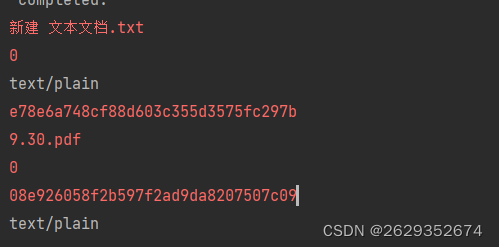
@Transactional @ApiOperation("上传一个文件") @RequestMapping(value = "/uploadfild",method = RequestMethod.POST) public ResponseUtils fileupload(@RequestParam("file") MultipartFile multipartFile, @RequestParam(defaultValue = "****") String bucket, @RequestParam(required = false) String objectName) throws Exception { MediaResources mediaResources = new MediaResources(); /** * 方法默认的保存路径为:C:\Documents and Settings\Administrator\Local Settings\Temp */ //立即删除文件 file.delete(); //在JVM退出时删除文件 file.deleteOnExit(); File tempFile = File.createTempFile("minio","temp"); /** * 先获取流 后面会改变 */ InputStream stream = multipartFile.getInputStream(); /** * 上传的文件拷贝到临时文件 */ multipartFile.transferTo(tempFile); String absolutePath = tempFile.getAbsolutePath(); FileInputStream fileInputStream = new FileInputStream(new File(absolutePath)); String s_md5 = DigestUtils.md5Hex(fileInputStream); //删除 tempFile.delete(); /** * 数据放入 */ mediaResources.setFileUniqueValue(s_md5); mediaResources.setBucket(bucket); mediaResources.setAccessAddress("/"+bucket+"/"+multipartFile.getOriginalFilename()); mediaResources.setUploadedBy("zhan_yuan"); mediaResources.setUploadTime(new Date()); mediaResources.setState("以审核"); String[] s = multipartFile.getOriginalFilename().split("\\."); ContentInfo ex = ContentInfoUtil.findExtensionMatch("."+s[1]); mediaResources.setFileType(ex.getMimeType()); mediaResources.setFileName(multipartFile.getOriginalFilename()); /** * 新增 */ mediaResourcesService.save(mediaResources); minioUtil.createBucket(bucket); if(objectName != null) minioUtil.uploadFile(stream,bucket,objectName+"/"+multipartFile.getOriginalFilename()); else minioUtil.uploadFile(stream,bucket,multipartFile.getOriginalFilename()); return ResponseUtils.success("/"+bucket+"/"+multipartFile.getOriginalFilename()); }- 1
- 2
- 3
- 4
- 5
- 6
- 7
- 8
- 9
- 10
- 11
- 12
- 13
- 14
- 15
- 16
- 17
- 18
- 19
- 20
- 21
- 22
- 23
- 24
- 25
- 26
- 27
- 28
- 29
- 30
- 31
- 32
- 33
- 34
- 35
- 36
- 37
- 38
- 39
- 40
- 41
- 42
- 43
- 44
- 45
-
相关阅读:
Linux eBPF介绍(二)
科技视界杂志科技视界杂志社科技视界编辑部2022年第21期目录
[论文笔记]ESIM
Matlab数据插值与数据重构技巧
puppeteer实现网页截图
vs2022 创建一个同时支持.net480和.net6.0的WPF项目
Ubuntu安装freeSwitch
ElementUI之动态树+数据表格+分页
深度解析linux内核模块编译makefile
好用的爬取静态页面谷歌浏览器工具:Save All Resources
- 原文地址:https://blog.csdn.net/qq_56352553/article/details/133897734

- 最新文章
-
沪漂五周年了:我越来越迷茫了
Agentic Skill Routing 实战:别再把所有 Skill 塞进 AI Agent 上下文
MySQL-Seconds_behind_master的精度误差
[MAF预定义ChatClient中间件-03]CachingChatClient——利用缓存省钱省时间
AI的至暗历史:从万众期待到被政府撤资,AI的两次死亡徘徊
Agent OS :五种驯服不确定性的范式
PortSwigger SQL注入LAB11
数据库即时编译JIT
[Begin]AI Learn Data Day 0
深度学习进阶(二十七)现代 LLM 的核心架构设计其二:SwiGLU