-
CSS之Flex布局的详细解析
Flex布局
目标:熟练使用 Flex 完成结构化布局
01-标准流
标准流也叫文档流,指的是标签在页面中默认的排布规则,例如:块元素独占一行,行内元素可以一行显示多个。

02-浮动
基本使用
作用:让块元素水平排列。
属性名:float
属性值
-
left:左对齐
-
right:右对齐
- <style>
- /* 特点:顶对齐;具备行内块显示模式特点;浮动的盒子会脱标 */
- .one {
- width: 100px;
- height: 100px;
- background-color: brown;
-
- float: left;
- }
-
- .two {
- width: 200px;
- height: 200px;
- background-color: orange;
-
- /* float: left; */
-
- float: right;
- }
- style>
-
- <div class="one">onediv>
- <div class="two">twodiv>
特点:
-
浮动后的盒子顶对齐
-
浮动后的盒子具备行内块特点
-
浮动后的盒子脱标,不占用标准流的位置
产品区域布局

HTML标签
- <div class="product">
- <div class="left">div>
- <div class="right">
- <ul>
- <li>li>
- <li>li>
- <li>li>
- <li>li>
- <li>li>
- <li>li>
- <li>li>
- <li>li>
- ul>
- div>
- div>
CSS样式
- <style>
- * {
- margin: 0;
- padding: 0;
- }
-
- li {
- list-style: none;
- }
-
- .product {
- margin: 50px auto;
- width: 1226px;
- height: 628px;
- background-color: pink;
- }
-
- .left {
- float: left;
- width: 234px;
- height: 628px;
- background-color: skyblue;
- }
-
- .right {
- float: right;
- width: 978px;
- height: 628px;
- background-color: brown;
- }
-
- .right li {
- float: left;
- margin-right: 14px;
- margin-bottom: 14px;
- width: 234px;
- height: 300px;
- background-color: orange;
- }
-
- /* 第四个li和第八个li 去掉右侧的margin */
- .right li:nth-child(4n) {
- margin-right: 0;
- }
-
- /* 细节:如果父级宽度不够,浮动的盒子会掉下来 */
- style>
清除浮动
场景:浮动元素会脱标,如果父级没有高度,子级无法撑开父级高度(可能导致页面布局错乱)
解决方法:清除浮动(清除浮动带来的影响)
场景搭建

-
- "top">"left">"right">
- "bottom">
额外标签法
在父元素内容的最后添加一个块级元素,设置 CSS 属性 clear: both
- <style>
- .clearfix {
- clear: both;
- }
- style>
-
- <div class="father">
- <div class="left">div>
- <div class="right">div>
- <div class="clearfix">div>
- div>
单伪元素法
-
准备 after 伪元素
- .clearfix::after {
- content: "";
- display: block;
- clear: both;
- }
-
父级使用 clearfix 类
<div class="father clearfix">div>双伪元素法
-
准备 after 和 before 伪元素
/* before 解决外边距塌陷问题 */
/* 双伪元素法 */
- .clearfix::before,
- .clearfix::after {
- content: "";
- display: table;
- }
-
- /* after 清除浮动 */
- .clearfix::after {
- clear: both;
- }
-
父级使用 clearfix 类
<div class="father clearfix">div>overfow法
- .father {
- margin: 10px auto;
- width: 1200px;
- /* height: 300px; */
- background-color: pink;
-
- overflow: hidden;
- }
03-Flex布局
Flex 布局也叫弹性布局,是浏览器提倡的布局模型,非常适合结构化布局,提供了强大的空间分布和对齐能力。
Flex 模型不会产生浮动布局中脱标现象,布局网页更简单、更灵活。

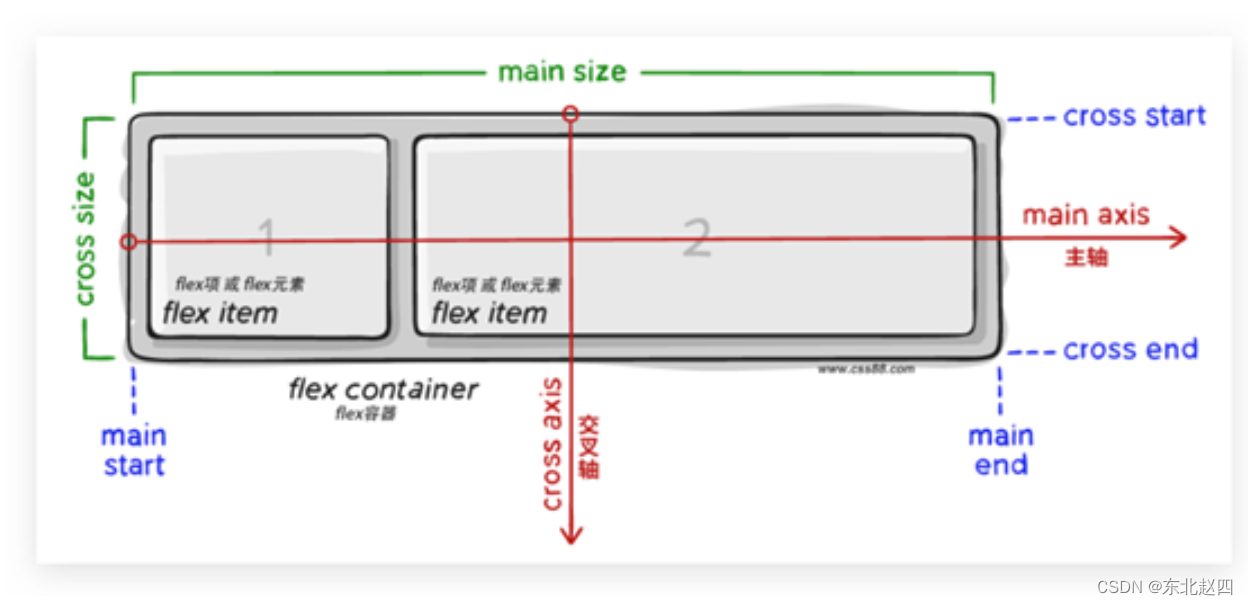
Flex组成
设置方式:给父元素设置 display: flex,子元素可以自动挤压或拉伸
组成部分:
-
弹性容器
-
弹性盒子
-
主轴:默认在水平方向
-
侧轴 / 交叉轴:默认在垂直方向
-
主轴对齐方式
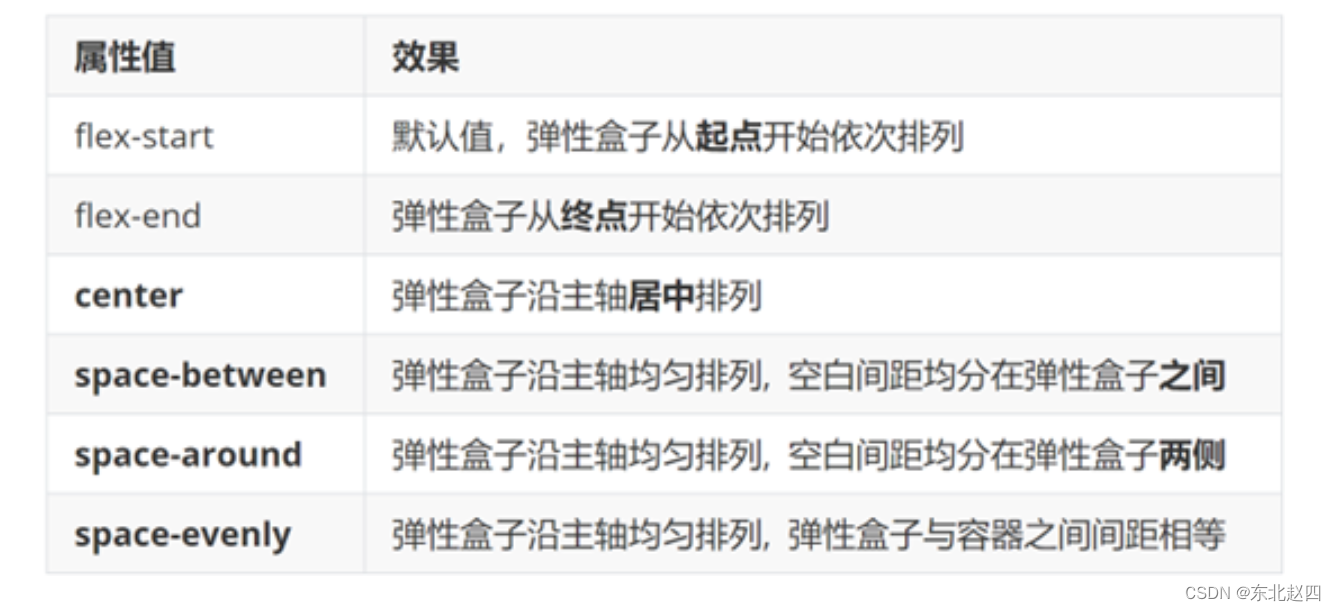
属性名:justify-content
侧轴对齐方式
-
align-items:当前弹性容器内所有弹性盒子的侧轴对齐方式(给弹性容器设置)
-
align-self:单独控制某个弹性盒子的侧轴对齐方式(给弹性盒子设置)
-

修改主轴方向
主轴默认在水平方向,侧轴默认在垂直方向
属性名:flex-direction

弹性伸缩比
作用:控制弹性盒子的主轴方向的尺寸。
属性名:flex
属性值:整数数字,表示占用父级剩余尺寸的份数。
弹性盒子换行
弹性盒子可以自动挤压或拉伸,默认情况下,所有弹性盒子都在一行显示。
属性名:flex-wrap
属性值
-
wrap:换行
-
nowrap:不换行(默认)
行内对齐方式
属性名:align-content

注意:该属性对单行弹性盒子模型无效。
04-综合案例 – 抖音解决方案

整体布局
- <style>
- * {
- margin: 0;
- padding: 0;
- box-sizing: border-box;
- }
-
- li {
- list-style: none;
- }
-
- .box {
- margin: 50px auto;
- width: 1200px;
- height: 418px;
- border: 1px solid #ddd;
- border-radius: 10px;
- }
- style>
-
- <div class="box">div>
列表布局
- <style>
- .box ul {
- display: flex;
- /* 弹性盒子换行 */
- flex-wrap: wrap;
- /* 调整主轴对齐方式 */
- justify-content: space-between;
-
- /* 调整 行对齐方式 */
- align-content: space-between;
-
- padding: 90px 40px 90px 60px;
- height: 418px;
- }
-
- .box li {
- display: flex;
- width: 500px;
- height: 88px;
- /* background-color: pink; */
- }
- style>
-
- <div class="box">
- <ul>
- <li>1li>
- <li>2li>
- <li>3li>
- <li>4li>
- ul>
- div>
内容样式
- <style>
- .box .pic {
- margin-right: 15px;
- }
-
- .box .text h4 {
- line-height: 40px;
- font-size: 20px;
- font-weight: 400;
- color: #333;
- }
-
- .box .text p {
- font-size: 14px;
- color: #666;
- }
- style>
-
- <ul>
- <li>
- <div class="pic">
- <img src="./images/1.svg" alt="">
- div>
- <div class="text">
- <h4>一键发布多端h4>
- <p>发布视频到抖音短视频、西瓜视频及今日头条p>
- div>
- li>
- <li>
- <div class="pic">
- <img src="./images/2.svg" alt="">
- div>
- <div class="text">
- <h4>管理视频内容h4>
- <p>支持修改已发布稿件状态和实时查询视频审核状态p>
- div>
- li>
- <li>
- <div class="pic">
- <img src="./images/3.svg" alt="">
- div>
- <div class="text">
- <h4>发布携带组件h4>
- <p>支持分享内容携带小程序、地理位置信息等组件,扩展内容及突出地域性p>
- div>
- li>
- <li>
- <div class="pic">
- <img src="./images/4.svg" alt="">
- div>
- <div class="text">
- <h4>数据评估分析h4>
- <p>获取视频在对应产品内的数据表现、获取抖音热点,及时进行表现评估p>
- div>
- li>
- ul>
-
-
相关阅读:
Leetcode算法解析——快乐数
FastDFS——从入门到入土(上)
【简单、高效、性能好】SetFit:无需Prompts的高效小样本学习
面向对象程序设计
线段树维护矩阵:0920T4
java编辑pdf(itextpdf)
JS鼠标、键盘、window、表单的事件类型
Day08--自定义组件的properties属性
uni-app 打包H5外部浏览器唤起微信支付
供货商与社群团购平台对接时的8大误区,你都知道吗?
- 原文地址:https://blog.csdn.net/qq_69748833/article/details/133936619

- 最新文章
-
沪漂五周年了:我越来越迷茫了
Agentic Skill Routing 实战:别再把所有 Skill 塞进 AI Agent 上下文
MySQL-Seconds_behind_master的精度误差
[MAF预定义ChatClient中间件-03]CachingChatClient——利用缓存省钱省时间
AI的至暗历史:从万众期待到被政府撤资,AI的两次死亡徘徊
Agent OS :五种驯服不确定性的范式
PortSwigger SQL注入LAB11
数据库即时编译JIT
[Begin]AI Learn Data Day 0
深度学习进阶(二十七)现代 LLM 的核心架构设计其二:SwiGLU