-
【大数据】Kafka 入门简介
1.什么是 Kafka
Kafka 是一个分布式流处理系统,流处理系统使它可以像消息队列一样
publish或者subscribe消息,分布式提供了容错性,并发处理消息的机制。2.Kafka 的基本概念
Kafka 运行在集群上,集群包含一个或多个服务器。Kafka 把消息存在 Topic 中,每一条消息包含键值(
Key),值(Value)和时间戳(Timestamp)。Kafka 有以下一些基本概念:
- Producer:消息生产者,就是向 Kafka Broker 发消息的客户端。
- Consumer:消息消费者,是消息的使用方,负责消费 Kafka 服务器上的消息。
- Topic:主题,由用户定义并配置在 Kafka 服务器,用于建立 Producer 和 Consumer 之间的订阅关系。生产者发送消息到指定的 Topic 下,消息者从这个 Topic 下消费消息。
- Partition:消息分区,一个 Topic 可以分为多个 Partition,每个 Partition 是一个有序的队列。Partition 中的每条消息都会被分配一个有序的
id(Offset)。 - Broker:一台 Kafka 服务器就是一个 Broker。一个集群由多个 Broker 组成。一个 Broker 可以容纳多个 Topic。
- Consumer Group:消费者分组,用于归组同类消费者。每个 Consumer 属于一个特定的 Consumer Group,多个消费者可以共同消费一个Topic下的消息,每个消费者消费其中的部分消息,这些消费者就组成了一个分组,拥有同一个分组名称,通常也被称为消费者集群。
- Offset:消息在 Partition 中的偏移量。每一条消息在 Partition 都有唯一的偏移量,消费者可以指定偏移量来指定要消费的消息。
3.Kafka 分布式架构

如上图所示,Kafka 将 Topic 中的消息存在不同的 Partition中。如果存在键值(Key),消息按照键值做分类存在不同的 Partition 中,如果不存在键值,消息按照轮询(Round Robin)机制存在不同的 Partition 中。默认情况下,键值决定了一条消息会被存在哪个 Partition 中。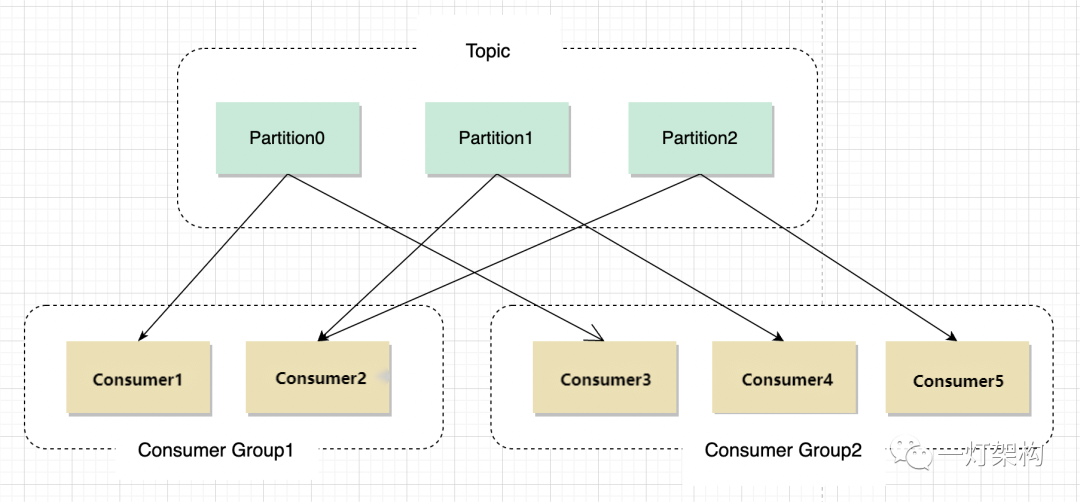
Partition 中的消息序列是有序的消息序列。Kafka 在 Partition 使用偏移量(Offset)来指定消息的位置。一个 Topic 的一个 Partition 只能被一个 Consumer Group 中的一个 Consumer 消费,同组的多个 Consumer 消费同一个 Partition 中的数据是不允许的;但是一个 Consumer 可以消费多个 Partition 中的数据。Kafka 将 Partition 的数据复制到不同的 Broker,提供了 Partition 数据的备份。每一个 Partition 都有一个 Broker 作为 Leader,若干个 Broker 作为 Follower。所有的数据读写都通过 Leader 所在的服务器进行,并且 Leader 在不同 Broker 之间复制数据。

上图中,对于 Partition 0,Broker 1 是它的 Leader,Broker 2 和 Broker 3 是 Follower。对于 Partition 1,Broker 2 是它的 Leader,Broker 1 和 Broker 3 是 Follower。
在上图中,当有 Client(也就是 Producer)要写入数据到 Partition 0 时,会写入到 Leader Broker 1,Broker 1 再将数据复制到 Follower Broker 2 和 Broker 3。
在上图中,Client 向 Partition 1 中写入数据时,会写入到 Broker 2,因为 Broker 2 是 Partition 1 的 Leader,然后 Broker 2 再将数据复制到 Follower Broker 1 和 Broker 3 中。上图中的 Topic 一共有 3 个 Partition,对每个 Partition 的读写都由不同的 Broker 处理,因此总的吞吐量得到了提升。
4.配置单机版 Kafka
这里我们使用 Kafka 0.10.0.0 0.10.0.0 0.10.0.0 版本。
4.1 下载并解压包
$ wget https://archive.apache.org/dist/kafka/0.10.0.0/kafka_2.11-0.10.0.0.tgz $ tar -xzf kafka_2.11-0.10.0.0.tgz $ cd kafka_2.11-0.10.0.0- 1
- 2
- 3
4.2 启动 Kafka
Kafka 需要用到 Zookeeper,所以需要先启动 Zookeeper。我们这里使用下载包里自带的单机版 Zookeeper。
$ bin/zookeeper-server-start.sh config/zookeeper.properties [2013-04-22 15:01:37,495] INFO Reading configuration from: config/zookeeper.properties (org.apache.zookeeper.server.quorum.QuorumPeerConfig) ...- 1
- 2
- 3
然后启动 Kafka
$ bin/kafka-server-start.sh config/server.properties [2013-04-22 15:01:47,028] INFO Verifying properties (kafka.utils.VerifiableProperties) [2013-04-22 15:01:47,051] INFO Property socket.send.buffer.bytes is overridden to 1048576 (kafka.utils.VerifiableProperties) ...- 1
- 2
- 3
- 4
4.3 创建 Topic
$ bin/kafka-topics.sh --create --zookeeper localhost:2181 --replication-factor 1 --partitions 1 --topic test- 1
查看创建的 Topic
$ bin/kafka-topics.sh --list --zookeeper localhost:2181 test- 1
- 2
4.4 向 Topic 中发送消息
$ bin/kafka-console-producer.sh --broker-list localhost:9092 --topic test This is a message This is another message- 1
- 2
- 3
4.5 从 Topic 中消费消息
$ bin/kafka-console-consumer.sh --zookeeper localhost:2181 --topic test --from-beginning This is a message This is another message- 1
- 2
- 3
5.实验
5.1 实验一:Python 实现生产者消费者
kafka-python是一个 Python 的 Kafka 客户端,可以用来向 Kafka 的 Topic 发送消息、消费消息。这个实验会实现一个 Producer 和一个 Consumer。roducer 向 Kafka 发送消息,Consumer 从 Topic 中消费消息。结构如下图:
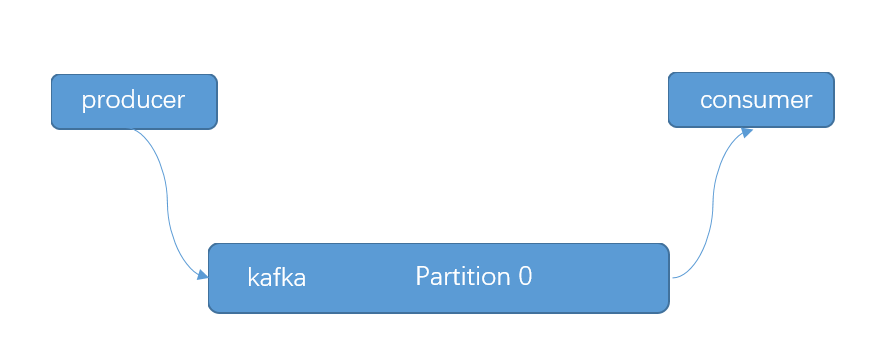
# producer.py import time from kafka import KafkaProducer producer = KafkaProducer(bootstrap_servers="localhost:9092") i = 0 while True: ts = int(time.time() * 1000) producer.send(topic="test", value=str(i), key=str(i), timestamp_ms=ts) producer.flush() print i i += 1 time.sleep(1)- 1
- 2
- 3
- 4
- 5
- 6
- 7
- 8
- 9
- 10
- 11
- 12
- 13
# consumer.py from kafka import KafkaConsumer consumer = KafkaConsumer("test", bootstrap_servers=["localhost:9092"]) for message in consumer: print message- 1
- 2
- 3
- 4
- 5
- 6
接下来创建一个 Topic,名为
test。$ bin/kafka-topics.sh --create --zookeeper localhost:2181 --replication-factor 1 --partitions 1 --topic test Created topic "test".- 1
- 2
打开两个窗口中,我们在
window-1中运行producer.py,如下:# window-1 $ python producer.py 0 1 2 3 4 5 ...- 1
- 2
- 3
- 4
- 5
- 6
- 7
- 8
- 9
在
window-2中运行consumer.py,如下:# window-2 $ python consumer.py ConsumerRecord(topic=u'test', partition=0, offset=128, timestamp=1512554839806, timestamp_type=0, key='128', value='128', checksum=-1439508774, serialized_key_size=3, serialized_value_size=3) ConsumerRecord(topic=u'test', partition=0, offset=129, timestamp=1512554840827, timestamp_type=0, key='129', value='129', checksum=1515993224, serialized_key_size=3, serialized_value_size=3) ConsumerRecord(topic=u'test', partition=0, offset=130, timestamp=1512554841834, timestamp_type=0, key='130', value='130', checksum=453490213, serialized_key_size=3, serialized_value_size=3) ConsumerRecord(topic=u'test', partition=0, offset=131, timestamp=1512554842841, timestamp_type=0, key='131', value='131', checksum=-632119731, serialized_key_size=3, serialized_value_size=3) ...- 1
- 2
- 3
- 4
- 5
- 6
- 7
可以看到
window-2中的 Consumer 成功的读到了 Producer 写入的数据。5.2 实验二:消费组实现容错性机制
这个实验将展示消费组的容错性的特点。这个实验中将创建一个有 2 个 Partition 的 Topic,和 2 个 Consumer,这 2 个 Consumer 共同消费同一个 Topic 中的数据。结构如下所示:
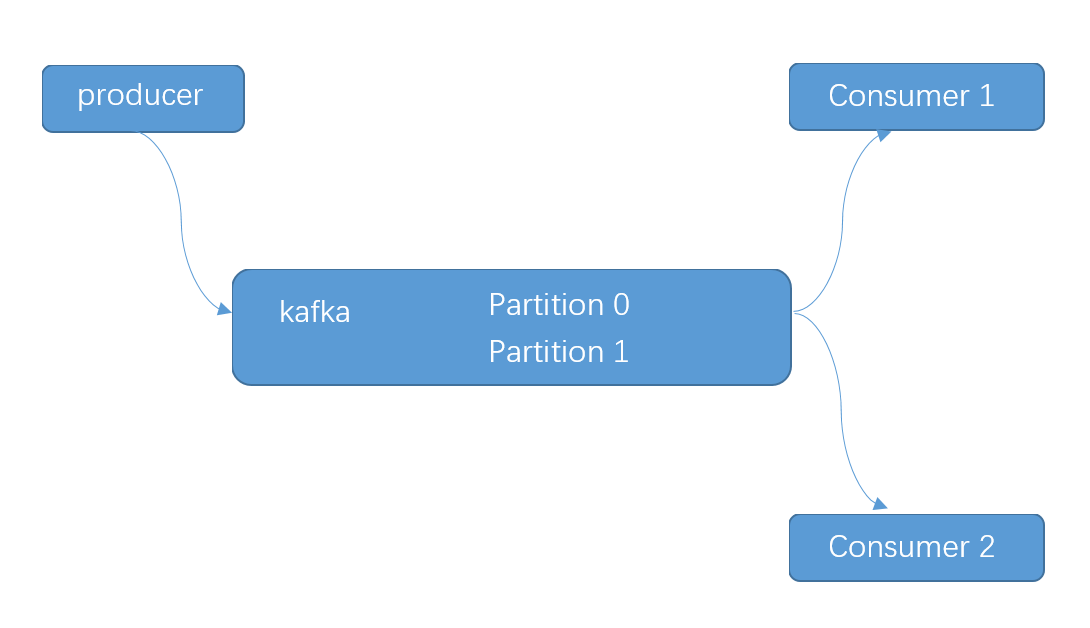
Producer 部分代码和实验一相同,这里不再重复。Consumer 需要指定所属的 Consumer Group,代码如下:# consumer.py from kafka import KafkaConsumer consumer = KafkaConsumer("test", bootstrap_servers=["localhost:9092"], group_id="testgroup") for message in consumer: print message- 1
- 2
- 3
- 4
- 5
- 6
接下来我们创建一个 Topic,名为 Test,设置 Partition 数量为 2。
$ bin/kafka-topics.sh --create --zookeeper localhost:2181 --replication-factor 1 --partitions 2 --topic test Created topic "test".- 1
- 2
打开三个窗口,一个窗口运行 Producer,还有两个窗口运行 Consumer。
运行 Consumer 的两个窗口的输出如下:
# window-1 $ python consumer.py ConsumerRecord(topic=u'test', partition=0, offset=11, timestamp=1512556619298, timestamp_type=0, key='15', value='15', checksum=-1492440752, serialized_key_size=2, serialized_value_size=2) ConsumerRecord(topic=u'test', partition=0, offset=12, timestamp=1512556621308, timestamp_type=0, key='17', value='17', checksum=-1029407634, serialized_key_size=2, serialized_value_size=2) ConsumerRecord(topic=u'test', partition=0, offset=13, timestamp=1512556622316, timestamp_type=0, key='18', value='18', checksum=1544755853, serialized_key_size=2, serialized_value_size=2) ConsumerRecord(topic=u'test', partition=0, offset=14, timestamp=1512556624326, timestamp_type=0, key='20', value='20', checksum=2130557725, serialized_key_size=2, serialized_value_size=2) ... # window-2 $ python consumer.py ConsumerRecord(topic=u'test', partition=1, offset=6, timestamp=1512556617287, timestamp_type=0, key='13', value='13', checksum=-1494513008, serialized_key_size=2, serialized_value_size=2) ConsumerRecord(topic=u'test', partition=1, offset=7, timestamp=1512556618293, timestamp_type=0, key='14', value='14', checksum=-1499251221, serialized_key_size=2, serialized_value_size=2) ConsumerRecord(topic=u'test', partition=1, offset=8, timestamp=1512556620303, timestamp_type=0, key='16', value='16', checksum=-783427375, serialized_key_size=2, serialized_value_size=2) ConsumerRecord(topic=u'test', partition=1, offset=9, timestamp=1512556623321, timestamp_type=0, key='19', value='19', checksum=-1902514040, serialized_key_size=2, serialized_value_size=2) ConsumerRecord(topic=u'test', partition=1, offset=10, timestamp=1512556626337, timestamp_type=0, key='22', value='22', checksum=782849423, serialized_key_size=2, serialized_value_size=2) ...- 1
- 2
- 3
- 4
- 5
- 6
- 7
- 8
- 9
- 10
- 11
- 12
- 13
- 14
- 15
- 16
- 17
可以看到两个 Consumer 同时运行的情况下,它们分别消费不同 Partition 中的数据。
window-1中的 Consumer 消费 Partition 0 中的数据,window-2中的 Consumer 消费 Parition 1 中的数据。我们尝试关闭
window-1中的 Consumer,可以看到如下结果:# window-2 ConsumerRecord(topic=u'test', partition=1, offset=105, timestamp=1512557514410,timestamp_type=0, key='46', value='46', checksum=-1821060627, serialized_key_size=2, serialized_value_size=2) ConsumerRecord(topic=u'test', partition=1, offset=106, timestamp=1512557518428,timestamp_type=0, key='50', value='50', checksum=281004575, serialized_key_size=2, serialized_value_size=2) ConsumerRecord(topic=u'test', partition=1, offset=107, timestamp=1512557521442,timestamp_type=0, key='53', value='53', checksum=1245067939, serialized_key_size=2, serialized_value_size=2) ConsumerRecord(topic=u'test', partition=1, offset=108, timestamp=1512557525461,timestamp_type=0, key='57', value='57', checksum=-1003840299, serialized_key_size=2, serialized_value_size=2) ConsumerRecord(topic=u'test', partition=0, offset=98, timestamp=1512557494325, timestamp_type=0, key='26', value='26', checksum=-1576244323, serialized_key_size=2, serialized_value_size=2) ConsumerRecord(topic=u'test', partition=0, offset=99, timestamp=1512557495329, timestamp_type=0, key='27', value='27', checksum=510530536, serialized_key_size=2, serialized_value_size=2) ConsumerRecord(topic=u'test', partition=0, offset=100, timestamp=1512557502360,timestamp_type=0, key='34', value='34', checksum=1781705793, serialized_key_size=2, serialized_value_size=2) ConsumerRecord(topic=u'test', partition=0, offset=101, timestamp=1512557504368,timestamp_type=0, key='36', value='36', checksum=2142677730, serialized_key_size=2, serialized_value_size=2) ConsumerRecord(topic=u'test', partition=0, offset=102, timestamp=1512557505372,timestamp_type=0, key='37', value='37', checksum=-1376259357, serialized_key_size=2, serialized_value_size=2) ...- 1
- 2
- 3
- 4
- 5
- 6
- 7
- 8
- 9
- 10
- 11
- 12
刚开始
window-2中的 Consumer 只消费 Partition 1 中的数据,当window-1中的 Consumer 退出后,window-2中的 Consumer 中也开始消费 Partition 0 中的数据了。5.3 实验三:Offset 管理
Kafka 允许 Consumer 将当前消费的消息的 Offset 提交到 Kafka中,这样如果 Consumer 因异常退出后,下次启动仍然可以从上次记录的 Offset 开始向后继续消费消息。
这个实验的结构和实验一的结构是一样的,使用一个 Producer,一个 Consumer,主题
test的 Partition 数量设为 1。Producer 的代码和实验一中的一样,这里不再重复。Consumer 的代码稍作修改,这里 Consumer 中打印出下一个要被消费的消息的 Offset。Consumer 代码如下:
from kafka import KafkaConsumer, TopicPartition tp = TopicPartition("test", 0) consumer = KafkaConsumer(bootstrap_servers=["localhost:9092"], group_id="testgroup", auto_offset_reset="earliest", enable_auto_commit=False) consumer.assign([tp]) print "start offset is", consumer.position(tp) for message in consumer: print message- 1
- 2
- 3
- 4
- 5
- 6
- 7
- 8
在一个窗口中启动 Producer,在另一个窗口并且启动 Consumer。Consumer 的输出如下:
$ python consumer.py start offset is 98 ConsumerRecord(topic=u'test', partition=0, offset=98, timestamp=1512558902904, timestamp_type=0, key='98', value='98', checksum=-588818519, serialized_key_size=2, serialized_value_size=2) ConsumerRecord(topic=u'test', partition=0, offset=99, timestamp=1512558903909, timestamp_type=0, key='99', value='99', checksum=1042712647, serialized_key_size=2, serialized_value_size=2) ConsumerRecord(topic=u'test', partition=0, offset=100, timestamp=1512558904915, timestamp_type=0, key='100', value='100', checksum=-838622723, serialized_key_size=3, serialized_value_size=3) ConsumerRecord(topic=u'test', partition=0, offset=101, timestamp=1512558905920, timestamp_type=0, key='101', value='101', checksum=-2020362485, serialized_key_size=3, serialized_value_size=3) ConsumerRecord(topic=u'test', partition=0, offset=102, timestamp=1512558906926, timestamp_type=0, key='102', value='102', checksum=-345378749, serialized_key_size=3, serialized_value_size=3) ...- 1
- 2
- 3
- 4
- 5
- 6
- 7
- 8
可以尝试退出 Consumer,再启动 Consumer。每一次重新启动,Consumer 都是从
offset=98的消息开始消费的。修改 Consumer 的代码如下,在 Consumer 消费每一条消息后将
offset提交回 Kafka。from kafka import KafkaConsumer, TopicPartition, OffsetAndMetadata tp = TopicPartition("test2", 0) consumer = KafkaConsumer(bootstrap_servers=["localhost:9092"], group_id="testgroup", auto_offset_reset="earliest", enable_auto_commit=False) consumer.assign([tp]) print "start offset is ", consumer.position(tp) for message in consumer: print message consumer.commit(message.offset + 1)- 1
- 2
- 3
- 4
- 5
- 6
- 7
- 8
- 9
启动 Consumer
$ python consumer.py start offset is 98 ConsumerRecord(topic=u'test', partition=0, offset=98, timestamp=1512559632153, timestamp_type=0, key='824', value='824', checksum=828849435, serialized_key_size=3, serialized_value_size=3) ... ConsumerRecord(topic=u'test', partition=0, offset=827, timestamp=1512559635164, timestamp_type=0, key='827', value='827', checksum=442222330, serialized_key_size=3, serialized_value_size=3) ConsumerRecord(topic=u'test', partition=0, offset=828, timestamp=1512559636169, timestamp_type=0, key='828', value='828', checksum=-267344764, serialized_key_size=3, serialized_value_size=3) ConsumerRecord(topic=u'test', partition=0, offset=829, timestamp=1512559637173, timestamp_type=0, key='829', value='829', checksum=1225853586, serialized_key_size=3, serialized_value_size=3)- 1
- 2
- 3
- 4
- 5
- 6
- 7
可以看到 Consumer 从
offset=98的消息开始消费,到offset=829时,我们Ctrl+C退出 Consumer。我们再次启动 Consumer
$ python consumer.py start offset is 830 ConsumerRecord(topic=u'test', partition=0, offset=830, timestamp=1512559638177, timestamp_type=0, key='830', value='830', checksum=1003305652, serialized_key_size=3, serialized_value_size=3) ConsumerRecord(topic=u'test', partition=0, offset=831, timestamp=1512559639181, timestamp_type=0, key='831', value='831', checksum=-361607666, serialized_key_size=3, serialized_value_size=3) ConsumerRecord(topic=u'test', partition=0, offset=832, timestamp=1512559640185, timestamp_type=0, key='832', value='832', checksum=-345891932, serialized_key_size=3, serialized_value_size=3) ...- 1
- 2
- 3
- 4
- 5
- 6
可以看到重新启动后,Consumer 从上一次记录的
offset开始继续消费消息。之后每一次 Consumer 重新启动,Consumer 都会从上一次停止的地方继续开始消费。6.总结
本文主要介绍了一下 Kafka 的基本概念,并结合一些实验帮助理解 Kafka 中的一些难点,如多个 Consumer 的容错性机制,Offset 管理。
-
相关阅读:
人工智能之Tensorflow编程模型
SpringCloud Alibaba Sentinel 限流详解
【CV】第 14 章:用最少的数据点训练
数字滚动动效(纯HTML5版和Vue版本)
HEU大三数字电路综合实验--简易数字频率计
【深度学习21天学习挑战赛】8、卷积神经网络(认识Xception模型):动物识别
Linux·知识点常见问题
.some方法、vh、多列布局、DNS域名解析过程、空页面文字内容渲染
bean的自动装配
k8s入门:Helm 构建 MySQL
- 原文地址:https://blog.csdn.net/be_racle/article/details/133913288