-
VTK 标注类Widget 文字标注 vtkCaptionWidget
目录
Part1: 简介
vtkCaptionWidget:用一个带线框及箭头的文本信息来标注某一对象;
在可视化程序中,经常会对某个对象做一些标注说明;
如,在医学图像诊断中,常常会手动标注出被诊断为肿瘤的区域或者其他病变区域,并用文字进行标注。
Part2: 效果
vtkCaptionWidget 如下表所示

也可以给它加个中心点;
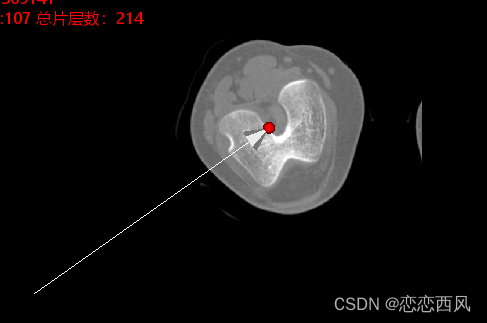
Part3: example
- #include "vtkSmartPointer.h"
- #include "vtkObjectFactory.h"
- #include "vtkRenderWindow.h"
- #include "vtkGenericRenderWindowInteractor.h"
- #include "vtkRenderer.h"
- #include "vtkActor.h"
- #include "vtkDICOMImageReader.h"
- #include "vtkImageViewer2.h"
- #include "vtkInteractorStyleImage.h"
- /
- #include
- #include
- #include
- #include
- #include
- #include
- #include
- #include
- #include
- #include
- #include
- #include
- #include
- #include
- #include
- #include
- #include
- #include
/// - #include
- #include
- #include
- #include
- #include
- int main(int argc, char* argv[])
- {
- auto reader = vtkSmartPointer
::New(); - reader->SetDirectoryName("D:/dicom");
- reader->Update();
- auto imageViewer = vtkSmartPointer
::New(); - imageViewer->SetInputConnection(reader->GetOutputPort());
- auto interactor = vtkSmartPointer
::New(); - interactor->SetRenderWindow(imageViewer->GetRenderWindow());
- imageViewer->SetupInteractor(interactor);
- imageViewer->SetSize(400, 400);
- imageViewer->SetColorLevel(211);
- imageViewer->SetColorWindow(2470);
- imageViewer->SetSliceOrientationToXY();
- imageViewer->GetRenderer()->SetBackground(0, 0, 0);
- vtkSmartPointer
captionWidget = - vtkSmartPointer
::New(); - captionWidget->SetInteractor(interactor);
- captionWidget->GetCaptionActor2D();
- vtkSmartPointer
captionRepresentation = - vtkSmartPointer
::New(); - captionRepresentation->GetCaptionActor2D()->SetCaption("VTK Caption Test");
- captionRepresentation->SetHandleSize(20);
- //captionRepresentation->GetCaptionActor2D()->SetBorder(false);
- captionRepresentation->GetCaptionActor2D()->GetTextActor()->GetTextProperty()->SetColor(1, 0, 0);
- captionRepresentation->GetCaptionActor2D()->GetTextActor()->GetTextProperty()->SetVerticalJustificationToCentered();
- double pos[3] = { 100,100, 10};
- captionRepresentation->SetAnchorPosition(pos);
- //captionWidget->SetCaptionActor2D(captionRepresentation->GetCaptionActor2D());
- captionWidget->SetRepresentation(captionRepresentation);
- captionWidget->On();
- imageViewer->Render();
- imageViewer->GetRenderer()->ResetCamera();
- imageViewer->Render();
- //memcpy(style->bound, captionWidget->GetRepresentation()->GetBounds(), sizeof(double) * 6);
- interactor->Start();
- return EXIT_SUCCESS;
- }
-
相关阅读:
分割数组的最大值问题
服务器数据恢复-Xen server虚拟机数据恢复案例
Modbus简介
springmvc-JSR303进行服务端校验&分组验证&SpringMVC定义Restfull接口&异常处理流程&RestController异常处理
金仓数据库KingbaseES Clusterware配置手册(搭建集群 )
js异步控制器,实现异步同步代码交替穿插执行
HBase在大数据集群的安装部署及整合Phoenix
AI视频教程下载:ChatGPT个人生产力提升指南
Vue 响应式原理
【X3m】opencv和opencv_contrib交叉编译
- 原文地址:https://blog.csdn.net/q610098308/article/details/133904711
- 最新文章
-
沪漂五周年了:我越来越迷茫了
Agentic Skill Routing 实战:别再把所有 Skill 塞进 AI Agent 上下文
MySQL-Seconds_behind_master的精度误差
[MAF预定义ChatClient中间件-03]CachingChatClient——利用缓存省钱省时间
AI的至暗历史:从万众期待到被政府撤资,AI的两次死亡徘徊
Agent OS :五种驯服不确定性的范式
PortSwigger SQL注入LAB11
数据库即时编译JIT
[Begin]AI Learn Data Day 0
深度学习进阶(二十七)现代 LLM 的核心架构设计其二:SwiGLU