-
Win10 环境下 VS2022 暴力编译PP-OCRv4
1 环境准备
- 下载PaddleOCR
PaddleOCR
C++ 部署代码位于 PaddleOCR\deploy\cpp_infer目录下
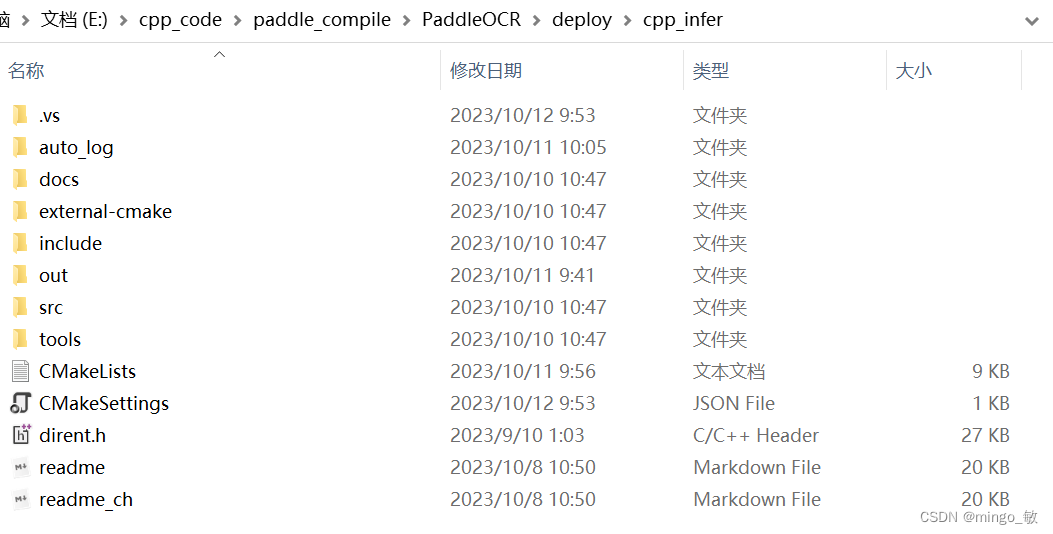
复制cpp_infer目录下include和src到项目目录下 - paddle_inference
paddle_inference
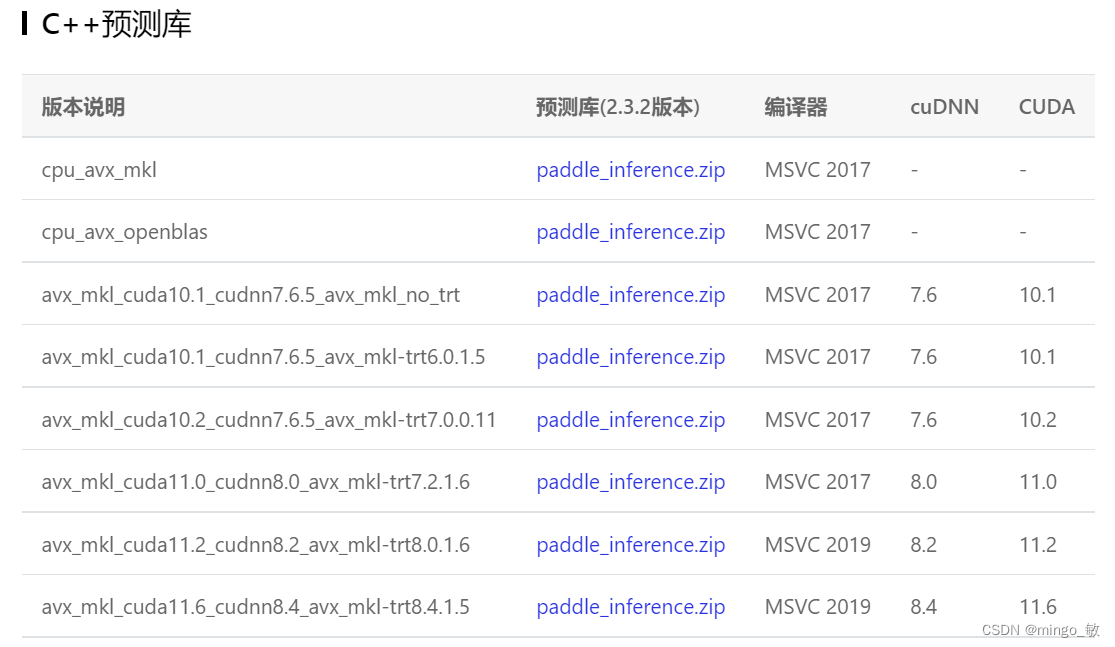
- opencv
这里使用已经安装好的opencv4.5.5 - 下载dirent-master.zip
下载dirent-master.zip, 解压并复制dirent.h文件到项目目录下 - 下载权重文件
检测模型 ch_PP-OCRv4_det_infer
方向分类器 ch_ppocr_mobile_v2.0_cls_infer
识别模型 ch_PP-OCRv4_rec_infer
2 Visual Studio 2022 环境配置
属性 --> VC++ 目录 --> 包含目录
E:\opencv455\build\include E:\cpp_code\PaddleOCR\paddle_inference\paddle\include E:\cpp_code\PaddleOCR\paddle_inference\third_party\install\cryptopp\include E:\cpp_code\PaddleOCR\paddle_inference\third_party\install\protobuf\include E:\cpp_code\PaddleOCR\paddle_inference\third_party\install\glog\include E:\cpp_code\PaddleOCR\paddle_inference\third_party\install\gflags\include E:\cpp_code\PaddleOCR\paddle_inference\third_party\install\xxhash\include E:\cpp_code\PaddleOCR\paddle_inference\third_party\install\onnxruntime\include E:\cpp_code\PaddleOCR\paddle_inference\third_party\install\paddle2onnx\include E:\cpp_code\PaddleOCR\paddle_inference\third_party\install\mklml\include E:\cpp_code\PaddleOCR\paddle_inference\third_party\install\mkldnn\include E:\cpp_code\PaddleOCR\paddle_inference\third_party\install\utf8proc\include E:\cpp_code\PaddleOCR\ocr_cpu- 1
- 2
- 3
- 4
- 5
- 6
- 7
- 8
- 9
- 10
- 11
- 12
- 13
属性 --> VC++ 目录 --> 库目录
E:\opencv455\build\x64\vc15\lib E:\cpp_code\PaddleOCR\paddle_inference\paddle\lib E:\cpp_code\PaddleOCR\paddle_inference\third_party\install\cryptopp\lib E:\cpp_code\PaddleOCR\paddle_inference\third_party\install\protobuf\lib E:\cpp_code\PaddleOCR\paddle_inference\third_party\install\glog\lib E:\cpp_code\PaddleOCR\paddle_inference\third_party\install\gflags\lib E:\cpp_code\PaddleOCR\paddle_inference\third_party\install\xxhash\lib E:\cpp_code\PaddleOCR\paddle_inference\third_party\install\onnxruntime\lib E:\cpp_code\PaddleOCR\paddle_inference\third_party\install\paddle2onnx\lib E:\cpp_code\PaddleOCR\paddle_inference\third_party\install\mklml\lib E:\cpp_code\PaddleOCR\paddle_inference\third_party\install\mkldnn\lib E:\cpp_code\PaddleOCR\paddle_inference\third_party\install\utf8proc\lib- 1
- 2
- 3
- 4
- 5
- 6
- 7
- 8
- 9
- 10
- 11
- 12
属性 --> 链接器 --> 输入 --> 附加依赖项
opencv_world455.lib paddle_inference.lib libpaddle_inference.lib cryptopp-static.lib gflags_static.lib shlwapi.lib glog.lib mkldnn.lib mklml.lib libiomp5md.lib onnxruntime.lib paddle2onnx.lib libprotobuf.lib utf8proc_static.lib xxhash.lib- 1
- 2
- 3
- 4
- 5
- 6
- 7
- 8
- 9
- 10
- 11
- 12
- 13
- 14
- 15
将 opencv_world455.dll,paddle_inference.dll,paddle2onnx.dll 和 onnxruntime.dll复制到项目的x64\Release目录下
3 测试
修改 main.cpp文件
int main() { SetConsoleOutputCP(CP_UTF8); FLAGS_det_model_dir = "E:\\cpp_code\\weights\\PP-OCRv4\\ch_PP-OCRv4_det_infer"; FLAGS_rec_model_dir = "E:\\cpp_code\\weights\\PP-OCRv4\\ch_PP-OCRv4_rec_infer"; FLAGS_cls_model_dir = "E:\\cpp_code\\weights\\PP-OCRv4\\ch_ppocr_mobile_v2.0_cls_infer"; FLAGS_rec_char_dict_path = "E:\\cpp_code\\paddle_compile\\PaddleOCR\\ppocr\\utils\\ppocr_keys_v1.txt"; FLAGS_image_dir = "E:\\cpp_code\\images\\img_20230926_105631025.jpg"; FLAGS_cpu_threads = 64; FLAGS_type = "ocr"; // "structure" FLAGS_output = ".\\output"; std::vector<cv::String> cv_all_img_names; cv::glob(FLAGS_image_dir, cv_all_img_names); std::cout << "total images num: " << cv_all_img_names.size() << std::endl; if (FLAGS_type == "ocr") { ocr(cv_all_img_names); } else if (FLAGS_type == "structure") { structure(cv_all_img_names); } else { std::cout << "only value in ['ocr','structure'] is supported" << std::endl; } }- 1
- 2
- 3
- 4
- 5
- 6
- 7
- 8
- 9
- 10
- 11
- 12
- 13
- 14
- 15
- 16
- 17
- 18
- 19
- 20
- 21
- 22
- 23
- 24
- 25
- 26
- 27
- 28

遇到的问题和解决方法:
- error LNK2038: 检测到“RuntimeLibrary”的不匹配项: 值“MT_StaticRelease”不匹配值“MD_DynamicRelease”
1>gflags_static.lib(gflags.cc.obj) : error LNK2038: 检测到“RuntimeLibrary”的不匹配项: 值“MT_StaticRelease”不匹配值“MD_DynamicRelease”(ocr_cpu.obj 中) 1>gflags_static.lib(gflags_reporting.cc.obj) : error LNK2038: 检测到“RuntimeLibrary”的不匹配项: 值“MT_StaticRelease”不匹配值“MD_DynamicRelease”(ocr_cpu.obj 中) 1>gflags_static.lib(gflags_completions.cc.obj) : error LNK2038: 检测到“RuntimeLibrary”的不匹配项: 值“MT_StaticRelease”不匹配值“MD_DynamicRelease”(ocr_cpu.obj 中) 1>libcpmt.lib(locale0.obj) : error LNK2038: 检测到“RuntimeLibrary”的不匹配项: 值“MT_StaticRelease”不匹配值“MD_DynamicRelease”(ocr_cpu.obj 中) 1>libcpmt.lib(cerr.obj) : error LNK2038: 检测到“RuntimeLibrary”的不匹配项: 值“MT_StaticRelease”不匹配值“MD_DynamicRelease”(ocr_cpu.obj 中) 1>libcpmt.lib(locale.obj) : error LNK2038: 检测到“RuntimeLibrary”的不匹配项: 值“MT_StaticRelease”不匹配值“MD_DynamicRelease”(ocr_cpu.obj 中) 1>libcpmt.lib(iosptrs.obj) : error LNK2038: 检测到“RuntimeLibrary”的不匹配项: 值“MT_StaticRelease”不匹配值“MD_DynamicRelease”(ocr_cpu.obj 中)- 1
- 2
- 3
- 4
- 5
- 6
- 7
解决方法: 属性 -> C/C++ -> 代码生成 -> 运行库

- error LNK2001: 无法解析的外部符号 “__declspec(dllimport) public: class std::basic_ostream
1>paddleocr.obj : error LNK2001: 无法解析的外部符号 "__declspec(dllimport) public: class std::basic_ostream- 1
- 2
- 3
- 4
解决方法: 属性 ->C/C++ ->预处理器 ->预处理器定义:GOOGLE_GLOG_DLL_DECL=

3. gflags_static.lib(gflags.cc.obj) : error LNK2001: 无法解析的外部符号 __imp_PathMatchSpecA解决方法:项目属性 -》链接器-》输入-》附加依赖项-》加上shlwapi.lib
- 下载PaddleOCR
-
相关阅读:
JavaEE初阶-计算机是如何工作的
【数据结构】数组和广义表
Java中该如何面向对象以及类的定义、使用和实例化
C++模板从入门到入土
黑马程序员微服务 第五天课程 分布式搜索引擎2
金蝶迷路“云”丛中
PIC10F200单片机编程总结-0
SAP ERP系统里的那些核心主数据
手机号正则
手机悬浮提词器怎么设置?分享三个简单的操作方法
- 原文地址:https://blog.csdn.net/shanglianlm/article/details/133812886
