-
深度学习基础知识 使用torchsummary、netron、tensorboardX查看模参数结构
1、直接打印网络参数结构
import torch.nn as nn from torchsummary import summary import torch class Alexnet(nn.Module): def __init__(self): super().__init__() self.net = nn.Sequential(nn.Conv2d(3, 96, kernel_size=11, stride=4, padding=1), nn.ReLU(), nn.MaxPool2d(kernel_size=3, stride=2), nn.Conv2d(96, 256, kernel_size=5, padding=2), nn.ReLU(), nn.MaxPool2d(kernel_size=3, stride=2), nn.Conv2d(256, 384, kernel_size=3, padding=1), nn.ReLU(), nn.Conv2d(384, 384, kernel_size=3, padding=1), nn.ReLU(), nn.Conv2d(384, 256, kernel_size=3, padding=1), nn.ReLU(), nn.MaxPool2d(kernel_size=3, stride=2), nn.Flatten(), nn.Linear(256 * 5 * 5, 4096), nn.ReLU(), nn.Dropout(0.5), nn.Linear(4096, 4096), nn.ReLU(), nn.Dropout(0.5), nn.Linear(4096, 10)) def forward(self, X): return self.net(X) if __name__=="__main__": device=torch.device("cuda:0" if torch.cuda.is_available() else "cpu") model=Alexnet().to(device) print(model) # summary(model,(3,224,224),16)- 1
- 2
- 3
- 4
- 5
- 6
- 7
- 8
- 9
- 10
- 11
- 12
- 13
- 14
- 15
- 16
- 17
- 18
- 19
- 20
- 21
- 22
- 23
- 24
- 25
- 26
- 27
- 28
- 29
- 30
- 31
结果输出:
Alexnet( (net): Sequential( (0): Conv2d(3, 96, kernel_size=(11, 11), stride=(4, 4), padding=(1, 1)) (1): ReLU() (2): MaxPool2d(kernel_size=3, stride=2, padding=0, dilation=1, ceil_mode=False) (3): Conv2d(96, 256, kernel_size=(5, 5), stride=(1, 1), padding=(2, 2)) (4): ReLU() (5): MaxPool2d(kernel_size=3, stride=2, padding=0, dilation=1, ceil_mode=False) (6): Conv2d(256, 384, kernel_size=(3, 3), stride=(1, 1), padding=(1, 1)) (7): ReLU() (8): Conv2d(384, 384, kernel_size=(3, 3), stride=(1, 1), padding=(1, 1)) (9): ReLU() (10): Conv2d(384, 256, kernel_size=(3, 3), stride=(1, 1), padding=(1, 1)) (11): ReLU() (12): MaxPool2d(kernel_size=3, stride=2, padding=0, dilation=1, ceil_mode=False) (13): Flatten(start_dim=1, end_dim=-1) (14): Linear(in_features=6400, out_features=4096, bias=True) (15): ReLU() (16): Dropout(p=0.5, inplace=False) (17): Linear(in_features=4096, out_features=4096, bias=True) (18): ReLU() (19): Dropout(p=0.5, inplace=False) (20): Linear(in_features=4096, out_features=10, bias=True) ) )- 1
- 2
- 3
- 4
- 5
- 6
- 7
- 8
- 9
- 10
- 11
- 12
- 13
- 14
- 15
- 16
- 17
- 18
- 19
- 20
- 21
- 22
- 23
- 24
- 25
上述方案存在的问题是:当网络参数设置存在错误时,无法检测出来
2、采用torchsummary检测、查看模型参数结构
安装torchsummary
pip install torchsummary- 1
通常采用torchsummary打印网络结构参数时,会出现以下问题
代码:import torch.nn as nn from torchsummary import summary class Alexnet(nn.Module): def __init__(self): super().__init__() self.net = nn.Sequential(nn.Conv2d(3, 96, kernel_size=11, stride=4, padding=1), nn.ReLU(), nn.MaxPool2d(kernel_size=3, stride=2), nn.Conv2d(96, 256, kernel_size=5, padding=2), nn.ReLU(), nn.MaxPool2d(kernel_size=3, stride=2), nn.Conv2d(256, 384, kernel_size=3, padding=1), nn.ReLU(), nn.Conv2d(384, 384, kernel_size=3, padding=1), nn.ReLU(), nn.Conv2d(384, 256, kernel_size=3, padding=1), nn.ReLU(), nn.MaxPool2d(kernel_size=3, stride=2), nn.Flatten(), nn.Linear(256 * 5 * 5, 4096), nn.ReLU(), nn.Dropout(0.5), nn.Linear(4096, 4096), nn.ReLU(), nn.Dropout(0.5), nn.Linear(4096, 10)) def forward(self, X): return self.net(X) net = Alexnet() print(summary(net, (3, 224, 224), 8))- 1
- 2
- 3
- 4
- 5
- 6
- 7
- 8
- 9
- 10
- 11
- 12
- 13
- 14
- 15
- 16
- 17
- 18
- 19
- 20
- 21
- 22
- 23
- 24
- 25
- 26
- 27
报错内容如下:
RuntimeError: Input type (torch.cuda.FloatTensor) and weight type (torch.FloatTensor) should be the same- 1
报错原因分析:
在使用torchsummary可视化模型时候报错,报这个错误是因为类型不匹配,根据报错内容可以看出Input type为torch.FloatTensor(CPU数据类型),而weight type(即网络权重参数这些)为torch.cuda.FloatTensor(GPU数据类型)
解决方案:
将model传到GPU上便可。将代码如下修改便可正常运行
if __name__ == "__main__": from torchsummary import summary device = torch.device("cuda:0" if torch.cuda.is_available() else "cpu") model = UNet().to(device) # modify print(model) summary(model, input_size=(3, 224, 224))- 1
- 2
- 3
- 4
- 5
- 6
整体代码:
import torch.nn as nn from torchsummary import summary import torch class Alexnet(nn.Module): def __init__(self): super().__init__() self.net = nn.Sequential(nn.Conv2d(3, 96, kernel_size=11, stride=4, padding=1), nn.ReLU(), nn.MaxPool2d(kernel_size=3, stride=2), nn.Conv2d(96, 256, kernel_size=5, padding=2), nn.ReLU(), nn.MaxPool2d(kernel_size=3, stride=2), nn.Conv2d(256, 384, kernel_size=3, padding=1), nn.ReLU(), nn.Conv2d(384, 384, kernel_size=3, padding=1), nn.ReLU(), nn.Conv2d(384, 256, kernel_size=3, padding=1), nn.ReLU(), nn.MaxPool2d(kernel_size=3, stride=2), nn.Flatten(), nn.Linear(256 * 5 * 5, 4096), nn.ReLU(), nn.Dropout(0.5), nn.Linear(4096, 4096), nn.ReLU(), nn.Dropout(0.5), nn.Linear(4096, 10)) def forward(self, X): return self.net(X) if __name__=="__main__": device=torch.device("cuda:0" if torch.cuda.is_available() else "cpu") model=Alexnet().to(device) # print(model) summary(model,(3,224,224),16) # 16:表示传入的数据批次- 1
- 2
- 3
- 4
- 5
- 6
- 7
- 8
- 9
- 10
- 11
- 12
- 13
- 14
- 15
- 16
- 17
- 18
- 19
- 20
- 21
- 22
- 23
- 24
- 25
- 26
- 27
- 28
- 29
- 30
- 31
打印结果:
---------------------------------------------------------------- Layer (type) Output Shape Param # ================================================================ Conv2d-1 [16, 96, 54, 54] 34,944 ReLU-2 [16, 96, 54, 54] 0 MaxPool2d-3 [16, 96, 26, 26] 0 Conv2d-4 [16, 256, 26, 26] 614,656 ReLU-5 [16, 256, 26, 26] 0 MaxPool2d-6 [16, 256, 12, 12] 0 Conv2d-7 [16, 384, 12, 12] 885,120 ReLU-8 [16, 384, 12, 12] 0 Conv2d-9 [16, 384, 12, 12] 1,327,488 ReLU-10 [16, 384, 12, 12] 0 Conv2d-11 [16, 256, 12, 12] 884,992 ReLU-12 [16, 256, 12, 12] 0 MaxPool2d-13 [16, 256, 5, 5] 0 Flatten-14 [16, 6400] 0 Linear-15 [16, 4096] 26,218,496 ReLU-16 [16, 4096] 0 Dropout-17 [16, 4096] 0 Linear-18 [16, 4096] 16,781,312 ReLU-19 [16, 4096] 0 Dropout-20 [16, 4096] 0 Linear-21 [16, 10] 40,970 ================================================================ Total params: 46,787,978 Trainable params: 46,787,978 Non-trainable params: 0 ---------------------------------------------------------------- Input size (MB): 9.19 Forward/backward pass size (MB): 163.58 Params size (MB): 178.48 Estimated Total Size (MB): 351.25 ----------------------------------------------------------------- 1
- 2
- 3
- 4
- 5
- 6
- 7
- 8
- 9
- 10
- 11
- 12
- 13
- 14
- 15
- 16
- 17
- 18
- 19
- 20
- 21
- 22
- 23
- 24
- 25
- 26
- 27
- 28
- 29
- 30
- 31
- 32
- 33
- 34
3、采用netron检测、查看模型参数结构
安装netron与onnx
pip install netron onnx- 1
代码实现:
import torch.nn as nn import netron import torch from onnx import shape_inference import onnx class Alexnet(nn.Module): def __init__(self): super().__init__() self.net = nn.Sequential(nn.Conv2d(3, 96, kernel_size=11, stride=4, padding=1), nn.ReLU(), nn.MaxPool2d(kernel_size=3, stride=2), nn.Conv2d(96, 256, kernel_size=5, padding=2), nn.ReLU(), nn.MaxPool2d(kernel_size=3, stride=2), nn.Conv2d(256, 384, kernel_size=3, padding=1), nn.ReLU(), nn.Conv2d(384, 384, kernel_size=3, padding=1), nn.ReLU(), nn.Conv2d(384, 256, kernel_size=3, padding=1), nn.ReLU(), nn.MaxPool2d(kernel_size=3, stride=2), nn.Flatten(), nn.Linear(256 * 5 * 5, 4096), nn.ReLU(), nn.Dropout(0.5), nn.Linear(4096, 4096), nn.ReLU(), nn.Dropout(0.5), nn.Linear(4096, 10)) def forward(self, X): return self.net(X) if __name__=="__main__": device=torch.device("cuda:0" if torch.cuda.is_available() else "cpu") model=Alexnet() temp_image=torch.rand((1,3,224,224)) # 1、利用torch.onnx.export,先将模型导出为onnx格式的文件,保存到本地./model.onnx torch.onnx.export(model=model,args=temp_image,f='model.onnx',input_names=['image'],output_names=['feature_map']) # 2、加载进onxx模型,并推理,然后再保存覆盖原先模型 onnx.save(onnx.shape_inference.infer_shapes(onnx.load("model.onnx")),"model.onnx") netron.start('model.onnx')- 1
- 2
- 3
- 4
- 5
- 6
- 7
- 8
- 9
- 10
- 11
- 12
- 13
- 14
- 15
- 16
- 17
- 18
- 19
- 20
- 21
- 22
- 23
- 24
- 25
- 26
- 27
- 28
- 29
- 30
- 31
- 32
- 33
- 34
- 35
- 36
- 37
- 38
- 39
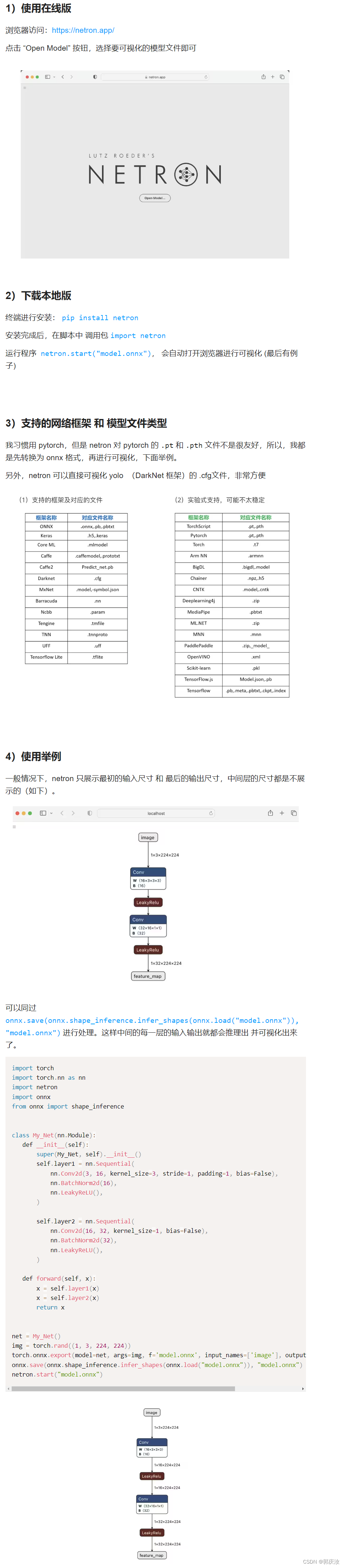
运行后,显示结构:

3、使用tensorboardX

代码实现:import torch import torch.nn as nn from tensorboardX import SummaryWriter as SummaryWriter class Alexnet(nn.Module): def __init__(self): super().__init__() self.net = nn.Sequential(nn.Conv2d(3, 96, kernel_size=11, stride=4, padding=1), nn.ReLU(), nn.MaxPool2d(kernel_size=3, stride=2), nn.Conv2d(96, 256, kernel_size=5, padding=2), nn.ReLU(), nn.MaxPool2d(kernel_size=3, stride=2), nn.Conv2d(256, 384, kernel_size=3, padding=1), nn.ReLU(), nn.Conv2d(384, 384, kernel_size=3, padding=1), nn.ReLU(), nn.Conv2d(384, 256, kernel_size=3, padding=1), nn.ReLU(), nn.MaxPool2d(kernel_size=3, stride=2), nn.Flatten(), nn.Linear(256 * 5 * 5, 4096), nn.ReLU(), nn.Dropout(0.5), nn.Linear(4096, 4096), nn.ReLU(), nn.Dropout(0.5), nn.Linear(4096, 10)) def forward(self, X): return self.net(X) net = Alexnet() img = torch.rand((1, 3, 224, 224)) with SummaryWriter(log_dir='logs') as w: w.add_graph(net, img)- 1
- 2
- 3
- 4
- 5
- 6
- 7
- 8
- 9
- 10
- 11
- 12
- 13
- 14
- 15
- 16
- 17
- 18
- 19
- 20
- 21
- 22
- 23
- 24
- 25
- 26
- 27
- 28
- 29
- 30
运行后,会在本地生成一个log日志文件
在命令行运行以下指令:tensorboard --logdir ./logs --port 6006- 1
-
相关阅读:
EasyAR使用
线性表——顺序表和链表
【C语言】函数传参与指针理解
什么是JavaScript中的闭包?
基于51单片机的花样流水灯设计
【软件分析第13讲-学习笔记】符号执行 Symbolic Execution
英语语法 — 词性
【计算机组成原理】IEEE 754
Moonbeam上的多链用例解析——Derek在Polkadot Decoded 2022的演讲文字回顾
【独立篇】React UI组件库
- 原文地址:https://blog.csdn.net/guoqingru0311/article/details/133696506