转载请注明出处:
1.使用ENSP 搭建如下拓扑:

数据准备
为完成此配置例,需准备如下的数据:
|
设备 |
Router ID |
Process ID |
IP地址 |
|
DeviceA |
1.1.1.1 |
1 |
区域0:192.168.0.0/24 区域1:192.168.1.0/24 |
|
DeviceB |
2.2.2.2 |
1 |
区域0:192.168.0.0/24 区域2:192.168.2.0/24 |
|
DeviceC |
3.3.3.3 |
1 |
区域1:192.168.1.0/24、172.16.1.0/24 |
|
DeviceD |
4.4.4.4 |
1 |
区域2:192.168.2.0/24、172.17.1.0/24 |
|
DeviceE |
5.5.5.5 |
1 |
区域1:172.16.1.0/24 |
|
DeviceF |
6.6.6.6 |
1 |
区域2:172.17.1.0/24 |
2.配置ospf
DeviceA配置如下:

display current-configuration configuration ospf
#
ospf 1
 area 0.0.0.0
  network 192.168.0.0 0.0.0.255
 area 0.0.0.1
  network 192.168.1.0 0.0.0.255
#
return
display current-configuration interface Ethernet 0/0/1
#
interface Ethernet0/0/1
 ip address 192.168.1.1 255.255.255.0
#
return
display current-configuration interface Ethernet 0/0/0
#
interface Ethernet0/0/0
 ip address 192.168.0.1 255.255.255.0
#
return
DeviceB 配置:
display current-configuration configuration ospf
#
ospf 1
 area 0.0.0.0
  network 192.168.0.0 0.0.0.255
 area 0.0.0.2
  network 192.168.2.0 0.0.0.255
#
return
display current-configuration interface Ethernet 0/0/0
#
interface Ethernet0/0/0
 ip address 192.168.0.2 255.255.255.0
#
return
display current-configuration interface Ethernet 0/0/1
#
interface Ethernet0/0/1
 ip address 192.168.2.1 255.255.255.0
#
return
DeviceC 配置:
display current-configuration configuration ospf
#
ospf 1
 area 0.0.0.1
  network 192.168.1.0 0.0.0.255
  network 172.16.1.0 0.0.0.255
#
return
display current-configuration interface Ethernet 0/0/0
#
interface Ethernet0/0/0
 ip address 192.168.1.2 255.255.255.0
#
return
display current-configuration interface Ethernet 0/0/1
#
interface Ethernet0/0/1
 ip address 172.16.1.1 255.255.255.0
#
return
DeviceD配置如下:
display current-configuration configuration ospf
#
ospf 1
 area 0.0.0.2
  network 192.168.2.0 0.0.0.255
  network 172.17.1.0 0.0.0.255
#
return
display current-configuration interface Ethernet 0/0/0
#
interface Ethernet0/0/0
 ip address 192.168.2.2 255.255.255.0
#
return
display current-configuration interface Ethernet 0/0/1
#
interface Ethernet0/0/1
 ip address 172.17.1.1 255.255.255.0
#
return
DeviceE配置如下:
display current-configuration configuration ospf
#
ospf 1
 area 0.0.0.1
  network 172.16.1.0 0.0.0.255
#
return
display current-configuration interface Ethernet 0/0/0
#
interface Ethernet0/0/0
 ip address 172.16.1.2 255.255.255.0
#
return
DeviceF配置如下:
display current-configuration configuration ospf
#
ospf 1
 area 0.0.0.2
  network 172.17.1.0 0.0.0.255
#
return

display current-configuration interface Ethernet 0/0/0
#
interface Ethernet0/0/0
 ip address 172.17.1.2 255.255.255.0
#
return
3.验证网络是否打通:
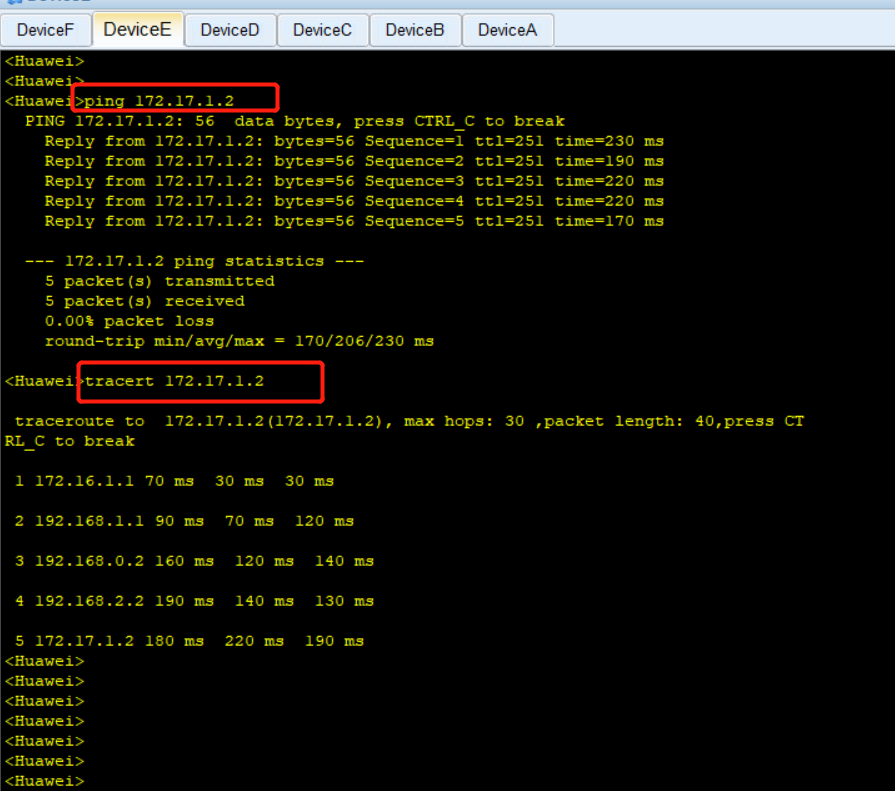
在 DeviceE 设备上ping 另一个边缘区域的DeviceF,并跟踪过程:
4.分别查看每个设备上的路由和ospf路由:
DeviceA 的路由表和ospf 路由表:

DeviceB 的路由表和ospf 路由表:

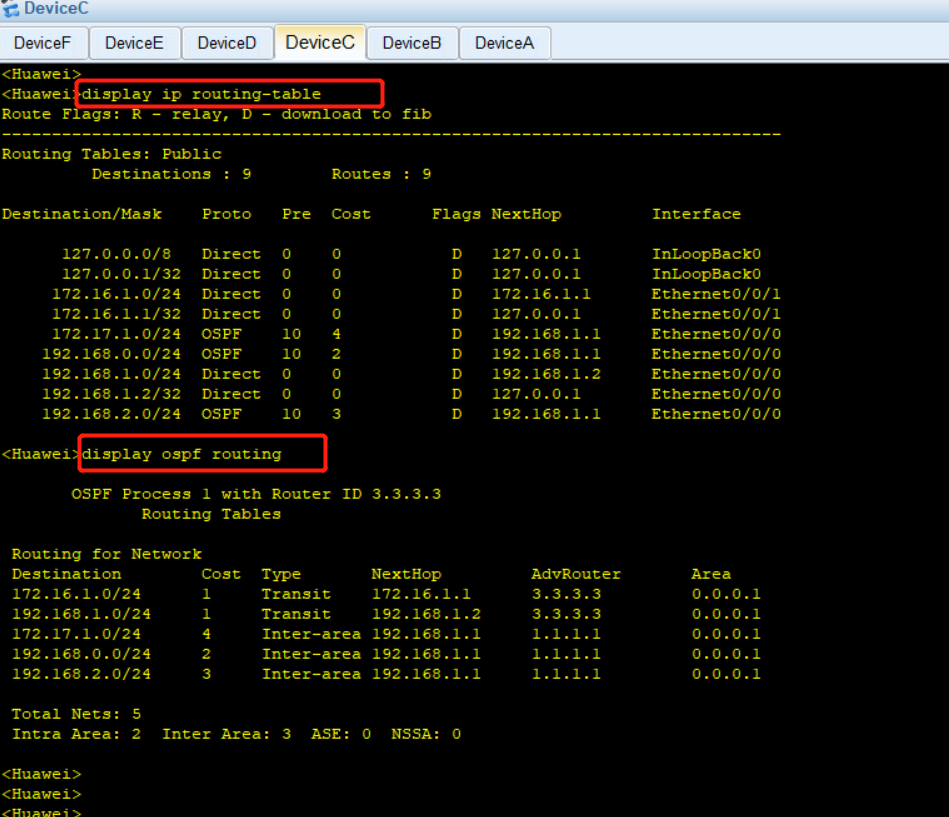
DeviceC 的路由表和ospf 路由表:
DeviceD 的路由表和ospf 路由表:

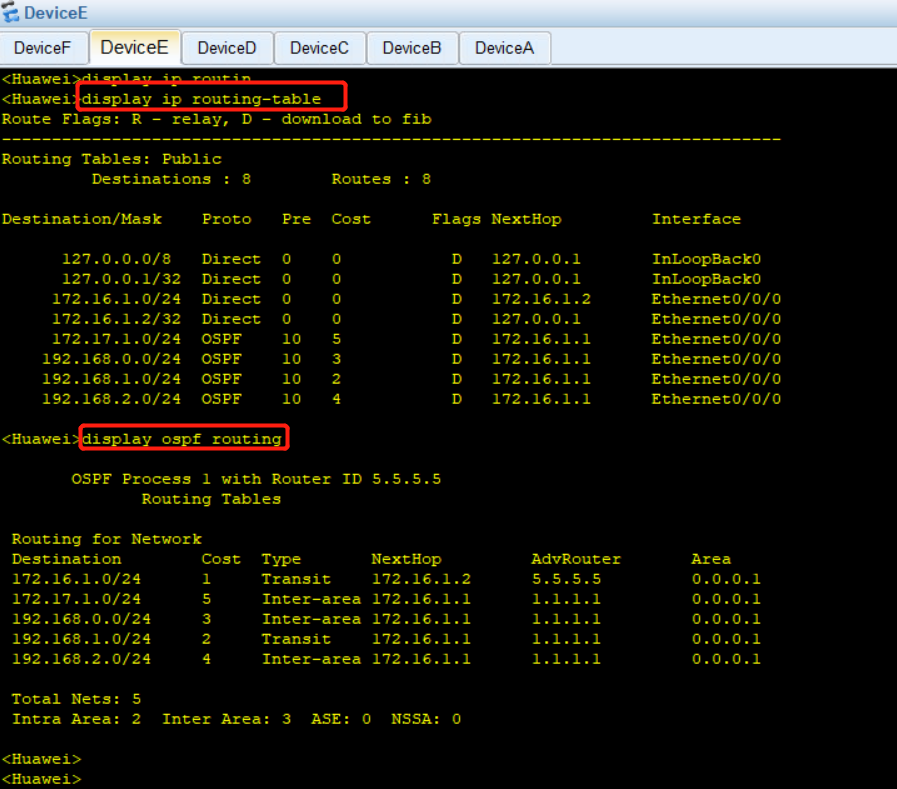
DeviceE 的路由表和ospf 路由表:
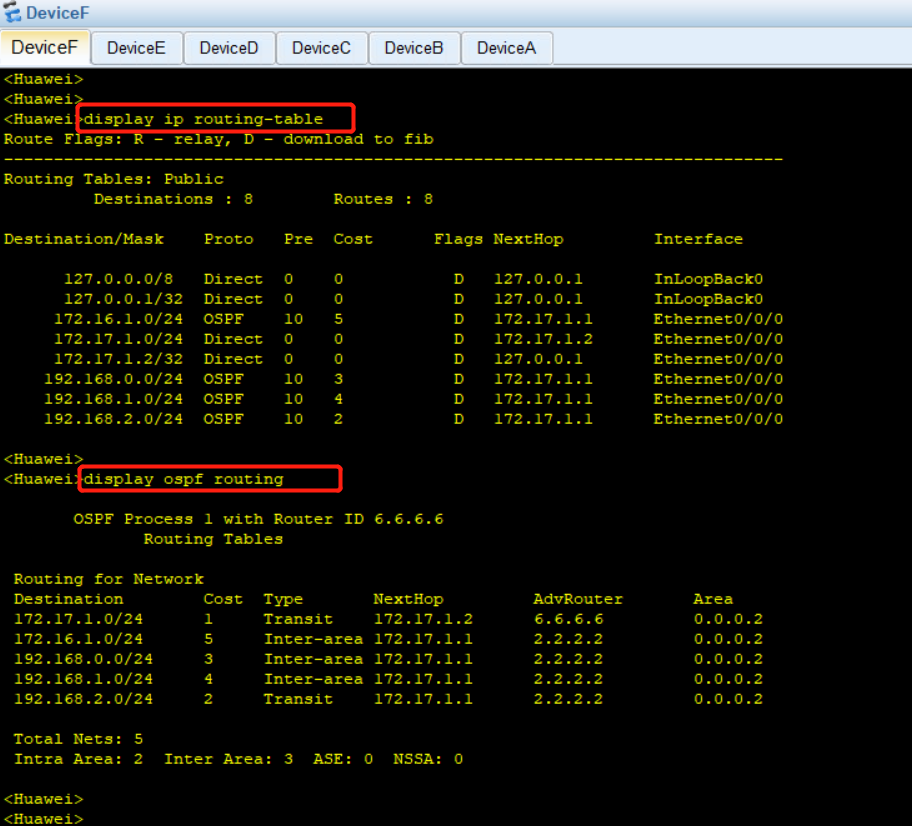
DeviceF 的路由表和ospf 路由表: