-
WPF 02
Grid容器
分行和分列
- <Grid>
- <Grid.RowDefinitions>
- <!--2*:此行是下面一行的两倍-->
- <RowDefinition Height="2*"/>
- <RowDefinition/>
- </Grid.RowDefinitions>
- <Grid.ColumnDefinitions>
- <ColumnDefinition/>
- <ColumnDefinition/>
- </Grid.ColumnDefinitions>
- <Border Background="blue"/>
- <Border Grid.Row="1" Background="red"/>
- <Border Grid.Column="1" Background="yellow"/>
- <Border Grid.Row="1" Grid.Column="1" Background="green"/>
- </Grid>

跨行和跨列
- <Border Grid.ColumnSpan="2" Grid.RowSpan="2" Background="blue"/>

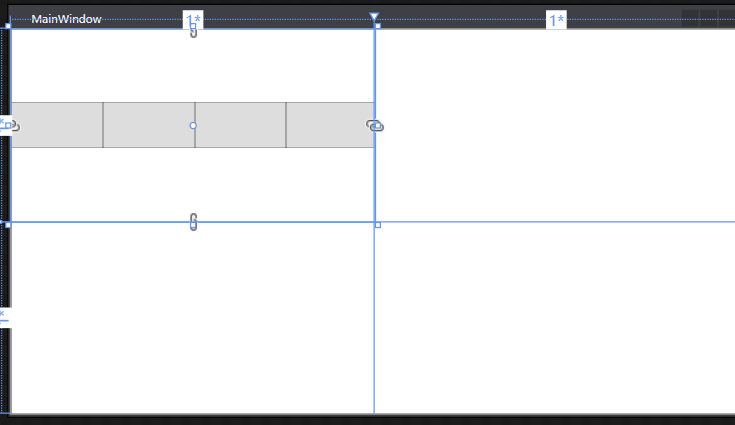
stackPanel:默认垂直排列
局部容器,一般修饰部分空间的元素排布
- <StackPanel>
- //<StackPanel Orientation="Horizontal">
- <Button Height="50" Width="100"/>
- <Button Height="50" Width="100"/>
- <Button Height="50" Width="100"/>
- <Button Height="50" Width="100"/>
- <Button Height="50" Width="100"/>
- </StackPanel>
WrapPanel :默认水平排序且换行
- <WrapPanel Grid.Row="1">
- <Button Height="50" Width="100"/>
- <Button Height="50" Width="100"/>
- <Button Height="50" Width="100"/>
- <Button Height="50" Width="100"/>
- <Button Height="50" Width="100"/>
- </WrapPanel>

WrapPanel可以自动换行
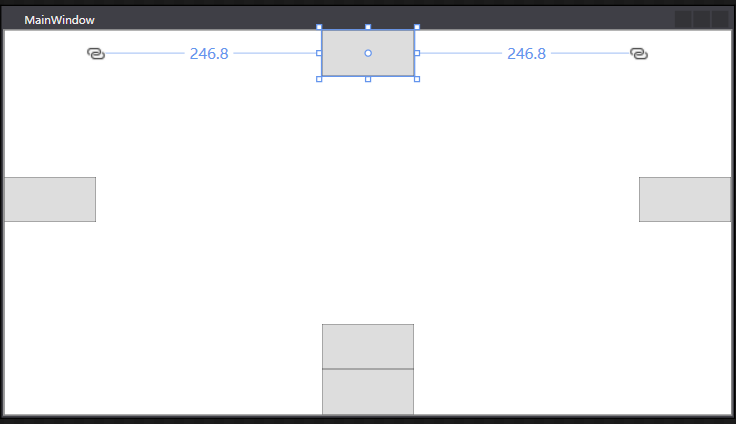
DockPanel:默认最后一个元素填充剩余所有空间
- <DockPanel>
- <Button Height="50" Width="100"/>
- <Button Height="50" Width="100"/>
- <Button Height="50" Width="100"/>
- <Button Height="50" Width="100"/>
- <Button Height="50" Width="100"/>
- </DockPanel>

取消最后一个元素填充剩余所有空间:
DockPanel可以停靠
- <DockPanel LastChildFill="False">
- <Button Height="50" Width="100" DockPanel.Dock="Bottom"/>
- <Button Height="50" Width="100" DockPanel.Dock="Left"/>
- <Button Height="50" Width="100" DockPanel.Dock="Right"/>
- <Button Height="50" Width="100" DockPanel.Dock="Top"/>
- <Button Height="50" Width="100" DockPanel.Dock="Bottom"/>
- </DockPanel>
UniformGrid: 在有限的空间内根据控件均分剩余空间
- <UniformGrid Rows="3" Columns="3">
- <Button/>
- <Button/>
- <Button/>
- <Button/>
- <Button/>
- <Button/>
- <Button/>
- <Button/>
- <Button/>
- </UniformGrid>

ctrl+k+d:自动格式化代码
课程案例1

模块划分代码:
- <Window x:Class="WpfDay01.MainWindow"
- xmlns="http://schemas.microsoft.com/winfx/2006/xaml/presentation"
- xmlns:x="http://schemas.microsoft.com/winfx/2006/xaml"
- xmlns:d="http://schemas.microsoft.com/expression/blend/2008"
- xmlns:mc="http://schemas.openxmlformats.org/markup-compatibility/2006"
- xmlns:local="clr-namespace:WpfDay01"
- mc:Ignorable="d"
- Title="MainWindow" Height="450" Width="800">
- <Grid>
- <Grid.RowDefinitions>
- <RowDefinition Height="50"/>
- <RowDefinition/>
- </Grid.RowDefinitions>
- <Border Background="#7378DB"/>
- <Grid Grid.Row="1">
- <Grid.ColumnDefinitions>
- <ColumnDefinition Width="200"/>
- <ColumnDefinition/>
- </Grid.ColumnDefinitions>
- <Border Margin="5" Background="blue"/>
- <Grid Grid.Column="1">
- <Grid.ColumnDefinitions>
- <ColumnDefinition/>
- <ColumnDefinition/>
- <ColumnDefinition/>
- <ColumnDefinition/>
- <ColumnDefinition/>
- </Grid.ColumnDefinitions>
- <Grid.RowDefinitions>
- <RowDefinition/>
- <RowDefinition/>
- <RowDefinition/>
- </Grid.RowDefinitions>
- <Border Margin="5" Background="#7378DB"/>
- <Border Margin="5" Grid.Column="1" Background="#4598CE"/>
- <Border Margin="5" Grid.Column="2" Background="#E080CE"/>
- <Border Margin="5" Grid.Column="3" Background="#50B9B8"/>
- <Border Margin="5" Grid.Column="4" Background="#E07A7D"/>
- <Border Margin="5" Grid.Row="1" Grid.ColumnSpan="3" Background="green"/>
- <Border Margin="5" Grid.Row="1" Grid.Column="3" Grid.ColumnSpan="2" Background="Yellow"/>
- <Border Margin="5" Grid.Row="2" Grid.ColumnSpan="3" Background="red"/>
- <Border Margin="5" Grid.Row="3" Grid.Column="3" Grid.ColumnSpan="2" Background="Blue"/>
- </Grid>
- </Grid>
- </Grid>
- </Window>

练习案例1
- <!--<Window x:Class="WpfDay01.MainWindow"
- xmlns="http://schemas.microsoft.com/winfx/2006/xaml/presentation"
- xmlns:x="http://schemas.microsoft.com/winfx/2006/xaml"
- xmlns:d="http://schemas.microsoft.com/expression/blend/2008"
- xmlns:mc="http://schemas.openxmlformats.org/markup-compatibility/2006"
- xmlns:local="clr-namespace:WpfDay01"
- mc:Ignorable="d"
- Title="MainWindow" Height="450" Width="800">
- <Grid>
- <Grid.RowDefinitions>
- <RowDefinition Height="50"/>
- <RowDefinition/>
- </Grid.RowDefinitions>
- <Border Background="#7378DB"/>
- <Grid Grid.Row="1">
- <Grid.ColumnDefinitions>
- <ColumnDefinition Width="200"/>
- <ColumnDefinition/>
- </Grid.ColumnDefinitions>
- <Border Margin="5" Background="blue"/>
- <Grid Grid.Column="1">
- <Grid.ColumnDefinitions>
- <ColumnDefinition/>
- <ColumnDefinition/>
- <ColumnDefinition/>
- <ColumnDefinition/>
- <ColumnDefinition/>
- </Grid.ColumnDefinitions>
- <Grid.RowDefinitions>
- <RowDefinition/>
- <RowDefinition/>
- <RowDefinition/>
- </Grid.RowDefinitions>
- <Border Margin="5" Background="#7378DB"/>
- <Border Margin="5" Grid.Column="1" Background="#4598CE"/>
- <Border Margin="5" Grid.Column="2" Background="#E080CE"/>
- <Border Margin="5" Grid.Column="3" Background="#50B9B8"/>
- <Border Margin="5" Grid.Column="4" Background="#E07A7D"/>
- <Border Margin="5" Grid.Row="1" Grid.ColumnSpan="3" Background="green"/>
- <Border Margin="5" Grid.Row="1" Grid.Column="3" Grid.ColumnSpan="2" Background="Yellow"/>
- <Border Margin="5" Grid.Row="2" Grid.ColumnSpan="3" Background="red"/>
- <Border Margin="5" Grid.Row="3" Grid.Column="3" Grid.ColumnSpan="2" Background="Blue"/>
- </Grid>
- </Grid>
- </Grid>
- </Window>-->
- <Window x:Class="WpfDay01.MainWindow"
- xmlns="http://schemas.microsoft.com/winfx/2006/xaml/presentation"
- xmlns:x="http://schemas.microsoft.com/winfx/2006/xaml"
- xmlns:d="http://schemas.microsoft.com/expression/blend/2008"
- xmlns:mc="http://schemas.openxmlformats.org/markup-compatibility/2006"
- xmlns:local="clr-namespace:WpfDay01"
- mc:Ignorable="d"
- Title="MainWindow" Height="450" Width="800">
- <Grid>
- <Grid.RowDefinitions>
- <RowDefinition Height="50"/>
- <RowDefinition Height="100"/>
- <RowDefinition/>
- </Grid.RowDefinitions>
- <Border Background="LightCyan"/>
- <Grid Grid.Row="1">
- <Grid.ColumnDefinitions>
- <ColumnDefinition/>
- <ColumnDefinition/>
- <ColumnDefinition/>
- <ColumnDefinition/>
- <ColumnDefinition/>
- </Grid.ColumnDefinitions>
- <Border Margin="5" Background="#219AFB"/>
- <Border Margin="5" Grid.Column="1" Background="#64B522"/>
- <Border Margin="5" Grid.Column="2" Background="#FF9F00"/>
- <Border Margin="5" Grid.Column="3" Background="#50B9B8"/>
- <Border Margin="5" Grid.Column="4" Background="#E07A7D"/>
- </Grid>
- <Grid Grid.Row="2">
- <Grid.ColumnDefinitions>
- <ColumnDefinition Width="0.667*"/>
- <ColumnDefinition/>
- </Grid.ColumnDefinitions>
- <Grid>
- <Grid.RowDefinitions>
- <RowDefinition/>
- <RowDefinition/>
- <RowDefinition/>
- </Grid.RowDefinitions>
- <Grid.ColumnDefinitions>
- <ColumnDefinition/>
- <ColumnDefinition/>
- </Grid.ColumnDefinitions>
- <Border Margin="5" Grid.ColumnSpan="2" Background="blue"/>
- <Border Margin="5" Grid.Row="1" Background="red"/>
- <Border Margin="5" Grid.Row="1" Grid.Column="1" Background="yellow"/>
- <Border Margin="5" Grid.Row="2" Background="pink"/>
- <Border Margin="5" Grid.Row="2" Grid.Column="1" Background="green"/>
- </Grid>
- <Grid Grid.Column="1">
- <Grid.RowDefinitions>
- <RowDefinition Height="1.5*"/>
- <RowDefinition/>
- </Grid.RowDefinitions>
- <Grid.ColumnDefinitions>
- <ColumnDefinition/>
- <ColumnDefinition/>
- </Grid.ColumnDefinitions>
- <Border Margin="5" Background="AntiqueWhite"/>
- <Border Margin="5" Grid.Column="1" Background="Gray"/>
- <Border Margin="5" Grid.Row="1" Grid.ColumnSpan="2" Background="SaddleBrown"/>
- </Grid>
- </Grid>
- </Grid>
- </Window>


样式的使用方法
- <Window x:Class="WpfDay01.MainWindow"
- xmlns="http://schemas.microsoft.com/winfx/2006/xaml/presentation"
- xmlns:x="http://schemas.microsoft.com/winfx/2006/xaml"
- xmlns:d="http://schemas.microsoft.com/expression/blend/2008"
- xmlns:mc="http://schemas.openxmlformats.org/markup-compatibility/2006"
- xmlns:local="clr-namespace:WpfDay01"
- mc:Ignorable="d"
- Title="MainWindow" Height="450" Width="800">
- <Window.Resources>
- <Style x:Key="BaseButtonStyle" TargetType="Button">
- <Setter Property="Foreground" Value="White"/>
- <Setter Property="Background" Value="Blue"/>
- </Style>
- <Style x:Key="ButtonStyle" TargetType="Button" BasedOn="{StaticResource BaseButtonStyle}">
- <Setter Property="Content" Value="text"/>
- </Style>
- </Window.Resources>
- <Grid>
- <StackPanel>
- <Button Content="button1" Background="Red" Style="{StaticResource ButtonStyle}"/>
- <Button Content="button2" Style="{StaticResource ButtonStyle}"/>
- <Button Content="button3" Style="{StaticResource ButtonStyle}"/>
- </StackPanel>
- </Grid>
- </Window>

数据模板
案例1
MainWindow.xaml
- <Window x:Class="WpfDay01.MainWindow"
- xmlns="http://schemas.microsoft.com/winfx/2006/xaml/presentation"
- xmlns:x="http://schemas.microsoft.com/winfx/2006/xaml"
- xmlns:d="http://schemas.microsoft.com/expression/blend/2008"
- xmlns:mc="http://schemas.openxmlformats.org/markup-compatibility/2006"
- xmlns:local="clr-namespace:WpfDay01"
- mc:Ignorable="d"
- Title="MainWindow" Height="450" Width="800">
- <Grid>
- <ListBox x:Name="list">
- <ListBox.ItemTemplate>
- <DataTemplate>
- <StackPanel Orientation="Horizontal">
- <Border Width="10" Height="10" Background="{Binding Code}"/>
- <TextBlock Margin="10, 0" Text="{Binding Name}"/>
- </StackPanel>
- </DataTemplate>
- </ListBox.ItemTemplate>
- </ListBox>
- </Grid>
- </Window>
MainWindow.xaml.cs
- using System;
- using System.Collections.Generic;
- using System.Linq;
- using System.Text;
- using System.Threading.Tasks;
- using System.Windows;
- using System.Windows.Controls;
- using System.Windows.Data;
- using System.Windows.Documents;
- using System.Windows.Input;
- using System.Windows.Media;
- using System.Windows.Media.Imaging;
- using System.Windows.Navigation;
- using System.Windows.Shapes;
- namespace WpfDay01
- {
- public partial class MainWindow : Window
- {
- public MainWindow()
- {
- InitializeComponent();
- List<Color> test = new List<Color>();
- test.Add(new Color() { Code= "#FF69B4", Name= "热情的粉红" });
- test.Add(new Color() { Code= "#C71585", Name= "适中的紫罗兰红色" });
- test.Add(new Color() { Code= "#DA70D6", Name= "兰花的紫色" });
- list.ItemsSource = test;
- }
- }
- public class Color
- {
- public string Code { get; set; }
- public string Name { get; set; }
- }
- }

案例2
MainWindow.xaml
- <Window x:Class="WpfDay01.MainWindow"
- xmlns="http://schemas.microsoft.com/winfx/2006/xaml/presentation"
- xmlns:x="http://schemas.microsoft.com/winfx/2006/xaml"
- xmlns:d="http://schemas.microsoft.com/expression/blend/2008"
- xmlns:mc="http://schemas.openxmlformats.org/markup-compatibility/2006"
- xmlns:local="clr-namespace:WpfDay01"
- mc:Ignorable="d"
- Title="MainWindow" Height="450" Width="800">
- <Grid>
- <DataGrid x:Name="grid"
- AutoGenerateColumns="False"
- CanUserAddRows="False">
- <DataGrid.Columns>
- <DataGridTextColumn Binding="{Binding Code}" Header="Code"/>
- <DataGridTextColumn Binding="{Binding Name}" Header="Name"/>
- <DataGridTemplateColumn Header="操作">
- <DataGridTemplateColumn.CellTemplate>
- <DataTemplate>
- <StackPanel Orientation="Horizontal">
- <Border Width="10" Height="10" Background="{Binding Code}"/>
- <TextBlock Margin="10 0" Text="{Binding Name}"/>
- </StackPanel>
- </DataTemplate>
- </DataGridTemplateColumn.CellTemplate>
- </DataGridTemplateColumn>
- </DataGrid.Columns>
- </DataGrid>
- </Grid>
- </Window>
MainWindow.xaml.cs
- namespace WpfDay01
- {
- public partial class MainWindow : Window
- {
- public MainWindow()
- {
- InitializeComponent();
- List<Color> test = new List<Color>();
- test.Add(new Color() { Code= "#FF69B4", Name= "热情的粉红" });
- test.Add(new Color() { Code= "#C71585", Name= "适中的紫罗兰红色" });
- test.Add(new Color() { Code= "#DA70D6", Name= "兰花的紫色" });
- grid.ItemsSource = test;
- }
- }
- public class Color
- {
- public string Code { get; set; }
- public string Name { get; set; }
- }
- }

修改dataTemplete
- <DataTemplate>
- <!--<StackPanel Orientation="Horizontal">
- <Border Width="10" Height="10" Background="{Binding Code}"/>
- <TextBlock Margin="10 0" Text="{Binding Name}"/>
- </StackPanel>-->
- <StackPanel Orientation="Horizontal">
- <Button Content="添加"/>
- <Button Content="修改"/>
- <Button Content="删除"/>
- </StackPanel>
- </DataTemplate>

绑定方法
双向数据绑定关系
- <Window x:Class="WpfDay01.MainWindow"
- xmlns="http://schemas.microsoft.com/winfx/2006/xaml/presentation"
- xmlns:x="http://schemas.microsoft.com/winfx/2006/xaml"
- xmlns:d="http://schemas.microsoft.com/expression/blend/2008"
- xmlns:mc="http://schemas.openxmlformats.org/markup-compatibility/2006"
- xmlns:local="clr-namespace:WpfDay01"
- mc:Ignorable="d"
- Title="MainWindow" Height="450" Width="800">
- <Grid>
- <StackPanel>
- <Slider x:Name="slider" Margin="5"/>
- <TextBox Text="{Binding ElementName=slider, Path=Value}" Margin="5"/>
- <TextBox Text="{Binding ElementName=slider, Path=Value}" Margin="5"/>
- <TextBox Text="{Binding ElementName=slider, Path=Value}" Margin="5"/>
- </StackPanel>
- </Grid>
- </Window>

绑定模式
- <StackPanel>
- <Slider x:Name="slider" Margin="5"/>
- <TextBox Text="{Binding ElementName=slider, Path=Value, Mode=OneTime}" Margin="5"/>
- <TextBox Text="{Binding ElementName=slider, Path=Value, Mode=OneWay}" Margin="5"/>
- <TextBox Text="{Binding ElementName=slider, Path=Value, Mode=OneWayToSource}" Margin="5"/>
- <TextBox Text="{Binding ElementName=slider, Path=Value, Mode=TwoWay}" Margin="5"/>
- </StackPanel>
TextBox数据绑定
MainWindow.xaml
- <Window x:Class="WpfDay01.MainWindow"
- xmlns="http://schemas.microsoft.com/winfx/2006/xaml/presentation"
- xmlns:x="http://schemas.microsoft.com/winfx/2006/xaml"
- xmlns:d="http://schemas.microsoft.com/expression/blend/2008"
- xmlns:mc="http://schemas.openxmlformats.org/markup-compatibility/2006"
- xmlns:local="clr-namespace:WpfDay01"
- mc:Ignorable="d"
- Title="MainWindow" Height="450" Width="800">
- <Grid>
- <StackPanel>
- <TextBox Text="{Binding Name}" Margin="5"/>
- </StackPanel>
- </Grid>
- </Window>
创建类test
- using System;
- using System.Collections.Generic;
- using System.Linq;
- using System.Text;
- using System.Threading.Tasks;
- namespace WpfDay01
- {
- class Test
- {
- public string Name { get; set; }
- }
- }
MainWindow.xaml.cs
- namespace WpfDay01
- {
- public partial class MainWindow : Window
- {
- public MainWindow()
- {
- InitializeComponent();
- this.DataContext = new Test()
- {
- Name = "张三"
- };
- }
- }
- public class Color
- {
- public string Code { get; set; }
- public string Name { get; set; }
- }
- }

ICommand使用方法
业务逻辑代码:MainViewModel.cs
UI代码:MainWindow.xaml
实现ICommand中的接口:MyCommand.cs
将View与ViewModel挂钩:MainWindow.xaml.cs
MyCommand.cs
- using System;
- using System.Collections.Generic;
- using System.Linq;
- using System.Text;
- using System.Threading.Tasks;
- using System.Windows.Input;
- namespace WpfDay01
- {
- public class MyCommand : ICommand
- {
- Action executeAction;
- Func<bool> canExecuteAction;
- public MyCommand(Action action,Func<bool> canExcuteAction)
- {
- executeAction = action;
- canExecuteAction = canExcuteAction;
- }
- public event EventHandler CanExecuteChanged;
- public bool CanExecute(object parameter)
- {
- return canExecuteAction();
- }
- public void Execute(object parameter)
- {
- executeAction();
- }
- }
- }
MainViewModel.cs
- using System;
- using System.Collections.Generic;
- using System.ComponentModel;
- using System.Linq;
- using System.Text;
- using System.Threading.Tasks;
- using System.Windows;
- namespace WpfDay01
- {
- public class MainViewModel
- {
- public MainViewModel()
- {
- ShowCommand = new MyCommand(Show,canExcuteAction);
- ShowCommand2 = new MyCommand(show2, canExcuteAction2);
- }
- private string myname="a";
- public string MyName
- {
- get { return myname; }
- set { myname = value; }
- }
- private bool canExcuteAction()
- {
- if (string.IsNullOrEmpty(MyName))
- return false;
- return true;
- }
- private bool canExcuteAction2()
- {
- return true;
- }
- public MyCommand ShowCommand { get; set; }
- public MyCommand ShowCommand2 { get; set; }
- public void Show()
- {
- MessageBox.Show("点击了按钮!");
- }
- public void show2()
- {
- MyName = "b";
- MessageBox.Show(MyName);
- }
- }
- }
MainWindow.xaml
- <Window x:Class="WpfDay01.MainWindow"
- xmlns="http://schemas.microsoft.com/winfx/2006/xaml/presentation"
- xmlns:x="http://schemas.microsoft.com/winfx/2006/xaml"
- xmlns:d="http://schemas.microsoft.com/expression/blend/2008"
- xmlns:mc="http://schemas.openxmlformats.org/markup-compatibility/2006"
- xmlns:local="clr-namespace:WpfDay01"
- mc:Ignorable="d"
- Title="MainWindow" Height="450" Width="800">
- <StackPanel>
- <TextBox Text="{Binding MyName}"></TextBox>
- <Button Width="100" Height="100" Content="Button" Command="{Binding ShowCommand}"/>
- <Button Width="100" Height="100" Content="Button" Command="{Binding ShowCommand2}"/>
- </StackPanel>
- </Window>
MainWindow.xaml.cs
DataContext:连接View与ViewModel挂钩。
- public partial class MainWindow : Window
- {
- public MainWindow()
- {
- InitializeComponent();
- this.DataContext = new MainViewModel();
- }
- private void Button_Click(object sender, RoutedEventArgs e)
- {
- MessageBox.Show("hhhh");
- }
- }
更新UI界面:INotifyPropertyChanged
业务逻辑代码:MainViewModel.cs
UI代码:MainWindow.xaml
实现ICommand中的接口:MyCommand.cs
将View与ViewModel挂钩:MainWindow.xaml.cs
INotifyPropertyChanged更新界面:ViewModelBase.cs
ViewModelBase.cs
- using System;
- using System.Collections.Generic;
- using System.ComponentModel;
- using System.Linq;
- using System.Runtime.CompilerServices;
- using System.Text;
- using System.Threading.Tasks;
- namespace WpfDay01
- {
- class ViewModelBase : INotifyPropertyChanged
- {
- public event PropertyChangedEventHandler PropertyChanged;
- public void OnPropertyChanged([CallerMemberName]string propertyName="")
- {
- PropertyChanged?.Invoke(this, new PropertyChangedEventArgs(propertyName));
- }
- }
- }
MyCommand.cs
- using System;
- using System.Collections.Generic;
- using System.Linq;
- using System.Text;
- using System.Threading.Tasks;
- using System.Windows.Input;
- namespace WpfDay01
- {
- class MyCommand : ICommand
- {
- Action executeAction;
- public MyCommand(Action action)
- {
- executeAction = action;
- }
- public event EventHandler CanExecuteChanged;
- public bool CanExecute(object parameter)
- {
- return true;
- }
- public void Execute(object parameter)
- {
- executeAction();
- }
- }
- }
MainViewModel.cs
- using System;
- using System.Collections.Generic;
- using System.ComponentModel;
- using System.Linq;
- using System.Text;
- using System.Threading.Tasks;
- using System.Windows;
- namespace WpfDay01
- {
- class MainViewModel: ViewModelBase
- {
- public MainViewModel()
- {
- MyName = "Hello";
- ShowCommand = new MyCommand(Show);
- ShowCommand2 = new MyCommand(show2);
- }
- private string myname;
- public string MyName
- {
- get { return myname; }
- set {
- myname = value;
- OnPropertyChanged();
- }
- }
- private string myTitle;
- public string MyTitle
- {
- get { return myTitle; }
- set { myTitle = value; OnPropertyChanged(); }
- }
- public MyCommand ShowCommand { get; set; }
- public MyCommand ShowCommand2 { get; set; }
- public void Show()
- {
- MyName = "点击了按钮";
- MyTitle = "myTitle";
- MessageBox.Show("点击了按钮!");
- }
- public void show2()
- {
- MyName = "b";
- MyTitle = "myTitle2";
- MessageBox.Show(MyName);
- }
- }
- }
MainWindow.xaml
- <Window x:Class="WpfDay01.MainWindow"
- xmlns="http://schemas.microsoft.com/winfx/2006/xaml/presentation"
- xmlns:x="http://schemas.microsoft.com/winfx/2006/xaml"
- xmlns:d="http://schemas.microsoft.com/expression/blend/2008"
- xmlns:mc="http://schemas.openxmlformats.org/markup-compatibility/2006"
- xmlns:local="clr-namespace:WpfDay01"
- mc:Ignorable="d"
- Title="MainWindow" Height="450" Width="800">
- <StackPanel>
- <TextBox Text="{Binding MyName}"></TextBox>
- <TextBox Text="{Binding MyTitle}"></TextBox>
- <Button Width="100" Height="100" Content="Button" Command="{Binding ShowCommand}"/>
- <Button Width="100" Height="100" Content="Button" Command="{Binding ShowCommand2}"/>
- </StackPanel>
- </Window>
MainWindow.xaml.cs
- using System;
- using System.Collections.Generic;
- using System.Linq;
- using System.Text;
- using System.Threading.Tasks;
- using System.Windows;
- using System.Windows.Controls;
- using System.Windows.Data;
- using System.Windows.Documents;
- using System.Windows.Input;
- using System.Windows.Media;
- using System.Windows.Media.Imaging;
- using System.Windows.Navigation;
- using System.Windows.Shapes;
- namespace WpfDay01
- {
- public partial class MainWindow : Window
- {
- public MainWindow()
- {
- InitializeComponent();
- this.DataContext = new MainViewModel();
- }
- private void Button_Click(object sender, RoutedEventArgs e)
- {
- MessageBox.Show("hhhh");
- }
- }
- }

MvvmLight框架

使用MvvmLight框架后不需要自定义MyCommand和ViewModelBase,直接调用即可。
MainViewModel.cs
- using GalaSoft.MvvmLight;
- using GalaSoft.MvvmLight.Command;
- using System;
- using System.Collections.Generic;
- using System.Linq;
- using System.Text;
- using System.Threading.Tasks;
- using System.Windows;
- namespace WpfDay02
- {
- class MainViewModel: ViewModelBase
- {
- public MainViewModel()
- {
- MyName = "hello!";
- ShowCommand = new RelayCommand(Show);
- }
- public RelayCommand ShowCommand { get; }
- private string myName;
- public string MyName
- {
- get { return myName; }
- set { myName = value; RaisePropertyChanged(); }
- }
- public void Show()
- {
- MyName = "按下了按钮!";
- MessageBox.Show("按下了按钮!");
- }
- }
- }
MainWindow.xaml
- <Window x:Class="WpfDay02.MainWindow"
- xmlns="http://schemas.microsoft.com/winfx/2006/xaml/presentation"
- xmlns:x="http://schemas.microsoft.com/winfx/2006/xaml"
- xmlns:d="http://schemas.microsoft.com/expression/blend/2008"
- xmlns:mc="http://schemas.openxmlformats.org/markup-compatibility/2006"
- xmlns:local="clr-namespace:WpfDay02"
- mc:Ignorable="d"
- Title="MainWindow" Height="450" Width="800">
- <Grid>
- <TextBox Text="{Binding MyName}"></TextBox>
- <Button Height="100" Width="100" Content="btn" Command="{Binding ShowCommand}"></Button>
- </Grid>
- </Window>
MainWindow.xaml.cs
- using System;
- using System.Collections.Generic;
- using System.Linq;
- using System.Text;
- using System.Threading.Tasks;
- using System.Windows;
- using System.Windows.Controls;
- using System.Windows.Data;
- using System.Windows.Documents;
- using System.Windows.Input;
- using System.Windows.Media;
- using System.Windows.Media.Imaging;
- using System.Windows.Navigation;
- using System.Windows.Shapes;
- namespace WpfDay02
- {
- public partial class MainWindow : Window
- {
- public MainWindow()
- {
- InitializeComponent();
- this.DataContext = new MainViewModel();
- }
- }
- }
将某个控件的内容关联到另外控件上(泛型的使用)
MainViewModel.cs
- using GalaSoft.MvvmLight;
- using GalaSoft.MvvmLight.Command;
- using System;
- using System.Collections.Generic;
- using System.Linq;
- using System.Text;
- using System.Threading.Tasks;
- using System.Windows;
- namespace WpfDay02
- {
- class MainViewModel: ViewModelBase
- {
- public MainViewModel()
- {
- MyName = "hello!";
- ShowCommand = new RelayCommand<string>(Show);
- }
- public RelayCommand<string> ShowCommand { get; }
- private string myName;
- public string MyName
- {
- get { return myName; }
- set { myName = value; RaisePropertyChanged(); }
- }
- public void Show(string content)
- {
- MyName = "按下了按钮!";
- MessageBox.Show(content);
- }
- }
- }
MainWindow.xaml
- <Window x:Class="WpfDay02.MainWindow"
- xmlns="http://schemas.microsoft.com/winfx/2006/xaml/presentation"
- xmlns:x="http://schemas.microsoft.com/winfx/2006/xaml"
- xmlns:d="http://schemas.microsoft.com/expression/blend/2008"
- xmlns:mc="http://schemas.openxmlformats.org/markup-compatibility/2006"
- xmlns:local="clr-namespace:WpfDay02"
- mc:Ignorable="d"
- Title="MainWindow" Height="450" Width="800">
- <Grid>
- <StackPanel>
- <TextBox Text="{Binding MyName}" Height="40" Margin="10"></TextBox>
- <TextBox x:Name="txtInput" Height="40" Margin="10"></TextBox>
- <Button Height="100" Width="100" Content="btn" Command="{Binding ShowCommand}"
- CommandParameter="{Binding ElementName=txtInput, Path=Text}"></Button>
- </StackPanel>
- </Grid>
- </Window>

将textBox中的内容通过button按钮显示到messageBox中。
使用Messenger注册接收消息
修改部分:MainWindow.xaml.cs和MainViewModel.cs
MainWindow.xaml.cs
- using GalaSoft.MvvmLight.Messaging;
- using System;
- using System.Collections.Generic;
- using System.Linq;
- using System.Text;
- using System.Threading.Tasks;
- using System.Windows;
- using System.Windows.Controls;
- using System.Windows.Data;
- using System.Windows.Documents;
- using System.Windows.Input;
- using System.Windows.Media;
- using System.Windows.Media.Imaging;
- using System.Windows.Navigation;
- using System.Windows.Shapes;
- namespace WpfDay02
- {
- public partial class MainWindow : Window
- {
- public MainWindow()
- {
- InitializeComponent();
- this.DataContext = new MainViewModel();
- //注册一个接收string类型参数的消息,地址是Token1
- Messenger.Default.Register<string>(this, "Token1", Show);
- }
- void Show(string value)
- {
- MessageBox.Show(value);
- }
- }
- }
MainViewModel.cs
- using GalaSoft.MvvmLight;
- using GalaSoft.MvvmLight.Command;
- using GalaSoft.MvvmLight.Messaging;
- using System;
- using System.Collections.Generic;
- using System.Linq;
- using System.Text;
- using System.Threading.Tasks;
- using System.Windows;
- namespace WpfDay02
- {
- class MainViewModel: ViewModelBase
- {
- public MainViewModel()
- {
- MyName = "hello!";
- ShowCommand = new RelayCommand<string>(Show);
- }
- public RelayCommand<string> ShowCommand { get; }
- private string myName;
- public string MyName
- {
- get { return myName; }
- set { myName = value; RaisePropertyChanged(); }
- }
- public void Show(string content)
- {
- MyName = "按下了按钮!";
- //MessageBox.Show(content);
- //给Token1的地址发送一个string类型的值 content
- Messenger.Default.Send(content, "Token1");
- }
- }
- }
效果与上面案例相同
CommunityToolkit.Mvvm框架

MainViewModel.cs
- using CommunityToolkit.Mvvm.ComponentModel;
- using CommunityToolkit.Mvvm.Input;
- using CommunityToolkit.Mvvm.Messaging;
- using System;
- using System.Collections.Generic;
- using System.Linq;
- using System.Text;
- using System.Threading.Tasks;
- using System.Windows;
- namespace WpfDay02
- {
- class MainViewModel: ObservableObject
- {
- public MainViewModel()
- {
- MyName = "hello!";
- ShowCommand = new RelayCommand<string>(Show);
- }
- public RelayCommand<string> ShowCommand { get; }
- private string myName;
- public string MyName
- {
- get { return myName; }
- set { myName = value; OnPropertyChanged(); }
- }
- public void Show(string content)
- {
- MyName = "按下了按钮!";
- //MessageBox.Show(content);
- WeakReferenceMessenger.Default.Send(content, "Token1");
- }
- }
- }
MainWindow.xaml.cs
- using CommunityToolkit.Mvvm.Messaging;
- using System;
- using System.Collections.Generic;
- using System.Linq;
- using System.Text;
- using System.Threading.Tasks;
- using System.Windows;
- using System.Windows.Controls;
- using System.Windows.Data;
- using System.Windows.Documents;
- using System.Windows.Input;
- using Sysatem.Windows.Media;
- using System.Windows.Media.Imaging;
- using System.Windows.Navigation;
- using System.Windows.Shapes;
- namespace WpfDay02
- {
- public partial class MainWindow : Window
- {
- public MainWindow()
- {
- InitializeComponent();
- this.DataContext = new MainViewModel();
- WeakReferenceMessenger.Default.Register<string, string>(this, "Token1", (s, e)=>
- {
- MessageBox.Show(e);
- });
- }
- }
- }
MainWindow.xaml
- <Window x:Class="WpfDay02.MainWindow"
- xmlns="http://schemas.microsoft.com/winfx/2006/xaml/presentation"
- xmlns:x="http://schemas.microsoft.com/winfx/2006/xaml"
- xmlns:d="http://schemas.microsoft.com/expression/blend/2008"
- xmlns:mc="http://schemas.openxmlformats.org/markup-compatibility/2006"
- xmlns:local="clr-namespace:WpfDay02"
- mc:Ignorable="d"
- Title="MainWindow" Height="450" Width="800">
- <Grid>
- <StackPanel>
- <TextBox Text="{Binding MyName}" Height="40" Margin="10"></TextBox>
- <TextBox x:Name="txtInput" Height="40" Margin="10"></TextBox>
- <Button Height="100" Width="100" Content="btn" Command="{Binding ShowCommand}"
- CommandParameter="{Binding ElementName=txtInput, Path=Text}"></Button>
- </StackPanel>
- </Grid>
- </Window>
-
相关阅读:
【数据结构与算法】之回溯、滑动窗口、分治算法经典问题
ps -xu | grep这个命令的用途
编程笔记 Golang基础 020 流程控制
STM32物联网项目-DMA使用介绍(ADC+DAC)
CentOs/Ubuntu 一行指令安装Docker
【机器学习】树模型预剪枝和后剪枝
压力大,休息日都没有,更别说年休假了
5G及其后的5G非地面网络:趋势和研究挑战-HARQ部分
easyrecovery 2023最新数据恢复软件免费下载激活教程
Ultra-Fast-Lane-Detection 车道线学习资料整理
- 原文地址:https://blog.csdn.net/ThePaK/article/details/133440258

- 最新文章
-
沪漂五周年了:我越来越迷茫了
Agentic Skill Routing 实战:别再把所有 Skill 塞进 AI Agent 上下文
MySQL-Seconds_behind_master的精度误差
[MAF预定义ChatClient中间件-03]CachingChatClient——利用缓存省钱省时间
AI的至暗历史:从万众期待到被政府撤资,AI的两次死亡徘徊
Agent OS :五种驯服不确定性的范式
PortSwigger SQL注入LAB11
数据库即时编译JIT
[Begin]AI Learn Data Day 0
深度学习进阶(二十七)现代 LLM 的核心架构设计其二:SwiGLU