-
Canal 实现MySQL与Elasticsearch7数据同步
1 工作原理
-
canal 模拟 MySQL slave 的交互协议,伪装自己为 MySQL slave ,向 MySQL master 发送 dump协议
-
MySQL master 收到 dump 请求,开始推送 binary log 给 slave (即 canal )
-
canal 解析 binary log 对象(原始为 byte 流)
优点: 可以完全和业务代码解耦,增量日志订阅。
缺点:实时性不高,订阅mysql日志,DB中数据事务成功后,开始同步至canal。
2 canal实现MySQL与Elasticsearch7数据同步
下面介绍下利用canal ,canal adapter实现MySQL与ES7数据同步
2.1 Mysql配置修改
在MySQL中需要创建一个用户,并授权:
-- 使用命令登录:mysql -u root -p -- 创建用户 用户名:canal create user 'canal'@'%' identified by 'canal'; -- 授权 .表示所有库 grant SELECT, REPLICATION SLAVE, REPLICATION CLIENT on . to 'canal'@'%' identified by 'canal';- 1
- 2
- 3
- 4
- 5
下一步在MySQL配置文件my.cnf设置如下信息:
[mysqld] # 开启binlog log-bin=mysql-bin # 选择ROW(行)模式 binlog-format=ROW # 配置MySQL replaction需要定义,不要和canal的slaveId重复 server_id=1- 1
- 2
- 3
- 4
- 5
- 6
- 7
改了配置文件之后,重启MySQL
2.2 下载Canal
下载最新的cana1.1.5并解压,1.1.5 才支持Elasticsearch7
下载地址:
canal.adapter-1.1.5-SNAPSHOT.tar.gz(适配器)
canal.deployer-1.1.5-SNAPSHOT.tar.gz(服务端)

canal.adapter为适配端,canal.deployer为服务端2.3 启动Canal服务端
2.3.1 修改数据库配置
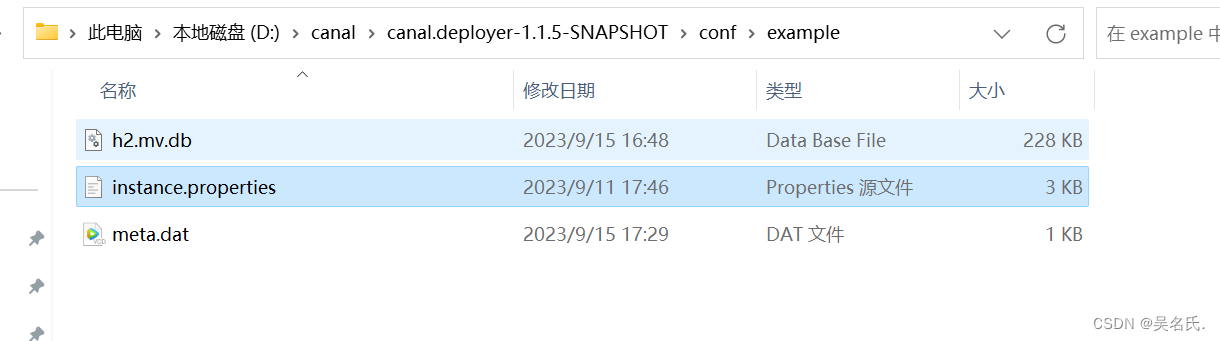
进入conf/example目录下,修改instance.properties为数据库配置

2.3.2 启动服务端
进入bin目录,双击starup.bat启动,出现下面界面,表明启动成功


服务端启动成功, 接下来进入客户端测试2.4 启动Canal客户端
2.4.1 修改配置
进入adapter目录,修改application.yml

yml内容:server: port: 8081 spring: jackson: date-format: yyyy-MM-dd HH:mm:ss time-zone: GMT+8 default-property-inclusion: non_null canal.conf: mode: rocketMQ #tcp kafka rocketMQ rabbitMQ flatMessage: true zookeeperHosts: syncBatchSize: 1000 retries: 0 timeout: accessKey: secretKey: consumerProperties: # canal tcp consumer canal.tcp.server.host: 127.0.0.1:11111 canal.tcp.zookeeper.hosts: canal.tcp.batch.size: 500 canal.tcp.username: canal.tcp.password: # kafka consumer kafka.bootstrap.servers: 127.0.0.1:9092 kafka.enable.auto.commit: false kafka.auto.commit.interval.ms: 1000 kafka.auto.offset.reset: latest kafka.request.timeout.ms: 40000 kafka.session.timeout.ms: 30000 kafka.isolation.level: read_committed kafka.max.poll.records: 1000 # rocketMQ consumer rocketmq.namespace: rocketmq.namesrv.addr: 127.0.0.1:9876 rocketmq.batch.size: 1000 rocketmq.enable.message.trace: false rocketmq.customized.trace.topic: rocketmq.access.channel: rocketmq.subscribe.filter: # rabbitMQ consumer rabbitmq.host: rabbitmq.virtual.host: rabbitmq.username: rabbitmq.password: rabbitmq.resource.ownerId: # srcDataSources: # defaultDS: # url: jdbc:mysql://127.0.0.1:3306/mytest?useUnicode=true # username: root # password: 121212 canalAdapters: - instance: example # canal instance Name or mq topic name groups: - groupId: g1 outerAdapters: - name: logger # - name: rdb # key: mysql1 # properties: # jdbc.driverClassName: com.mysql.jdbc.Driver # jdbc.url: jdbc:mysql://127.0.0.1:3306/mytest2?useUnicode=true # jdbc.username: root # jdbc.password: 121212 # - name: rdb # key: oracle1 # properties: # jdbc.driverClassName: oracle.jdbc.OracleDriver # jdbc.url: jdbc:oracle:thin:@localhost:49161:XE # jdbc.username: mytest # jdbc.password: m121212 # - name: rdb # key: postgres1 # properties: # jdbc.driverClassName: org.postgresql.Driver # jdbc.url: jdbc:postgresql://localhost:5432/postgres # jdbc.username: postgres # jdbc.password: 121212 # threads: 1 # commitSize: 3000 # - name: hbase # properties: # hbase.zookeeper.quorum: 127.0.0.1 # hbase.zookeeper.property.clientPort: 2181 # zookeeper.znode.parent: /hbase # - name: es # hosts: 127.0.0.1:9300 # 127.0.0.1:9200 for rest mode # properties: # mode: transport # or rest # # security.auth: test:123456 # only used for rest mode # cluster.name: elasticsearch # - name: kudu # key: kudu # properties: # kudu.master.address: 127.0.0.1 # ',' split multi address- 1
- 2
- 3
- 4
- 5
- 6
- 7
- 8
- 9
- 10
- 11
- 12
- 13
- 14
- 15
- 16
- 17
- 18
- 19
- 20
- 21
- 22
- 23
- 24
- 25
- 26
- 27
- 28
- 29
- 30
- 31
- 32
- 33
- 34
- 35
- 36
- 37
- 38
- 39
- 40
- 41
- 42
- 43
- 44
- 45
- 46
- 47
- 48
- 49
- 50
- 51
- 52
- 53
- 54
- 55
- 56
- 57
- 58
- 59
- 60
- 61
- 62
- 63
- 64
- 65
- 66
- 67
- 68
- 69
- 70
- 71
- 72
- 73
- 74
- 75
- 76
- 77
- 78
- 79
- 80
- 81
- 82
- 83
- 84
- 85
- 86
- 87
- 88
- 89
- 90
- 91
- 92
- 93
- 94
- 95
- 96
- 97
2.4.2 创建索引, 根据同步sql数据至Elasticsearch中
调用http://127.0.0.1:9200/product(PUT请求)创建索引,product为索引名字
{ "mappings" : { "properties" : { "attrs" : { "type" : "nested", "properties" : { "attrId" : { "type" : "long" }, "attrName" : { "type" : "keyword" }, "attrValueId" : { "type" : "long" }, "attrValueName" : { "type" : "keyword" } } }, "tags" : { "type" : "nested", "properties" : { "tagId" : { "type" : "long" }, "seq" : { "type" : "integer" } } }, "brandId" : { "type" : "long" }, "brandImg" : { "type" : "keyword" }, "brandName" : { "type" : "keyword" }, "code" : { "type" : "text", "fields" : { "keyword" : { "type" : "keyword", "ignore_above" : 256 } } }, "commentNum" : { "type" : "integer" }, "createTime" : { "type" : "date" }, "hasStock" : { "type" : "boolean" }, "imgUrls" : { "type" : "keyword", "index" : false, "doc_values" : false }, "mainImgUrl" : { "type" : "text", "fields" : { "keyword" : { "type" : "keyword", "ignore_above" : 256 } } }, "marketPriceFee" : { "type" : "long" }, "priceFee" : { "type" : "long" }, "saleNum" : { "type" : "integer" }, "sellingPoint" : { "type" : "text", "analyzer" : "ik_max_word", "search_analyzer" : "ik_smart" }, "shopId" : { "type" : "long" }, "shopImg" : { "type" : "keyword", "index" : false, "doc_values" : false }, "shopName" : { "type" : "text", "analyzer" : "ik_max_word", "search_analyzer" : "ik_smart" }, "shopType" : { "type" : "integer" }, "shopPrimaryCategoryId" : { "type" : "long" }, "shopPrimaryCategoryName" : { "type" : "keyword" }, "shopSecondaryCategoryId" : { "type" : "long" }, "shopSecondaryCategoryName" : { "type" : "keyword" }, "primaryCategoryId" : { "type" : "long" }, "primaryCategoryName" : { "type" : "keyword" }, "secondaryCategoryId" : { "type" : "long" }, "secondaryCategoryName" : { "type" : "keyword" }, "categoryId" : { "type" : "long" }, "categoryName" : { "type" : "keyword" }, "spuId" : { "type" : "long" }, "spuName" : { "type" : "text", "analyzer" : "ik_max_word", "search_analyzer" : "ik_smart" }, "spuStatus" : { "type" : "integer" }, "success" : { "type" : "boolean" } } } }- 1
- 2
- 3
- 4
- 5
- 6
- 7
- 8
- 9
- 10
- 11
- 12
- 13
- 14
- 15
- 16
- 17
- 18
- 19
- 20
- 21
- 22
- 23
- 24
- 25
- 26
- 27
- 28
- 29
- 30
- 31
- 32
- 33
- 34
- 35
- 36
- 37
- 38
- 39
- 40
- 41
- 42
- 43
- 44
- 45
- 46
- 47
- 48
- 49
- 50
- 51
- 52
- 53
- 54
- 55
- 56
- 57
- 58
- 59
- 60
- 61
- 62
- 63
- 64
- 65
- 66
- 67
- 68
- 69
- 70
- 71
- 72
- 73
- 74
- 75
- 76
- 77
- 78
- 79
- 80
- 81
- 82
- 83
- 84
- 85
- 86
- 87
- 88
- 89
- 90
- 91
- 92
- 93
- 94
- 95
- 96
- 97
- 98
- 99
- 100
- 101
- 102
- 103
- 104
- 105
- 106
- 107
- 108
- 109
- 110
- 111
- 112
- 113
- 114
- 115
- 116
- 117
- 118
- 119
- 120
- 121
- 122
- 123
- 124
- 125
- 126
- 127
- 128
- 129
- 130
- 131
- 132
- 133
- 134
- 135
- 136
- 137
- 138
- 139
- 140
- 141
- 142
- 143
- 144
- 145
- 146
- 147
- 148
- 149

2.4.3 启动客户端
进入\canal.adapter-1.1.5-SNAPSHOT\bin 双击startup.bat 出现下面界面,表明启动成功

3 注意事项
3.1 使用队列
2.4.1中客户端配置需要配置队列,我使用的rocketmq,大家可以根据自己需要选择队列,根据选择的队列,需改配置
3.2 启动顺序
需要优先启动Mysql和Elasticsearch,然后启动Canal服务端,最后启动客户端
4 验证
当你在操作界面添加一个商品时,那么此时Elasticsearch也会同步这条数据,具体不展开来了
-
-
相关阅读:
【JavaScript】判断是否为对象
Python:打印目录下每层的文件总数
【实用调试技巧】总是找不到Bug?手把手教你在vs2022中调试程序
MySQL8.0.28安装教程
00后会不会改变软件测试行业现状?
java面试(缓存Redis)
javaEE基于springboot的小区社区文化活动报名系统jsp生活服务网站
Stream的简单学习
SpringMVC框架中的异常处理机制
yii1 使用memcache 缓存不更新、过期时间不生效
- 原文地址:https://blog.csdn.net/qq_37284798/article/details/133129624