-
zabbix监控添加监控项及其监控Mysql、nginx
本届主要介绍添加监控项和修改中文乱码,监控mysql,nginx服务
一、zabbix监控添加监控项
1、配置agent服务器
在配置文件中添加:
UserParameter=lsq_userd,free -m | grep Mem | awk '{ print $3 }'
服务器内存使用量
UserParameter=du,df -Th | awk '/\/$/{print $6}' | awk -F% '{print $1}'磁盘使用量

重启agent服务

2、在service服务器上查是否可以读取到。
zabbix_get -s 192.168.2.4 -p 10050 -k lsq_userd
zabbix_get -s 192.168.2.4 -p 10050 -k du
UserParameter=memory userd,free -m lgrep Mem |awk '[print $3)
语法: UserParameter=key,shell command
监控key 值: memory_userd,key 值可以随意编写,但是一会需要在 web 页面创建监控项时指定 key 值;
Shell 命令或脚本: free -mlgrep Memlawk print $3y注:在 zabbix server 端可以使用 zabbix get -s agent 端 ip 地址 -p 10050 -k key 名通过此命令可以查看 agent 端 key 的监控值;

3、在service服务的web页面添加监控项
1.创建主机及添加主机添加模板


2.添加监控项
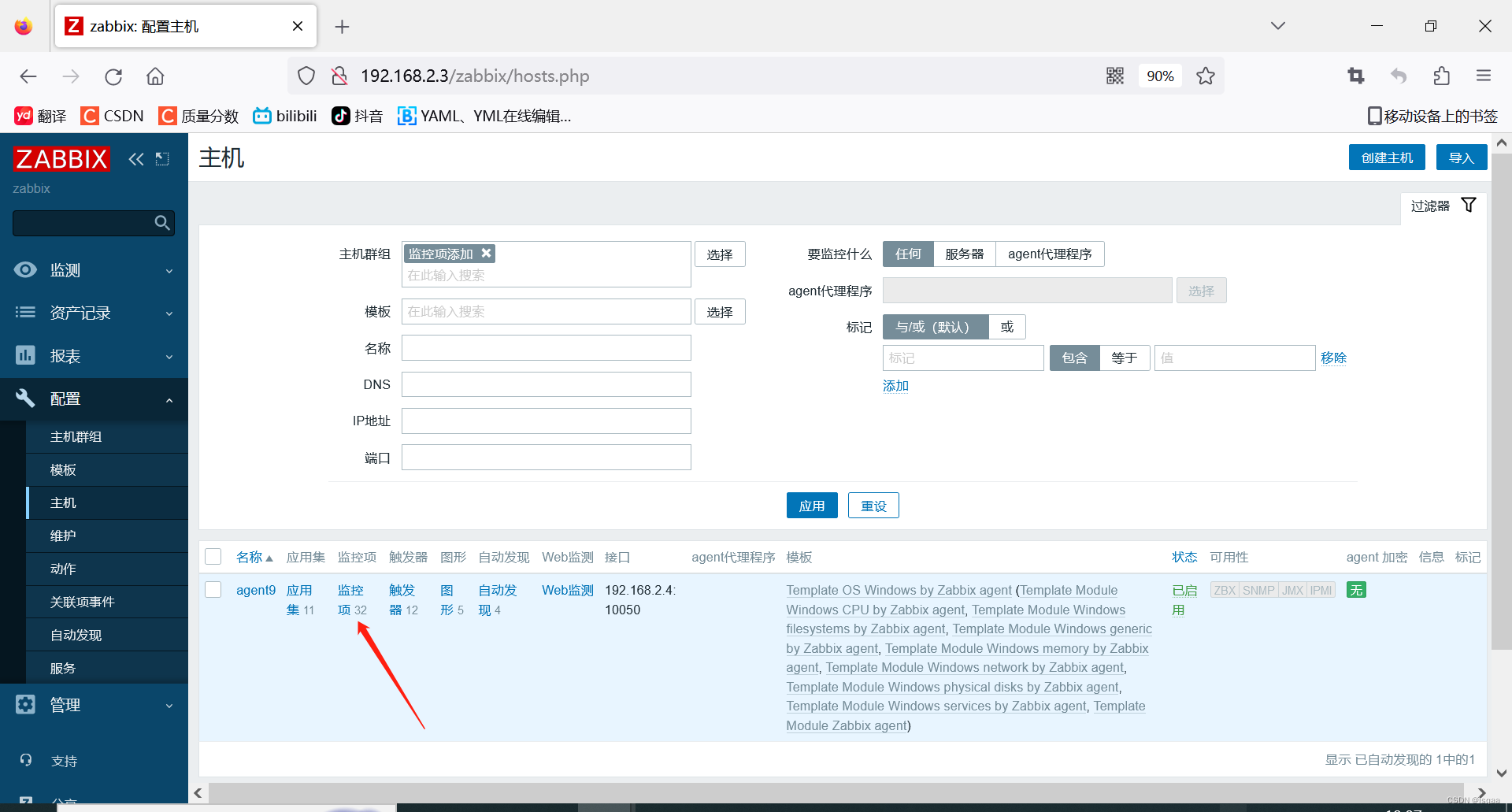


3.添加触发器


4.添加图像


5.点击:监测—主机—图形—查看

二、解决中文乱码
以上可看到图形中的中文有问题。
1.在宿主机上使用win+r 输入fonts随便找一个ttl文件

2.在service服务器上修改文件
在该路径下/usr/share/fonts/dejavu
:找到该文件
3.随便从win中找到ttf文件覆盖掉DejaVuSans.ttf

4.回到web页面查看图形

三、zabbix监控mysql软件配置
1、zabbix-agent端的配置
1.在数据库中创建zabbix用户和赋权

2.在zabbix客户端默认配置路径下 /etc/zabbix 目录下新建 .my.cnf 文件,然后新增一个监控帐号,上面我们新建了一个zabbix帐号


3.复制模板
cp /usr/share/doc/zabbix-agent-5.0.37/userparameter_mysql.conf .


4.将拷贝过来的文件中","后,添加HOME=/etc/zabbix/

2、配置web页面
1.添加对应模板到群组中

2.更改宏为agent地址

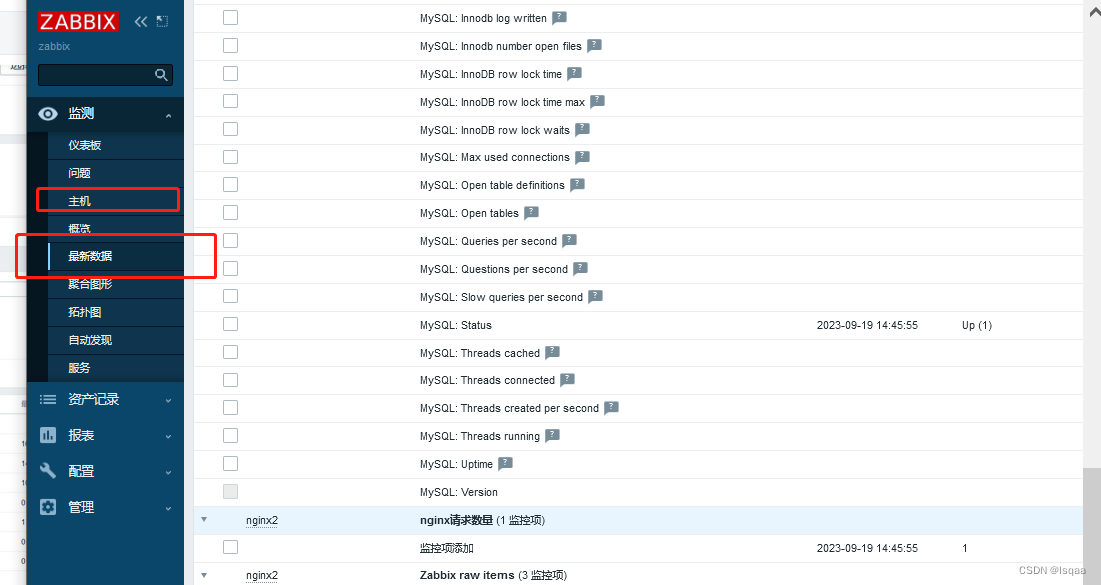
3.查看状态:监测---主机---最新数据


4.图像查看

四、zabbix监控nginx软件配置
1、查看nginx内置模块是否安装内置运行状态模块
nginx -V

2、配置nginx运行状态模块
在nginx配置文件中service字段中输入:
- location /status { #定义运行状态页面名称,页面为status
- stub_status on; #开启模块
- access_log off; #不开启访问日志记录
- allow 127.0.0.1; #运行127.0.0.1地址访问此网页
- allow 192.168.2.0/24; #只运行192.168.2.0网段的主机访问此网页
- deny all; #其余网段主机不允许访问
- }

3、浏览器访问

4、编写监控nginx脚本
在/zabbix目录下编写
- #!/bin/bash
- #定义Nginx status页面
- ngx_status="http://127.0.0.1/status"
- #判断status页面是否存活
- ngx_status_code() {
- http_code=`curl -o /dev/null -s -w %{http_code} ${ngx_status}`
- if [ ${http_code} == "200" ];then
- return 1
- else
- echo "Nginx status is not running."
- fi
- }
- #获取当前活动的客户端连接数
- active() {
- ngx_status_code || curl -s ${ngx_status} | grep "Active" | awk '{print $NF}'
- }
- #获取接收客户端连接的总数量
- accepts() {
- ngx_status_code || curl -s ${ngx_status} | awk NR==3 | awk '{print $1}'
- }
- #获取已处理的连接总数量
- handled() {
- ngx_status_code || curl -s ${ngx_status} | awk NR==3 | awk '{print $2}'
- }
- #获取客户端请求总数量
- requests() {
- ngx_status_code || curl -s ${ngx_status} | awk NR==3 | awk '{print $3}'
- }
- #获取正在读取请求标头的当前连接数量
- reading() {
- ngx_status_code || curl -s ${ngx_status} | grep "Reading" | awk '{print $2}'
- }
- #获取正在将响应写回到客户端的当前连接数量
- writing() {
- ngx_status_code || curl -s ${ngx_status} | grep "Writing" | awk '{print $2}'
- }
- #获取当前正在等待响应的客户端连接数量
- waiting() {
- ngx_status_code || curl -s ${ngx_status} | grep "Waiting" | awk '{print $2}'
- }
- #使用位置变量控制脚本输出
- case $1 in
- active)
- active;;
- accepts)
- accepts;;
- handled)
- handled;;
- requests)
- requests;;
- reading)
- reading;;
- writing)
- writing;;
- waiting)
- waiting;;
- *)
- echo "Unknown options"
- esac

5、配置zabbix agent 服务
参考以下内容进行修改:
LogFileSize=0
DenyKey=system.run[*]
EnableRemoteCommands=1
Server=10.1.1.1
ServerActive=10.1.1.1 (服务器地址)
UnsafeUserParameters=1[root@nginx ~]# grep -v "^#" /etc/zabbix/zabbix_agentd.conf | grep -v "^$"(查看到如下状态则修改完成)

6、创建自定义监控项
vim /etc/zabbix/zabbix_agentd.d/userparameter_nginx.conf添加以下内容
UserParameter=nginx.active,bash /etc/zabbix/ngx_status.sh active
UserParameter=nginx.accepts,bash /etc/zabbix/ngx_status.sh accepts
UserParameter=nginx.handled,bash /etc/zabbix/ngx_status.sh handled
UserParameter=nginx.requests,bash /etc/zabbix/ngx_status.sh requests
UserParameter=nginx.reading,bash /etc/zabbix/ngx_status.sh reading
UserParameter=nginx.writing,bash /etc/zabbix/ngx_status.sh writing
UserParameter=nginx.waiting,bash /etc/zabbix/ngx_status.sh waiting
重启服务。
7、模板创建


7.2在对应的模板中创建相关的监控项


8、创建监控主机,连接模板


9、监测--主机--最新数据
-
相关阅读:
tcp字节传输(java)-自定义包头和数据识别
力扣算法 Java 刷题笔记【十大排序算法】代码实现
Qt Creato配置PCL库
DDD:BC Map映射关系
20个提升效率的JS简写技巧,告别屎山!
【深度学习实验】图像处理(二):PIL 和 PyTorch(transforms)中的图像处理与随机图片增强
【前端代码实例】使用HTML5+CSS3+JavaScript制作一个响应式的后台管理系统~带侧边导航栏仪表盘功能
GUN介绍
python数据分析-糖尿病数据集数据分析预测
Linux多线程【生产者消费者模型】
- 原文地址:https://blog.csdn.net/lsqaa/article/details/132991260
