-
uniapp微信小程序用户隐私保护
使用wx.requirePrivacyAuthorize实现微信小程序用户隐私保护。
一、前言
微信小程序官方公告《关于小程序隐私保护指引设置的公告》。不处理的话,会导致很多授权无法使用,比如头像昵称、获取手机号、位置、访问相册、上传图片视频、访问剪切板内容等等,具体详见《小程序用户隐私保护指引内容介绍》 。
二、隐私相关设置
1、在 微信公众平台的
【设置】- 【服务内容与声明】,设置用户隐私保护指引,添加项目需要的接口权限。ps:【用户隐私保护指引】提交之后,官方会进行审核。审核通过之后,对应的接口权限才会生效。


比如:上传头像报错如下。
chooseAvatar:fail api scope is not declared in the privacy agreement。
2、打开
uniapp项目的manifest.json,选择【源码视图】, 添加配置如下配置- "mp-weixin": {
- "__usePrivacyCheck__": true, //隐私政策
- },
3、设置微信开发者工具的调试基础库,最低
2.33.0
三、解决方案
1)验证用户是否已经隐私授权
使用wx.requirePrivacyAuthorize() 接口,验证用户之前已经同意过隐私授权
- onReady() {
- var _this = this;
- // 隐私政策
- wx.getPrivacySetting({
- success: res => {
- // 返回结果为: res = { needAuthorization: true/false, privacyContractName: '《xxx隐私保护指引》' }
- console.log(res)
- if (res.needAuthorization) {
- // 需要弹出隐私协议
- _this.$refs.privacy.privacyShow = true;
- return;
- } else {
- // 用户已经同意过隐私协议,所以不需要再弹出隐私协议,也能调用隐私接口
- }
- },
- fail: () => {},
- complete:() => {}
- })
- },

如果needAuthorization返回值为true,则需要用户进行隐私授权。
2)index引入组件
- <template>
- <view>
- <!-- 用户隐私保护指引弹窗租金 -->
- <UserPrivacy ref="privacy"></UserPrivacy>
- </view>
- </template>
- <script>
- import UserPrivacy from "@/components/user/userPrivacy.vue";
- export default {
- components: {
- UserPrivacy
- },
- data() {
- return {
- // 隐私设置弹窗开关
- privacyShow: false,
- }
- },
- onReady() {
- var _this = this;
- // #ifdef MP-WEIXIN
- // 隐私政策
- wx.getPrivacySetting({
- success: res => {
- // 返回结果为: res = { needAuthorization: true/false, privacyContractName: '《xxx隐私保护指引》' }
- console.log(res)
- if (res.needAuthorization) {
- // 显示用户隐私组件弹窗
- _this.$refs.privacy.privacyShow = true;
- return;
- } else {
- // 用户已经同意过隐私协议,所以不需要再弹出隐私协议,也能调用隐私接口
- // 调用授权位置接口
- _this.getLocation();
- }
- },
- fail: () => {},
- complete:() => {}
- })
- // #endif,
- methods: {
- // 获取当前位置
- getLocation() {
- let _this = this;
- var mapkey = uni.getStorageSync('webConfig').web_config_str.mapkey;
- uni.getFuzzyLocation({
- type: 'gcj02', //国测局坐标gcj02
- geocode: true, //是否解析地址信息,仅App平台支持
- isHighAccuracy: true, //开启高精度定位
- success(res) {
- console.log('==获取当前位置的经纬度-成功==');
- console.log(res);
- _this.longitude = res.longitude;
- _this.latitude = res.latitude;
- // 设置经纬度缓存
- uni.setStorageSync('longitude', res.longitude);
- uni.setStorageSync('latitude', res.latitude);
- // 引入腾讯地图SDK核心类
- var QQMapWX = require('@/util/qqmap-wx-jssdk.min.js');
- var qqmapsdk = new QQMapWX({
- key: mapkey,
- });
- // 根据经纬度获取所在位置
- qqmapsdk.reverseGeocoder({
- location: {
- longitude: res.longitude,
- latitude: res.latitude,
- },
- success: function(res) {
- console.log("==根据经纬度获取所在位置==");
- console.log(res);
- _this.city = res.result.ad_info.city;
- // 设置城市缓存
- uni.setStorageSync('province', res.result.ad_info.province);
- uni.setStorageSync('city', res.result.ad_info.city);
- uni.setStorageSync('district', res.result.ad_info.district);
- uni.setStorageSync('address', res.result.address);
- }
- });
- },
- fail(err) {
- console.log('获取当前位置的经纬度-失败');
- // 设置默认城市、经纬度
- }
- });
- },
- }
- }
- </script>
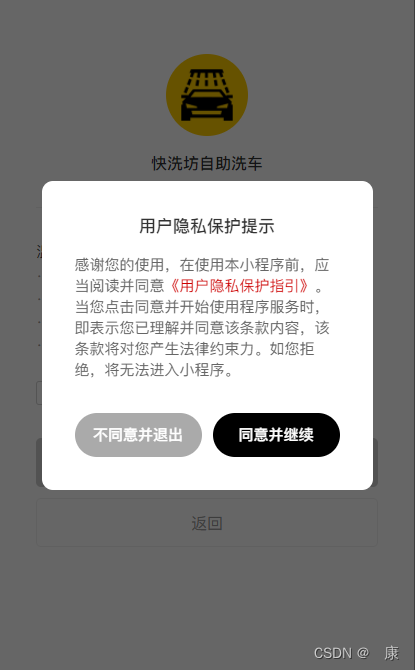
3) 弹窗组件代码
- <template>
- <view>
- <u-popup v-model="privacyShow" mode="center" width="600rpx" border-radius="20" :mask-close-able="false">
- <view class="privacyBox">
- <view class="privacyTit">用户隐私保护提示view>
- <view class="privacyDesc">
- 感谢您的使用,在使用本小程序前,应当阅读并同意<text
- @click="openClick">《用户隐私保护指引》text>。当您点击同意并开始使用程序服务时,即表示您已理解并同意该条款内容,该条款将对您产生法律约束力。如您拒绝,将无法进入小程序。
- view>
- <view class="privacyPost">
- <view class="refuseBtn">
- <navigator target="miniProgram" open-type="exit">不同意并退出navigator>
- view>
- <button class="agreeBtn" open-type="agreePrivacyAuthorization"
- @agreeprivacyauthorization="agreeClick">同意并继续button>
- view>
- view>
- u-popup>
- view>
- template>
- <script>
- export default {
- data() {
- return {
- // 隐私设置弹窗开关
- privacyShow: false,
- }
- },
- onReady() {
- },
- methods: {
- // 打开隐私协议
- openClick() {
- wx.openPrivacyContract({
- success: () => {}, // 打开成功
- fail: () => {}, // 打开失败
- complete: () => {}
- })
- },
- // 同意
- agreeClick() {
- // 用户点击了同意,之后所有已声明过的隐私接口和组件都可以调用了
- this.privacyShow = false;
- // 重新授权定位,调取父组件方法
- this.$parent.getLocation();
- },
- }
- }
- script>
- <style scoped lang="scss">
- .privacyBox {
- width: 600rpx;
- padding: 60rpx;
- box-sizing: border-box;
- }
- .privacyTit {
- font-size: 32rpx;
- font-weight: bold;
- color: $uni-text-main;
- text-align: center;
- overflow: hidden;
- }
- .privacyDesc {
- font-size: 28rpx;
- color: $uni-text-sub;
- overflow: hidden;
- margin-top: 30rpx;
- }
- .privacyDesc text {
- color: $uni-primary;
- }
- .privacyPost {
- overflow: hidden;
- margin-top: 60rpx;
- display: flex;
- justify-content: center;
- align-items: center;
- }
- .privacyPost .refuseBtn {
- flex: 1;
- height: 80rpx;
- line-height: 80rpx;
- text-align: center;
- font-size: 28rpx;
- font-weight: bold;
- color: #fff;
- background: $uni-info-dark;
- border-radius: 40rpx;
- box-sizing: border-box;
- overflow: hidden;
- }
- .privacyPost .agreeBtn {
- flex: 1;
- height: 80rpx;
- line-height: 80rpx;
- text-align: center;
- font-size: 28rpx;
- font-weight: bold;
- color: #fff;
- background: $uni-primary;
- border-radius: 40rpx;
- box-sizing: border-box;
- overflow: hidden;
- margin-left: 20rpx;
- }
- style>
ps:弹窗组件框架,demo用的uView1版本。底层遮罩样式,可自行用view代替。
4)弹窗效果图
参考示例:悦玩悦乐自助棋牌室、快洗坊自助洗车。

-
相关阅读:
CPU的运行与其对线程的影响
SpringBoot对Filter过滤器中的异常进行全局处理
springcloud alibaba 整合seata的TCC
linux上安装nginx
2、项目第三阶段——代码优化
Apache Pulsar工作原理
Linux(1):开始
丙二醇二乙酸酯(Propylene Glycol Diacetate)
【论文笔记】Deep High-Resolution Representation Learning for Human Pose Estimation
软件测试实战项目【电商、银行、商城、金融、医药、电商】
- 原文地址:https://blog.csdn.net/qq_40047019/article/details/132607521