欢迎访问我的GitHub
这里分类和汇总了欣宸的全部原创(含配套源码):https://github.com/zq2599/blog_demos
本篇概览
- 本文是《quarkus依赖注入》系列的第五篇,经过前面的学习,咱们熟悉了依赖注入的基本特性,接下来进一步了解相关的高级特性,先从本篇的拦截器开始
- 如果您熟悉spring的话,对拦截器应该不会陌生,通过拦截器可以将各种附加功能与被拦截代码的主体解耦合,例如异常处理、日志、数据同步等多种场景
- 本篇会演示如何自定义拦截器,以及如何对bean的方法进行进行拦截,由以下章节构成
- 定义和使用拦截器的操作步骤介绍
- 拦截异常
- 拦截构造方法
- 获取被拦截方法的参数
- 多个拦截器之间传递参数
定义和使用拦截器的操作步骤介绍
- 定义和使用拦截器一共要做三件事:
- 定义:新增一个注解(假设名为A),要用@InterceptorBinding修饰该注解
- 实现:拦截器A到底要做什么事情,需要在一个类中实现,该类要用两个注解来修饰:A和Interceptor
- 使用:用A来修饰要拦截器的bean
- 整个流程如下图所示

- 接下来通过实战掌握拦截器的开发和使用,从最常见的拦截异常开始
拦截异常
-
写一个拦截器,在程序发生异常的时候可以捕获到并将异常打印出来
-
首先是定义一个拦截器,这里的拦截器名为HandleError,注意要用InterceptorBinding修饰
package com.bolingcavalry.interceptor.define;

import javax.interceptor.InterceptorBinding;
import java.lang.annotation.ElementType;
import java.lang.annotation.Retention;
import java.lang.annotation.RetentionPolicy;
import java.lang.annotation.Target;
import static java.lang.annotation.ElementType.TYPE;

@InterceptorBinding
@Target({TYPE, ElementType.METHOD})
@Retention(RetentionPolicy.RUNTIME)
public @interface HandleError {
}
- 其次是实现拦截器的具体功能,下面代码有几处要注意的地方稍后会提到
package com.bolingcavalry.interceptor.impl;

import com.bolingcavalry.interceptor.define.HandleError;
import io.quarkus.arc.Priority;
import io.quarkus.logging.Log;

import javax.interceptor.AroundInvoke;
import javax.interceptor.Interceptor;
import javax.interceptor.InvocationContext;

@HandleError
@Interceptor
@Priority(Interceptor.Priority.APPLICATION +1)
public class HandleErrorInterceptor {

    @AroundInvoke
    Object execute(InvocationContext context) {

        try {
            // 注意proceed方法的含义:调用下一个拦截器,直到最后一个才会执行被拦截的方法
            return context.proceed();
        } catch (Exception exception) {
            Log.errorf(exception,
                    "method error from %s.%s\n",
                    context.getTarget().getClass().getSimpleName(),
                    context.getMethod().getName());
        }

        return null;
    }
}
- 上述代码有以下四点需要注意:
- Priority注解的作用是设定HandleError拦截器的优先级(值越小优先级越高),可以同时用多个拦截器拦截同一个方法
- AroundInvoke注解的作用,是表明execute会在拦截bean方法时被调用
- proceed方法的作用,并非是执行被拦截的方法,而是执行下一个拦截器,直到最后一个拦截器才会执行被拦截的方法
- 可以从入参context处取得被拦截实例和方法的信息
- 然后是使用拦截器,这里创建个bean来演示拦截器如何使用,bean里面有个业务方法会抛出异常,可见拦截器使用起来很简单:用HandleError修饰bean即可
@ApplicationScoped
@HandleError
public class HandleErrorDemo {

    public void executeThrowError() {
        throw new IllegalArgumentException("this is business logic exception");
    }
}
- 验证拦截器的单元测试代码如下,只要执行HandleErrorDemo的executeThrowError方法就会抛出异常,然后观察日志中是否有拦截器日志信息即可验证拦截器是否符合预期
@QuarkusTest
public class InterceptorTest {

    @Inject
    HandleErrorDemo handleErrorDemo;

    @Test
    public void testHandleError() {
        handleErrorDemo.executeThrowError();
    }
}
- 执行单元测试,如下图红框所示,拦截器捕获了异常并打印出异常信息

- 至此,拦截异常的操作就完成了,除了用AroundInvoke拦截普通的bean方法,还能用AroundConstruct拦截bean的构造方法,接下里编码体验
拦截构造方法
- 拦截器定义
@InterceptorBinding
@Target({TYPE, ElementType.METHOD})
@Retention(RetentionPolicy.RUNTIME)
public @interface HandleConstruction {
}
- HandleConstruction拦截器的实现,要注意的有两点稍后会提到
@HandleConstruction
@Interceptor
@Priority(Interceptor.Priority.APPLICATION +1)
public class HandleConstructionInterceptor {

    @AroundConstruct
    void execute(InvocationContext context) throws Exception {
        // 执行业务逻辑可以在此
        Log.infov("start construction interceptor");

        // 执行bean的构造方法
        context.proceed();

        // 注意,对于context.getTarget()的返回值,此时不是null,如果在context.proceed()之前,则是null
        Log.infov("bean instance of {0}", context.getTarget().getClass().getSimpleName());
    }
}
- 上述代码有两处要注意的
- 被AroundConstruct注解修饰后,execute方法会在bean的构造方法执行时被调用
- context.getTarget()的返回值,只有在context.proceed执行后才不为空
- 拦截器的使用,用HandleConstruction修饰要拦截的bean,为了调试和分析,还在构造方法中打印了日志
@ApplicationScoped
@HandleConstruction
public class HandleonstructionDemo {

    public HandleonstructionDemo() {
        super();
        Log.infov("construction of {0}", HandleonstructionDemo.class.getSimpleName());
    }

    public void hello() {
        Log.info("hello world!");
    }
}
- 用单元测试来验证拦截器能否成功拦截构造方法
@QuarkusTest
public class InterceptorTest {

    @Inject
    HandleonstructionDemo handleonstructionDemo;

    @Test
    public void testHandleonstruction() {
        handleonstructionDemo.hello();
    }
}
- 运行单元测试,控制台输出如下,可见构造方法拦截成功
2022-03-27 15:51:03,158 INFO  [io.quarkus] (main) Quarkus 2.7.3.Final on JVM started in 0.867s. Listening on: http://localhost:8081
2022-03-27 15:51:03,158 INFO  [io.quarkus] (main) Profile test activated.
2022-03-27 15:51:03,158 INFO  [io.quarkus] (main) Installed features: [agroal, cdi, narayana-jta, resteasy, smallrye-context-propagation, vertx]
2022-03-27 15:51:03,164 INFO  [com.bol.int.dem.HandleonstructionDemo] (main) construction of HandleonstructionDemo
2022-03-27 15:51:03,397 INFO  [com.bol.int.imp.HandleConstructionInterceptor] (main) start construction interceptor
2022-03-27 15:51:03,398 INFO  [com.bol.int.dem.HandleonstructionDemo] (main) construction of HandleonstructionDemo
2022-03-27 15:51:03,398 INFO  [com.bol.int.imp.HandleConstructionInterceptor] (main) bean instance of HandleonstructionDemo
2022-03-27 15:51:03,398 INFO  [com.bol.int.dem.HandleonstructionDemo] (main) hello world!
2022-03-27 15:51:03,416 INFO  [io.quarkus] (main) Quarkus stopped in 0.015s
获取被拦截方法的参数
- 拦截方法时,可能需要知道方法入参的值,才好实现具体的拦截功能(如参数校验),接下来就试试如何取得被拦截方法的参数并打印到日志中
- 首先是拦截器定义
@InterceptorBinding
@Target({TYPE, ElementType.METHOD})
@Retention(RetentionPolicy.RUNTIME)
public @interface TrackParams {
}
- 拦截器实现,可以用context.getParameters方法取得被拦截方法的入参数组,然后遍历并打印
@TrackParams
@Interceptor
@Priority(Interceptor.Priority.APPLICATION + 1)
public class TrackParamsInterceptor {

    @AroundInvoke
    Object execute(InvocationContext context) throws Exception {

        // context.getParameters()返回拦截方法的所有参数,
        // 用Optional处理非空时候的数组
        Optional.of(Arrays.stream(context.getParameters()))
                .ifPresent(stream -> {
                    stream.forEach(object -> Log.infov("parameter type [{0}], value [{1}]",
                                                       object.getClass().getSimpleName(),
                                                       object)
                    );
                });

        return context.proceed();
    }
}
- 使用拦截器的bean,其hello方法有两个入参,正常情况下会在拦截器中打印出来
@ApplicationScoped
@TrackParams
public class TrackParamsDemo {

    public void hello(String name, int id) {
        Log.infov("Hello {0}, your id is {1}", name, id);
    }
}
- 测试类,调用了TrackParamsDemo的hello方法
@QuarkusTest
public class InterceptorTest {

    @Inject
    TrackParamsDemo trackParamsDemo;

    @Test
    public void testTrackParams() {
        trackParamsDemo.hello("Tom", 101);
    }
}
- 执行单元测试,控制台输出如下,可见hello方法的两个入参的类型和值都被拦截器打印出来了
2022-03-27 17:15:46,582 INFO  [io.quarkus] (main) Quarkus 2.7.3.Final on JVM started in 0.905s. Listening on: http://localhost:8081
2022-03-27 17:15:46,582 INFO  [io.quarkus] (main) Profile test activated.
2022-03-27 17:15:46,582 INFO  [io.quarkus] (main) Installed features: [agroal, cdi, narayana-jta, resteasy, smallrye-context-propagation, vertx]
2022-03-27 17:15:46,587 INFO  [com.bol.int.dem.HandleonstructionDemo] (main) construction of HandleonstructionDemo
2022-03-27 17:15:46,827 INFO  [com.bol.int.imp.TrackParamsInterceptor] (main) parameter type [String], value [Tom]
2022-03-27 17:15:46,827 INFO  [com.bol.int.imp.TrackParamsInterceptor] (main) parameter type [Integer], value [101]
2022-03-27 17:15:46,827 INFO  [com.bol.int.dem.TrackParamsDemo] (main) Hello Tom, your id is 101
2022-03-27 17:15:46,845 INFO  [io.quarkus] (main) Quarkus stopped in 0.015s
- 以上就是获取被拦截方法入参的操作了,如果被拦截的构造方法也有入参,也能用此方式全部获取到
多个拦截器之间传递参数
- 多个拦截器拦截同一个方法是很正常的,他们各司其职,根据优先级按顺序执行,如果这些拦截器之间有一定逻辑关系,例如第二个拦截器需要第一个拦截器的执行结果,此时又该如何呢?
- quarkus支持不同拦截器间共享同一个上下文的数据(这让我想到了数据总线),接下来就演示多个拦截器之间是如何共享数据的
- 首先,定义拦截器,这里增加了一个常量KEY_PROCEED_INTERCEPTORS,后面在拦截器的实现中会用到
@InterceptorBinding
@Target({TYPE, ElementType.METHOD})
@Retention(RetentionPolicy.RUNTIME)
public @interface ContextData {
    String KEY_PROCEED_INTERCEPTORS = "proceedInterceptors";
}
- 其次,首先拦截器,因为要演示多个拦截器共享数据,这里会有两个拦截器,为了简化开发,先写个父类,把两个拦截器的公共代码写入父类,可见拦截器之间共享数据的关键是context.getContextData()方法的返回值,这是个map,某个拦截器向此map中放入的数据,可以在后面的拦截器中取得,这里为了演示,将当前实例的类名存入了map中
package com.bolingcavalry.interceptor.impl;

import io.quarkus.logging.Log;

import javax.interceptor.InvocationContext;
import java.util.ArrayList;
import java.util.List;
import java.util.Map;

import static com.bolingcavalry.interceptor.define.ContextData.KEY_PROCEED_INTERCEPTORS;

public class BaseContextDataInterceptor {

    Object execute(InvocationContext context) throws Exception {
        // 取出保存拦截器间共享数据的map
        Map map = context.getContextData();

        List list;

        String instanceClassName = this.getClass().getSimpleName();

        // 根据指定key从map中获取一个list
        if (map.containsKey(KEY_PROCEED_INTERCEPTORS)) {
            list = (List) map.get(KEY_PROCEED_INTERCEPTORS);
        } else {
            // 如果map中没有,就在此新建一个list,存如map中
            list = new ArrayList<>();
            map.put(KEY_PROCEED_INTERCEPTORS, list);

            Log.infov("from {0}, this is first processor", instanceClassName);
        }

        // 将自身内容存入list中,这样下一个拦截器只要是BaseContextDataInterceptor的子类,
        // 就能取得前面所有执行过拦截操作的拦截器
        list.add(instanceClassName);

        Log.infov("From {0}, all processors {0}", instanceClassName, list);

        return context.proceed();
    }
}
- 再新建一个拦截器实现类ContextDataInterceptorA,是BaseContextDataInterceptor的子类:
@ContextData
@Interceptor
@Priority(Interceptor.Priority.APPLICATION + 1)
public class ContextDataInterceptorA extends BaseContextDataInterceptor {

    @AroundInvoke
    Object execute(InvocationContext context) throws Exception {
        return super.execute(context);
    }
}
- 另一个拦截器实现类ContextDataInterceptorB,注意它的Priority注解的值,表明其优先级低于ContextDataInterceptorA
@ContextData
@Interceptor
@Priority(Interceptor.Priority.APPLICATION + 2)
public class ContextDataInterceptorB extends BaseContextDataInterceptor {

    @AroundInvoke
    Object execute(InvocationContext context) throws Exception {
        return super.execute(context);
    }
}
- 然后是被拦截bean
@ApplicationScoped
@ContextData
public class ContextDataDemo {

    public void hello() {
        Log.info("Hello world!");
    }
}
- 单元测试代码
@QuarkusTest
public class InterceptorTest {

    @Inject
    ContextDataDemo contextDataDemo;

    @Test
    public void testContextData() {
        contextDataDemo.hello();
    }
}
- 执行单元测试,控制台输入如下,可见执行顺序分别是ContextDataInterceptorA、ContextDataInterceptorB、被拦截方法,另外,存放在共享数据中的内容也随着拦截器的执行,越来越多,符合预期
2022-03-27 23:29:27,703 INFO  [io.quarkus] (main) Quarkus 2.7.3.Final on JVM started in 0.903s. Listening on: http://localhost:8081
2022-03-27 23:29:27,703 INFO  [io.quarkus] (main) Profile test activated.
2022-03-27 23:29:27,703 INFO  [io.quarkus] (main) Installed features: [agroal, cdi, narayana-jta, resteasy, smallrye-context-propagation, vertx]
2022-03-27 23:29:27,708 INFO  [com.bol.int.dem.HandleonstructionDemo] (main) construction of HandleonstructionDemo
2022-03-27 23:29:27,952 INFO  [com.bol.int.imp.BaseContextDataInterceptor] (main) from ContextDataInterceptorA, this is first processor
2022-03-27 23:29:27,953 INFO  [com.bol.int.imp.BaseContextDataInterceptor] (main) From ContextDataInterceptorA, all processors ContextDataInterceptorA
2022-03-27 23:29:27,953 INFO  [com.bol.int.imp.BaseContextDataInterceptor] (main) From ContextDataInterceptorB, all processors ContextDataInterceptorB
2022-03-27 23:29:27,953 INFO  [com.bol.int.dem.ContextDataDemo] (main) Hello world!
2022-03-27 23:29:27,971 INFO  [io.quarkus] (main) Quarkus stopped in 0.015s
- 至此,有关拦截器的实战已经完成,往后不管是自建拦截器还是使用已有拦截器,相信您都能从容应对,信手拈来,有了拦截器,我们在增强应用能力的同时还能保持低耦合性,用好它,打造更完善的应用。
源码下载
- 本篇实战的完整源码可在GitHub下载到,地址和链接信息如下表所示(https://github.com/zq2599/blog_demos)
| 名称 | 链接 | 备注 |
|---|---|---|
| 项目主页 | https://github.com/zq2599/blog_demos | 该项目在GitHub上的主页 |
| git仓库地址(https) | https://github.com/zq2599/blog_demos.git | 该项目源码的仓库地址,https协议 |
| git仓库地址(ssh) | git@github.com:zq2599/blog_demos.git | 该项目源码的仓库地址,ssh协议 |
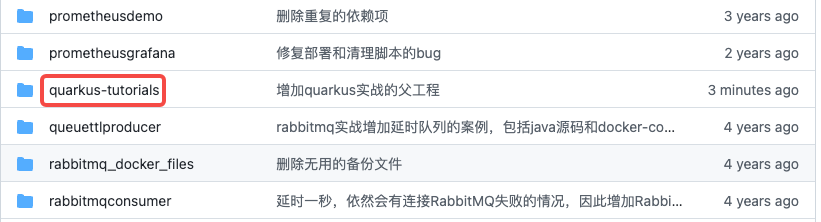
- 这个git项目中有多个文件夹,本次实战的源码在quarkus-tutorials文件夹下,如下图红框
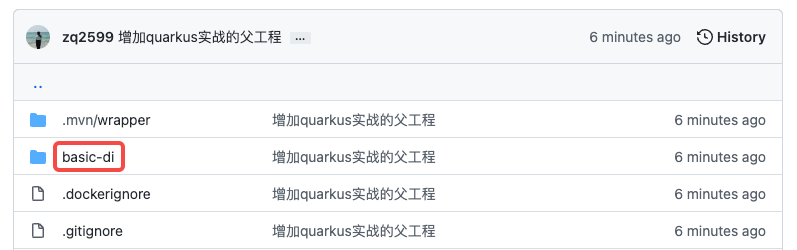
- quarkus-tutorials是个父工程,里面有多个module,本篇实战的module是basic-di,如下图红框