-
Java:Springboot和React中枚举值(数据字典)的使用
1、开发中的需求
开发和使用过程中,通常会涉及四个角色:数据库管理员、后端开发人员、前端开发人员、浏览者
- 数据库使用int类型的数值进行存储(eg: 0、1、2)
- Java代码使用enum枚举类型的对象进行逻辑判断(eg: SexEnum.UNKOWN SexEnum.MAN、SexEnum.WOMAN)
- 接口返回枚举值的字符串形式用于必要的逻辑判断(eg: UNKOWN、MAN、WOMAN)
- 显示给用户查看(eg: 未知、男性、女性)
使用方 数值类型 用途 示例 数据库 int数值 存储 0、1、2 后端代码 Enum枚举类 逻辑判断 SexEnum.UNKOWN SexEnum.MAN、SexEnum.WOMAN 前端代码 string常量字符串 逻辑判断 UNKOWN、MAN、WOMAN 用户视图 string字符串 查看 未知、男性、女性 假设:
1、如果后端返回数字,数字本身没有很直观的意思,不便于前端人员检查问题,如果书写错误,同样会导致不容易发现的问题。
2、如果后端返回用户友好的字符串,前端如果需要做逻辑判断就很不好,毕竟不知道产品经理什么时候会把显示的内容修改掉,比如:男性 改为 男
3、如果后端返回枚举类型的常量字符串,那每次需要显示的时候,都必须做一个映射转换,前端人员也很苦恼
综上:
后端同时返回 枚举字符串 和 用户友好的字符串 比较好,既方便前端人员做逻辑判断,也方便给用户展示;
一般情况下,枚举类型统一在后端维护,如果需要修改,也只需要修改一个地方就可以
如果,前端也需要使用枚举值进行逻辑判断,那么前端也需要和后端约定好的映射关系自己定义好枚举,可以直接使用常量字符串作为枚举,前端显示的值可以和后端约定好,什么数值,显示什么字符串
同时,需要给前端返回一个枚举映射关系表,用于下拉选择等业务
2、实现效果
1、列表页
- 顶部筛选类型由接口返回,接口增加类型后,前端代码不用修改,直接生效
- 列表
性别列,直接显示后端返回sexLabel的字段 - 列表
颜色列,由于前端需要根据不同的值,做一些逻辑判断,所以前端代码也需要做好枚举,做逻辑判断,此时需要注意默认值,预防后端增加类型之后,前端代码增加容错
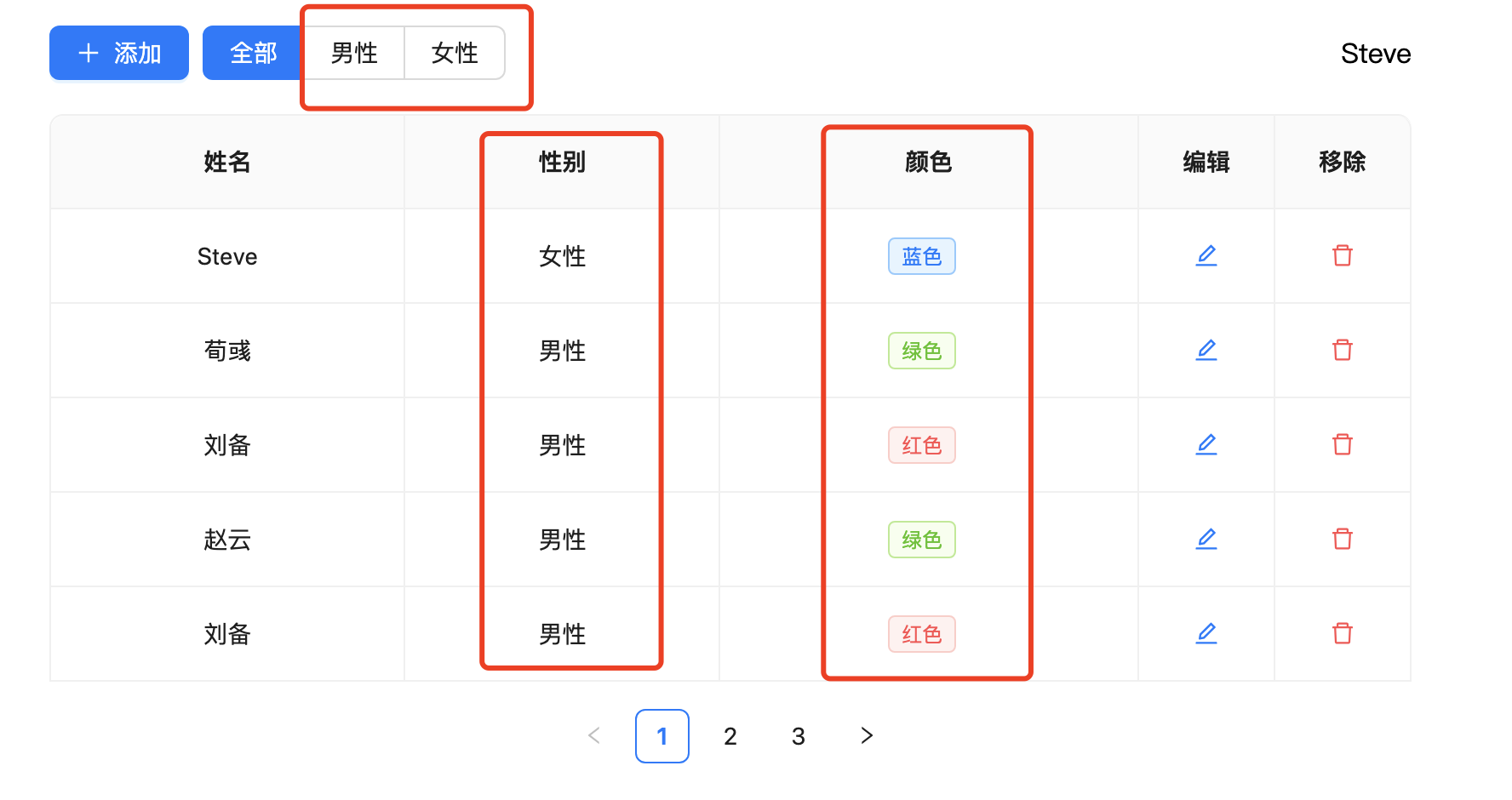
2、添加页性别和颜色都使用后端返回的配置数据即可,后端增加类型数据之后,前端无需修改代码

3、后端代码
配合MyBatis-Plus使用,可以很容易进行数据库和代码之间的转换
定义3个值,由后端代码统一维护
code # 用于数据库存储 value # 用于后端和前端的逻辑判断 label # 用户展示给用户- 1
- 2
- 3
如果有其他属性,也可以增加
先定义一个通用的枚举接口
package com.example.demo.enums; /** * 字典枚举接口 */ public interface IDictEnum { Integer getCode(); String getLabel(); String name(); // @JsonValue // 标记响应json值 default String getValue() { return this.name(); } }- 1
- 2
- 3
- 4
- 5
- 6
- 7
- 8
- 9
- 10
- 11
- 12
- 13
- 14
- 15
- 16
- 17
- 18
- 19
定义枚举类
package com.example.demo.enums; import com.baomidou.mybatisplus.annotation.EnumValue; /** * 性别枚举 */ public enum SexEnum implements IDictEnum { /** * 男性 */ MAN(1, "男性"), /** * 女性 */ WOMEN(2, "女性"); /** * 存储值 */ @EnumValue // 配置 mybatis-plus 使用 标记数据库存的值是 code private final Integer code; /** * 显示值 */ private final String label; SexEnum(Integer code, String label) { this.code = code; this.label = label; } @Override public Integer getCode() { return this.code; } @Override public String getLabel() { return this.label; } }- 1
- 2
- 3
- 4
- 5
- 6
- 7
- 8
- 9
- 10
- 11
- 12
- 13
- 14
- 15
- 16
- 17
- 18
- 19
- 20
- 21
- 22
- 23
- 24
- 25
- 26
- 27
- 28
- 29
- 30
- 31
- 32
- 33
- 34
- 35
- 36
- 37
- 38
- 39
- 40
- 41
- 42
- 43
- 44
- 45
- 46
自动扫描枚举类
package com.example.demo.config; import com.example.demo.vo.EnumVO; import lombok.extern.slf4j.Slf4j; import org.springframework.beans.BeanUtils; import org.springframework.context.annotation.Bean; import org.springframework.core.io.Resource; import org.springframework.core.io.support.PathMatchingResourcePatternResolver; import org.springframework.core.io.support.ResourcePatternResolver; import org.springframework.core.type.classreading.CachingMetadataReaderFactory; import org.springframework.core.type.classreading.MetadataReader; import org.springframework.core.type.classreading.MetadataReaderFactory; import org.springframework.stereotype.Component; import org.springframework.util.ClassUtils; import java.io.IOException; import java.lang.reflect.InvocationTargetException; import java.lang.reflect.Method; import java.util.ArrayList; import java.util.HashMap; import java.util.List; import java.util.Map; /** * 枚举配置类 */ @Slf4j @Component public class DictEnumConfig { // 通同匹配 private static final String RESOURCE_PATTERN = "/**/*Enum.class"; // 扫描的包名 private static final String BASE_PACKAGES = "com.example.demo.enums"; private ResourcePatternResolver resourcePatternResolver = new PathMatchingResourcePatternResolver(); @Bean(name = "enumConfig") public Map<String, List<EnumVO>> enumConfig() { Map<String, List<EnumVO>> enumMap = new HashMap<>(); try { // 根据classname生成class对应的资源路径,需要扫描的包路径 //ResourcePatternResolver.CLASSPATH_ALL_URL_PREFIX + String pattern = ClassUtils.convertClassNameToResourcePath(BASE_PACKAGES) + RESOURCE_PATTERN; // 获取classname的IO流资源 Resource[] resources = resourcePatternResolver.getResources(pattern); // MetadataReaderFactory接口 ,MetadataReader的工厂接口。允许缓存每个MetadataReader的元数据集 MetadataReaderFactory readerFactory = new CachingMetadataReaderFactory(this.resourcePatternResolver); for (Resource resource : resources) { if (resource.isReadable()) { // 通过class资源(resource)生成MetadataReader MetadataReader reader = readerFactory.getMetadataReader(resource); // 获取class名 String className = reader.getClassMetadata().getClassName(); Class<?> clz = Class.forName(className); if (!clz.isEnum()) { continue; } // 将枚举类名首字母转小写,去掉末尾的Enum enumMap.put(clz.getSimpleName(), this.enumToList(clz)); } } } catch (IOException e) { e.printStackTrace(); } catch (ClassNotFoundException e) { e.printStackTrace(); } catch (NoSuchMethodException e) { e.printStackTrace(); } catch (IllegalAccessException e) { e.printStackTrace(); } catch (InvocationTargetException e) { e.printStackTrace(); } return enumMap; } public List<EnumVO> enumToList(Class<?> dictEnum) throws NoSuchMethodException, InvocationTargetException, IllegalAccessException { List<EnumVO> list = new ArrayList<>(); Method valuesMethod = dictEnum.getMethod("values"); Object[] values = (Object[]) valuesMethod.invoke(null); for (Object obj : values) { EnumVO enumVO = new EnumVO(); BeanUtils.copyProperties(obj, enumVO); list.add(enumVO); } return list; } }- 1
- 2
- 3
- 4
- 5
- 6
- 7
- 8
- 9
- 10
- 11
- 12
- 13
- 14
- 15
- 16
- 17
- 18
- 19
- 20
- 21
- 22
- 23
- 24
- 25
- 26
- 27
- 28
- 29
- 30
- 31
- 32
- 33
- 34
- 35
- 36
- 37
- 38
- 39
- 40
- 41
- 42
- 43
- 44
- 45
- 46
- 47
- 48
- 49
- 50
- 51
- 52
- 53
- 54
- 55
- 56
- 57
- 58
- 59
- 60
- 61
- 62
- 63
- 64
- 65
- 66
- 67
- 68
- 69
- 70
- 71
- 72
- 73
- 74
- 75
- 76
- 77
- 78
- 79
- 80
- 81
- 82
- 83
- 84
- 85
- 86
- 87
- 88
- 89
- 90
- 91
- 92
- 93
- 94
- 95
- 96
- 97
- 98
- 99
4、前端代码
前端定义一个全局的变量,来存储数据字典,可以在应用初始化前就请求接口获取数据,确保后续组件中正常使用
import http from "../api/index.js"; /** * 全局静态数据 */ export const globalData = { SexEnum: [], ColorEnum: [], }; // 初始化 export async function initGlobalData() { const res = await http.get("/getEnumConfig"); for (const key in globalData) { globalData[key] = res[key]; } } // === getter === export function getSexEnumFilterOptions() { console.log(globalData); return [{ value: "", label: "全部" }, ...globalData.SexEnum]; } export function getSexEnumOptions() { return globalData.SexEnum; } export function getColorEnumOptions() { return globalData.ColorEnum; }- 1
- 2
- 3
- 4
- 5
- 6
- 7
- 8
- 9
- 10
- 11
- 12
- 13
- 14
- 15
- 16
- 17
- 18
- 19
- 20
- 21
- 22
- 23
- 24
- 25
- 26
- 27
- 28
- 29
- 30
- 31
- 32
- 33
- 34
前端需要进行逻辑判断,可自行枚举
/** * 颜色枚举,前端代码需要逻辑判断 */ export const ColorEnum = { // 红色 RED: 'RED', // 绿色 GREEN: 'GREEN', // 蓝色 BLUE: 'BLUE', }; export const ColorEnumOptions = [ { // 红色 value: ColorEnum.RED, color: 'error', }, { // 绿色 value: ColorEnum.GREEN, color: 'success', }, { // 蓝色 value: ColorEnum.BLUE, color: 'processing', }, ]; export function getColorEnumColor(value) { return ( ColorEnumOptions.find((item) => item.value === value)?.color || 'default' ); }- 1
- 2
- 3
- 4
- 5
- 6
- 7
- 8
- 9
- 10
- 11
- 12
- 13
- 14
- 15
- 16
- 17
- 18
- 19
- 20
- 21
- 22
- 23
- 24
- 25
- 26
- 27
- 28
- 29
- 30
- 31
- 32
- 33
- 34
- 35
- 36
5、接口数据
直接返回value和label字段,便于直接对接element和antd UI组件库,不需要再进行数据转换
获取枚举配置
GET http://localhost:8080/getEnumConfig { "ColorEnum": [ { "value": "RED", "label": "红色" }, { "value": "GREEN", "label": "绿色" }, { "value": "BLUE", "label": "蓝色" } ], "SexEnum": [ { "value": "MAN", "label": "男性" }, { "value": "WOMEN", "label": "女性" } ] }- 1
- 2
- 3
- 4
- 5
- 6
- 7
- 8
- 9
- 10
- 11
- 12
- 13
- 14
- 15
- 16
- 17
- 18
- 19
- 20
- 21
- 22
- 23
- 24
- 25
- 26
- 27
- 28
前端提交数据
POST http://localhost:8080/addUser Content-Type: application/json { "name": "Steve", "sex": "WOMEN" }- 1
- 2
- 3
- 4
- 5
- 6
- 7
前端获取数据
GET http://localhost:8080/getUserList [ { "id": 21, "name": "Steve", "sex": "WOMEN", "color": null, "sexLabel": "女性", "colorLabel": "" } ]- 1
- 2
- 3
- 4
- 5
- 6
- 7
- 8
- 9
- 10
- 11
- 12
sexLabel 为方便前端显示数据而增加的字段
6、完整代码
后端代码:https://github.com/mouday/spring-boot-demo/SpringBoot-Enum
前端代码:https://gitee.com/mouday/react-enum7、参考文章
-
相关阅读:
MuLogin浏览器如何在一台设备上安全登录和管理多个LinkedIn账户?
nodejs+Vue+Elementui高校奖学金管理系统express前端项目源码介绍
Hafnium之S-EL0分区支持
代码随想录day49:动态规划part10
20、实现短信验证码的登录注册功能
35岁程序员,都到哪儿去了?
还在每天玩单调的控制台窗口?赶紧进来!!!用EasyX画出自己的优美窗口(万字教程,一文入门)
关于MMC子系统添加CMD56获取金士顿数据写入量方案
JVM的内存分配及垃圾回收
权限系统设计
- 原文地址:https://blog.csdn.net/mouday/article/details/132650598
