-
【JUC基础】11. 并发下的集合类
目录
1、前言
我们直到ArrayList,HashMap等是线程不安全的容器。但是我们通常会频繁的在JUC中使用集合类,那么应该如何确保线程安全?
2、并发下的ArrayList
2.1、传统方式
如果在JUC中直接使用ArrayList,可能会引发一系列问题。先来看一段代码:
- public class ArrayListTest {
- // 创建一个集合类
- static List<Integer> list = new ArrayList<>(10);
- public static void main(String[] args) throws InterruptedException {
- // 这里执行10次,对比10次结果
- for (int i = 0; i < 10; i++) {
- // 每次执行前将list清空
- list.clear();
- // 创建两个线程,分别往list里面存放数据,每个线程存放10000个
- Thread thread1 = new Thread(new MyThread());
- Thread thread2 = new Thread(new MyThread());
- thread1.start();
- thread2.start();
- thread1.join();
- thread2.join();
- // 当两个线程执行完毕后,期望值应该是list会扩容到20000个,并且打印list.sizes()=20000
- System.out.println("最终集合数量:" + list.size());
- }
- }
- // 操作集合list线程
- static class MyThread implements Runnable {
- @Override
- public void run() {
- for (int i = 0; i < 10000; i++) {
- list.add(i);
- }
- }
- }
- }
执行结果:

我们看到执行了10次,居然会出现3种不同的结果。
2.1.1、程序正常运行
从上述的运行结果可以看出,运行10次,有概率出现程序正常运行,也得到了期望的20000这个数值。这说明在JUC中使用ArrayList集合,有概率成功,并不一定每次都会出现问题。
2.1.2、程序异常
可以看到上面其中一次运行结果出现了报错,抛出了ArrayIndexOutOfBoundsException异常。这是因为ArrayList我们设置初始容量为10,在多线程操作中要进行扩容。而在扩容过程中,内部的一致性被破坏,由于没有锁机制,另外一个线程访问到了不一致的内部状态,导致数组越界。
2.1.3、运行期望值不符
相比上面程序异常,程序异常会显式抛出异常信息,还相对容易排查。而这个问题较为隐蔽,从执行结果来看,大部分都是这个问题。也就是运行结果并不是我们所期望的结果。JUC学到这里,应该多少都直到这个就是典型的线程不安全导致的结果。由于多线程访问冲突,使得list容器大小的变量被多线程不正常访问,两个线程对list中的同一个位置进行赋值导致的。
2.2、加锁
上面说到list没有锁机制,出现了多线程问题。那么要解决此类问题,肯定是直接加锁, 我们顺便把集合数量改大点。改造后代码:
- public class ArrayListTest {
- // 创建一个集合类
- static List<Integer> list = new ArrayList<>(10);
- public static void main(String[] args) throws InterruptedException {
- // 这里执行10次,对比10次结果
- for (int i = 0; i < 10; i++) {
- // 每次执行前将list清空
- list.clear();
- // 创建两个线程,分别往list里面存放数据,每个线程存放1000000个
- Thread thread1 = new Thread(new MyThread());
- Thread thread2 = new Thread(new MyThread());
- thread1.start();
- thread2.start();
- thread1.join();
- thread2.join();
- // 当两个线程执行完毕后,期望值应该是list会扩容到2000000个,并且打印list.sizes()=2000000
- System.out.println("最终集合数量:" + list.size());
- }
- }
- // 操作集合list线程
- static class MyThread implements Runnable {
- @Override
- public void run() {
- for (int i = 0; i < 1000000; i++) {
- synchronized (list) {
- list.add(i);
- }
- }
- }
- }
- }
运行结果:

说明线程安全问题被解决。
2.3、synchronizedList
相比上面直接加synchronized方法的解决方式,JDK提供了一种自带synchronized的集合,来保证线程安全。如vector也是如此。
改造代码:
- public class ArrayListTest {
- // 创建一个集合类,Collections.synchronizedList来保证线程安全
- static List<Integer> list = Collections.synchronizedList(new ArrayList<>(10));
- public static void main(String[] args) throws InterruptedException {
- // 这里执行10次,对比10次结果
- for (int i = 0; i < 10; i++) {
- // 每次执行前将list清空
- list.clear();
- // 创建两个线程,分别往list里面存放数据,每个线程存放10000个
- Thread thread1 = new Thread(new MyThread());
- Thread thread2 = new Thread(new MyThread());
- thread1.start();
- thread2.start();
- thread1.join();
- thread2.join();
- // 当两个线程执行完毕后,期望值应该是list会扩容到20000个,并且打印list.sizes()=20000
- System.out.println("最终集合数量:" + list.size());
- }
- }
- // 操作集合list线程
- static class MyThread implements Runnable {
- @Override
- public void run() {
- for (int i = 0; i < 1000000; i++) {
- list.add(i);
- }
- }
- }
- }
同样执行结果:
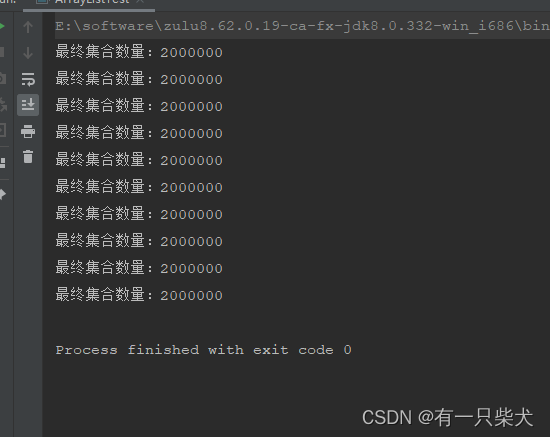
2.4、CopyOnWriteArrayList
JUC也给我们提供了一种线程安全的变体ArrayList。根据名字就可以直到他是采用复制“快照”的方式,性能上是会有一定开销的。这里在实验过程中,明显感觉得到结果的速度变慢了。

改造后代码:
- public class ArrayListTest {
- // 创建一个集合类,CopyOnWriteArrayList,写入时复制。
- // 当多个线程调用的时候,对list进行写入操作时,将数据拷贝避免由于多线程同时操作而被覆盖。可以简单理解成读写分离操作。
- // 这个类的操作使用的是lock锁,相比上述的两种synchronized来实现同步,性能更高
- static List<Integer> list = new CopyOnWriteArrayList<>();
- public static void main(String[] args) throws InterruptedException {
- // 这里执行10次,对比10次结果
- for (int i = 0; i < 10; i++) {
- // 每次执行前将list清空
- list.clear();
- // 创建两个线程,分别往list里面存放数据,每个线程存放10000个
- Thread thread1 = new Thread(new MyThread());
- Thread thread2 = new Thread(new MyThread());
- thread1.start();
- thread2.start();
- thread1.join();
- thread2.join();
- // 当两个线程执行完毕后,期望值应该是list会扩容到20000个,并且打印list.sizes()=20000
- System.out.println("最终集合数量:" + list.size());
- }
- }
- // 操作集合list线程
- static class MyThread implements Runnable {
- @Override
- public void run() {
- for (int i = 0; i < 10000; i++) {
- list.add(i);
- }
- }
- }
- }
运行结果:

那么他是如何保证线程安全的呢?我们查看他的源码发现:

在他的setArra方法中,对array加了transient和volatile修饰,从而保证了线程安全。
transient:被transient修饰的属性,是不会被序列化的。后面有机会单独详细讲
volatile:防止指令重排,以及保证可见性。他是java中一种轻量的同步机制,相比synchronized来说,volatile更轻量级。后面单独会讲
3、并发下的HashSet
HashSet和ArrayList存在同样的问题。
- public class HashSetTest {
- static Set<Integer> hashSet = new HashSet<>();
- public static void main(String[] args) throws InterruptedException {
- // 这里执行10次,对比10次结果
- for (int i = 0; i < 10; i++) {
- // 每次执行前将list清空
- hashSet.clear();
- // 创建两个线程,分别往list里面存放数据,每个线程存放10000个
- Thread thread1 = new Thread(new MyThread());
- Thread thread2 = new Thread(new MyThread());
- thread1.start();
- thread2.start();
- thread1.join();
- thread2.join();
- // 当两个线程执行完毕后,期望值应该是list会扩容到20000个,并且打印list.sizes()=20000
- System.out.println("最终集合数量:" + hashSet.size());
- }
- }
- // 操作集合list线程
- static class MyThread implements Runnable {
- @Override
- public void run() {
- for (int i = 0; i < 10000; i++) {
- hashSet.add(i);
- }
- }
- }
- }
执行结果:

与ArrayList类似,当然也存在加锁的方式。同样采用JDK提供的方式:
Collections.synchronizedSet(new HashSet<>());3.1、CopyOnWriteArraySet
同样JUC也提供了类似CopyOnWriteArrayList的方式。

改造后代码:
- public class HashSetTest {
- static Set<Integer> hashSet = new CopyOnWriteArraySet<>();
- public static void main(String[] args) throws InterruptedException {
- // 这里执行10次,对比10次结果
- for (int i = 0; i < 10; i++) {
- // 每次执行前将list清空
- hashSet.clear();
- // 创建两个线程,分别往list里面存放数据,每个线程存放10000个
- Thread thread1 = new Thread(new MyThread());
- Thread thread2 = new Thread(new MyThread());
- thread1.start();
- thread2.start();
- thread1.join();
- thread2.join();
- // 当两个线程执行完毕后,期望值应该是list会扩容到20000个,并且打印list.sizes()=20000
- System.out.println("最终集合数量:" + hashSet.size());
- }
- }
- // 操作集合list线程
- static class MyThread implements Runnable {
- @Override
- public void run() {
- for (int i = 0; i < 10000; i++) {
- hashSet.add(i);
- }
- }
- }
- }
运行结果:

3.2、HashSet底层是什么?
细心的网友有没有发现,这里的运行结果也不是我们期望的20000。而是10000。那么是不是说明这里其实并不能保证线程安全?JDK出bug了?
这里就涉及到HashSet的底层存储结构了。我们跟进去看下HashSet源码:

我们可以看到HashSet的底层结构其实是个HashMap,而HashSet存储的是使用了HashMap的key。这就保证了HashSet的存储是不能重复的。
hashSet的add方法使用的就是HashMap的put方法:
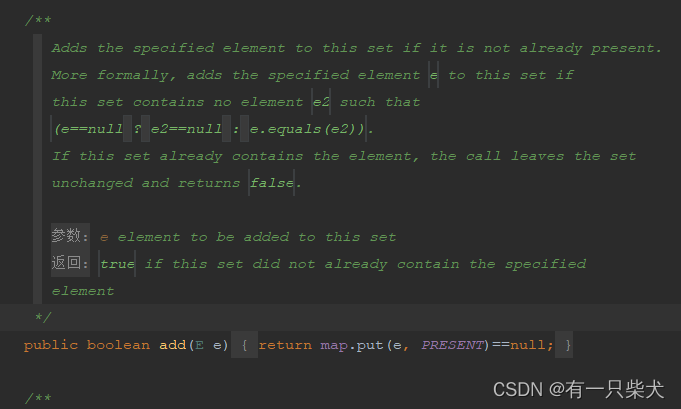
而我们上面两个线程都同时从0开始存储,因而被去重导致期望结果是10000。而CopyOnWriteArraySet虽然实现存储结构是CopyOnWriteArrayList,但他保留了Hashset的去重结构,在add的时候使用了AddIfAbsent,因而输出的结果值为10000。

要验证这个结果其实也很简单,我们把hashSet.add()中的值,改为不重复的,比如使用雪花id来填充:
- public class HashSetTest {
- static Set<String> hashSet = new CopyOnWriteArraySet<>();
- public static void main(String[] args) throws InterruptedException {
- // 这里执行10次,对比10次结果
- for (int i = 0; i < 10; i++) {
- // 每次执行前将list清空
- hashSet.clear();
- // 创建两个线程,分别往list里面存放数据,每个线程存放10000个
- Thread thread1 = new Thread(new MyThread());
- Thread thread2 = new Thread(new MyThread());
- thread1.start();
- thread2.start();
- thread1.join();
- thread2.join();
- // 当两个线程执行完毕后,期望值应该是list会扩容到20000个,并且打印list.sizes()=20000
- System.out.println("最终集合数量:" + hashSet.size());
- }
- }
- // 操作集合list线程
- static class MyThread implements Runnable {
- @Override
- public void run() {
- for (int i = 0; i < 10000; i++) {
- hashSet.add(IdUtil.getSnowflakeNextIdStr());
- }
- }
- }
- }
那么结果就是我们想要的20000了:

4、并发下的HashMap
4.1、传统方式
- public class HashMapTest {
- static Map<String, Object> hashMap = new HashMap<>();
- public static void main(String[] args) throws InterruptedException {
- // 这里执行10次,对比10次结果
- for (int i = 0; i < 10; i++) {
- // 每次执行前将list清空
- hashMap.clear();
- // 创建两个线程,分别往list里面存放数据,每个线程存放10000个
- Thread thread1 = new Thread(new MyThread());
- Thread thread2 = new Thread(new MyThread());
- thread1.start();
- thread2.start();
- thread1.join();
- thread2.join();
- // 当两个线程执行完毕后,期望值应该是list会扩容到20000个,并且打印list.sizes()=20000
- System.out.println("最终集合数量:" + hashMap.size());
- }
- }
- // 操作集合list线程
- static class MyThread implements Runnable {
- @Override
- public void run() {
- for (int i = 0; i < 10000; i++) {
- hashMap.put(IdUtil.getSnowflakeNextIdStr(), i);
- }
- }
- }
- }
运行结果:

同样也存在线程安全问题。与ArrayList类似,当然也存在加锁的方式。同样采用JDK提供的方式:
Collections.synchronizedMap(new HashMap<>());4.2、ConcurrentHashMap
与CopyOnWriteArrayList或者set类似,JUC也提供了线程安全的Map集合。只是换个了名字:ConcurrentHashMap。

改造后代码:
- public class HashMapTest {
- static Map<String, Object> hashMap = new ConcurrentHashMap<>();
- public static void main(String[] args) throws InterruptedException {
- // 这里执行10次,对比10次结果
- for (int i = 0; i < 10; i++) {
- // 每次执行前将list清空
- hashMap.clear();
- // 创建两个线程,分别往list里面存放数据,每个线程存放10000个
- Thread thread1 = new Thread(new MyThread());
- Thread thread2 = new Thread(new MyThread());
- thread1.start();
- thread2.start();
- thread1.join();
- thread2.join();
- // 当两个线程执行完毕后,期望值应该是list会扩容到20000个,并且打印list.sizes()=20000
- System.out.println("最终集合数量:" + hashMap.size());
- }
- }
- // 操作集合list线程
- static class MyThread implements Runnable {
- @Override
- public void run() {
- for (int i = 0; i < 10000; i++) {
- hashMap.put(IdUtil.getSnowflakeNextIdStr(), i);
- }
- }
- }
- }
运行结果:

4.3、ConcurrentHashMap底层结构
那么JUC为什么不叫CopyOnWriteHashMap,而改名叫ConcurrentHashMap呢?因为他们两者的实现方式完全不一样。 前面讲到CopyOnWriteArrayList是采用复制快照的方式,实现类似读写分离的方式来确保数值不会被覆盖。
而ConcurrentHashMap却采用了分段锁的机制来确保线程安全。具体的后面专门来讲。这里只需要记住ConcurrentHashMap是可以保证线程安全即可。
可以初步看到源码中采用了分段,并添加了synchronized同步块代码,来确保高性能下的线程安全。

5、小结
学到这里,我们发现java下的集合类大部分都不是线程安全的。而为了确保线程安全,我们可以采取多种措施,包括JDK也提供了多种方式来确保集合在多线程中的线程安全问题。而很多时候,因为集合线程不安全导致的问题是很隐蔽的,如上述示例代码所示,并不会每次都显式的抛出异常信息,只是会让你每次的结果不一致,而每次运行结果未必都会复现。所以针对此类问题,需要谨慎对待。
-
相关阅读:
【计算机网络】HTTPS的基础知识
前端异常监控系统
MySQL数据类型介绍及使用场景
31一维信号滤波(限幅滤波、中值滤波、均值滤波、递推平均滤波),MATLAB程序已调通,可直接运行。
redis搭建主从、redis搭建集群、redis中StrictRedis()、RedisCluster()方法与python交互
双馈风力发电机-900V直流混合储能并网系统Simulink仿真
清华训练营悟道篇之操作系统的调用接口
Exoplayer简介
ES6之数值的扩展
MySQL总结(DQL)
- 原文地址:https://blog.csdn.net/p793049488/article/details/130911768
