首先新建一个MyStorage.py,自定义Storage类

from io import BytesIO

from django.core.files.storage import Storage
from django.conf import settings

from utils.minioClient import go_upload_file, go_delete_file, go_upload_file_have_size
from utils.tools import img_bucket


class MinioStorage(Storage):
    """
    自定义文件存储系统
    """
    def __init__(self):
        pass

    def _open(self, name, mode='rb'):
        """
        用于打开文件
        :param name: 要打开的文件的名字
        :param mode: 打开文件方式
        :return: None
        """
        pass

    def _save(self, name, content):
        """
        用于保存文件
        :param name: 要保存的文件名字
        :param content: 要保存的文件的内容
        :return: None
        """
        # print(name)
        name = name.replace('\\', '/')
        # ret = go_upload_file(BytesIO(content.read()), bucket=img_bucket, path_name=name)
        ret = go_upload_file_have_size(BytesIO(content.read()), content.size, bucket=img_bucket, path_name=name)
        assert ret == 1, '文件上传失败'
        path = '/' + name
        return path

    def delete(self, name):
        # im = get_file_path(instance.img)
        # print(name)
        # name = str(name).split('/')[-1]
        ret = go_delete_file(bucket=img_bucket, path_name=str(name))
        # print(ret)

    def url(self, name):
        """
        返回name所指文件的绝对URL
        :param name: 要读取文件的引用
        :return:
        """
        host = settings.MINIOHTTP + settings.MINIOWEBHOST + ':' + settings.MINIOWEBPORT
        return host + "/" + img_bucket + name

    def exists(self, name):
        """
        检查文件存在
        """
        return False
这么实现 def url(self, name)这个函数,需要在Minio后台将 bucket 权限设置为public,就是开放的所有人皆可访问
Minio实现上传文件,新建minioClient.py
import copy
import os

from django.conf import settings
from minio import Minio


MINIO_CONF = {
    'endpoint': settings.MINIOHOST + ':' + settings.MINIOPORT,
    'access_key': settings.MINIOUSER,
    'secret_key': settings.MINIOPWD,
    'secure': False
}

client = Minio(**MINIO_CONF)


def get_file_size(file):
    """
    获取文件大小
    file: bytes
    return: int
    """
    file.seek(0, os.SEEK_END)
    return file.tell()
    # im = io.BytesIO(file)
    # return im.getbuffer().nbytes


def go_upload_file(file, bucket='media', path_name=''):
    """
    上传文件
    """
    try:
        # print(path_name)
        # print(type(file))
        file_len = get_file_size(copy.copy(file))
        # print(file_len)
        client.put_object(bucket_name=bucket, object_name=path_name, data=file, length=file_len)
        return 1
    except Exception as e:
        print(e)
        return 0


def go_upload_file_have_size(file, size, bucket='media', path_name=''):
    """
    上传文件,已有文件大小
    """
    try:
        client.put_object(bucket_name=bucket, object_name=path_name, data=file, length=size)
        return 1
    except Exception as e:
        print(e)
        return 0


def go_delete_file(bucket='media', path_name=''):
    """
    删除文件
    """
    try:
        # print(bucket, path_name)
        client.remove_object(bucket_name=bucket, object_name=path_name)
        return 1
    except Exception as e:
        print(e)
        return 0


def go_delete_file_list(bucket='media', path_name_list=[]):
    """
    删除文件列表
    未实现,据说需要删除完遍历结果
    """
    try:
        ret = client.remove_objects(bucket, path_name_list, bypass_governance_mode=False)
        print(ret)
        return 1
    except Exception as e:
        print(e)
        return 0


def get_file_url(bucket='media', path_name=''):
    """
    获取文件url
    """
    try:
        url = client.presigned_get_object(bucket_name=bucket, object_name=path_name)
        return url
    except Exception as e:
        print(e)
        return None


def get_file_path(path):
    path = path.split('/')[2:]
    final_path = '/'.join(path)
    return final_path
新建一个tools.py
import datetime
import os
import random
import time

img_type_list = ['.jpg', '.png', '.jpeg']
img_bucket = 'media'


def get_secret(request):
    """
    获取加密的key
    """
    return request.META.get('HTTP_AUTHORIZATION') or 'wchime'


def get_time_string():
    """
    :return: 20220525140635467912
    :PS :并发较高时尾部随机数增加
    """
    time_string = str(datetime.datetime.fromtimestamp(time.time())).replace("-", "").replace(" ", "").replace(":","").replace(".", "") + str(random.randint(100, 999))
    return time_string


def split_file_type(file):
    """
    对文件名切割,获取名字和类型
    """
    file_li = os.path.splitext(file)
    return file_li[0], file_li[1]


if __name__ == '__main__':
    im = 'a.png'
    s = split_file_type(im)
    print(s)
我的models.py
class TestImg(models.Model):
    name = models.CharField(verbose_name="名字", max_length=256)
    img = models.ImageField(upload_to='zzz')
新建一个视图文件
from io import BytesIO

from django.core.files.base import ContentFile
from django.core.files.storage import default_storage
from django.utils.decorators import method_decorator
from rest_framework import status, serializers
from rest_framework.response import Response

from ani import models
from utils.decorators import request_decrypt
from utils.myView import MyPagination, MyView, MixinGetList, MixinPostCreateModel, MixinPutUpdateModel, \
    MixinDeleteDestroyModel
from utils.tools import split_file_type, img_type_list, get_time_string, img_bucket


class TestImgSerializer(serializers.ModelSerializer):
    class Meta:
        model = models.TestImg
        fields = '__all__'

    def create(self, validated_data):
        res = models.TestImg.objects.create(**validated_data)
        return res

    def update(self, instance, validated_data):

        instance.name = validated_data.get('name')
        if validated_data.get('img', False) is not False:
            instance.img = validated_data.get('img')
        instance.save()
        return instance


@method_decorator(request_decrypt, name='get')
class TestImgView(MyView, MixinGetList):
    queryset = models.TestImg.objects.all()
    serializer_class = TestImgSerializer
    all_serializer_class = TestImgSerializer
    filter_class = ['name__icontains']
    pagination_class = MyPagination
    lookup_field = 'id'
    ordeing_field = ('-id',)

    def post(self, request, *args, **kwargs):
        data = request.data
        file_content = data.get('file').read()
        file_name = get_time_string() + '.png'
        # print(file_content)
        content_file = ContentFile(file_content, file_name)
        # print(content_file)
        data['img'] = content_file

        serializer_class = TestImgSerializer
        serializer = serializer_class(data=data)
        # print(serializer.is_valid())
        serializer.is_valid(raise_exception=True)
        serializer.save()
        return Response(serializer.data, status=status.HTTP_201_CREATED)

    def put(self, request, *args, **kwargs):
        data = request.data
        try:
            instance = self.queryset.get(id=data.get(self.lookup_field))
        except Exception:
            return Response({'state': 'fail', 'msg': '未找到该数据'}, status=status.HTTP_400_BAD_REQUEST)
        file = data.get('file')
        if file:
            file_content = file.read()
            file_name = get_time_string() + '.png'
            # print(file_content)
            content_file = ContentFile(file_content, file_name)
            # print(content_file)
            data['img'] = content_file
            if instance.img:
                default_storage.delete(instance.img)
        serializer_class = TestImgSerializer
        serializer = serializer_class(instance=instance, data=data, partial=True)
        # print(serializer.is_valid())
        serializer.is_valid(raise_exception=True)
        serializer.save()
        return Response(serializer.data, status=status.HTTP_201_CREATED)

    def delete(self, request, *args, **kwargs):
        try:
            instance = self.queryset.get(id=request.data.get(self.lookup_field))
        except Exception:
            return Response({'state': 'fail', 'msg': '未找到数据'}, status=status.HTTP_400_BAD_REQUEST)
        default_storage.delete(instance.img)
        instance.delete()
        return Response({'state': 'success', 'msg': '删除成功'}, status=status.HTTP_204_NO_CONTENT)
在settings.py中加上
DEFAULT_FILE_STORAGE = 'utils.MyStorage.MinioStorage'
整个项目文件结构

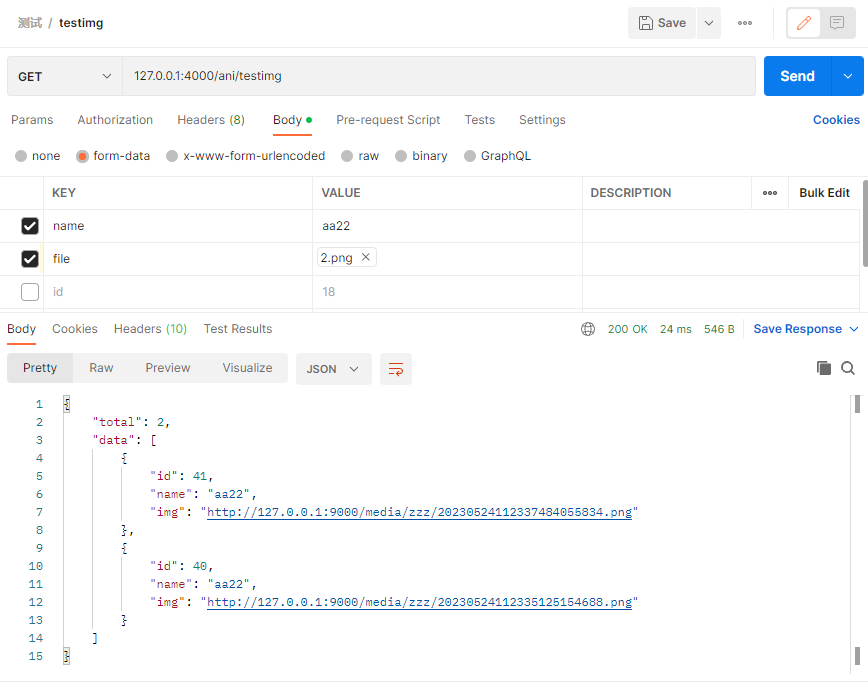
postman调用的结果