-
C#上位机系列(5)—示波器二基础代码+线条绘制
本文是讲解C#.net平台的Winform框架下的第四个内容,手把手介绍上位机项目的创建方式以及一些写软件时常用的功能,讲解从零开始的每一个步骤。
接上一节的介绍,本次内容为上位机项目中示波功能代码的基本函数和画图功能。
目的是通过几行代码实现简单线条的绘制
所有代码附后
1.GDI绘图
GDI是.NET Framework中提供二维图形,图像处理等功能。
GDI绘图的核心是Graphics对象,所有的绘图函数功能包括其中。
需要引用System.Drawing;
下面根据项目所需依次解释一些常用函数功能。
2.示波器界面参数
为了使窗口可以灵活改变,首先确定如下参数。
定义绘图原点startPoint(这里将上文讲到的计算机界面坐标转换成传统笛卡尔坐标原点,后续确定坐标点采用笛卡尔坐标),整个图形界面的原点。
定义坐标原点originPoint,即示波器框的原点。该参数设定为距离绘图原点相对的距离。
定义示波器的X,Y轴长度Slength_X,Slength_Y,控制示波器框的大小。
创建一个画笔TablePen用来画线条。

定义坐标转换函数Pointconvert()。

画图函数Form_Paint()。
首先在设计函数里添加如下代码


回到FormScope.cs定义函数
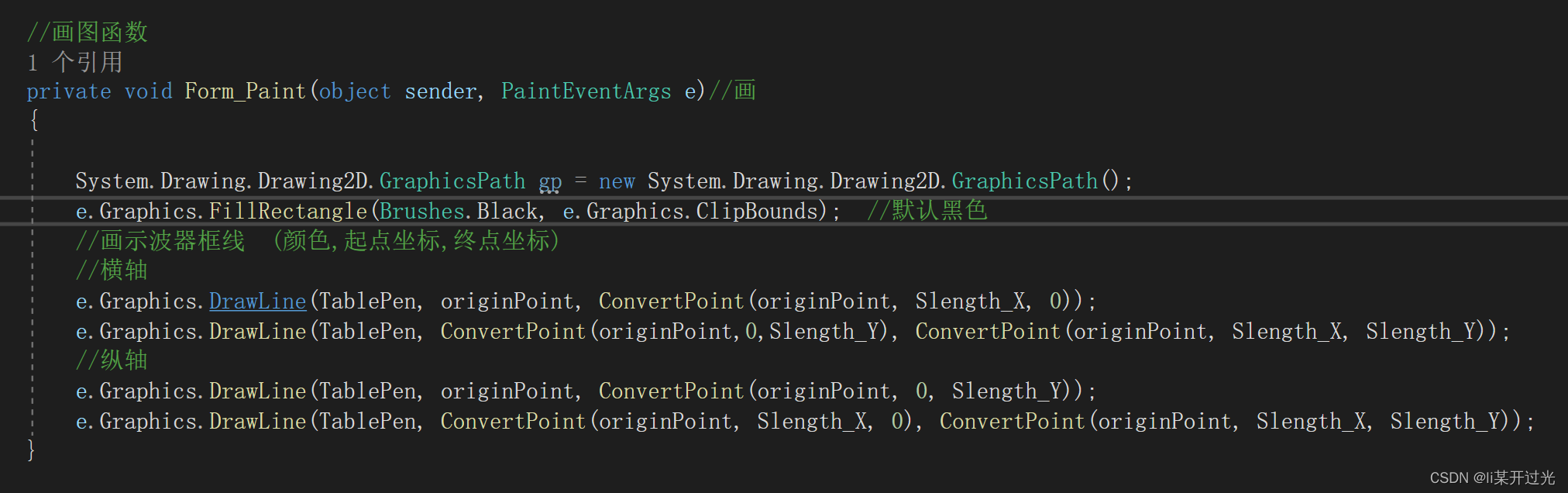
定义初始化函数ScopeInit()。

效果如下:

通过修改参数,可以方便的移动示波器边框的位置。
本节代码附下,分为函数窗口FormScope.cs和设计窗口FormScope.Designer.cs文件
FormScope.cs
- using System;
- using System.Collections.Generic;
- using System.ComponentModel;
- using System.Data;
- using System.Drawing;
- using System.Linq;
- using System.Text;
- using System.Threading.Tasks;
- using System.Windows.Forms;
- namespace WinForms_Start1
- {
- public partial class FormScope : Form
- {
- //示波器参数
- PointF startPoint; //绘图原点
- PointF originPoint; //示波器框的原点
- float Slength_X, Slength_Y;
- private Pen TablePen = new Pen(Color.FromArgb(0x3c, 0x3c, 0x3c));//线条画笔,灰色
- public FormScope()
- {
- InitializeComponent();
- ScopeInit();
- }
- /// <summary>
- /// 示波器初始化函数
- /// </summary>
- public void ScopeInit()
- {
- startPoint.X = 30;
- startPoint.Y = 500;
- originPoint = ConvertPoint(startPoint, 10, 50);//示波器原点坐标
- Slength_X = 600;
- Slength_Y = 400;
- Invalidate();//刷新显示
- }
- //画图函数
- private void Form_Paint(object sender, PaintEventArgs e)//画
- {
- System.Drawing.Drawing2D.GraphicsPath gp = new System.Drawing.Drawing2D.GraphicsPath();
- e.Graphics.FillRectangle(Brushes.Black, e.Graphics.ClipBounds); //默认黑色
- //画示波器框线 (颜色,起点坐标,终点坐标)
- //横轴
- e.Graphics.DrawLine(TablePen, originPoint, ConvertPoint(originPoint, Slength_X, 0));
- e.Graphics.DrawLine(TablePen, ConvertPoint(originPoint,0,Slength_Y), ConvertPoint(originPoint, Slength_X, Slength_Y));
- //纵轴
- e.Graphics.DrawLine(TablePen, originPoint, ConvertPoint(originPoint, 0, Slength_Y));
- e.Graphics.DrawLine(TablePen, ConvertPoint(originPoint, Slength_X, 0), ConvertPoint(originPoint, Slength_X, Slength_Y));
- }
- /// <summary>
- /// 坐标转换函数
- /// </summary>
- /// <param name="point"></param>
- /// <param name="x"></param>
- /// <param name="y"></param>
- /// <returns>新坐标值</returns>
- ///
- PointF ConvertPoint(PointF point, float x, float y)
- {
- PointF p = point;
- p.X += x;
- p.Y -= y;
- return p;
- }
- }
- }
FormScope.Designer.cs
- namespace WinForms_Start1
- {
- partial class FormScope
- {
- /// <summary>
- /// Required designer variable.
- /// </summary>
- private System.ComponentModel.IContainer components = null;
- /// <summary>
- /// Clean up any resources being used.
- /// </summary>
- /// <param name="disposing">true if managed resources should be disposed; otherwise, false.</param>
- protected override void Dispose(bool disposing)
- {
- if (disposing && (components != null))
- {
- components.Dispose();
- }
- base.Dispose(disposing);
- }
- #region Windows Form Designer generated code
- /// <summary>
- /// Required method for Designer support - do not modify
- /// the contents of this method with the code editor.
- /// </summary>
- private void InitializeComponent()
- {
- this.SuspendLayout();
- //
- // FormScope
- //
- this.AutoScaleDimensions = new System.Drawing.SizeF(12F, 24F);
- this.AutoScaleMode = System.Windows.Forms.AutoScaleMode.Font;
- this.ClientSize = new System.Drawing.Size(1774, 1129);
- this.Name = "FormScope";
- this.Text = "示波器";
- this.Paint += new System.Windows.Forms.PaintEventHandler(this.Form_Paint);
- this.ResumeLayout(false);
- }
- #endregion
- }
- }
-
相关阅读:
从零开始 Spring Boot 13:参数校验
生信豆芽菜-预后模型比较c-index计算
为何我国会成为水稻进口大国?国稻种芯:很简单了---价格
08c++呵呵老师【给子弹添加爆炸效果】
阿里云短信服务设置操作项目
虚良SEO怎么有效的对百度蜘蛛权重优化?
【SpringBoot】内容协商机制
89.(cesium篇)cesium聚合图(自定义图片)
ib课程北京国际学校哪里有?
R语言中不同类型的聚类方法比较
- 原文地址:https://blog.csdn.net/qq_49552487/article/details/128067788
- 最新文章
-
沪漂五周年了:我越来越迷茫了
Agentic Skill Routing 实战:别再把所有 Skill 塞进 AI Agent 上下文
MySQL-Seconds_behind_master的精度误差
[MAF预定义ChatClient中间件-03]CachingChatClient——利用缓存省钱省时间
AI的至暗历史:从万众期待到被政府撤资,AI的两次死亡徘徊
Agent OS :五种驯服不确定性的范式
PortSwigger SQL注入LAB11
数据库即时编译JIT
[Begin]AI Learn Data Day 0
深度学习进阶(二十七)现代 LLM 的核心架构设计其二:SwiGLU