-
SpringMvc--文件上传下载
编辑下载好后要先打开代理ReverseProxy_windows_amd64.exe(顺序不能错)
一.什么是SpringMvc文件上传下载
Spring MVC是一个基于Java的MVC(Model-View-Controller)框架,用于构建Web应用程序。文件上传下载是指在Web应用中将文件从客户端上传到服务器或从服务器下载到客户端的过程。
在Spring MVC中,文件上传下载可以通过以下几个步骤完成:
文件上传:
- 在表单中设置enctype为"multipart/form-data",以支持文件上传。
- 使用MultipartFile接口作为Controller方法的参数,用于接收上传的文件。
- 使用MultipartResolver来解析并处理上传的文件。
文件下载:
- 设置正确的响应头信息,包括文件类型(Content-Type)和文件名(Content-Disposition)。
- 将文件内容写入响应体中,以便客户端可以下载。
Spring MVC提供了许多方便的工具和类来简化文件上传下载的过程,例如MultipartFile、MultipartResolver、ResponseEntity等。您可以根据具体的需求,结合这些功能进行文件上传下载的实现。
二.文件上传
编写hpjyController类
- package com.xy.web;
- import com.xy.biz.hpjyBiz;
- import com.xy.model.hpjy;
- import com.xy.utils.PageBean;
- import com.xy.utils.PropertiesUtil;
- import org.apache.commons.io.FileUtils;
- import org.springframework.beans.factory.annotation.Autowired;
- import org.springframework.stereotype.Controller;
- import org.springframework.web.bind.annotation.GetMapping;
- import org.springframework.web.bind.annotation.RequestMapping;
- import org.springframework.web.multipart.MultipartFile;
- import javax.servlet.http.HttpServletRequest;
- import java.io.File;
- import java.io.IOException;
- import java.util.List;
- /**
- * @author bing人
- * @site
- * @company xy集团
- * @create 2023-09-08 19:13
- */
- @Controller
- @RequestMapping("/hpjy")
- public class hpjyController {
- @Autowired
- private hpjyBiz hpjyBiz;
- //增
- @RequestMapping("/add")
- public String add(hpjy hpjy){
- int i = hpjyBiz.insertSelective(hpjy);
- return "redirect:list";
- }
- //删
- @RequestMapping("/del")
- public String del(hpjy hpjy){
- hpjyBiz.deleteByPrimaryKey(hpjy.getId());
- return "redirect:list";
- }
- //改
- @RequestMapping("/edit")
- public String edit(hpjy hpjy){
- hpjyBiz.updateByPrimaryKeySelective(hpjy);
- return "redirect:list";
- }
- //文件上传
- @RequestMapping("/upload")
- public String upload(hpjy hpjy,MultipartFile xxx){
- try {
- //后端可以直接利用MultipartFile类,接收前端传递到后台的文件
- //将文件转成流,然后写入服务器(某一个硬盘)
- //上传的图片真实存放地址
- String dir= PropertiesUtil.getValue("dir");
- //网络访问地址
- String server= PropertiesUtil.getValue("server");
- String filename = xxx.getOriginalFilename();
- System.out.println("文件名:"+filename);
- System.out.println("文件类别:"+xxx.getContentType());
- FileUtils.copyInputStreamToFile(xxx.getInputStream(),new File(dir+filename));
- hpjy.setImage(server+filename);
- hpjyBiz.updateByPrimaryKeySelective(hpjy);
- } catch (IOException e) {
- e.printStackTrace();
- }
- return "redirect:list";
- }
- //查
- @RequestMapping("/list")
- public String list(hpjy hpjy, HttpServletRequest request){
- PageBean pageBean =new PageBean();
- pageBean.setRequest(request);
- List
hpjies = hpjyBiz.listPager(hpjy, pageBean); - request.setAttribute("lst",hpjies);
- request.setAttribute("pageBean",pageBean);
- return "hpjy/list";
- }
- //数据回显
- @RequestMapping("/presave")
- public String presave(hpjy hpjy,HttpServletRequest request){
- if(hpjy != null && hpjy.getId() !=null && hpjy.getId() !=0){
- hpjy h = hpjyBiz.selectByPrimaryKey(hpjy.getId());
- request.setAttribute("h",h);
- }
- return "hpjy/edit";
- }
- }
编写upload.jsp
- <%--
- Created by IntelliJ IDEA.
- User: 30340
- Date: 2023/9/9
- Time: 14:05
- To change this template use File | Settings | File Templates.
- --%>
- <%@ page contentType="text/html;charset=UTF-8" language="java" %>
枪械logo上传 - "text" name="id" readonly="readonly" value="${param.id}"/>
- "file" name="xxx"/>
- "submit" value="上传图片"/>
建立一个储存图片的文件夹

编写PageController来处理页面跳转
- package com.xy.web;
- import org.springframework.stereotype.Controller;
- import org.springframework.web.bind.annotation.PathVariable;
- import org.springframework.web.bind.annotation.RequestMapping;
- /**
- * @author bing人
- * @site
- * @company xy集团
- * @create 2023-09-07 14:53
- */
- //专门用来处理页面跳转
- @Controller
- public class PageController {
- @RequestMapping("/page/{page}")
- public String toPage(@PathVariable("page") String page){
- return page;
- }
- @RequestMapping("/page/{Dir}/{page}")
- public String toDirPage(@PathVariable("Dir") String dir,
- @PathVariable("page") String page){
- return dir + "/" + page;
- }
- }
编写工具类PropertiesUtil
- package com.xy.utils;
- import java.io.IOException;
- import java.io.InputStream;
- import java.util.Properties;
- public class PropertiesUtil {
- public static String getValue(String key) throws IOException {
- Properties p = new Properties();
- InputStream in = PropertiesUtil.class.getResourceAsStream("/resource.properties");
- p.load(in);
- return p.getProperty(key);
- }
- }
编写resource.properties类

编写list.jsp
- <%@ page language="java" contentType="text/html; charset=UTF-8"
- pageEncoding="UTF-8"%>
- <%@ taglib uri="http://jsp.veryedu.cn" prefix="z"%>
- <%@ taglib uri="http://java.sun.com/jsp/jstl/core" prefix="c"%>
- "-//W3C//DTD HTML 4.01 Transitional//EN" "http://www.w3.org/TR/html4/loose.dtd">
- "Content-Type" content="text/html; charset=UTF-8">
- href="https://cdn.bootcdn.net/ajax/libs/twitter-bootstrap/4.5.0/css/bootstrap.css"rel="stylesheet">src="https://cdn.bootcdn.net/ajax/libs/twitter-bootstrap/4.5.0/js/bootstrap.js">
博客列表 action="${pageContext.request.contextPath }/hpjy/list" method="get">"form-group mb-2">"text" class="form-control-plaintext" name="name"placeholder="请输入枪械名称"><%--"pagination" value="false" type="hidden">--%>"table table-striped bg-success">
"col">枪械编号 "col">枪械名称 "col">枪械属性 "col">图片logo "col">操作 ${b.id } ${b.name } ${b.type } "${b.image}" style="height: 100px;width: 60px;">
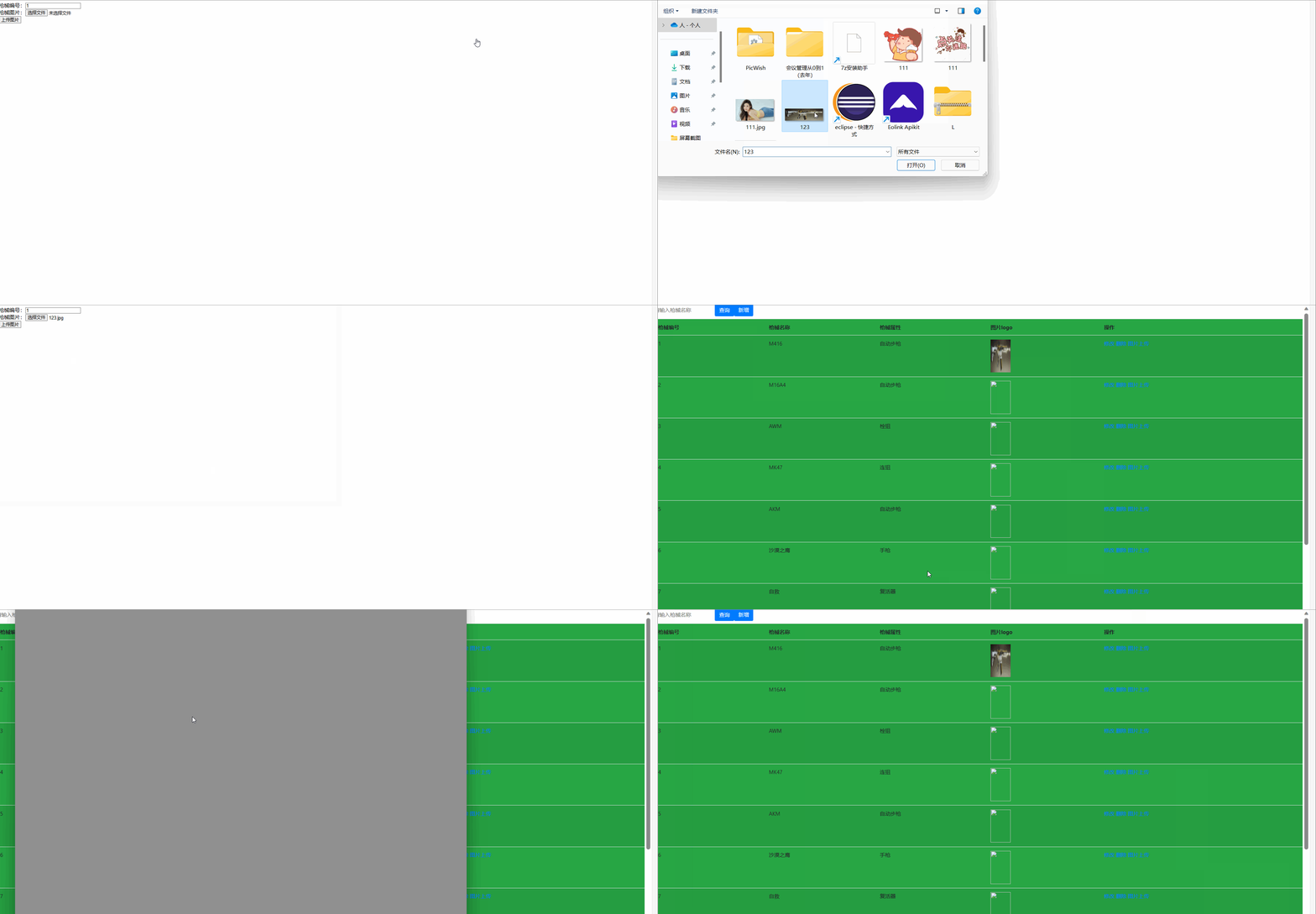
${pageBean }测试结果
三.文件下载
编写hpjyController类
- package com.xy.web;
- import com.xy.biz.hpjyBiz;
- import com.xy.model.hpjy;
- import com.xy.utils.PageBean;
- import com.xy.utils.PropertiesUtil;
- import org.apache.commons.io.FileUtils;
- import org.springframework.beans.factory.annotation.Autowired;
- import org.springframework.http.HttpHeaders;
- import org.springframework.http.HttpStatus;
- import org.springframework.http.MediaType;
- import org.springframework.http.ResponseEntity;
- import org.springframework.stereotype.Controller;
- import org.springframework.web.bind.annotation.GetMapping;
- import org.springframework.web.bind.annotation.RequestMapping;
- import org.springframework.web.multipart.MultipartFile;
- import javax.servlet.http.HttpServletRequest;
- import java.io.File;
- import java.io.IOException;
- import java.util.List;
- /**
- * @author bing人
- * @site
- * @company xy集团
- * @create 2023-09-08 19:13
- */
- @Controller
- @RequestMapping("/hpjy")
- public class hpjyController {
- @Autowired
- private hpjyBiz hpjyBiz;
- //增
- @RequestMapping("/add")
- public String add(hpjy hpjy){
- int i = hpjyBiz.insertSelective(hpjy);
- return "redirect:list";
- }
- //删
- @RequestMapping("/del")
- public String del(hpjy hpjy){
- hpjyBiz.deleteByPrimaryKey(hpjy.getId());
- return "redirect:list";
- }
- //改
- @RequestMapping("/edit")
- public String edit(hpjy hpjy){
- hpjyBiz.updateByPrimaryKeySelective(hpjy);
- return "redirect:list";
- }
- //文件上传
- @RequestMapping("/upload")
- public String upload(hpjy hpjy,MultipartFile xxx){
- try {
- //后端可以直接利用MultipartFile类,接收前端传递到后台的文件
- //将文件转成流,然后写入服务器(某一个硬盘)
- //上传的图片真实存放地址
- String dir= PropertiesUtil.getValue("dir");
- //网络访问地址
- String server= PropertiesUtil.getValue("server");
- String filename = xxx.getOriginalFilename();
- System.out.println("文件名:"+filename);
- System.out.println("文件类别:"+xxx.getContentType());
- FileUtils.copyInputStreamToFile(xxx.getInputStream(),new File(dir+filename));
- hpjy.setImage(server+filename);
- hpjyBiz.updateByPrimaryKeySelective(hpjy);
- } catch (IOException e) {
- e.printStackTrace();
- }
- return "redirect:list";
- }
- //查
- @RequestMapping("/list")
- public String list(hpjy hpjy, HttpServletRequest request){
- PageBean pageBean =new PageBean();
- pageBean.setRequest(request);
- List
hpjies = hpjyBiz.listPager(hpjy, pageBean); - request.setAttribute("lst",hpjies);
- request.setAttribute("pageBean",pageBean);
- return "hpjy/list";
- }
- //数据回显
- @RequestMapping("/presave")
- public String presave(hpjy hpjy,HttpServletRequest request){
- if(hpjy != null && hpjy.getId() !=null && hpjy.getId() !=0){
- hpjy h = hpjyBiz.selectByPrimaryKey(hpjy.getId());
- request.setAttribute("h",h);
- }
- return "hpjy/edit";
- }
- @RequestMapping(value="/download")
- public ResponseEntity<byte[]> download(hpjy hpjy, HttpServletRequest req){
- try {
- //先根据文件id查询对应图片信息
- hpjy h = this.hpjyBiz.selectByPrimaryKey(hpjy.getId());
- String diskPath = PropertiesUtil.getValue("dir");
- String reqPath = PropertiesUtil.getValue("server");
- String realPath = h.getImage().replace(reqPath,diskPath);
- String fileName = realPath.substring(realPath.lastIndexOf("/")+1);
- //下载关键代码
- File file=new File(realPath);
- HttpHeaders headers = new HttpHeaders();//http头信息
- String downloadFileName = new String(fileName.getBytes("UTF-8"),"iso-8859-1");//设置编码
- headers.setContentDispositionFormData("attachment", downloadFileName);
- headers.setContentType(MediaType.APPLICATION_OCTET_STREAM);
- //MediaType:互联网媒介类型 contentType:具体请求中的媒体类型信息
- return new ResponseEntity<byte[]>(FileUtils.readFileToByteArray(file),headers, HttpStatus.OK);
- }catch (Exception e){
- e.printStackTrace();
- }
- return null;
- }
- }
编写list.jsp
- <%@ page language="java" contentType="text/html; charset=UTF-8"
- pageEncoding="UTF-8"%>
- <%@ taglib uri="http://jsp.veryedu.cn" prefix="z"%>
- <%@ taglib uri="http://java.sun.com/jsp/jstl/core" prefix="c"%>
- "-//W3C//DTD HTML 4.01 Transitional//EN" "http://www.w3.org/TR/html4/loose.dtd">
- "Content-Type" content="text/html; charset=UTF-8">
- href="https://cdn.bootcdn.net/ajax/libs/twitter-bootstrap/4.5.0/css/bootstrap.css"rel="stylesheet">src="https://cdn.bootcdn.net/ajax/libs/twitter-bootstrap/4.5.0/js/bootstrap.js">
博客列表 action="${pageContext.request.contextPath }/hpjy/list" method="get">"form-group mb-2">"text" class="form-control-plaintext" name="name"placeholder="请输入枪械名称"><%--"pagination" value="false" type="hidden">--%>"table table-striped bg-success">
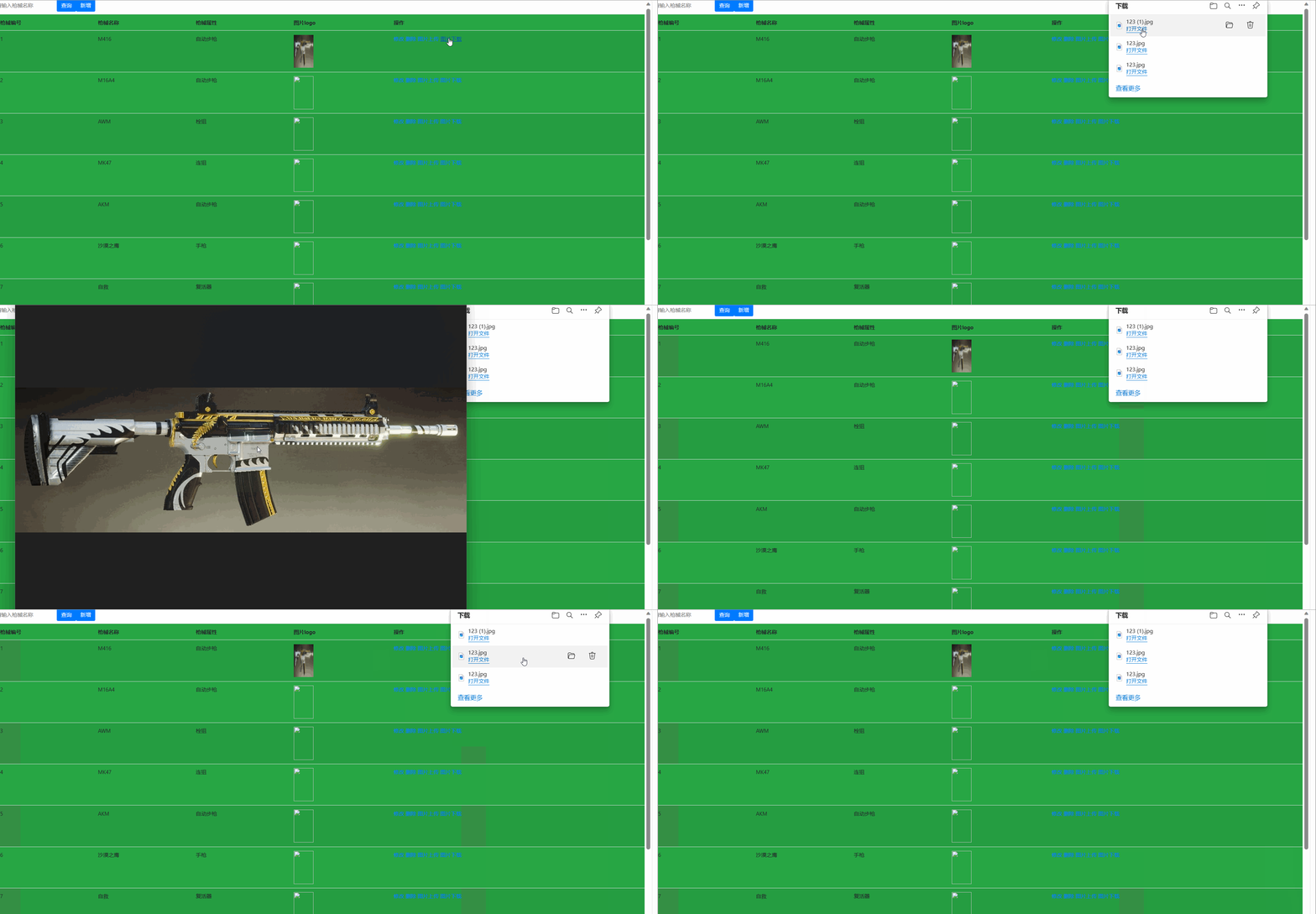
"col">枪械编号 "col">枪械名称 "col">枪械属性 "col">图片logo "col">操作 ${b.id } ${b.name } ${b.type } ${pageBean }测试结果
四.jrebel&多文件上传
下载JRebel插件
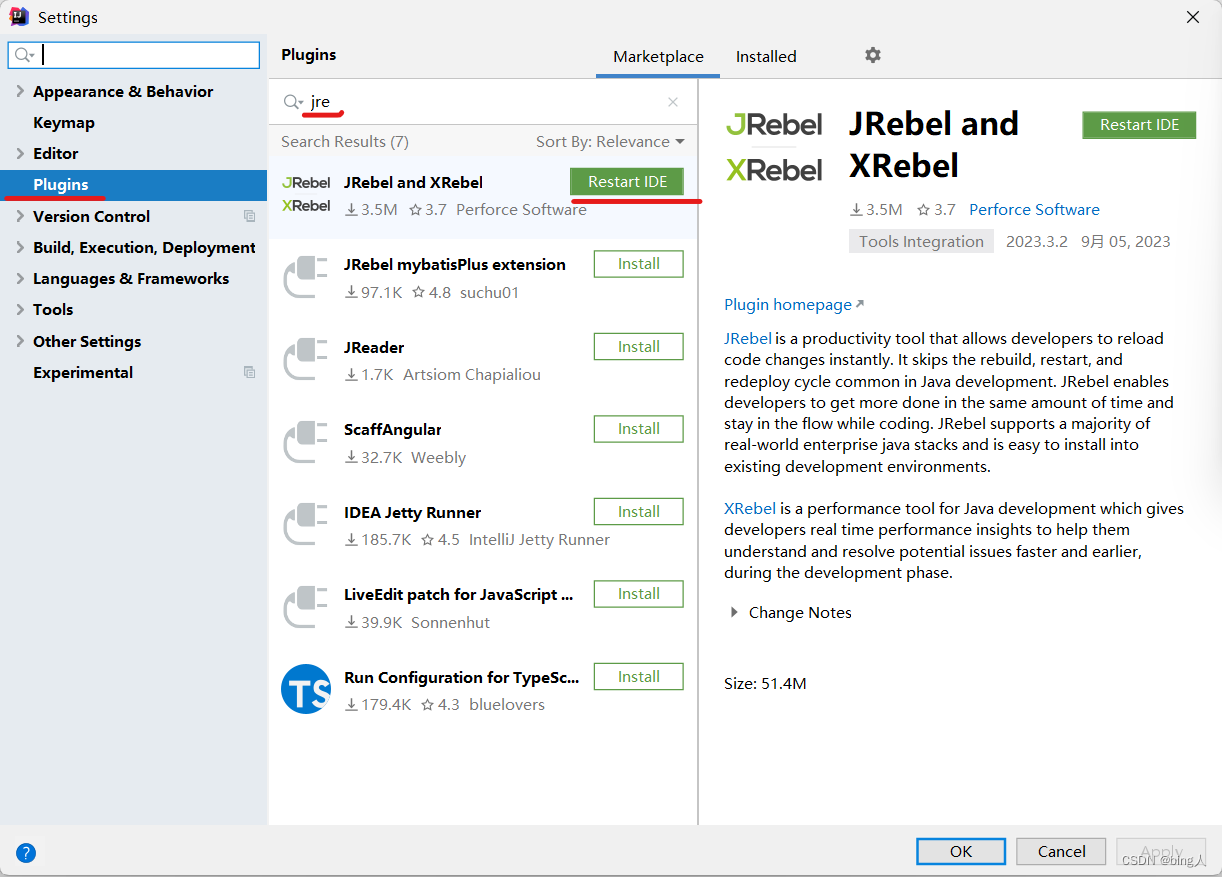
下载好后重启idear
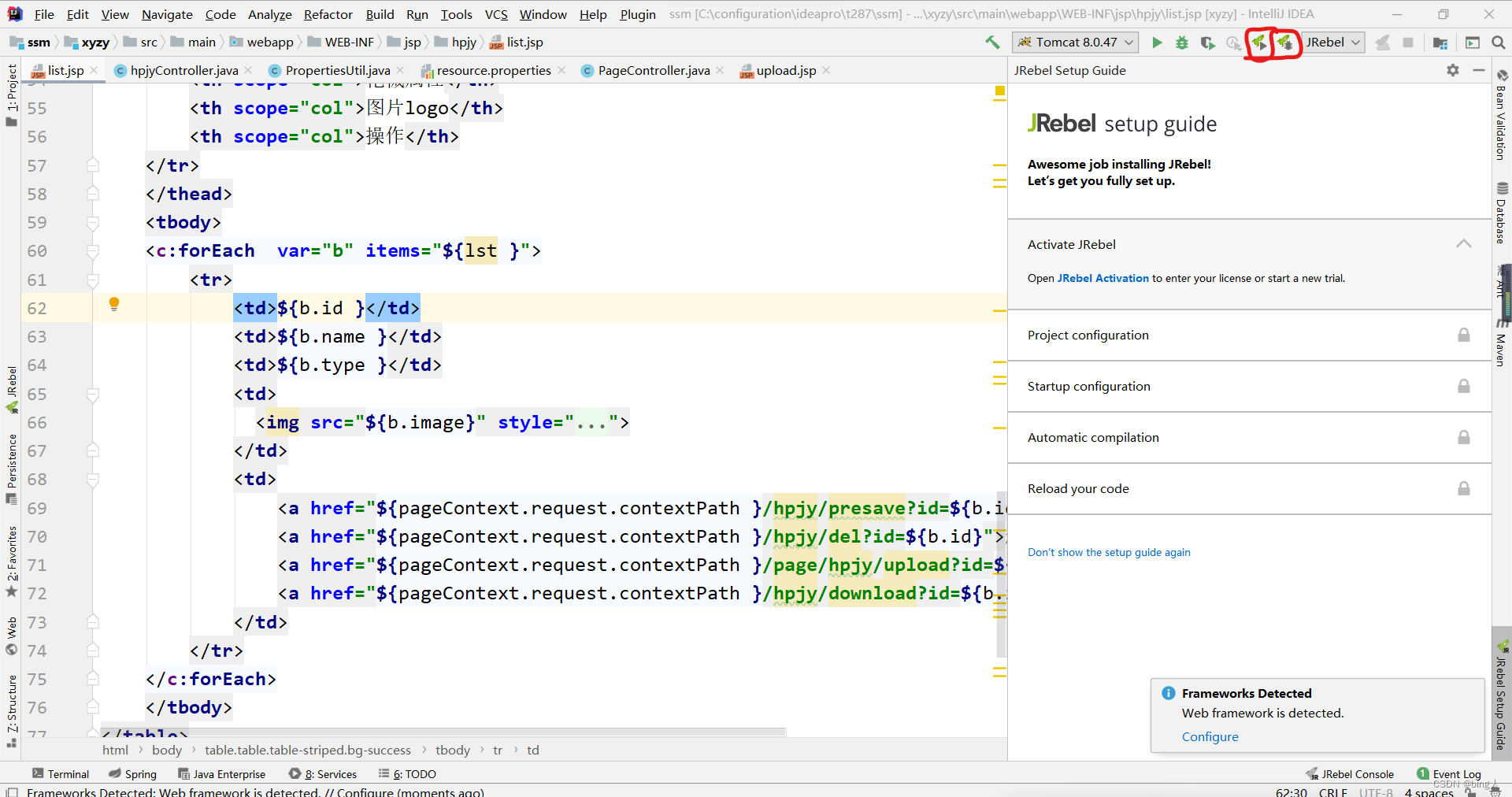 下载好后要先打开代理ReverseProxy_windows_amd64.exe(顺序不能错)
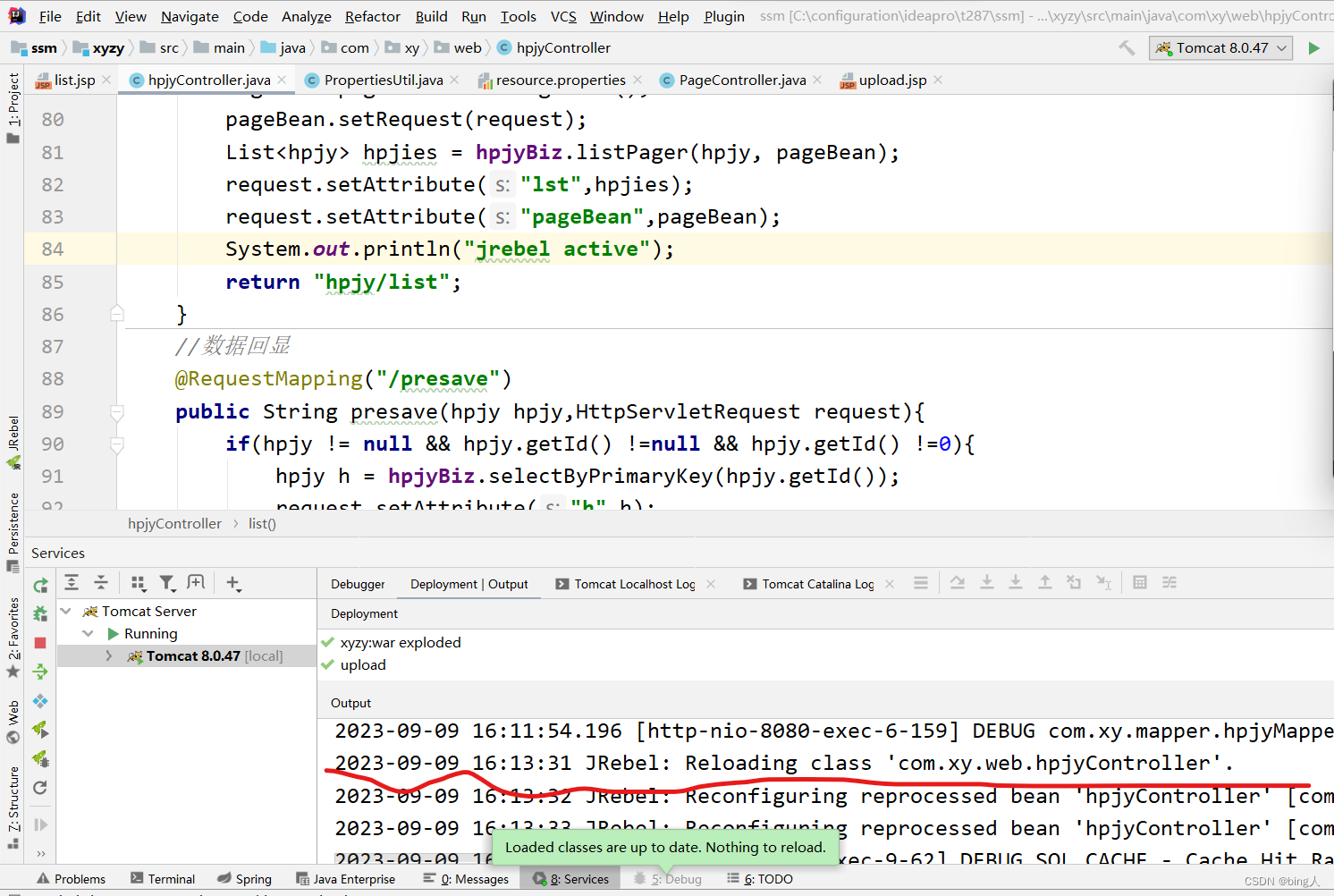
jrebel项目启动

注册jrebel

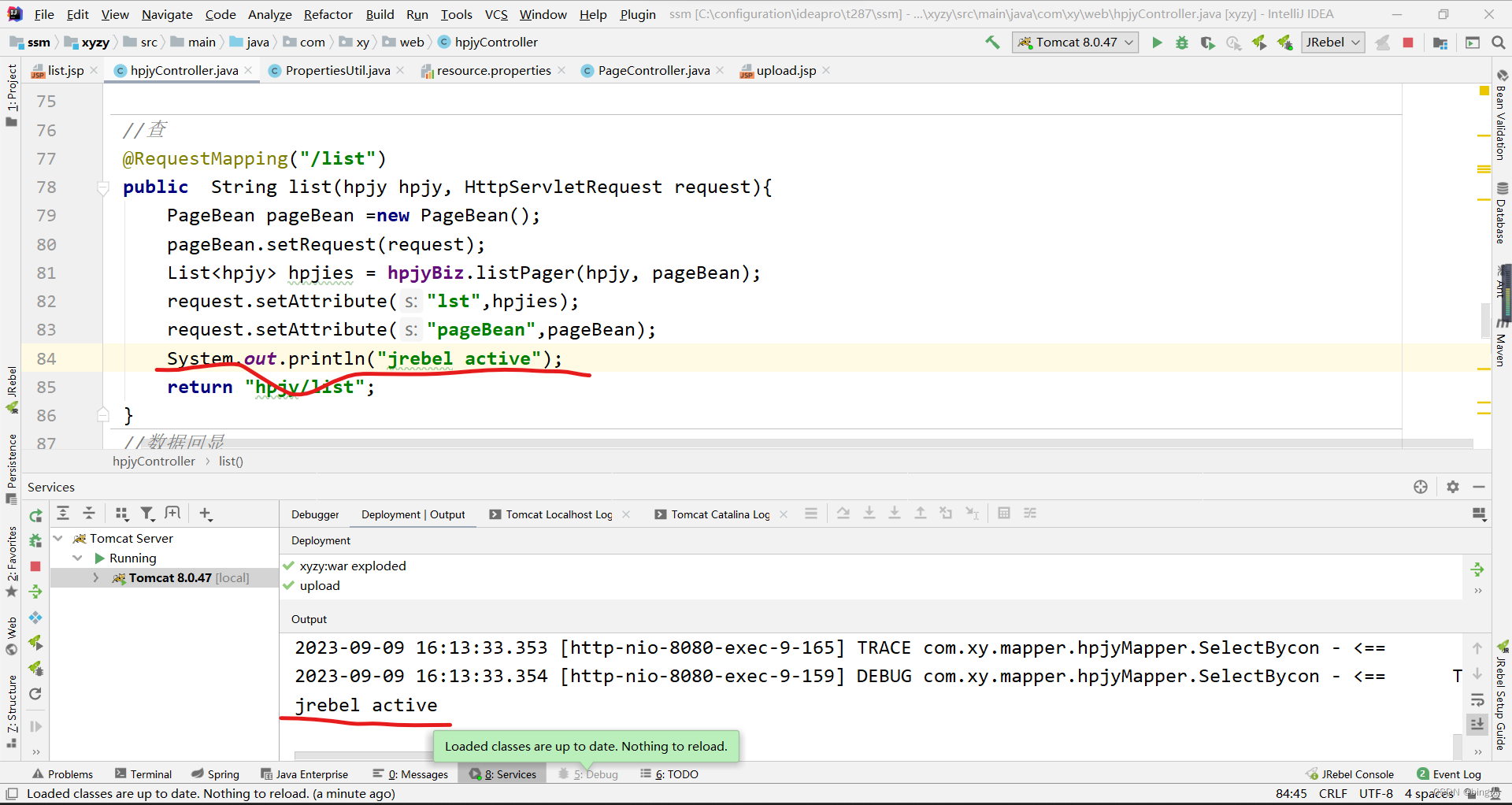
测试结果
(出来了这一行就代表启动成功了)
设置离线状态
(没有离线状态)

离线状态(出先了这两个就是离线状态了)
 多文件上传
多文件上传编写hpjyController类
- package com.xy.web;
- import com.xy.biz.hpjyBiz;
- import com.xy.model.hpjy;
- import com.xy.utils.PageBean;
- import com.xy.utils.PropertiesUtil;
- import org.apache.commons.io.FileUtils;
- import org.springframework.beans.factory.annotation.Autowired;
- import org.springframework.http.HttpHeaders;
- import org.springframework.http.HttpStatus;
- import org.springframework.http.MediaType;
- import org.springframework.http.ResponseEntity;
- import org.springframework.stereotype.Controller;
- import org.springframework.web.bind.annotation.GetMapping;
- import org.springframework.web.bind.annotation.RequestMapping;
- import org.springframework.web.multipart.MultipartFile;
- import javax.servlet.http.HttpServletRequest;
- import java.io.File;
- import java.io.IOException;
- import java.util.List;
- /**
- * @author bing人
- * @site
- * @company xy集团
- * @create 2023-09-08 19:13
- */
- @Controller
- @RequestMapping("/hpjy")
- public class hpjyController {
- @Autowired
- private hpjyBiz hpjyBiz;
- //增
- @RequestMapping("/add")
- public String add(hpjy hpjy){
- int i = hpjyBiz.insertSelective(hpjy);
- return "redirect:list";
- }
- //删
- @RequestMapping("/del")
- public String del(hpjy hpjy){
- hpjyBiz.deleteByPrimaryKey(hpjy.getId());
- return "redirect:list";
- }
- //改
- @RequestMapping("/edit")
- public String edit(hpjy hpjy){
- hpjyBiz.updateByPrimaryKeySelective(hpjy);
- return "redirect:list";
- }
- //文件上传
- @RequestMapping("/upload")
- public String upload(hpjy hpjy,MultipartFile xxx){
- try {
- //后端可以直接利用MultipartFile类,接收前端传递到后台的文件
- //将文件转成流,然后写入服务器(某一个硬盘)
- //上传的图片真实存放地址
- String dir= PropertiesUtil.getValue("dir");
- //网络访问地址
- String server= PropertiesUtil.getValue("server");
- String filename = xxx.getOriginalFilename();
- System.out.println("文件名:"+filename);
- System.out.println("文件类别:"+xxx.getContentType());
- FileUtils.copyInputStreamToFile(xxx.getInputStream(),new File(dir+filename));
- hpjy.setImage(server+filename);
- hpjyBiz.updateByPrimaryKeySelective(hpjy);
- } catch (IOException e) {
- e.printStackTrace();
- }
- return "redirect:list";
- }
- //多文件上传
- @RequestMapping("/uploads")
- public String uploads(HttpServletRequest req, hpjy hpjy, MultipartFile[] files){
- try {
- StringBuffer sb = new StringBuffer();
- for (MultipartFile cfile : files) {
- //思路:
- //1) 将上传图片保存到服务器中的指定位置
- String dir = PropertiesUtil.getValue("dir");
- String server = PropertiesUtil.getValue("server");
- String filename = cfile.getOriginalFilename();
- FileUtils.copyInputStreamToFile(cfile.getInputStream(),new File(dir+filename));
- sb.append(filename).append(",");
- }
- System.out.println(sb.toString());
- } catch (Exception e) {
- e.printStackTrace();
- }
- return "redirect:list";
- }
- //查
- @RequestMapping("/list")
- public String list(hpjy hpjy, HttpServletRequest request){
- PageBean pageBean =new PageBean();
- pageBean.setRequest(request);
- List
hpjies = hpjyBiz.listPager(hpjy, pageBean); - request.setAttribute("lst",hpjies);
- request.setAttribute("pageBean",pageBean);
- System.out.println("jrebel active");
- return "hpjy/list";
- }
- //数据回显
- @RequestMapping("/presave")
- public String presave(hpjy hpjy,HttpServletRequest request){
- if(hpjy != null && hpjy.getId() !=null && hpjy.getId() !=0){
- hpjy h = hpjyBiz.selectByPrimaryKey(hpjy.getId());
- request.setAttribute("h",h);
- }
- return "hpjy/edit";
- }
- @RequestMapping(value="/download")
- public ResponseEntity<byte[]> download(hpjy hpjy, HttpServletRequest req){
- try {
- //先根据文件id查询对应图片信息
- hpjy h = this.hpjyBiz.selectByPrimaryKey(hpjy.getId());
- String diskPath = PropertiesUtil.getValue("dir");
- String reqPath = PropertiesUtil.getValue("server");
- String realPath = h.getImage().replace(reqPath,diskPath);
- String fileName = realPath.substring(realPath.lastIndexOf("/")+1);
- //下载关键代码
- File file=new File(realPath);
- HttpHeaders headers = new HttpHeaders();//http头信息
- String downloadFileName = new String(fileName.getBytes("UTF-8"),"iso-8859-1");//设置编码
- headers.setContentDispositionFormData("attachment", downloadFileName);
- headers.setContentType(MediaType.APPLICATION_OCTET_STREAM);
- //MediaType:互联网媒介类型 contentType:具体请求中的媒体类型信息
- return new ResponseEntity<byte[]>(FileUtils.readFileToByteArray(file),headers, HttpStatus.OK);
- }catch (Exception e){
- e.printStackTrace();
- }
- return null;
- }
- }
编写upload.jsp
- <%--
- Created by IntelliJ IDEA.
- User: 30340
- Date: 2023/9/9
- Time: 14:05
- To change this template use File | Settings | File Templates.
- --%>
- <%@ page contentType="text/html;charset=UTF-8" language="java" %>
枪械logo上传 - "text" name="id" readonly="readonly" value="${param.id}"/>
- "file" name="xxx"/>
- "submit" value="上传图片"/>
- "file" name="files" multiple>
测试结果

-
相关阅读:
新晋国产证书品牌——JoySSL
Open3D(C++) 点到平面的ICP算法实现点云精配准
canal rocketmq
浅谈以驱动为中心的运维架构
c语言练习题55:IP 地址⽆效化
unity mono IL2app ILruntime huatuo
深度学习--- Xception迁移学习
JMM内存模型
课程表系列
基于安卓android微信小程序宠物交易小程序
- 原文地址:https://blog.csdn.net/2201_75455485/article/details/132776739
